One minute you are watching a recipe Reel, trying to freeze the frame right when the chef adds “just a pinch” of something suspiciously expensive. The next minute, Facebook keeps rolling like it is training for a marathon. No pause. No mercy. Just another Reel sprinting past while you stab at your screen like you are trying to disarm a tiny bomb.
If that sounds familiar, you are not alone. A lot of users end up searching for the same thing: Why can’t I pause Facebook Reels anymore? The frustrating part is that the answer is not always “because Facebook is broken.” Sometimes it is a design change. Sometimes it is a glitch. Sometimes your app, browser, or device is simply out of sync with the newest Facebook video controls.
In this guide, we will break down what is probably happening, why Facebook Reels not pausing has become such a common complaint, and the 8 fixes most worth trying. You will also get practical examples, a simple troubleshooting order, and a longer real-life experience section at the end for readers who want the full story instead of the three-second social-media version.
Why Facebook Reels May Not Pause Like They Used To
Before jumping into fixes, it helps to understand the big picture. Facebook’s video experience has changed a lot. Short videos, longer videos, and fullscreen playback have been blended together more than before. That sounds tidy from a product-design perspective, but for regular users it can feel like somebody rearranged the furniture in the dark.
In older viewing habits, many people got used to one specific gesture to stop a video. Then Facebook adjusted how video playback and controls appear in the app. That means your old muscle memory may no longer match what the current interface expects. In plain English: your screen taps may be working fine, but Facebook may now want a different action, or it may be hiding the controls until the first tap.
There are usually four main reasons this problem shows up:
- The Reel controls changed and you are using the old pause method.
- Your app version is buggy or outdated, so the controls do not load correctly.
- Cached data is corrupted, making Facebook behave like it forgot its own job.
- Your device, browser, or network is interfering with smooth video playback.
The good news is that most cases do not require heroic measures. You usually do not need a new phone, a new account, or a ritual sacrifice to the algorithm. You need a few practical checks, done in the right order.
How to Pause Facebook Reels First
Start with the obvious question: are you trying the current control method?
On many versions of Facebook, tapping a video can bring up playback controls instead of instantly stopping the Reel. In other cases, users expect a press-and-hold behavior because that was once common on short-form video platforms. If Facebook updated your interface, the pause button may now be hidden until you tap once to reveal controls.
So before assuming the app is broken, try this simple sequence:
- Tap the Reel once.
- Wait for playback controls to appear.
- Tap the pause icon if it shows up.
- If nothing appears, close the Reel and reopen another one to compare.
If that does not work, move on to the actual fixes below.
8 Fixes to Try When Facebook Reels Won’t Pause
1. Force-Close Facebook and Open It Again
This is the least glamorous fix, which is probably why people skip it. But it works often enough to deserve first place. Facebook is a big, busy app. If one background process gets stuck, video controls can stop responding even while the rest of the app still looks normal.
Close Facebook completely instead of just swiping away from it casually and hoping for the best. On iPhone, force the app to close from the app switcher, then reopen it. On Android, fully close it from recent apps or from App Settings if needed.
Example: You tap a Reel and the audio keeps playing, comments open fine, and sharing works, but pause does nothing. That is classic “the app is technically open but internally confused” behavior. A full relaunch often fixes that.
2. Update the Facebook App
If you have an old version of Facebook, you may be stuck with a temporary bug or an interface that does not match the latest server-side rollout. Updating the app is one of the most important fixes for Facebook Reels pause problems.
Open the App Store on iPhone or the Play Store on Android and check for a Facebook update manually. Do not assume automatic updates already handled it. Sometimes they do. Sometimes they absolutely do not.
This matters because Meta pushes frequent app updates, often with crash fixes and performance changes. If your version is behind, you might be using video controls that are already known to be unstable.
Best use case for this fix: Reels stopped pausing right after you noticed other UI changes, or right after your friends said their app looks different from yours.
3. Restart Your Phone or Tablet
Yes, the classic “turn it off and on again” advice survives because it keeps earning its paycheck. Restarting your device clears temporary memory issues, resets stuck app services, and gives video playback a cleaner environment.
If Facebook Reels are freezing, skipping controls, or ignoring taps, the issue may not be Facebook alone. It can also be a device-level hiccup.
Example: Maybe Facebook, Instagram, and YouTube all started acting weird after your phone had been running for six days straight with 47 tabs open and battery saver clinging to life. A restart is not an insult. It is a rescue mission.
4. Clear Facebook Cache or Browsing Data
When Facebook stores too much temporary data, weird things can happen. Controls may disappear. Videos may load strangely. Buttons may feel delayed or fail to respond. In that situation, clearing the cache can help the app rebuild cleaner working files.
On Android, you can usually clear Facebook cache through your phone’s App Settings. Inside Facebook itself, there may also be browser-related data you can clear. If you are using Facebook in a desktop or mobile browser, clear the browser cache and cookies for Facebook.
This is especially useful when the problem appeared suddenly even though nothing else changed.
Good clue: Reels do not pause, pages load oddly, and thumbnails or text sometimes render incorrectly. That points toward corrupted cached data.
5. Check Your Internet Connection
At first glance, pause should not depend heavily on the internet. But weak or unstable connections can make Reels behave unpredictably, especially when the app is struggling to buffer, sync controls, or load the next segment. What looks like a pause failure may actually be a delayed response caused by poor connectivity.
Switch from mobile data to Wi-Fi, or from Wi-Fi to mobile data, and test again. If your connection is weak, move closer to the router or reconnect to the network.
Example: On a bad connection, you tap a Reel and nothing happens for a second or two. Then the screen flickers, the comments load late, and the next Reel starts without warning. That is less “bad pause button” and more “your connection is auditioning for a soap opera.”
6. Try Facebook in a Different Browser or Update Your Current One
If you use Facebook on desktop, the problem may be browser-specific. Old browser data, outdated browser versions, incompatible extensions, or broken site settings can interfere with Facebook’s video player.
Try opening Facebook in another browser like Edge, Firefox, or Chrome. If Reels pause normally there, the issue is likely local to your original browser. Clear cache and cookies, update the browser, and disable suspicious extensions one by one.
This is one of the smartest fixes for people who say, “Facebook Reels won’t pause on my laptop, but they work on my phone.” That comparison is a giant hint.
7. Reinstall Facebook
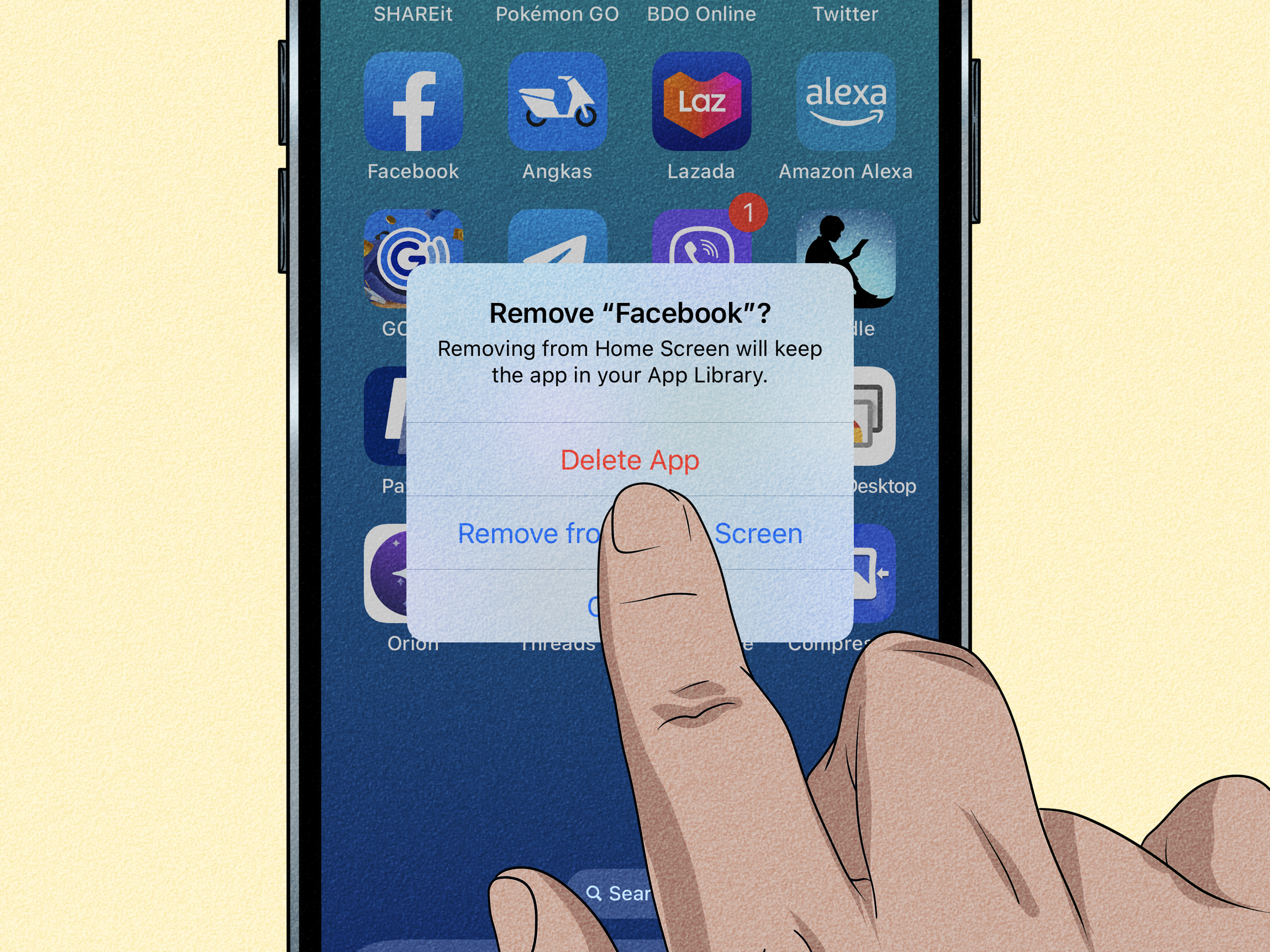
If updating and clearing cache did not help, reinstalling the app gives you a more thorough reset. It removes damaged app files, refreshes permissions, and replaces whatever gremlin may have rented an apartment inside your current installation.
Delete Facebook, restart your device for good measure, then download Facebook again from the official app store. Sign back in and test Reels before changing a bunch of settings.
When this fix makes sense: The problem started after a failed update, a device OS upgrade, or a long stretch of app instability that smaller fixes did not touch.
8. Wait for a Rollout Fix or Report the Problem
This is the fix nobody loves because it is the least satisfying. Still, it is real. Sometimes Facebook changes Reel controls gradually, tests new player behavior, or ships a buggy update that affects only certain users, devices, or regions. In those cases, the app can be “working as rolled out” for one user and “acting like a confused ferret” for another.
If you have already tried everything else, check whether the problem is account-specific or device-specific:
- Try another Facebook account on the same device.
- Try your account on another device or browser.
- Use Facebook’s in-app Help or Report a Problem feature.
- Wait for the next app update if the issue began very recently.
If the bug is tied to Facebook’s current rollout, you may not be able to fix it locally. That does not mean you did anything wrong. It just means you have been volunteered for an involuntary beta test, which is the social-media equivalent of being handed a mop at a party.
The Best Troubleshooting Order
If you want the shortest path without overthinking it, use this order:
- Tap once to reveal controls and test the current pause method.
- Force-close Facebook.
- Update Facebook.
- Restart your device.
- Clear cache or browser data.
- Test another network.
- Try another browser or device.
- Reinstall Facebook.
- Report the problem and wait for the next update if nothing works.
That sequence saves time because it starts with the easiest, least disruptive fixes and moves toward the more annoying ones later.
How to Tell Whether It Is a Bug or a New Feature
This is the million-dollar question. If Facebook Reels do not pause the way you expect, how do you know whether the app is malfunctioning or simply behaving differently?
It is probably a feature change if:
- The app looks different overall.
- The Reel pauses only after a different tap pattern.
- Another updated device shows the same behavior.
- Everything else in Facebook works normally.
It is probably a bug if:
- Pause works on one Reel but not another for no clear reason.
- Buttons vanish or become unresponsive.
- Facebook crashes, stutters, or ignores multiple touches.
- The problem started suddenly after an update.
Understanding that difference keeps you from wasting an hour trying to fix a control change that is actually intentional.
Final Thoughts
If you are wondering, “Why can’t I pause Facebook Reels anymore?” the answer is usually one of two things: Facebook changed the playback experience, or your current app setup is not playing nicely with the latest version of that experience.
Most users can solve the problem by checking the new pause method, updating Facebook, restarting the device, and clearing cache. More stubborn cases may need a reinstall, browser cleanup, or simply patience while Meta rolls out another fix.
The important thing is this: if Reels suddenly feel harder to control, you are not imagining it. Social apps love to move buttons around as if they are in witness protection. The good news is that with the right troubleshooting steps, you can usually get back to pausing videos exactly when you need to read a caption, copy a recipe, inspect a product, or figure out whether that “easy DIY” really involved twelve power tools and an engineering degree.
Real-World Experiences: What This Problem Feels Like for Actual Users
One reason this issue gets so much attention is that it does not feel like a normal tech problem. When Facebook Reels stop pausing properly, the app still mostly works. You can scroll. You can like. You can share. You can even open comments. That half-working state makes the issue extra irritating because it feels slippery. The app is not obviously broken enough to scream for help, but it is broken enough to make you mutter at your screen in public.
A common experience goes like this: you are watching a Reel with instructions, maybe a makeup tutorial, a recipe, a workout, or a quick home repair tip. You need a two-second pause to read one line or copy one step. Instead, the Reel keeps moving, loops, or jumps to the next clip. Suddenly what should have been a tiny pause becomes a full replay-and-guess routine. Users often describe this as making Facebook feel less useful and more frantic.
Another common scenario happens with parents, students, and shoppers. A parent wants to pause a Reel showing a lunchbox hack. A student wants to stop on a quote or study tip. A shopper wants to freeze a product demo long enough to read the brand name. In all those situations, the inability to pause turns a short video into a moving target. You are not trying to binge entertainment. You are trying to extract one useful detail before it disappears into the algorithmic sunset.
Desktop users report a different kind of annoyance. On a larger screen, people expect clear controls. So when Facebook Reels do not pause in a browser, it feels more like a design failure than a small bug. Many users say they start doubting themselves: “Am I clicking the wrong place?” “Did Facebook remove the pause button?” “Is my mouse acting up?” That confusion is part of what makes this issue so memorable. It messes with something that should be simple and obvious.
Then there is the update effect. Plenty of users only notice the problem right after Facebook changes something else. The app may look cleaner, more fullscreen, more video-heavy, and supposedly more modern. But users often experience that as, “Great, now the one button I needed has gone on vacation.” Even when the pause function still exists, a changed gesture or hidden control can make people feel like the feature was removed.
The shared emotional theme is not rage. It is friction. Tiny, repetitive, unnecessary friction. And that is exactly why this topic keeps trending in support forums and search results. People can tolerate a major outage because at least it is obvious. What they hate is a basic control becoming weird, inconsistent, or mysteriously harder than it used to be.
So if Facebook Reels suddenly feel awkward on your phone or computer, your reaction is completely reasonable. You are not “bad at apps.” You are dealing with a real usability issue, whether it came from a product change, a glitch, or a device-specific problem. And thankfully, that means the fixes above are not random guesses. They are the fastest path back to a pause button that behaves like a pause button instead of an abstract concept.