The Raspberry Pi has always been a tiny computer with an oversized personality. It teaches children to code, runs home servers from shoeboxes, powers retro arcade cabinets, blinks LEDs with heroic seriousness, and occasionally gets taped behind a monitor as if that were a legitimate data-center strategy. For years, however, one question kept circling the maker world: why did Ubuntu, the world’s most recognizable desktop Linux distribution, feel slightly late to the Raspberry Pi party?
Then Ubuntu officially landed on the Raspberry Pi in a way that ordinary users could actually recognize. Ubuntu Server gained official Raspberry Pi 4 support with Ubuntu 19.10, and Ubuntu Desktop followed more visibly with optimized Raspberry Pi images in Ubuntu 20.10. Today, Ubuntu for Raspberry Pi is no longer a weird weekend experiment involving obscure forum posts, strange boot files, and the emotional resilience of a submarine engineer. It is available through official Ubuntu channels and Raspberry Pi Imager, with Desktop, Server, and Ubuntu Core options for different users.
But the title asks the real question: will anyone notice? The answer is yes, but not everyone will notice for the same reason. Casual Raspberry Pi users may still be perfectly happy with Raspberry Pi OS. Developers, robotics builders, home-lab tinkerers, edge-computing experimenters, and Linux fans, however, may see Ubuntu on Raspberry Pi as more than just another operating system image. It is a bridge between pocket-sized hardware and the broader Ubuntu ecosystem.
Why Ubuntu On Raspberry Pi Matters
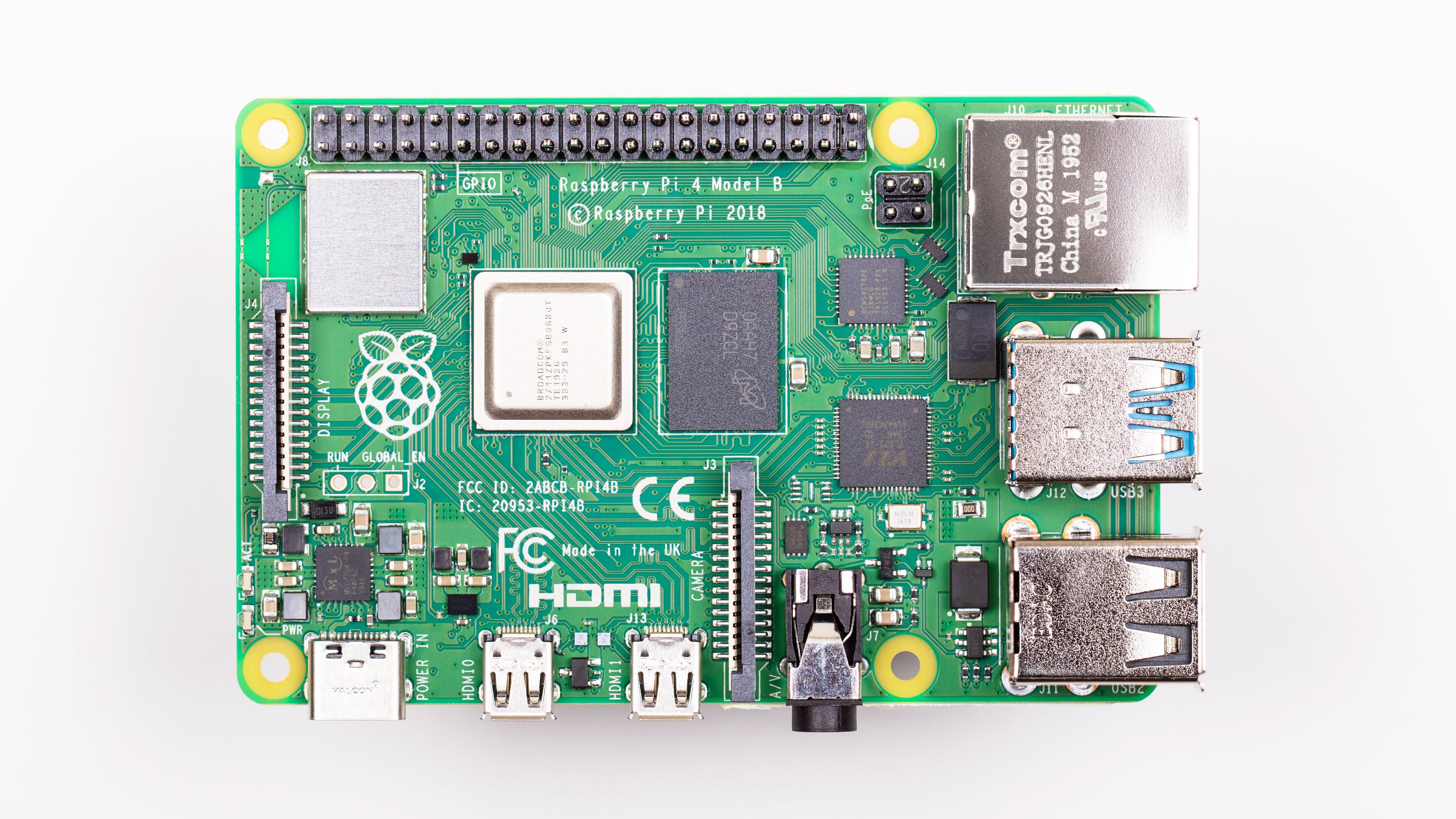
Ubuntu’s arrival on Raspberry Pi matters because the Raspberry Pi is no longer just a cute educational board. The Raspberry Pi 4 brought real desktop potential with a 64-bit Arm processor, USB 3.0, Gigabit Ethernet, dual micro-HDMI output, and memory options that eventually reached 8GB. The Raspberry Pi 5 pushed the platform further with a faster Arm Cortex-A76 processor, improved I/O, and RAM options that make the board feel much less like a toy and much more like a tiny workstation with delusions of grandeur.
That hardware progress changed expectations. Users stopped asking, “Can this run Linux?” and started asking, “Can this run the same Linux environment I use on my laptop, server, cloud instance, or CI pipeline?” Ubuntu answers that question with a familiar package ecosystem, predictable release cycle, Snap support, cloud tooling, documentation, and a strong developer community.
For students, Ubuntu on Raspberry Pi means learning Linux in an environment that resembles real-world developer workstations and cloud servers. For hobbyists, it means using a familiar desktop or server environment without abandoning low-cost hardware. For companies, it means testing edge workloads on affordable boards before scaling to industrial devices. In plain English: it lets a $60-to-$100-ish board pretend it belongs in a meeting with serious computers, and somehow it does not look completely ridiculous.
The Long Road From “It Boots!” To “It’s Official”
Before official support became a headline, Ubuntu on Raspberry Pi was possible, but not always elegant. Community builds, Ubuntu MATE images, server experiments, and manual workarounds helped adventurous users get Ubuntu running on earlier Raspberry Pi boards. The problem was not whether Ubuntu could run. The problem was whether it felt supported enough for normal people to trust it.
That distinction matters. In the Linux world, “it works” can mean anything from “click install and enjoy” to “compile this kernel while holding a GPIO pin and whispering encouragement.” Official support reduces that uncertainty. It tells users that the image was built with the hardware in mind, that updates should behave sensibly, and that documentation exists for people who do not consider bootloader archaeology a relaxing hobby.
Canonical’s official support for Ubuntu Server on Raspberry Pi 4 marked a turning point. It showed that the Raspberry Pi had become powerful enough for Ubuntu’s server story: containers, edge computing, Kubernetes clusters, cloud-init workflows, and remote development. Later, Ubuntu Desktop support made the news more visible to everyday users. Suddenly, Raspberry Pi owners could install a familiar Ubuntu desktop without pretending a headless server was exactly what they wanted all along.
Ubuntu Desktop On Raspberry Pi: Useful Or Just Cool?
Ubuntu Desktop on Raspberry Pi is both useful and cool, though it is important to set expectations. A Raspberry Pi is not a high-end laptop. Open enough browser tabs and even the bravest little board starts to sweat like it forgot its homework. But for writing, coding, basic web browsing, lightweight development, remote administration, and education, Ubuntu Desktop can be a genuinely pleasant experience on newer Raspberry Pi models, especially when paired with sufficient RAM, good cooling, and fast storage.
The biggest advantage is familiarity. If you already use Ubuntu on a desktop, laptop, virtual machine, or cloud server, using it on Raspberry Pi feels natural. You get the same general layout, many of the same tools, and a predictable way to install software. This is especially useful for learners who want their Raspberry Pi practice to transfer to larger machines.
Still, Raspberry Pi OS remains the default choice for many people. It is lighter, deeply integrated with Raspberry Pi hardware, and designed specifically around the board’s educational mission. If your project depends heavily on Raspberry Pi-specific tools, camera modules, GPIO tutorials, or beginner-friendly setup, Raspberry Pi OS may still be the smoothest path.
So, will casual users notice Ubuntu Desktop on Raspberry Pi? Some will. Many will not. But the users who do notice are likely the ones who want their Pi to behave less like a special-purpose gadget and more like a small member of the Ubuntu family.
Ubuntu Server: Where The Raspberry Pi Gets Serious
If Ubuntu Desktop gets the attention, Ubuntu Server may be where the real action happens. Raspberry Pi boards are popular for home labs, local web servers, DNS filtering, network monitoring, file sharing, lightweight databases, and container experiments. Ubuntu Server fits that world beautifully because it brings a familiar server environment to inexpensive Arm hardware.
For developers, this is a big deal. A Raspberry Pi running Ubuntu Server can serve as a miniature staging box, a Kubernetes learning node, a Git server, a Docker host, or a test machine for Arm compatibility. With tools like MicroK8s, users can build small Kubernetes clusters using multiple Raspberry Pis. Will this replace a cloud provider? No. Will it teach you more about distributed systems than a dozen abstract tutorials? Absolutely.
Ubuntu Server on Raspberry Pi also makes sense for edge computing. Edge devices process data closer to where it is created, whether that means sensors in a workshop, cameras in a lab, or industrial devices in the field. The Raspberry Pi is affordable and widely available, while Ubuntu provides a software stack that feels familiar to developers working in cloud and server environments.
Ubuntu Core: The Quietly Important Option
Ubuntu Core may not sound as exciting as a full desktop, but it could be the most important Raspberry Pi option for commercial and IoT use. Ubuntu Core is designed as an immutable operating system for connected devices. It emphasizes security, confined applications, reliable updates, and rollback behavior. That makes it attractive for devices that need to run unattended without turning every software update into a cliffhanger.
For hobbyists, Ubuntu Core may feel restrictive compared with regular Ubuntu. That is partly the point. It is not designed for someone who wants to install random packages at midnight and see what happens. It is designed for appliance-like systems: smart gateways, robotics platforms, kiosks, sensors, and edge devices where stability matters more than tinkering freedom.
This is where Ubuntu on Raspberry Pi becomes more than a desktop story. It becomes a deployment story. A company can prototype on Raspberry Pi, use Ubuntu Core for secure device behavior, and later move toward certified or industrial hardware while keeping the software model consistent. That is not flashy, but neither are seat belts, and we all agreed those were useful.
Why Raspberry Pi OS Still Has The Home-Field Advantage
Ubuntu may be famous, but Raspberry Pi OS owns the home-field advantage. It is the official Raspberry Pi operating system, based on Debian, built with Raspberry Pi hardware in mind, and heavily represented in tutorials. If a beginner searches for how to blink an LED, configure a camera, enable I2C, or use a Raspberry Pi HAT, the instructions often assume Raspberry Pi OS.
That matters because the Raspberry Pi community is powered by tutorials. Beginners do not want philosophical debates about package management. They want the thing to work before dinner. Raspberry Pi OS is often the shortest route from “I bought a Pi” to “Look, it does the thing!”
Ubuntu has strengths, but it also carries more weight. The full desktop can be heavier than Raspberry Pi OS, especially on older boards or microSD cards with slow random I/O. GNOME is polished, but it is not exactly famous for sipping RAM politely from a tiny porcelain cup. Users who expect a full laptop experience from a low-cost board may need to adjust expectations or use faster storage, a lighter desktop environment, or Ubuntu Server instead.
Who Will Actually Notice?
Developers
Developers will notice because Ubuntu is already common in cloud, server, and software development environments. Running Ubuntu on Raspberry Pi gives them a cheap Arm machine for testing, compiling, container work, and automation. It also makes the Pi more useful as a local development server that behaves like larger Ubuntu systems.
Students And Teachers
Students and teachers will notice when the goal is to learn Linux beyond Raspberry Pi-specific basics. Raspberry Pi OS is excellent for starting out, but Ubuntu introduces learners to a mainstream Linux distribution used widely in professional settings. That makes it valuable for classes focused on DevOps, Linux administration, robotics, cybersecurity labs, and programming.
Home-Lab Builders
Home-lab users will definitely notice. These are the people who look at a quiet Saturday and think, “What if I built a miniature production environment in the closet?” Ubuntu Server gives them a familiar foundation for containers, monitoring, storage experiments, VPNs, and automation. Their families may not notice, except when the internet briefly disappears because someone “improved DNS.”
IoT And Edge Teams
Businesses and product teams may notice because Ubuntu Core and Ubuntu Server provide a path from prototype to managed deployment. Raspberry Pi is not always the final industrial device, but it is a popular development platform. Having an official Ubuntu path makes experimentation easier and more credible.
Casual Raspberry Pi Users
Casual users may not notice much. If Raspberry Pi OS already runs their media server, retro gaming setup, classroom project, or coding lesson, Ubuntu may not offer an urgent reason to switch. And that is fine. Operating systems are tools, not sports teams. You do not have to paint your face and shout for one at the stadium.
Performance: The Elephant In The Tiny Room
Performance depends heavily on the board, storage, cooling, and workload. A Raspberry Pi 4 with 4GB or 8GB of RAM can run Ubuntu Desktop, but it benefits from fast storage and realistic expectations. A Raspberry Pi 5 improves the experience with a faster processor and better I/O, making Ubuntu feel more convincing as a desktop or development machine.
MicroSD cards remain a weak link. They are convenient, cheap, and easy to image, but they are not always ideal for desktop operating systems or write-heavy server tasks. Booting from a quality USB SSD or NVMe setup, where supported, can make Ubuntu on Raspberry Pi feel dramatically better. The difference can be less like “minor improvement” and more like “the computer stopped walking through pudding.”
Cooling also matters. Modern Raspberry Pi boards can throttle under sustained load if heat is not managed. If you plan to compile software, run containers, host services, or use Ubuntu Desktop for long sessions, a case with airflow or a decent heatsink is not a luxury. It is basic kindness toward a very small computer trying its best.
Ubuntu On Raspberry Pi Versus Raspberry Pi OS
The best choice depends on what you are building. Choose Raspberry Pi OS if you want the most beginner-friendly path, the richest Raspberry Pi-specific tutorial support, and tight hardware integration. Choose Ubuntu Desktop if you want a familiar Linux desktop experience that resembles what you might use on a laptop or workstation. Choose Ubuntu Server if your Pi is going to live headless on a shelf and quietly do useful work. Choose Ubuntu Core if you are thinking about secure IoT devices, repeatable deployments, or appliance-style systems.
In other words, Ubuntu does not replace Raspberry Pi OS. It expands the menu. And menus are good, especially when the alternative is pretending everyone wants the same sandwich.
Why The Timing Makes Sense Now
Ubuntu’s official Raspberry Pi presence makes more sense today than it would have in the earliest Pi years. The first Raspberry Pi boards were revolutionary, but modest. Newer boards are much more capable. They can handle real development work, small server workloads, media tasks, and even lightweight desktop use. At the same time, Arm computing has become more mainstream, from cloud servers to laptops to embedded devices.
That broader Arm momentum gives Ubuntu on Raspberry Pi extra relevance. Developers increasingly need to test software across architectures. A Raspberry Pi running Ubuntu is an affordable Arm box that fits on a desk, uses little power, and does not require a procurement department. That is useful even if you never plug in a monitor.
My Hands-On Experience: What Ubuntu On Raspberry Pi Feels Like In Real Life
Using Ubuntu on a Raspberry Pi feels a little like asking a clever bicycle to commute on the freeway. It can do more than people expect, but the experience depends on how you prepare it. The first lesson is simple: the storage matters. A cheap microSD card can make Ubuntu Desktop feel sluggish, especially during updates, browser launches, and package installs. Move to faster storage and the whole system becomes more responsive. It is the difference between waiting politely and wondering whether the mouse has joined a labor union.
The second lesson is that Ubuntu Server is often the sweet spot. On a headless Raspberry Pi, Ubuntu Server feels clean, practical, and familiar. SSH into the machine, update packages, install Docker, configure a service, and suddenly the tiny board is doing real work. It can run a personal dashboard, a small web app, a local Git repository, a test database, or a container stack. It is not magic, but it is satisfying in the way only a quiet, low-power machine can be.
Ubuntu Desktop is more situational. On a Raspberry Pi 4 with enough RAM, it is usable for basic tasks. On a Raspberry Pi 5, it feels much more natural. Still, it works best when treated as a lightweight workstation, not a gaming laptop or video-editing rig. Writing code, editing documents, using a terminal, browsing with restraint, and learning Linux are all reasonable. Opening 47 tabs, streaming video, compiling a giant project, and expecting buttery smooth multitasking is how you teach a small computer to resent you.
One pleasant surprise is how normal Ubuntu feels once it is running. That normality is the whole point. You are not constantly thinking, “This is a special Raspberry Pi operating system.” You are thinking, “This is Ubuntu, just smaller.” That is powerful for learners and developers. Commands behave as expected. Packages are familiar. Tutorials written for Ubuntu often apply with fewer changes. When something breaks, search results tend to be useful because Ubuntu has a massive user base.
The less glamorous experience is hardware-specific work. If your project depends heavily on camera modules, GPIO libraries, unusual HATs, or Raspberry Pi-specific configuration, Raspberry Pi OS can still be easier. Ubuntu can handle many tasks, but the path may involve more checking, more documentation, and occasionally more patience. For pure maker projects, the official Raspberry Pi OS ecosystem remains hard to beat.
For home labs, though, Ubuntu on Raspberry Pi is a joy. A cluster of Raspberry Pis running Ubuntu Server feels like a tiny data center assembled by someone with both curiosity and questionable cable management. You can practice Kubernetes concepts, test Ansible playbooks, build monitoring dashboards, and learn networking without renting cloud instances all weekend. The stakes are low, the power use is modest, and the educational value is high.
The biggest practical recommendation is to match the Ubuntu flavor to the job. Use Desktop for learning, coding, and general Linux exploration. Use Server for services, automation, containers, and remote workloads. Use Core when you want controlled, appliance-like behavior. And always use decent power, cooling, and storage. Many “Ubuntu is slow on Raspberry Pi” complaints are really “my Pi is running from a tired microSD card powered by a suspicious phone charger” complaints wearing a fake mustache.
After spending time with the idea, the answer to “Will anyone notice?” becomes clearer. The average beginner may not rush to switch. The experienced tinkerer, developer, teacher, or edge-computing builder absolutely will. Ubuntu on Raspberry Pi is not just about adding another operating system to a list. It is about making the Raspberry Pi feel like part of a larger professional Linux world while keeping the playful, low-cost spirit that made the board famous in the first place.
Conclusion: A Small Board Joins A Big Ecosystem
Ubuntu officially landing on the Raspberry Pi is not a revolution that makes Raspberry Pi OS obsolete. It is more subtle and more useful than that. It gives users another serious option. It lets developers bring familiar Ubuntu workflows to Arm hardware. It gives educators a bridge between classroom tinkering and professional Linux skills. It gives home-lab builders another excuse to buy “just one more Pi,” which we all know is how the drawer of cables begins.
Will everyone notice? No. Many Raspberry Pi owners will continue using Raspberry Pi OS and never feel deprived. But the right people will notice: developers, students, server hobbyists, robotics builders, IoT teams, and anyone who wants a tiny Ubuntu machine for experiments that are cheap, portable, and surprisingly capable.
Ubuntu on Raspberry Pi is not the only way to use the board. It may not even be the easiest way for every project. But it is an important way, and its official status changes the conversation from “Can I make this work?” to “What should I build with it?” That is a much better questionand a lot more fun.
Note: This article was written for web publication in standard American English and synthesizes verified information from official Ubuntu, Canonical, Raspberry Pi documentation, and established technology reporting.