Writing your own WiFi driver for the Raspberry Pi Pico W sounds a little like building your own toaster from river rocks and optimism. The board already has WiFi. The official Pico SDK already includes support for the wireless chip. MicroPython can connect to a network in a few friendly lines. So why would anyone willingly crawl beneath the abstraction layer, flashlight in teeth, and start poking registers?
The answer is simple: control. Also curiosity. Also the strange embedded-systems joy of saying, “I wonder what happens if I talk to the radio chip myself,” and then spending a weekend discovering that the radio chip is not impressed by your confidence.
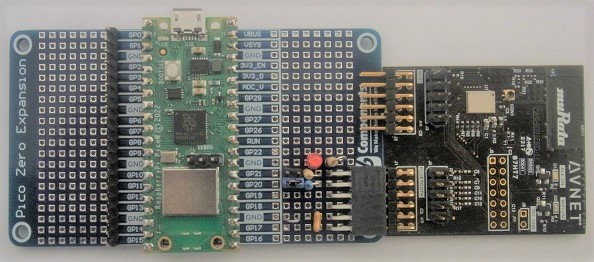
The Raspberry Pi Pico W pairs the RP2040 microcontroller with an Infineon CYW43439 wireless chip. That tiny combination gives makers, students, and product prototypers a low-cost path into connected embedded projects: sensors, dashboards, home automation gadgets, remote monitors, web servers, and the occasional contraption that emails you when your plant is emotionally thirsty. But under the friendly APIs is a stack of fascinating machinery: firmware loading, SPI communication, event handling, network frames, TCP/IP integration, power behavior, and timing rules.
This article explores what it means to roll your own WiFi driver for the Pico W, why you might do it, what pieces you need to understand, and where the dragons are likely to be hiding.
What Makes the Pico W Interesting?
The original Raspberry Pi Pico became popular because it delivered a capable microcontroller at a friendly price. Its RP2040 chip includes two Arm Cortex-M0+ cores, flexible I/O, programmable I/O blocks, SRAM, timers, DMA, UART, SPI, I2C, PWM, ADC, and USB support. In plain English: it is small, cheap, and surprisingly willing to do weird things if you ask nicely.
The Pico W adds wireless networking through the Infineon CYW43439. This chip supports 2.4 GHz WiFi 4, also known as 802.11n, and the hardware family includes Bluetooth capability as well. On the Pico W, the wireless chip is connected to the RP2040 through a specialized SPI-style interface. That detail matters because a WiFi driver is not simply “send password, receive internet.” It is a layered conversation between the microcontroller, the radio chip, chip firmware, interrupt signals, data buffers, and the network stack.
For ordinary projects, you do not need to touch any of this. You can use the Pico SDK, MicroPython, CircuitPython, or Rust frameworks such as Embassy. But if your goal is to understand the hardware deeply, debug performance, shrink dependencies, experiment with bare-metal code, or build a specialized system, writing a custom driver becomes more than a stunt. It becomes a lab bench with an antenna.
The Official Path: Pico SDK, CYW43, and lwIP
The official C/C++ route normally uses the Pico SDK’s CYW43 architecture layer. That layer initializes the CYW43 driver, handles background servicing, and can integrate with lwIP, a lightweight TCP/IP stack designed for embedded systems. This is the sensible route. It gives you station mode, access point features, sockets or raw TCP/IP APIs depending on configuration, and a practical way to get networked code running without writing a small novel in register definitions.
lwIP is important because WiFi hardware alone does not give you a web server, MQTT client, UDP broadcaster, DNS lookup, DHCP lease, or TCP connection. The WiFi driver moves Ethernet-like frames between the radio chip and your application environment. The TCP/IP stack turns those frames into familiar networking behavior. Without that stack, you are not browsing the network; you are sorting envelopes in the basement.
The SDK also gives you choices about execution style. A polling build requires your main loop to call service functions regularly. A background-safe build lets the system handle driver work automatically. A FreeRTOS approach can run the network work in a task. Those choices matter because WiFi is event-heavy. Packets arrive when they feel like it. The access point may change rates. DHCP may time out. Interrupts may fire. If your firmware spends three seconds blocking while calculating the world’s least urgent animation, your network stack may respond by silently judging you.
So Why Roll Your Own WiFi Driver?
There are several good reasons to build your own Pico W WiFi driver, and “because it sounds cool” is only the first one.
1. You Want Full Visibility
Official drivers are useful, but abstraction can hide behavior. A custom driver lets you see the handshake with the CYW43439, watch firmware loading, inspect register access, trace events, and understand exactly when packets move. If you are debugging a tricky timing problem, that visibility can be priceless.
2. You Want a Smaller or More Specialized Build
Many embedded projects do not need every network feature. A sensor that sends one UDP packet every minute may not need a general-purpose socket layer, a web server, and a buffet of optional protocols. A custom driver can focus on one narrow task, though this is easier said than done. Minimalism in embedded networking is like packing for a trip: you start with “just the essentials” and somehow end up needing three adapters, DHCP, ARP, DNS, retries, and a tiny emotional-support state machine.
3. You Want Bare-Metal Control
Bare-metal programming removes the operating system or runtime framework from the picture. You handle initialization, timing, interrupts, memory, and scheduling yourself. This is not always practical for production, but it is excellent for learning and for systems where deterministic behavior matters.
4. You Want to Experiment With Throughput
Custom implementations can explore how the SPI interface is driven, how buffers are managed, how interrupts are handled, and whether PIO can improve communication with the wireless chip. The RP2040’s programmable I/O is one of its superpowers. Using PIO to assist communication can free CPU time and improve consistency, especially when the interface has unusual timing requirements.
5. You Enjoy the Mountain
Some projects exist because the mountain is there. Writing a WiFi driver for the Pico W is not the shortest path to blinking an LED over HTTP. It is a deep technical climb. The reward is understanding.
The Layers You Need to Understand
A Pico W WiFi driver is not one thing. It is a stack of responsibilities. Each layer has to behave, and each layer has its own favorite way to ruin your afternoon.
Hardware Interface
The RP2040 must communicate with the CYW43439 over the board’s wireless interface. This involves command formats, read and write operations, timing, and sometimes special handling that does not look like ordinary SPI traffic. You need to know when to assert chip select, how to transfer command words, how to read status, and how to move blocks of data without corrupting them.
Firmware Loading
WiFi chips in this family commonly depend on firmware loaded by the host. The host does not merely flip a “WiFi on” switch. It prepares the wireless chip, transfers firmware or configuration data, starts execution, and then communicates with the running chip firmware. That boot sequence is one of the first major hurdles for a custom driver.
Register and Memory Access
Before you can send packets, you need reliable access to the chip’s internal registers and memory windows. This is where a logic analyzer becomes your best friend. A debugger can tell you what your code thinks it sent. A logic analyzer tells you what actually appeared on the pins, which is often followed by a quiet moment of personal growth.
Event Handling
Wireless chips are chatty. They report scans, joins, authentication status, link changes, packet availability, errors, and other events. Your driver must receive those events, parse them, and update its state machine. If you ignore events, the chip may technically be working while your application has no idea what happened.
Frame Transport
At some point, your driver needs to send and receive network frames. These frames are the bridge between the WiFi hardware and the TCP/IP stack. Your job is to move them accurately, preserve ordering where required, handle buffer lifetimes, and avoid memory leaks. On a desktop computer, sloppy buffer management wastes RAM. On a microcontroller, sloppy buffer management turns into a ghost story.
TCP/IP Stack Integration
You can write a driver that only sends and receives raw frames, but most useful applications need IP networking. Integrating with lwIP, embassy-net, or another embedded networking stack means implementing the glue layer: packet input, packet output, link status, MAC address handling, timers, DHCP support, and synchronization rules.
A Practical Roadmap for Building Your Own Pico W Driver
You do not begin by writing a web server. You begin by proving the smallest possible hardware conversation.
Step 1: Confirm Board-Level Communication
Start by verifying that the RP2040 can talk to the CYW43439 at all. Build tiny test routines that read known registers or status values. Keep the code boring. Boring code is beautiful when you are debugging hardware. Fancy code is just a bug wearing cologne.
Step 2: Reproduce the Startup Sequence
Study known working implementations and observe what happens during initialization. The sequence usually includes powering or enabling the chip, establishing bus communication, loading firmware or configuration, waiting for readiness, and setting basic variables. Document each phase. Do not trust memory. Your future self will not remember why delay number seven exists.
Step 3: Control the Onboard LED
On the Pico W, even the onboard LED is connected through the wireless chip rather than directly to an RP2040 GPIO. That makes LED control a useful milestone. If your custom code can toggle the LED through the CYW43439, you have proven that low-level chip control is alive.
Step 4: Scan for Networks
Scanning is a natural next target because it exercises command submission and event reception without requiring a full TCP/IP stack. A successful scan means your driver can ask the chip to perform radio work and receive structured results.
Step 5: Join an Access Point
Joining a WiFi network adds authentication, association, security configuration, and more event handling. This is where mistakes become more subtle. A wrong key is obvious. A mishandled status event can look like a wrong key, a bad antenna, a timing bug, or the universe being dramatic.
Step 6: Move Frames
Once associated, the driver must transmit and receive frames. At this stage, you can test with ARP and ICMP. Sending a ping is a classic milestone because it proves that your frame path, IP configuration, and response handling are beginning to cooperate.
Step 7: Integrate With a Network Stack
After raw frame movement works, connect the driver to lwIP or another embedded stack. This unlocks DHCP, UDP, TCP, DNS, HTTP, MQTT, and the rest of the network toolbox. It also introduces stack-specific rules about threading, callbacks, timers, and memory pools. Read those rules twice. Then read them again after the first crash.
Common Challenges and How to Think About Them
Timing Is Not Optional
WiFi driver development punishes vague timing. Initialization delays, interrupt servicing, packet polling, and retry windows all matter. If you use a polling architecture, the main loop must service the driver often enough. If you use interrupts, your interrupt path must be short, safe, and coordinated with the rest of the system.
Memory Is Always Smaller Than It Looks
The RP2040 has enough SRAM for many projects, but networking can consume memory quickly. Buffers, queues, stack memory, firmware blobs, TLS libraries, and application data all compete for space. If you plan to add HTTPS, be extra careful. TLS on microcontrollers is possible, but it does not arrive wearing a feather-light backpack.
Debugging Needs Instruments
Serial logging helps, but it is not enough. A logic analyzer can reveal bus-level behavior. GPIO timing pins can show when code enters and exits critical sections. Packet captures from another computer can confirm whether frames are actually reaching the air. Good debugging is not about guessing louder; it is about collecting better evidence.
Security Is Not a Decoration
A custom WiFi driver still has to respect secure network behavior. WPA2 and WPA3 support depend on the chip firmware, driver commands, and stack integration. Do not treat authentication as an afterthought. A device that connects unreliably is annoying. A device that connects insecurely is a future incident report with blinking LEDs.
Legal and Licensing Details Matter
Embedded wireless development often involves firmware blobs, vendor licenses, regulatory constraints, and open-source components with different license terms. If you are experimenting at home, the stakes may be low. If you are building a commercial product, review every dependency and wireless certification requirement before you celebrate.
Where Custom Drivers Shine
A custom Pico W WiFi driver is not the best choice for every project. If you want to publish temperature readings to an MQTT broker, use the official tools and go enjoy your weekend. But custom drivers are valuable in research, education, performance experiments, minimal firmware builds, unusual network appliances, and bare-metal demonstrations.
For example, a university lab might use a custom driver to teach students how embedded networking works below the socket API. A hardware hacker might use it to understand the CYW43439 interface. A product engineer might prototype a leaner transport path for a single-purpose UDP device. A Rust developer might study Embassy’s CYW43 support to understand how async embedded networking handles the Pico W. Different goals, same rabbit hole.
Example Project Ideas
Minimal UDP Beacon
Create a driver path that joins a network and sends a small UDP packet every few seconds. This is simpler than full TCP and useful for telemetry. It teaches association, DHCP or static IP handling, frame movement, and timing.
Raw Ping Responder
Build enough of the stack to answer ICMP echo requests. This is a fantastic learning project because ping is simple, visible, and emotionally satisfying. Few things feel better than seeing replies from code you wrote near the metal.
PIO-Assisted Bus Transport
Use RP2040 PIO to handle parts of the wireless chip interface. This can reduce CPU load and create cleaner timing. It is also a great way to appreciate why the RP2040 became popular with hardware experimenters.
Network Debug Console
Create a firmware build that logs CYW43439 events, bus transactions, and network status changes over USB serial. This may not sound glamorous, but debug tools are the difference between engineering and ritual chanting.
Best Practices Before You Begin
Start with a known-good Pico W. Use a stable power supply. Keep your access point simple during early testing: 2.4 GHz enabled, reasonable distance, standard WPA2 settings, and no exotic enterprise authentication. Save fancy network configurations for later.
Build in layers. Do not write the TCP server before register reads work. Do not chase throughput before packet movement is correct. Use version control from the first day. Commit every working milestone. When the driver breaks, and it will, being able to roll back is better than asking the code what hurt its feelings.
Keep logs structured. Print event IDs, status codes, buffer lengths, timing values, and state transitions. Avoid huge logs inside tight interrupt paths. If necessary, buffer debug events and print them later. A debug message that changes the timing of the bug is not a debug message; it is performance art.
Experience Notes: What It Feels Like to Roll Your Own Pico W WiFi Driver
The first experience many developers have with a custom Pico W WiFi driver is humility. You may begin with a clean plan: read a register, load firmware, join WiFi, send a packet. By hour three, you are staring at a logic analyzer trace wondering whether a single bit is wrong, whether the chip is asleep, whether your delay is too short, or whether the board has developed a personal grudge.
The best approach is to treat the project like a series of small negotiations. First, negotiate with the bus. Can you read anything predictable? Then negotiate with reset and power sequencing. Does the chip wake up the same way every time? Then negotiate with firmware loading. Does the chip accept the image and report readiness? Each victory should be celebrated, preferably with coffee and a commit message that is more descriptive than “stuff works.”
One useful habit is to build two firmware images: a tiny experimental driver and a known-good SDK-based reference program. When your custom code fails, flash the reference. If the reference works, your hardware and network are probably fine. If the reference fails too, congratulations, your bug may be the router, the password, the antenna position, the power supply, or the cat sitting on the USB cable.
Another lesson is that WiFi feels different from many microcontroller peripherals. UART is straightforward. SPI sensors usually answer politely. I2C devices may sulk, but at least they sulk in familiar ways. A WiFi chip is a computer attached to your computer. It has firmware, internal memory, command queues, asynchronous events, security state, radio behavior, and opinions. Your driver is not controlling a passive peripheral; it is coordinating with a tiny networking roommate.
Testing should become part of the design, not an afterthought. Create repeatable tests for initialization, scanning, joining, disconnecting, reconnecting, packet send, packet receive, and error recovery. Try bad passwords. Try weak signals. Reboot the access point. Move the board across the room. Let it run overnight. Embedded networking bugs love short demos because short demos end before the gremlins wake up.
You will also learn to respect memory. A packet buffer that is “obviously freed later” may not be freed later. A callback that “probably cannot overlap” will overlap at the exact moment you demonstrate the project. Use clear ownership rules for every buffer. Decide which layer owns received frames, when memory returns to the pool, and what happens when buffers run out. Network code under memory pressure is where cheerful prototypes go to become case studies.
The most rewarding moment is not necessarily loading a web page. It is the first clean ping, the first scan result, or the first LED toggle through the wireless chip. Those milestones prove that you are no longer just using the Pico W as a product. You are understanding it as a system. That knowledge transfers to other boards, other radios, other stacks, and other debugging nightmares. In embedded work, understanding is reusable; copy-pasted code is only rented.
Rolling your own WiFi driver for the Pico W is not the easiest route, but it is one of the most educational. It teaches hardware communication, firmware boundaries, event-driven design, embedded memory discipline, TCP/IP integration, and the practical value of good tools. It also teaches patience, which is useful because the chip will not care how confident you sounded when you started.
Conclusion
Rolling your own WiFi driver for the Pico W is a deep dive into the machinery that most projects wisely hide. The official SDK, MicroPython, lwIP, and modern Rust embedded libraries already make the Pico W useful for everyday IoT development. But a custom driver reveals the layers underneath: the RP2040 talking to the CYW43439, firmware loading, event parsing, packet transport, memory management, timing discipline, and stack integration.
If your goal is to ship a reliable connected gadget quickly, use the existing tools. If your goal is to learn how wireless networking really works on a microcontroller, a custom Pico W WiFi driver is a fascinating challenge. It is not a shortcut. It is a scenic route through the engine room, complete with blinking lights, strange noises, and the occasional smell of overheated assumptions.
And that is the charm. The Pico W is inexpensive enough to experiment with, powerful enough to be useful, and open enough at the software level to reward curiosity. Whether you build a minimal UDP beacon, a raw ping responder, or a full stack integration, the project will make you a better embedded developer. It may also make you mutter at SPI traces in the middle of the night, but honestly, that is how you know the learning is working.