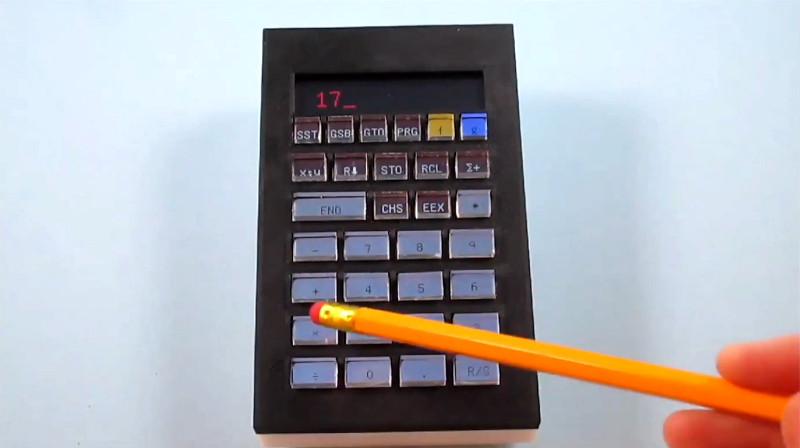
Some gadgets quietly do their jobs. Others march onto the desk wearing a pocket protector, a vintage HP haircut, and the confidence of a device that knows exactly where the square root key lives. The MP-29 tactile touchscreen calculator belongs to the second group. It is a clever retro calculator design that combines the charm of classic Hewlett-Packard scientific calculators with a modern touchscreen interface and, most importantly, physical-feeling key presses.
That last detail matters more than it sounds. A calculator is not just a tiny math computer. It is a rhythm machine. Tap, tap, enter, divide, mutter at your own mistake, clear, tap again. Anyone who has used an old scientific calculator knows the feeling: firm buttons, clear labels, and enough mechanical feedback to make each calculation feel intentional. Modern touchscreens are powerful, but they often feel like typing numbers on a polite piece of glass. The MP-29 asks a delightful question: What if a touchscreen could behave like a real keypad?
What Is the MP-29 Tactile Touchscreen Calculator?
The MP-29 is a handmade programmable scientific calculator concept by Michael Park, inspired by Hewlett-Packard classics such as the HP-29C. Rather than creating a direct emulator, the project acts more like a love letter to classic calculator design. It borrows the visual discipline, compact layout, and serious engineering spirit of older HP calculators while introducing a reconfigurable touchscreen-based keypad.
The heart of the design is surprisingly elegant. Instead of using dozens of individual display keys, Park used one touchscreen positioned beneath transparent key overlays. Under the screen sits a tactile switch, and a scissor-arm guide mechanism helps the touchscreen move straight down when pressed. The result is a keypad that can show changing labels like a display, but still deliver the satisfying click of a physical button.
Why Retro Calculator Design Still Feels So Good
Classic calculators were built during a period when industrial design had to solve problems with hardware, not software patches and cheerful pop-up tutorials. The HP-35, introduced in 1972, became famous as the first handheld scientific calculator and helped push the slide rule toward retirement. It had 35 keys, a red LED display, and a layout built for engineers who wanted power in a shirt pocket rather than a desk-sized machine.
That history matters because the best calculators were not designed like disposable office supplies. Their keyboards, displays, cases, colors, and legends were carefully considered. The HP-35, for example, used color grouping and durable key legends to make complex functions easier to find and harder to wear away. It was not just a math tool; it was an interface designed around human hands.
The Magic of a Button You Can Trust
A good key press tells your finger, “Yes, that happened.” It reduces doubt. It lets you work faster without staring at the keyboard. When a user presses “ENTER” on a classic RPN calculator, the finger gets feedback before the eyes even check the display. That tiny confirmation loop is why many engineers, accountants, students, and calculator collectors still defend physical keys with the intensity of someone guarding the last slice of pizza.
Touchscreens, by contrast, are flexible but vague. They can become any interface, but they do not naturally feel like anything. They can show a graph, a button, a keyboard, or a picture of a cat wearing safety goggles, but under the fingertip it is all the same flat surface. The MP-29 design tries to rescue the best part of physical calculators while keeping the flexibility of software-defined controls.
How the Creative Tactile Touchscreen Works
The MP-29 solves a classic hardware problem: dynamic labels are useful, but tactile keys are satisfying. Individual keys with built-in displays exist, but they can be expensive, bulky, and impractical for a compact custom calculator. A single touchscreen is cheaper and easier to update, but it lacks the finger-friendly feel of a real keypad.
Park’s solution is to mount the touchscreen so it can move vertically and activate a switch beneath it. The scissor mechanism keeps the movement level, even if the user presses near the edge of a key area. That detail is important. Without guidance, a screen could twist, bind, or feel uneven. With the scissor-arm structure, the screen behaves more like a large, unified mechanical button.
Transparent overlays divide the touchscreen into individual key zones. The display underneath can change the visible labels, giving the calculator a fully reconfigurable keypad. In practical terms, one key area can become a trigonometric function, a programming command, a memory function, or something else depending on mode. It is the calculator equivalent of a stage actor who can play every character but still wears sturdy shoes.
Why Dynamic Key Labels Are a Big Deal
Scientific and programmable calculators often struggle with label overload. A small device may need digits, arithmetic operators, trigonometric functions, logarithms, memory controls, stack operations, program commands, and mode-specific shortcuts. Traditional calculators handle this with shift keys, color-coded legends, tiny secondary labels, and the user’s willingness to squint.
A touchscreen keypad changes the rules. Instead of printing every possible function on the case, the calculator can show only the functions relevant to the current mode. This reduces clutter and allows alternate layouts without rebuilding the hardware. For a programmable calculator, that flexibility is especially appealing because users may want different key arrangements for different workflows.
Retro Outside, Adaptable Inside
The MP-29 keeps the visual language of old-school calculators while sneaking in a modern interface idea: context-aware controls. It looks like something that belongs beside a soldering iron, a graph paper notebook, and a cup of coffee that has given up on being warm. But underneath the retro appearance is a design philosophy similar to modern software interfaces: show the right control at the right time.
This is where the project becomes more than nostalgia. It is not simply asking, “Can we make an old calculator again?” It asks, “Can we learn from old calculator ergonomics and apply them to modern interaction design?” That is a much more interesting question, and frankly, it wears nicer shoes.
The HP Influence: More Than a Vintage Costume
The HP-29C and related HP calculators earned loyal followings because they combined programmability, compact design, and efficient input methods. The HP-19C and HP-29C also featured Continuous Memory, which allowed programs and stored values to remain available until the user cleared or changed them. For people doing repeated technical calculations, that was a major convenience.
HP calculators also became closely associated with Reverse Polish Notation, or RPN. RPN places operators after operands, so a user enters values first and then applies operations. It can feel strange at first, like learning to drive a manual transmission after years of automatic cars. But once it clicks, many users find it fast, logical, and efficient for chained calculations.
The MP-29 taps into this heritage without becoming a museum piece. It respects the layout-driven thinking of classic HP devices while exploring what a flexible display-based keypad can do. In other words, it brings the old calculator soul to a new interface body.
Haptics and the Future of Touch Interfaces
The MP-29 also fits into a broader design trend: making digital interfaces feel more physical. Modern haptic feedback appears in phones, tablets, game controllers, trackpads, watches, and accessibility tools. Good haptics can confirm actions, guide attention, and reduce the need to constantly look at a screen. Bad haptics feel like a mosquito trapped inside a phone case.
Major design systems increasingly treat touch feedback as part of the user experience rather than a novelty. The principle is simple: feedback should be timely, consistent, and meaningful. A click should feel like a click because the user did something that deserves confirmation. The MP-29 takes this idea further by using actual mechanical movement rather than relying only on vibration.
Mechanical Feedback Beats “Glass Anxiety”
Anyone who has mistyped a PIN on a smooth touchscreen knows the feeling of glass anxiety. Did the tap register? Did it hit the wrong spot? Did your finger drift? Did the device ignore you out of spite? Physical key travel reduces that uncertainty. When your finger feels a press, travel, and click, the action becomes more trustworthy.
For calculators, that trust matters because a single wrong digit can turn a correct result into mathematical soup. A tactile touchscreen calculator offers a middle path: flexible software labels with the reassuring feel of hardware input.
Why Standalone Calculators Still Matter
It is tempting to ask why anyone needs a calculator when every phone can calculate, graph, convert, translate, photograph lunch, and distract you with sixteen notifications before breakfast. Yet standalone calculators still hold value. They are focused tools. They are allowed in many exam environments where phones are not. They have long battery life, dedicated layouts, and fewer opportunities to accidentally open a social media app while trying to compute a tangent.
Education policies also keep calculators relevant. ACT guidelines allow many four-function, scientific, and graphing calculators, while College Board calculator rules specify restrictions such as limits on CAS functionality for SAT use. These policies show that the calculator is still a real category, not just a nostalgic desk ornament.
For professionals, a dedicated calculator can also be faster. A financial analyst using a familiar keypad, an engineer running repeated formulas, or a hobbyist checking component values may prefer real buttons over a phone app. The best tool is often the one that stays out of the way.
Design Lessons from the MP-29
The MP-29 tactile touchscreen calculator offers several lessons for product designers, hardware hackers, and anyone who has ever yelled at a touchscreen kiosk in public.
1. Nostalgia Works Best When It Solves a Problem
Retro design is not automatically good design. A fake woodgrain sticker does not make a product meaningful; it just makes it look like it escaped from a basement in 1978. The MP-29 succeeds because its retro inspiration is functional. It borrows the tactile confidence and layout clarity of classic calculators, then improves flexibility with modern display technology.
2. Physical Feedback Improves Confidence
The project reminds us that human fingers are excellent sensors. A click, a bump, or a short travel distance can communicate faster than a visual animation. In high-focus tasks like calculation, that feedback can reduce errors and increase speed.
3. Reconfigurable Interfaces Need Restraint
A dynamic keypad can become confusing if it changes too often or hides important controls. The best use of reconfigurable labels is not to turn every button into a mystery box. It is to reduce clutter while preserving predictable structure. The MP-29 concept works because it still looks and behaves like a calculator, not a tiny tablet having an identity crisis.
4. Hardware Can Be Playful and Serious
The design is charming, but it is not a toy. It addresses real interface problems: cost, layout flexibility, tactile confirmation, and usability. That blend of playfulness and engineering seriousness is exactly why hardware hobby projects often feel more inspiring than polished commercial products.
Specific Examples of Where This Design Could Shine
A tactile touchscreen calculator could be useful in several real-world scenarios. In engineering, a user might switch between standard arithmetic, complex-number calculations, unit conversions, and programming shortcuts. The labels could change by mode while the finger feel remains consistent.
In education, a calculator with dynamic labels could simplify beginner modes and reveal advanced functions gradually. Instead of overwhelming students with a forest of tiny printed legends, the device could show only the needed functions for algebra, trigonometry, statistics, or programming.
In accessibility-focused design, tactile feedback could help users who rely on physical confirmation. While a fully accessible calculator would require more features, including audio or high-contrast options, the MP-29 points toward interfaces that do not depend only on sight.
For makers, the design suggests an exciting path for custom control panels. Imagine a lab instrument, synthesizer, CAD shortcut pad, or CNC controller that uses one display under tactile zones. It could change labels for different tasks but still provide real press feedback. That is not just a calculator idea; it is a broader interface idea wearing calculator pajamas.
What Makes This Retro Calculator Design So Appealing?
The appeal comes from the balance between opposites. It is retro but not outdated. It is digital but not formless. It is flexible but still tactile. It honors HP-style calculator culture without freezing it in amber.
Many modern devices chase smoothness until they become anonymous rectangles. The MP-29 goes in the other direction. It adds texture, motion, and mechanical personality. It understands that efficiency is not only about processing speed; it is also about the quality of interaction between hand, eye, and mind.
Experiences Related to Retro Calculator Design Has Creative Tactile Touchscreen
Using a good calculator is a strangely personal experience. The first thing you notice is not the processor, memory, or mathematical precision. It is the way the keys answer back. A stiff key makes the device feel stubborn. A mushy key feels cheap. A crisp key press feels like the calculator has joined your side in the battle against numbers, invoices, lab reports, and the occasional tax form that looks like it was designed by a committee of sleep-deprived raccoons.
A retro calculator with a tactile touchscreen would change the experience in a subtle but powerful way. When you press a key, you would not just see a number appear; you would feel the action happen. That makes the device feel alive in the hand. It also restores the rhythm that touchscreen calculator apps often lose. On a phone, every tap feels identical. On a tactile calculator, the keypad becomes a landscape your fingers can learn.
One of the best experiences with physical calculators is eyes-free movement. After enough use, your fingers know where the digits are. You can press plus, minus, enter, or clear without staring at every key. That muscle memory turns calculation into flow. A creative tactile touchscreen can preserve that flow while allowing the labels and functions to change. It is like having a familiar neighborhood where the shops can update their signs without moving the streets.
There is also an emotional experience here. Retro technology often feels satisfying because it is understandable. You can look at it and imagine how it works. A classic calculator does not hide everything behind a glowing slab. It has a case, keys, a display, screws, circuits, and a purpose. The MP-29 keeps that approachable feeling while adding a modern trick. It says, “Yes, I am a touchscreen, but I still respect your fingers.” That is a surprisingly polite thing for a gadget to say.
For writers, engineers, students, and hobbyists, this kind of device can also support focus. A phone calculator lives inside a distraction machine. You open it to divide two numbers and somehow leave twenty minutes later knowing the weather in Phoenix, three celebrity birthdays, and nothing about your original calculation. A dedicated calculator has manners. It calculates. It does not ask you to update an app, accept cookies, or watch a video ad before finding cosine.
The MP-29 concept also makes you think about the future of tools. Not every product needs to become flatter, thinner, and less tactile. Some tools become better when they push back a little. The press of a key, the click of a switch, and the certainty of feedback can make technology feel more human. A retro calculator design with a creative tactile touchscreen is charming because it remembers something important: hands are part of the user interface too.
That is the real lesson. The future does not have to be a frictionless sheet of glass. Sometimes the smartest design is one that gives your finger a tiny click and lets your brain relax.
Conclusion
The MP-29 tactile touchscreen calculator is more than a nostalgic hardware project. It is a thoughtful experiment in how old and new interface ideas can work together. By combining a touchscreen, transparent key overlays, a tactile switch, and a scissor-arm mechanism, the design creates a flexible keypad that still feels satisfyingly physical.
Its inspiration from classic HP calculators gives it historical weight, while its dynamic labels and tactile touchscreen make it relevant to modern interface design. In a world full of smooth glass rectangles, this retro calculator reminds us that touch still matters. Sometimes the best innovation is not removing the button. Sometimes it is reinventing the button so it can do more.