Every engineer eventually meets a problem that looks simple until two machines try to have a conversation. One device says, “Hello.” The other replies with digital silence, a confused error code, or a stream of bytes that appears to have been sneezed out by a caffeinated robot. That is the moment when a protocol analyzer stops being “that expensive box on the shelf” and becomes the hero of the lab.
Protocol Analyzer Remembered is more than a nostalgic phrase. It is a reminder of a tool category that shaped modern networking, serial communications, embedded systems, telecommunications, cybersecurity, and even the way we debug the internet today. Before clean dashboards, cloud observability, and cheerful green check marks, there were instruments that sat between systems and listened carefully. They captured frames, decoded protocols, exposed timing problems, and turned mysterious electrical chatter into something a human could understand.
Today, the protocol analyzer has many forms: vintage Hewlett-Packard serial analyzers, logic analyzers with protocol decoding, oscilloscopes that understand UART and I2C, command-line tools such as tcpdump, and software packet analyzers such as Wireshark. The casing has changed. The mission has not. When systems communicate, protocol analyzers help us answer the oldest technical question in the room: “What exactly just happened?”
What Is a Protocol Analyzer?
A protocol analyzer is a hardware or software tool used to capture, inspect, decode, and interpret communication between devices. In plain English, it listens to the conversation and translates it from “machine mumbling” into human-readable evidence. Depending on the environment, that conversation may happen across Ethernet, Wi-Fi, RS-232, RS-485, USB, CAN bus, PCI Express, Bluetooth, industrial networks, or another communication channel.
The best protocol analyzers do not merely show raw bits. They understand structure. They can identify headers, addresses, ports, commands, checksums, payloads, retransmissions, acknowledgments, errors, and timing relationships. That matters because the difference between a working system and a broken one may be a single flipped bit, a missing carriage return, an incorrect baud rate, or a packet arriving 300 milliseconds too late.
Protocol analyzer vs. packet analyzer
The terms are often used together, but there is a useful distinction. A packet analyzer usually refers to software that captures and inspects network packets, especially IP traffic. Wireshark is the classic example. A protocol analyzer is broader. It may analyze network packets, serial links, telecom protocols, embedded buses, or high-speed digital interfaces. In practice, both tools share the same spirit: capture the conversation, decode the rules, and reveal the truth.
Why Vintage Protocol Analyzers Still Matter
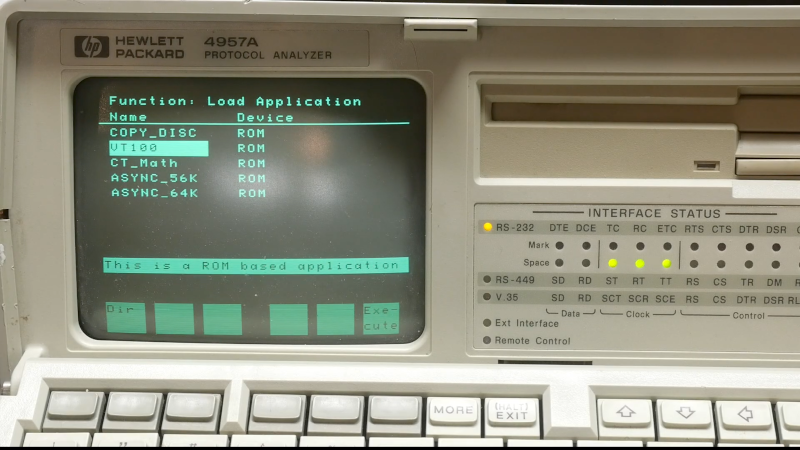
Old protocol analyzers looked serious. Many had built-in keyboards, small monochrome displays, floppy drives, interface pods, and enough front-panel buttons to make a pilot feel underdressed. Instruments such as the HP 4951C and HP 4952A were designed for data communications testing when serial links, leased lines, X.25 networks, SDLC, HDLC, BSC, SNA, and RS-232 connections were daily business rather than museum material.
These machines could monitor and decode data transmission, simulate network components, test remote facilities, and perform bit error rate testing. That was not just convenient; it was revolutionary. If a terminal could not talk to a host, or a modem link behaved like it had trust issues, the analyzer could sit in the middle and show what each side actually sent. No guessing. No blaming “the network” like it was a mischievous office ghost.
What makes these vintage analyzers fascinating today is not only their engineering charm. It is their philosophy. They were purpose-built for observation. They encouraged disciplined troubleshooting: capture first, interpret second, conclude last. That mindset remains priceless, especially in a world where modern systems often hide complexity behind APIs, encrypted sessions, virtual networks, and layers of automation.
The Core Job: Listening Without Interrupting
A good protocol analyzer behaves like a very polite detective. It observes traffic without changing it. In networking, that may mean capturing packets from a mirrored switch port, a network tap, or a local interface. In serial communications, it may involve a breakout cable, interface pod, or logic probe. In embedded development, it might use test clips or scope channels to watch SPI, I2C, UART, or CAN signals.
This passive listening is critical. If the analyzer changes timing, voltage levels, signal quality, or traffic flow, it can accidentally “fix” the problem or create a new one. Engineers call this a measurement effect. Everyone else calls it “the device only works when I’m watching it,” which is less scientific but emotionally accurate.
What a Protocol Analyzer Can Reveal
Protocol analyzers are valuable because they show both the message and the behavior around the message. A single capture may reveal several layers of truth at once.
1. Syntax errors
Some communication failures are caused by malformed frames, incorrect field lengths, invalid checksums, missing delimiters, or unsupported commands. A protocol analyzer can show whether a device is following the protocol specification or improvising jazz with binary data.
2. Timing problems
Many systems do not fail because the data is wrong. They fail because the data arrives too early, too late, or in the wrong sequence. Timing analysis can expose delayed acknowledgments, retry storms, slow application responses, and devices that need a tiny pause before they can process the next command.
3. Configuration mismatches
On serial links, mismatched baud rates, parity settings, stop bits, and flow-control options can turn readable communication into digital confetti. On IP networks, subnet errors, DNS failures, firewall rules, MTU issues, VLAN mistakes, and routing problems can all appear clearly in a capture.
4. Security signals
Network protocol analysis is central to security monitoring. Analysts use packet captures, Zeek logs, Suricata alerts, and other traffic records to investigate suspicious connections, malware callbacks, unusual DNS activity, lateral movement, and data exfiltration. A protocol analyzer will not magically make attackers confess, but it can show the footprints they forgot to wipe.
From RS-232 to Wireshark: The Evolution of Protocol Analysis
The earliest protocol analyzers were often dedicated hardware instruments built for specific communication environments. They had physical interfaces, specialized decoding capabilities, and test functions that made sense for telecom, mainframe, terminal, and industrial systems. If you were troubleshooting a serial line, you wanted a tool that understood serial behavior deeply.
As Ethernet and TCP/IP became dominant, software analyzers rose in importance. Wireshark became the friendly giant of packet analysis because it could capture traffic, decode hundreds of protocols, filter conversations, reconstruct streams, and display data in a way that made complicated network behavior understandable. tcpdump stayed beloved by administrators because it was fast, scriptable, remote-friendly, and available when a graphical interface was nowhere to be found.
Modern test equipment has also absorbed protocol analysis. Oscilloscopes now offer serial bus triggering and decoding. Logic analyzers can identify SPI transactions, UART messages, I2C addresses, CAN frames, and more. High-speed protocol analyzers exist for PCIe, USB, DDR memory, and other advanced interfaces. The old standalone analyzer did not disappear; it scattered into software, scopes, appliances, cloud tools, and security platforms.
Why “Protocol Analyzer Remembered” Hits a Nerve
Remembering protocol analyzers is partly nostalgia, but it is also a warning. Modern systems are easier to deploy yet harder to understand. A developer can spin up containers, APIs, message brokers, VPNs, load balancers, TLS termination, and cloud firewalls faster than an old analyzer could boot from a floppy. Wonderful! Also terrifying.
When something fails in that stack, logs may tell only part of the story. Application logs say what the software thinks happened. Monitoring dashboards summarize what metrics suggest happened. A protocol analyzer shows what crossed the wire. That difference is enormous. The wire does not care about your assumptions, your ticket comments, or your hope that the problem is “probably DNS.” The capture is blunt. Sometimes brutally blunt. It is the technical equivalent of a friend who loves you enough to say your code is sending the wrong header.
Practical Examples of Protocol Analyzer Use
Example 1: The silent serial device
Imagine a warehouse scanner connected through RS-232 to an older inventory terminal. The scanner powers on, the terminal is ready, and nothing useful happens. A protocol analyzer placed between the two devices can reveal whether the scanner is transmitting at the expected baud rate, whether the terminal sends a wake-up command, and whether flow-control signals are blocking communication. Instead of replacing random cables and muttering ancient curses, the technician can identify the exact mismatch.
Example 2: The website that is “slow”
A user says a web application is slow. The server team blames the network. The network team blames the application. The application team blames the user’s browser, which is traditional and legally required. A packet capture can show DNS lookup time, TCP connection behavior, TLS negotiation, retransmissions, server response delay, and payload transfer timing. Suddenly “slow” becomes measurable.
Example 3: Suspicious outbound traffic
During a security investigation, analysts notice a workstation repeatedly contacting a strange domain. A protocol analyzer or network traffic analysis tool can help identify DNS queries, destination IPs, HTTP headers, TLS metadata, packet timing, and related connections. Even when payloads are encrypted, metadata can provide useful clues about behavior, frequency, and direction.
Hardware Protocol Analyzer vs. Software Protocol Analyzer
| Type | Best For | Strengths | Limitations |
|---|---|---|---|
| Dedicated hardware analyzer | Legacy serial links, telecom systems, embedded debugging, specialized buses | Precise capture, physical-layer awareness, purpose-built decoding | Cost, aging hardware, limited protocol updates |
| Software packet analyzer | Ethernet, IP networks, troubleshooting, security review | Flexible, searchable, widely supported, excellent protocol libraries | Depends on capture point quality and system performance |
| Oscilloscope or logic analyzer with decoding | Embedded systems, UART, SPI, I2C, CAN, signal timing | Correlates electrical signals with decoded protocol data | May require probes, setup time, and careful interpretation |
| Network security monitoring platform | Enterprise security, incident response, long-term visibility | Scalable, searchable, integrates alerts and logs | Can be complex and may not capture every packet forever |
How to Think Like a Protocol Analyst
Tools matter, but method matters more. A protocol analyzer is not a magic wand. It is a microscope. If you point it at the wrong place, use the wrong filter, or ignore timing, you may get a beautiful capture of the wrong problem.
Start with a clear question
Do not capture “everything” unless you truly need everything. Ask a specific question first: Is the client sending the request? Is the server responding? Are packets being retransmitted? Is the device using the expected protocol? Is the authentication exchange failing? Good questions lead to useful captures.
Capture near the problem
Where you capture matters. Capturing on the client shows what the client sees. Capturing near the server shows what reaches the server. Capturing on a switch mirror port or network tap may reveal traffic neither endpoint reports clearly. In serial debugging, placement between devices is often essential.
Use filters carefully
Filters are wonderful until they hide the clue. Display filters help reduce noise after capture. Capture filters reduce what is recorded in the first place. When diagnosing unknown behavior, it is often safer to capture broadly and filter later.
Correlate with logs
The best analysis combines packet evidence with application logs, system logs, device counters, firewall records, and user reports. Packets tell you what moved. Logs may tell you why software made a decision. Together, they create a much sharper story.
Common Mistakes in Protocol Analysis
The first mistake is assuming the analyzer is automatically correct. Decoders can misinterpret traffic if the wrong protocol, port, speed, or encapsulation is selected. The second mistake is ignoring encryption. Modern traffic often hides payload contents, so analysts must rely on metadata, certificates, handshake behavior, endpoint logs, or authorized decryption methods. The third mistake is forgetting privacy. Packet captures can contain credentials, personal data, session tokens, internal hostnames, and confidential payloads. Treat captures like sensitive documents, not like screenshots of a harmless error message.
Another classic error is capturing too little. A ten-second capture after the problem has already occurred may show nothing useful. Intermittent failures require patience, timestamps, ring buffers, or triggered captures. The gremlin never appears during the first demo. Gremlins are theatrical.
Why Protocol Analyzers Belong in Modern SEO-Tech Conversations
At first glance, protocol analyzers sound like a niche engineering topic. But they touch almost everything digital publishers, businesses, developers, and security teams care about: uptime, performance, user experience, cybersecurity, application reliability, and technical trust. A slow checkout page, a broken API integration, a failing IoT device, or a suspicious outbound connection can all lead back to protocol behavior.
For organizations, the lesson is simple: visibility beats guessing. Whether the tool is Wireshark on a laptop, tcpdump on a Linux server, a hardware analyzer in an electronics lab, or a full network security monitoring platform, protocol analysis gives teams evidence. Evidence shortens outages, reduces finger-pointing, and prevents the dreaded meeting where twelve people discuss a problem no one has actually measured.
Field Notes: Experiences Related to Protocol Analyzer Remembered
The first unforgettable experience with a protocol analyzer usually starts with embarrassment. A system is down, everyone has a theory, and someone quietly captures the traffic. Five minutes later, the analyzer reveals that the client never sent the expected request, or the server replied correctly, or a firewall reset the connection with the confidence of a bouncer rejecting a fake ID. The room goes quiet. Then someone says, “Ah.” In engineering, “Ah” is both a confession and a breakthrough.
One common field experience involves serial devices that appear broken but are merely misunderstood. Older industrial controllers, barcode scanners, lab instruments, and point-of-sale hardware often depend on exact settings. A single mismatch in parity or stop bits can ruin the conversation. Without an analyzer, the technician swaps cables, updates drivers, restarts software, and considers a new career in pottery. With an analyzer, the truth appears: the device is transmitting, but the receiver is configured differently. The fix may take thirty seconds. The lesson lasts for years.
Another memorable experience comes from network troubleshooting. A website or internal application feels slow, and every team has a different suspect. Packet analysis can reveal that the real delay is not bandwidth at all, but repeated TCP retransmissions, DNS timeout, asymmetric routing, or a server waiting too long before responding. This is where protocol analyzers shine: they convert emotion into measurement. “The network is terrible” becomes “there are retransmissions after the third packet in the TLS handshake.” That sentence may not win a poetry contest, but it can fix an outage.
Security analysts have their own relationship with protocol analyzers. During an incident, packet captures can feel like a diary written by the network. The entries may be cryptic, but they are honest. Analysts can follow suspicious DNS lookups, odd beaconing intervals, unexpected protocols, strange user agents, and connections to unfamiliar infrastructure. Even encrypted traffic can reveal patterns. The payload may be hidden, but timing, destinations, certificate details, and session behavior can still point investigators in the right direction.
The most important experience, however, is philosophical. Protocol analyzers teach humility. They remind us that systems do exactly what they do, not what documentation, diagrams, or confident humans claim they should do. They reward curiosity and punish assumptions. They also create better engineers because they train the eye to look beneath the interface. The next time a dashboard says “healthy” while users are glaring at their screens, someone who remembers the protocol analyzer will ask, “What did the packets say?” That question is timeless.
Conclusion: The Analyzer Is Gone, Long Live the Analyzer
The classic protocol analyzer may no longer dominate the lab bench the way it once did, but its spirit is everywhere. It lives in Wireshark dissectors, tcpdump captures, serial decode options, logic analyzer traces, Zeek logs, Suricata alerts, cloud packet mirrors, and the careful habits of people who refuse to troubleshoot by superstition.
Protocol Analyzer Remembered is not just a look back at old test gear. It is a celebration of a discipline: listen carefully, capture accurately, decode intelligently, and trust evidence over assumptions. Whether you are debugging a vintage RS-232 link, analyzing enterprise traffic, investigating a security incident, or trying to understand why two devices are giving each other the digital cold shoulder, the protocol analyzer remains one of the most powerful ideas in technology.
Note: This article is written for web publication and intentionally omits source links while synthesizing real information from reputable technical documentation, cybersecurity references, network analysis tools, and historical protocol analyzer material.