
Note: This article is written for web publication in standard American English and synthesizes real information from engineering research, mechanism-design software, mechanical-linkage theory, and computational design practice without inserting source links.
When Software Starts Guessing the Gears for You
Designing a mechanical linkage sounds charmingly simple until you actually try it. Four bars, a few pivot points, a moving part, maybe a crank, and suddenly your innocent sketch has become a tiny metal yoga instructor bending itself into impossible positions. This is why linkage inferring software feels so magical at first glance. Instead of forcing a designer to manually invent a mechanism that carries a part through several desired poses, the software attempts to infer the linkage automatically.
The title “Linkage Inferring Software Handwaves Away The Hard Stuff” captures both the appeal and the danger of this idea. The appeal is obvious: tell the computer what motion you want, and let it do the tedious search through geometry, pivots, bars, joints, constraints, and collisions. The danger is that “handwaving” is exactly what bad engineering tools do when the real world walks into the room wearing steel-toed boots.
Mechanical linkage design sits at the intersection of geometry, motion, manufacturing, materials, and patience. A linkage is not just a drawing. It is a physical promise. If the pivots are off, if the links collide, if the motion locks up, or if the actuator cannot provide enough force, the mechanism does not politely fail. It jams, snaps, rattles, or performs the traditional engineering dance known as “why is it doing that?”
What Is Linkage Inferring Software?
Linkage inferring software is a computational design tool that tries to generate mechanical linkages from a desired motion. In plain English, the user specifies where certain moving parts should be at different moments, and the program searches for a set of rigid links and joints that can produce that motion with one input, usually a single degree of freedom.
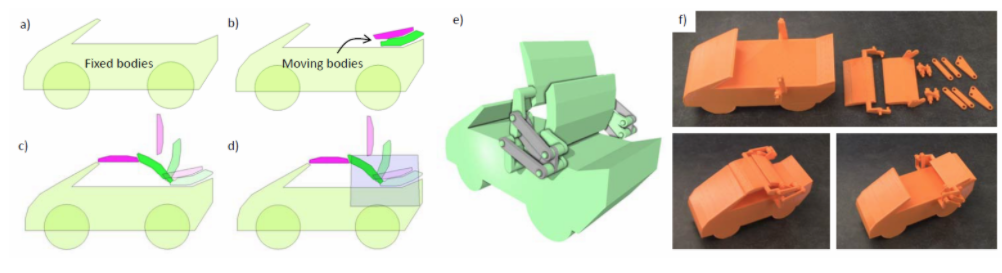
The concept has been explored in academic work such as multi-pose interactive linkage design, where users draw shapes and a few key poses, then the system automatically generates a one-degree-of-freedom linkage. These tools aim to help novice designers create objects such as folding tables, sofa beds, vehicle roofs, toy mechanisms, and small 3D-printable assemblies without needing to manually solve every kinematic equation.
Traditional linkage synthesis includes motion generation, path generation, and function generation. Motion generation focuses on moving a body through prescribed positions and orientations. Path generation focuses on making a point trace a desired curve. Function generation coordinates input and output angles. Real products often need a messy combination of all three. A car seat does not merely rotate. It must fold, avoid the dashboard, clear nearby brackets, feel smooth, and not pinch anyone’s fingers. Computers love neat categories; mechanisms love embarrassing neat categories.
Why Designers Want This Tool So Badly
Manual linkage synthesis can be slow and unforgiving. Designers may use sketches, CAD constraints, simulation tools, curve atlases, optimization methods, or old-school geometric constructions. A four-bar linkage, one of the simplest closed-chain mechanisms, can still produce surprisingly complex coupler curves. This is why mechanical engineers have relied on coupler-curve atlases, numerical methods, and increasingly, computational optimization.
Software promises a more intuitive workflow: sketch the target poses, press a button, watch the linkage appear, and pretend you did not spend your college years suffering through kinematics homework. For educators, hobbyists, product designers, roboticists, and prototypers, that is powerful. It lowers the entry barrier and encourages experimentation. A designer can explore ten mechanism layouts before lunch instead of spending lunch explaining why “just add a hinge” is not a design strategy.
The Hard Stuff the Software Tries to Hide
The phrase “handwaves away the hard stuff” is funny because the hard stuff is exactly where mechanical design lives. A linkage generator can search through many possible designs, but it still has to judge whether those designs are physically useful. That means checking for collision, defects, smoothness, compactness, manufacturability, and reliability.
1. Collision Is Not a Minor Detail
In a CAD window, a linkage may look brilliant until one link passes through another like a ghost in a haunted machine shop. Real links cannot do that. Good linkage inferring software must simulate candidate mechanisms and reject designs where links intersect, joints collide, or moving bodies crash into fixed structures.
This is especially important for folding furniture, vehicle roofs, robotic arms, and deployable structures. The mechanism must not only hit the desired key poses; it must travel between them without doing anything rude. A sofa bed that reaches both “sofa” and “bed” positions is not successful if it needs to pass through “wooden explosion” in between.
2. Circuit Defects Can Ruin the Party
Some linkages can technically match the target poses but cannot move continuously between them without being disassembled. This is called a circuit defect. On paper, the mechanism checks out. In real life, it gets stuck on the wrong branch of its motion path. This is a classic example of software needing to understand more than endpoints.
A useful system must evaluate whether the mechanism can move through the intended sequence in order. It is not enough to say, “Look, the part can be here, here, and here.” The important question is whether it can get from here to there without requiring a screwdriver, prayer, or a physics waiver.
3. Branch Defects and Monotonic Motion Matter
Branch defects occur when a mechanism can move in more than one unintended way, or when the input angle does not progress cleanly through the desired sequence. Some research systems reduce these problems by encouraging joint angles to change monotonically from the first pose to the last. That sounds mathematically polite, but it has practical value: it helps keep the linkage’s motion predictable.
Predictability matters because most real mechanisms are driven by motors, springs, hands, or gravity. If the motion suddenly reverses, snaps, or wanders into another configuration, the product becomes unreliable. Nobody wants a folding table with a secret alternate personality.
4. Force and Torque Are Often the Elephant in the Workshop
Many linkage design tools focus on kinematics: where parts go, how they move, and whether they collide. But real machines also care about kinetics: forces, torque, friction, stiffness, and loads. A mechanism may move beautifully in simulation while requiring a motor the size of a lunchbox to operate.
This is one of the biggest limitations of early or simplified linkage inference systems. They can generate plausible geometry, but they may not fully account for driving force, joint friction, material flex, backlash, wear, or manufacturing tolerance. In other words, the software may design a ballerina, while the shop floor receives a shopping cart with one bad wheel.
How Linkage Inference Usually Works
At the core of many linkage inference systems is a search process. The program creates candidate mechanisms, simulates them, scores their performance, discards bad candidates, and refines promising ones. This can resemble evolutionary optimization, genetic algorithms, sampling-based search, or machine learning assisted synthesis.
In a genetic-algorithm style workflow, each possible linkage can be treated like a “gene.” The software mutates and recombines these candidates, then evaluates which ones best match the target motion. Poor performers get removed. Better performers survive. After enough iterations, the system may converge on a useful design. It is Darwin, but with more pivot pins.
Modern research has also explored deep generative models for four-bar linkage synthesis. These systems can learn relationships between desired kinematic conditions and linkage dimensions, then generate diverse candidate mechanisms. That diversity matters because there is rarely one perfect mechanism. There may be several acceptable mechanisms with different trade-offs: one is compact, one has smoother torque transmission, one is easier to manufacture, and one looks like it was designed by a caffeinated spider.
The Role of Simulation
Simulation is where the software stops daydreaming and starts being useful. A candidate linkage must be animated through its range of motion. The program checks how closely it follows target poses, whether it moves smoothly, and whether it violates geometric constraints. Some systems also estimate trajectory tortuosity, compactness, and defect avoidance.
This step is computationally expensive because the software may need to test thousands or millions of variations. But without simulation, linkage inference is just random geometry wearing a lab coat. The best tools do not simply draw bars; they evaluate behavior.
Real-World Examples Where Linkage Design Matters
Mechanical linkages appear everywhere because they are simple, durable, and elegant when designed well. Windshield wipers use linkages to sweep a controlled path across glass. Automotive hoods and seats use mechanisms to open, fold, recline, or stow. Construction equipment uses linkages to guide buckets and arms. Folding tables, wall beds, convertible roofs, and deployable devices rely on carefully planned motion.
In robotics, linkages can reduce the number of motors needed to create complex motion. A single actuator can drive a coordinated mechanical sequence, which saves weight, cost, and control complexity. In medical and rehabilitation devices, linkage mechanisms can guide limbs along therapeutic paths. In toys and kinetic sculptures, they turn simple rotation into delightful motion that makes people say, “Wait, how is it doing that?”
Why Four-Bar Linkages Are Still a Big Deal
The four-bar linkage is famous because it is the simplest closed-chain movable linkage. It has four links connected in a loop, usually with revolute joints. Despite that simplicity, it can generate a wide variety of motions. Change the link lengths and pivot positions, and the output path changes dramatically.
This is both wonderful and annoying. Wonderful, because a simple mechanism can do a lot. Annoying, because finding the right dimensions for a specific path can be deeply non-obvious. That is the opening where linkage inferring software enters, wearing a cape made of algorithms.
The Difference Between a Cool Demo and a Useful Engineering Tool
A cool demo shows a linkage moving on screen. A useful engineering tool helps someone build a working product. The distance between those two things is where the hard stuff lives.
For a generated linkage to be useful, designers need more than an animation. They need editable geometry, manufacturable parts, tolerance awareness, exportable CAD, actuator recommendations, material considerations, and clear warnings about limitations. They also need the ability to compare alternatives. A mechanism that works perfectly in theory but requires impossible assembly is not a design; it is a prank.
Manufacturing Constraints
When a linkage is 3D printed, laser cut, machined, or assembled from off-the-shelf hardware, physical details matter. Hole sizes, joint clearances, layer orientation, fastener selection, and material stiffness all affect performance. A pivot that is too tight creates friction. A pivot that is too loose creates wobble. A link that is too thin bends. A link that is too thick collides with its neighbor. Mechanical design is basically geometry with consequences.
User Intent
Another challenge is that users often sketch approximate poses, not exact engineering specifications. The software must balance precision with practicality. If the user draws a folding chair in three rough positions, the system needs to infer a mechanism that honors the intention while still producing smooth, compact, collision-free motion. That is not trivial. Human sketches are optimistic little lies, and software has to translate them into metal, plastic, or wood.
Why “Handwaving” Is Not Always Bad
There is a generous way to interpret the handwaving. Good software hides unnecessary complexity so users can focus on design intent. Nobody wants to manually solve vector loop equations every time they prototype a toy crane. Abstraction is valuable. CAD software already hides enormous complexity behind friendly handles, constraints, and timelines.
The problem is not that linkage inferring software simplifies. The problem is when it oversimplifies without warning. A responsible tool should say, “Here is a promising linkage, but it has high torque demand,” or “This motion is collision-free in 2D projection but may need spacing in 3D,” or “This design reaches the poses but may be sensitive to tolerance.” That kind of honesty is engineering gold.
The future of linkage inference will likely combine interactive sketching, optimization, machine learning, physics simulation, manufacturability checks, and AI-assisted design critique. In the best version, the software becomes less like a magic wand and more like a brutally honest design partner. It suggests options, flags risks, and never says “probably fine” unless it has earned the right.
Experience Notes: What Working With Linkage Ideas Teaches You
Anyone who has spent time sketching, simulating, or building linkage mechanisms learns one lesson quickly: motion is sneaky. A mechanism can look clean in one pose, acceptable in the second, and then turn into mechanical spaghetti halfway through the travel. This is why linkage inferring software is exciting but also why experienced designers stay skeptical. The first animation is not the final truth. It is the opening argument.
In practical design work, the most useful habit is to prototype early and test motion continuously. Even a cardboard model with thumbtacks can reveal problems that a beautiful screen render politely ignores. When you move a rough linkage by hand, you feel dead spots, binding, over-center behavior, sudden acceleration, and awkward assembly paths. That tactile feedback is hard to replace. Software can predict many things, but your fingers are still excellent sensors, especially when they are not being pinched by a poorly placed link.
A common experience is discovering that the “best” linkage according to geometry is not the best linkage for the product. Maybe it follows the desired path closely but puts a pivot in an impossible location. Maybe it is compact but impossible to service. Maybe it works with perfect rigid bodies but flexes under real load. Maybe it requires a custom machined part when the project budget is clearly living on instant noodles. This is where engineering judgment matters.
Another lesson is that constraints should be added in layers. Start with the desired motion. Then add collision constraints. Then add size limits. Then add manufacturing limits. Then add force and torque requirements. If everything is demanded at once, the search space becomes a swamp. If nothing is demanded, the software returns fantasy mechanisms. The art is knowing which constraints are sacred and which ones are negotiable.
For students and hobbyists, linkage inferring tools are especially valuable because they make mechanism design feel playable. You can sketch a folding arm, generate a candidate, watch it fail, adjust the poses, and learn. That loop builds intuition. After enough experiments, you start to recognize why pivots want to live in certain regions, why link proportions matter, and why compactness can fight smoothness. The software becomes a teacher, even when it produces something ridiculous. Sometimes the ridiculous result teaches more than the polished one.
For professional designers, the same tools can speed early exploration. Instead of replacing engineering expertise, they expand the number of ideas worth considering. A designer may not use the generated linkage directly, but it can reveal a layout, pivot relationship, or motion strategy that inspires the final mechanism. In that sense, linkage inferring software is less of an automatic engineer and more of a brainstorming assistant with a geometry addiction.
The healthiest attitude is enthusiasm with a wrench nearby. Use the software. Enjoy the magic. Let it handle the boring search through candidate mechanisms. But verify the motion, test the forces, check the clearances, and build prototypes. Mechanical systems have a way of humbling anyone who believes the simulation too early. The hard stuff never truly disappears. Good software just helps us meet it sooner, with better options and fewer crumpled sketches on the floor.
Conclusion: The Magic Is Real, But So Is the Metal
Linkage inferring software is one of those technologies that feels like cheating in the best possible way. It takes a difficult mechanical design problem and turns it into an interactive search. That is a big deal for product designers, educators, roboticists, makers, and anyone who has ever stared at a folding mechanism and muttered, “There has to be a better way.”
But the hard stuff does not vanish. Collision, defects, torque, tolerance, materials, assembly, and manufacturing still matter. The smartest tools will not merely generate linkages; they will explain trade-offs, expose risks, and help designers move from sketch to working mechanism with fewer surprises. In short, the future of linkage inference is not about replacing mechanical thinking. It is about making mechanical thinking faster, clearer, and a little less likely to involve angry noises in the garage.











