
“`
Uploading files to Wikipedia sounds simple until you meet the real boss battle: copyright. You may think, “I have a photo. Wikipedia needs photos. Let’s make knowledge happen.” Wonderful energy. But Wikipedia and Wikimedia Commons are not ordinary image-hosting sites. They are part of a free-knowledge ecosystem where files must be useful, properly described, and legally reusable. In other words, you cannot just toss in a celebrity screenshot, a company logo, or a random photo from Google Images and hope the copyright gnomes are on vacation.
This guide explains how to upload files in Wikipedia in 13 practical steps. It covers the difference between uploading to Wikimedia Commons and uploading locally to English Wikipedia, how to choose the right license, how to write a good file description, and how to avoid the most common mistakes that get uploads deleted faster than a typo in a featured article.
Most free images used on Wikipedia are uploaded through Wikimedia Commons, the shared media repository used across Wikipedia and other Wikimedia projects. Local uploads to English Wikipedia are usually reserved for limited cases, especially certain non-free files that meet strict requirements. So before you upload anything, the big question is not “Where is the button?” It is “Is this file allowed?” Once you understand that, the button becomes much friendlier.
What Counts as a File on Wikipedia?
A Wikipedia file can be an image, diagram, map, audio recording, video clip, scan, or other media file that helps readers understand a topic. Good files make articles clearer. A photo of a historic building helps readers recognize it. A map explains geography faster than a paragraph doing cartwheels. A public-domain portrait can add context to a biography.
However, not every file belongs on Wikipedia or Wikimedia Commons. A vacation selfie, a blurry picture of your lunch, or a poster you found online is usually not a good candidate. Files should have educational value, meaning they should reasonably help explain a topic, document a subject, or support public knowledge. Wikipedia is an encyclopedia, not a personal cloud drive with footnotes.
Wikimedia Commons vs. Wikipedia Uploads
Use Wikimedia Commons for Free Media
In most cases, you should upload files to Wikimedia Commons. Files on Commons can be used across multiple Wikimedia projects and languages. If you took the photo yourself, created the diagram yourself, or have a public-domain or freely licensed file, Commons is usually the right place.
Use English Wikipedia Uploads for Limited Non-Free Files
English Wikipedia also allows some local file uploads, but this route is much narrower. It is often used for files such as certain logos, album covers, book covers, or screenshots when no free replacement exists and the file is needed for a specific encyclopedic purpose. These files must meet strict non-free content rules. Think of local upload as the “only when truly necessary” lane, not the express lane.
How to Upload Files in Wikipedia: 13 Steps
Step 1: Create or Log In to Your Wikipedia Account
Before uploading, create an account or log in to your existing Wikipedia account. Registration is important because uploads are tied to user accounts, and some upload options may not be available to brand-new or anonymous users. A logged-in account also helps you track your contributions, respond to questions, and fix issues if another editor flags your file.
Use a real email address if possible. Wikipedia editors may contact you through your talk page, but account recovery and notifications are easier when your email is confirmed. You do not need to use your real name. In fact, many editors use usernames for privacy.
Step 2: Decide Whether Your File Belongs on Wikimedia Commons or Wikipedia
Ask yourself one simple question: “Can anyone reuse this file for any purpose, including commercial use, under a free license or public-domain status?” If the answer is yes, Wikimedia Commons is probably the correct destination.
If the answer is no, the file may not be accepted on Commons. For example, a copyrighted movie poster, software screenshot, magazine cover, or sports team logo is usually not free media. In rare cases, English Wikipedia may allow such a file locally under non-free content rules, but only if it is necessary, minimal, and no free alternative can serve the same purpose.
Step 3: Check Whether the File Already Exists
Before uploading, search Wikimedia Commons and Wikipedia to see whether the file or a better version already exists. Duplicate uploads create clutter and may be deleted. Search using the subject’s name, alternate spellings, location, date, and file type. For example, if you want to upload a photo of the Golden Gate Bridge, search for “Golden Gate Bridge,” “San Francisco bridge,” and related categories.
If an existing file is better, use that one. If your file is clearly different, higher quality, more recent, or shows a unique angle, it may still be worth uploading. Wikipedia appreciates useful media, not copy-paste confetti.
Step 4: Confirm That You Own the Copyright or Have Permission
This is the step where many uploads go to meet their deletion template. Taking a file from the internet does not mean it is free to use. “Found on Google” is not a license. “No copyright intended” is not legal armor. “My cousin said it was fine” is charming but not enough.
You can usually upload your own original photo, drawing, chart, map, or recording if you are willing to release it under an accepted free license. If someone else created the file, you need clear evidence that it is freely licensed or in the public domain. Permission must allow reuse by anyone, not just Wikipedia. A file that is “free for educational use only” is normally not free enough for Commons because it restricts reuse.
Step 5: Understand Free Licenses Before You Click Upload
A free license allows other people to reuse, share, modify, and often commercially use the file, as long as they follow the license terms. Common licenses on Wikimedia Commons include Creative Commons licenses such as CC BY and CC BY-SA. These usually require attribution, and share-alike licenses require derivative works to use compatible terms.
If you upload your own work, you are not giving up credit. You are giving permission for broad reuse. That is the whole point of Wikimedia’s free-knowledge model. If you are uncomfortable with people reusing your file outside Wikipedia, do not upload it under a free license. Once released, you generally cannot wave a magic wand and pull the permission back from everyone who already received it.
Step 6: Prepare the File Properly
Use the best-quality version you have. For images, upload a clear, uncropped original when possible. For diagrams, use readable labels and avoid tiny text that looks like ants held a committee meeting. For audio and video, choose formats accepted by Wikimedia projects and keep the content relevant.
Remove private information from file metadata if needed. Photos may contain location data, camera details, or timestamps. Sometimes that information is useful, but sometimes it is more personal than you intended. Review it before uploading, especially for photos taken near your home, school, or workplace.
Step 7: Go to the Wikimedia Commons Upload Wizard
For most free files, open the Wikimedia Commons Upload Wizard. The wizard walks you through the process, including selecting files, confirming copyright status, choosing a license, adding descriptions, and publishing the upload. It is designed for regular contributors, not just technical wizards wearing robes made of keyboard shortcuts.
You can upload one file or multiple files, but start with one if you are new. A single careful upload teaches you more than 30 rushed uploads that all need fixing later.
Step 8: Select Your File and Start the Upload
Choose the media file from your device. During upload, keep the browser tab open until the process is complete. Large files may take time depending on your connection and file size.
Use a descriptive file name before or during upload. A name like Jefferson-Memorial-Washington-DC-sunrise-2026.jpg is much better than IMG_4829.jpg. Descriptive names help editors find, understand, and use your file. Your camera’s default file name may know what happened in the camera roll, but Wikipedia does not share its emotional journey.
Step 9: Choose the Correct Copyright Status
The Upload Wizard will ask whether the file is your own work, someone else’s work, or from another source. Be accurate. If you created the file entirely yourself, choose the own-work option and select a free license. If it comes from another source, provide the source and license information.
Do not mark someone else’s work as your own. That is one of the fastest ways to have a file deleted and your account questioned. If the file is public domain because of age, government authorship, or another reason, explain that clearly and choose the correct public-domain tag when available.
Step 10: Add a Clear Description
A good description tells future readers and editors what the file shows. Include the subject, location, date, and context. For example: “Front entrance of the Carnegie Library in Pittsburgh, Pennsylvania, photographed in May 2026.” That is useful. “Nice building lol” is less useful, though emotionally honest.
If the file shows a person, artwork, historical object, or event, include enough context to make it understandable without exaggerating. Avoid promotional language. Wikipedia wants neutral descriptions, not marketing copy wearing a fake mustache.
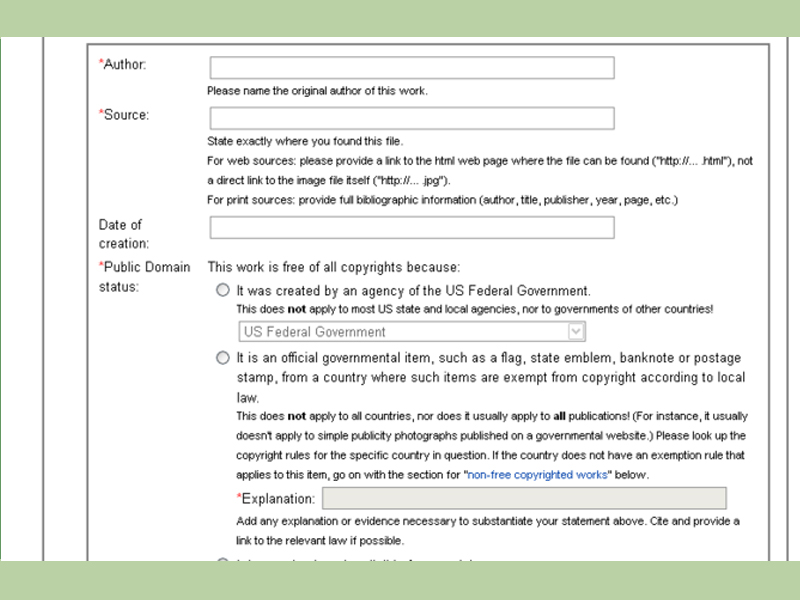
Step 11: Add Source, Author, Date, and Categories
The source explains where the file came from. For your own work, the source can be “Own work.” The author is the creator. The date is when the file was created or published. These fields matter because they help other users verify the file’s copyright status and educational usefulness.
Categories are also important on Wikimedia Commons. They organize files by topic, place, person, object, event, or media type. Add the most specific relevant categories you can find. A photo of a library in Boston should not only be placed in “Buildings.” It should ideally appear in categories related to that specific library, Boston, libraries in Massachusetts, or the architectural style if known.
Step 12: Publish the File and Review the File Page
After entering the required information, publish the upload. Then open the file page and review it carefully. Check the title, description, license, source, author, date, and categories. Fix typos. Make sure the preview displays correctly. If something looks wrong, edit the file page right away.
Do not panic if the page looks more technical than expected. Wikimedia file pages contain templates, metadata, categories, and sometimes warnings. Read any notices carefully. They often explain exactly what needs to be fixed.
Step 13: Add the File to a Wikipedia Article When Appropriate
Uploading a file does not automatically place it in an article. To use it, edit the relevant Wikipedia article and insert the file using the visual editor or wiki markup. Add a concise caption that explains why the file matters in that article. A good caption does not repeat the file name; it gives context.
Only add images where they improve the article. Do not stuff an article with media just because you uploaded it. Wikipedia articles should look informative, not like someone opened a scrapbook during a thunderstorm. One strong image in the right place is better than five decorative images that distract readers.
Common Mistakes to Avoid When Uploading Files
Uploading Random Images From the Internet
The most common mistake is uploading a file found on a website, blog, social media post, or search engine result. Unless the file has a compatible free license or is clearly public domain, it usually cannot be uploaded to Wikimedia Commons. Even if a website says “free download,” that does not always mean free for reuse, modification, and commercial purposes.
Choosing the Wrong License
Licensing is not a decoration. It is the legal foundation of the file. If you choose the wrong license, the file may be deleted or challenged. When in doubt, slow down and read the license options. If you cannot prove the file is free, do not upload it to Commons.
Writing Weak Descriptions
A vague description makes a file harder to use. Instead of writing “old photo,” write what the photo shows, where it was taken, and why it matters. Good descriptions increase the chance that other editors will use your file correctly.
Forgetting Educational Value
Wikimedia Commons is not a storage locker for personal media. A file should have realistic educational use. A clear photo of a public monument, rare plant, historic building, or public event may be useful. A random selfie with no encyclopedic purpose probably is not.
When Should You Use Local Wikipedia Upload Instead?
Use English Wikipedia’s local upload process only when the file cannot go to Commons but may qualify under Wikipedia’s non-free content rules. Typical examples include a low-resolution album cover in an article about that album, a logo in an article about the organization, or a screenshot in an article where the visual appearance is being discussed.
Even then, the file must be necessary. If a free image can replace it, the non-free file should not be used. The file should also be used in at least one article, have a specific fair-use rationale, and be no larger or more detailed than needed. Non-free uploads are not a loophole; they are a narrow exception with a paperwork personality.
Best Practices for Successful Wikipedia File Uploads
Start with your own original work whenever possible. A photo you took yourself of a public building, natural landmark, object, or event is often easier to upload than a file with complicated ownership. Use clear file names, complete descriptions, accurate categories, and honest copyright information.
For images of living people, be thoughtful. Public event photos may be acceptable, but privacy and consent still matter, especially in sensitive settings. For artwork, buildings, logos, and products, remember that the photo itself may be yours, but the subject may involve additional copyright or trademark issues. A photograph of a sculpture, mural, or modern artwork can be more complicated than a photo of a tree. Trees are refreshingly bad at filing copyright claims.
Finally, be ready to learn from other editors. If someone tags your file for missing information, do not take it personally. Wikimedia projects are maintained by volunteers who try to keep the media library useful and legally safe. Fixing a file page is part of the process.
Real-World Examples
Example 1: A Photo You Took of a Historic Library
You photograph a historic public library from the sidewalk. You upload it to Wikimedia Commons as your own work, choose a Creative Commons license, write a description with the building name and location, add the date, and place it in relevant categories. This is usually a strong upload because it is original, educational, and useful for an article.
Example 2: A Company Logo
You want to upload a company logo for the company’s Wikipedia article. Because most logos are copyrighted or trademarked, Commons may not accept it as free media. English Wikipedia may allow a small logo locally if it meets non-free content requirements and is used only where appropriate. You would need a proper non-free rationale.
Example 3: A Celebrity Photo From Instagram
You find a great celebrity photo on Instagram. Unless it is clearly released under a compatible free license by the copyright holder, do not upload it. Public visibility is not the same as public domain. The internet is not a buffet where copyright is the garnish.
Experience Notes: What Uploading Files to Wikipedia Teaches You
The first time you upload a file to Wikipedia or Wikimedia Commons, the process may feel more serious than expected. That is a good thing. The rules are not there to scare away contributors; they exist because Wikipedia’s mission depends on reusable knowledge. A file without clear rights is like a bridge missing half its bolts. It may look fine from a distance, but nobody wants to depend on it.
One useful experience is learning to think like a future editor. When you upload a file, you are not only sharing it for today’s article. You are creating a media resource that someone may use years later in another language, another project, or another educational context. That future person needs to know what the file shows, who created it, when it was made, and why it can be reused. A complete file page is a small gift to future volunteers.
Another lesson is that quality matters, but usefulness matters more. A technically perfect photo of an unimportant subject may be less valuable than a slightly imperfect photo of a rare building, local monument, historic event, or under-documented topic. Wikipedia has plenty of polished images of famous places. What it often needs are accurate, well-described files about subjects that do not already have strong media coverage.
Uploading also teaches patience. Sometimes your file may be tagged for missing categories, unclear permission, or weak description. This can feel annoying, especially when you thought you did everything right. But those tags are often fixable. Add a better source, improve the description, clarify the license, or ask for help on the relevant talk page. Many good contributors started with messy first uploads. The difference is that they learned instead of rage-quitting into the nearest comment box.
A practical habit is to prepare information before opening the Upload Wizard. Keep the file name, description, date, author, source, license, and categories ready. If the file is not your own work, save proof of the license. If the subject has an existing Wikipedia article, check how images are already used there. This preparation makes the upload smoother and reduces mistakes.
Over time, you may start noticing gaps in Wikipedia’s visual coverage. Maybe your town’s historic school has no photo. Maybe a local park, bridge, sculpture, train station, or public building is missing images. Maybe an article has a poor-quality file that could be improved with a better freely licensed photograph. That is where uploading becomes genuinely rewarding. You are not just adding pixels; you are improving public knowledge.
The best contributors upload carefully, not carelessly. They respect copyright, write useful descriptions, choose accurate categories, and add files only where they help readers. If you follow that approach, your uploads are more likely to survive review, appear in articles, and become part of the shared knowledge library that millions of people use every day.
Conclusion
Learning how to upload files in Wikipedia is really learning how to contribute media responsibly. The technical steps are straightforward: log in, choose the right upload path, select your file, add licensing information, describe it clearly, publish it, and use it where appropriate. The deeper skill is knowing whether the file belongs there in the first place.
If the file is your own work and you are happy to release it under a free license, Wikimedia Commons is usually the best choice. If the file is copyrighted and only needed in a narrow encyclopedic context, English Wikipedia’s local upload process may apply, but the requirements are strict. When you respect those rules, you help keep Wikipedia useful, legal, and genuinely free for everyone.











