
Note: Phone menus can vary slightly by iPhone version, Android model, carrier, and region. The steps below use the most common current wording for iPhone, Google Phone, and Samsung Galaxy devices.
A phone call always seems to arrive at the worst possible moment: during a meeting, in the checkout line, halfway through a workout, or exactly when your mouth is full of sandwich. Ignoring the call works, sure, but it can feel rude when the caller is a friend, client, family member, coworker, or someone who might actually need a reply. That is where the humble “decline call with text” feature saves the day.
Learning how to decline a phone call with a text message lets you stay polite without picking up. Instead of letting the call ring forever or sending someone into voicemail limbo, you can quickly reply with a short message like, “Can’t talk right now. I’ll call you back soon.” It is fast, clear, and much less dramatic than whispering “I’m in a meeting” while everyone at the conference table stares at you like you just confessed to stealing the office stapler.
This guide explains how to reject a call with a text message on iPhone and Android, how to customize quick responses, what to write in different situations, and when it is better not to send a reply at all. Whether you want a professional call decline message, a friendly quick response, or a polite way to dodge your third robocall of the morning, these nine steps will help you handle incoming calls without creating awkward digital smoke signals.
Why Declining a Call with a Text Is Useful
Declining a call with a text message is not just a convenience feature. It is a small communication skill. A missed call with no explanation can make people wonder whether you are busy, annoyed, asleep, trapped under furniture, or simply pretending your phone is a decorative rectangle. A short text removes the mystery.
It also protects your attention. Not every call deserves to interrupt what you are doing. If you are driving, working, studying, exercising, caring for a child, sitting in class, attending an appointment, or trying to enjoy one peaceful cup of coffee, you can acknowledge the caller without opening the door to a full conversation.
The trick is to keep your message short, honest, and useful. You do not need to write a tiny memoir. In fact, please do not. “Can’t talk now, I’ll call you after 3” is better than a 200-word explanation involving traffic, emotional weather, and your complicated relationship with notifications.
How to Decline a Phone Call with a Text Message: 9 Steps
Step 1: Look at Who Is Calling Before You Respond
Before you tap anything, check the caller ID. Is it your boss, your spouse, your child’s school, your doctor, a friend, a delivery driver, or an unknown number with the emotional energy of a scam warranty extension? The caller matters because your response should match the relationship and urgency.
For someone you know, sending a quick text is usually helpful. For example, “I’m in a meeting. Can I call you in 20 minutes?” tells the person you saw the call and are not ignoring them. For an unknown number, it may be smarter to let the call go to voicemail. If it is legitimate, they can leave a message. If it is a spam call, replying may confirm that your number is active, which is not exactly the life upgrade anyone asked for.
Use common sense. If the same trusted contact calls repeatedly, it may be urgent. If a random number calls once from a city you have never visited, you probably do not owe it a personalized haiku.
Step 2: Use the Built-In “Message” Option on iPhone
On an iPhone, declining a call with a text is simple. When a call comes in, look for the Message option on the incoming call screen. Tap it, then choose one of the suggested replies or tap Custom to write your own message.
Common default responses may include messages such as “Sorry, I can’t talk right now,” “I’m on my way,” or “Can I call you later?” The exact wording can vary, but the idea is the same: tap, send, return to your life.
If your iPhone is locked, you may need to tap the call banner or access the expanded incoming call options first. If the call appears as a small banner at the top of the screen, tap or expand it to see more choices. Once you send the message, the call is declined, and the caller receives your text.
Step 3: Customize “Respond with Text” on iPhone
Default messages are useful, but they can sound a little robotic. “I can’t talk right now” is fine, but it does not tell your coworker whether you will call back in five minutes or sometime after the next solar eclipse. Customizing your iPhone responses makes the feature more practical.
To customize call decline messages on iPhone, open Settings, go to Apps, choose Phone, then tap Respond with Text. From there, you can edit the available quick replies. Older iOS versions may show the Phone settings directly under Settings > Phone > Respond with Text.
Good iPhone quick replies include:
- “I’m busy right now. I’ll call you back soon.”
- “Can’t talk at the moment. Is this urgent?”
- “In a meeting. I’ll text when I’m free.”
- “Driving right now. I’ll reply when parked.”
- “Please text me what you need.”
Try to create responses you would actually use. A message like “Greetings, valued caller, I am temporarily unavailable” may be technically polite, but unless you are a Victorian butler with unlimited data, it may feel a little much.
Step 4: Use Quick Responses on Android
On many Android phones that use the Google Phone app, you can decline an incoming call and send a text by tapping Message on the call screen. You will see quick response options, and you can choose one to send immediately.
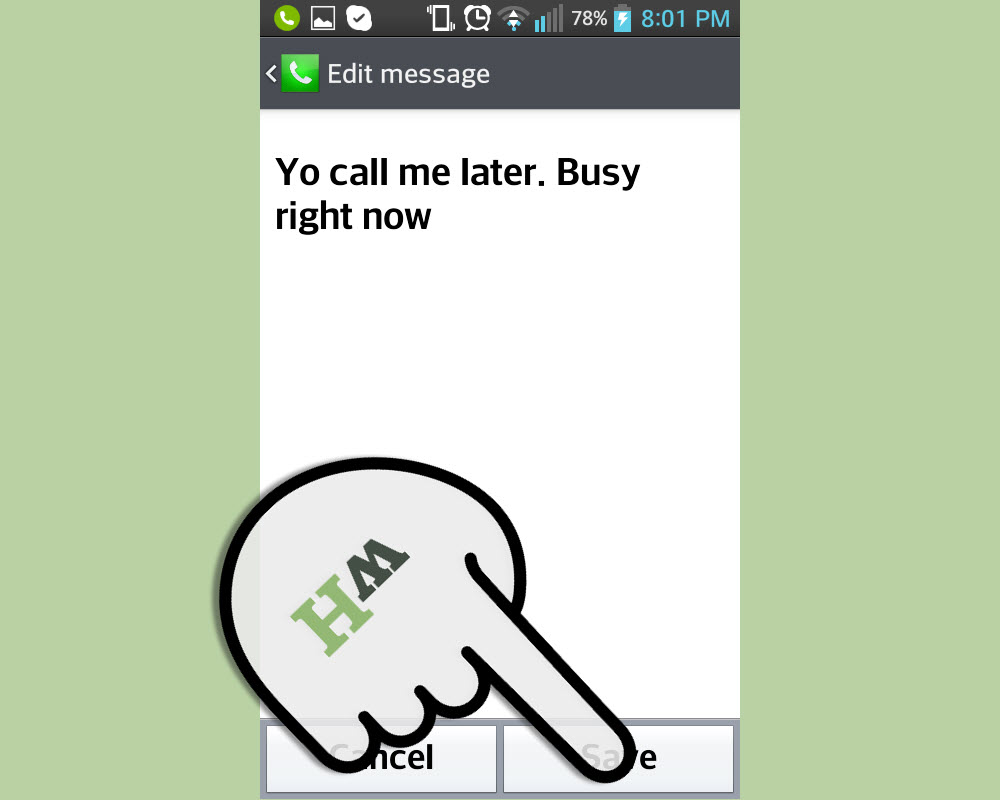
To edit those responses, open the Phone app, tap the More menu, go to Settings, then select Quick responses. Tap a response, edit the wording, and save it. This gives you a set of ready-made messages for moments when answering is not possible.
Because Android phones vary by brand, your exact path may differ. Some devices use labels like Reject with message, Decline with message, or Quick reply. The feature is usually found inside the Phone app settings rather than the general Messages app.
Step 5: Use Quick Decline Messages on Samsung Galaxy
Samsung Galaxy phones commonly use the phrase Quick Decline messages. When a call comes in, you can swipe or tap the message option on the incoming call screen and choose a saved response. Samsung also allows users to customize these messages in the Phone app settings.
To adjust them, open the Phone app, tap the three-dot menu, choose Settings, and look for Quick decline messages. You can add, remove, or edit the replies so they sound like you instead of a customer service chatbot that recently discovered feelings.
Samsung users may also see call decline message features on compatible Galaxy Watches. That is useful during workouts, commutes, or situations where pulling out your phone is inconvenient. Just remember: short is the goal. Your smartwatch is not the place to type a legal affidavit with your thumb.
Step 6: Write a Message That Matches the Situation
The best call decline text depends on context. A message to your manager should not sound like a message to your best friend. A message to a client should not include “lol sorry chaos.” Unless that client is also your best friend, in which case congratulations on your exciting boundary puzzle.
For work, keep it professional:
- “I’m in a meeting right now. I’ll call you back at 2:30.”
- “I can’t take the call at the moment. Please text me the details.”
- “I’m unavailable right now, but I’ll follow up shortly.”
For friends or family, you can sound warmer:
- “Can’t talk now, but I’ll call you later.”
- “Busy for a bit. Everything okay?”
- “I’m tied up right now. Text me if it’s urgent.”
For service calls or appointments, be direct:
- “I can’t answer right now. Please text the details.”
- “Please leave a voicemail and I’ll return your call.”
- “I’m unavailable. Can you send the information by text?”
A good text does three things: acknowledges the call, explains your availability, and gives the caller a next step.
Step 7: Avoid Over-Explaining
When you decline a phone call with a text message, you do not need to defend your entire schedule. “I can’t talk right now” is enough. People are busy. Phones are portable, but that does not mean your attention is public property.
Over-explaining can accidentally create more conversation. If you write, “I’m at the grocery store, then I have to pick up laundry, then I need to stop by the bank, then maybe I’ll be free after dinner,” the caller may respond with three new questions. Now you are not declining a call. You are hosting a documentary about your errands.
Keep the message brief. Add a time frame when possible. “I’ll call you after 5” is more useful than “later,” because “later” can mean anything from ten minutes to next fiscal quarter.
Step 8: Know When Not to Send a Text
Declining a call with a text is useful, but it is not always the right move. Do not send a text while driving. If you need to respond, pull over safely and park first, or let your phone’s Do Not Disturb or driving mode handle the interruption. No text message is worth turning your commute into a physics lesson.
Be cautious with unknown numbers. If a call looks suspicious, let it go to voicemail. Scammers often rely on engagement, so a reply can be more attention than they deserve. If the caller claims to be from a bank, government agency, delivery company, or support team, do not share personal information by text. Instead, contact the organization using an official number or app.
Also, avoid texting bad news, sensitive information, medical details, financial information, or anything emotionally loaded as a quick call decline. A short “I can’t talk right now, but I’ll call you soon” is fine. A major life announcement delivered through a call rejection text? That is how family group chats become courtroom exhibits.
Step 9: Follow Up When You Say You Will
The most polite call decline message is only as good as your follow-through. If you text “I’ll call you back in 30 minutes,” try to actually call back in 30 minutes. If you cannot, send another quick update: “Still tied up, but I haven’t forgotten. I’ll call after dinner.”
This matters most in professional settings. Clients, coworkers, managers, and business contacts appreciate clarity. A quick response can make you look organized, but forgetting to follow up can undo that good impression. Use reminders if needed. Many phones let you set a callback reminder, or you can ask your assistant app to remind you.
For personal relationships, following up shows care. You may not be able to answer every call, but a timely response tells people they matter. It is the digital version of waving from across a crowded room and saying, “I see you, I’m not ignoring you, and yes, I will explain later why I was carrying a pineapple.”
Best Text Message Examples for Declining a Call
Here are polished examples you can save as quick replies or use when writing a custom call decline message.
Professional Examples
- “I’m in a meeting right now. I’ll call you back as soon as I’m free.”
- “I can’t take your call at the moment. Please text me the key details.”
- “I’m unavailable right now, but I’ll follow up later today.”
- “I’m with a client. I’ll return your call shortly.”
- “Can we schedule a time to speak?”
Friendly Examples
- “Can’t talk right now. Everything okay?”
- “Busy at the moment. I’ll call you later.”
- “I saw your call. Give me a bit and I’ll ring you back.”
- “In the middle of something. Text me if it’s urgent.”
- “Not ignoring you, just trapped in real life for a minute.”
Short and Simple Examples
- “Can’t talk now. I’ll call back soon.”
- “Please text me.”
- “Is it urgent?”
- “I’ll call you later.”
- “In a meeting.”
Common Mistakes to Avoid
The first mistake is sounding too cold. A message like “Unavailable” may be efficient, but it can feel like it was sent by a parking meter. Add a little warmth when the relationship calls for it.
The second mistake is promising a callback you cannot make. If you are not sure when you will be free, write, “I’ll get back to you when I can” instead of naming a specific time. Honesty beats fake precision.
The third mistake is using the same message for everyone. “Text me” may be fine for a friend, but it may feel abrupt to a client. “I’m unavailable right now, but please send the details by text” sounds more professional.
The fourth mistake is replying to suspicious calls. If you do not know the number and the call seems odd, let voicemail do its job. Voicemail is not glamorous, but neither is explaining to your bank why you texted personal details to “Definitely Real Fraud Department.”
How to Make Call Decline Texts Sound More Human
To make your quick responses sound natural, use your normal voice. If you never say “at the moment” in real life, do not use it in every text. If you usually say “I’m tied up,” use that. The goal is not to sound fancy. The goal is to sound clear and respectful.
Add time when possible: “after lunch,” “in 20 minutes,” “this evening,” or “tomorrow morning.” Add a next step when helpful: “Please text the details,” “Leave a voicemail,” or “Send me the address.” These small details prevent follow-up confusion.
You can also create different saved replies for different parts of your life. One professional, one personal, one driving-related, and one urgent-check message will cover most situations.
Personal Experiences and Practical Lessons from Declining Calls with Texts
One of the biggest lessons from using call decline texts is that people usually do not mind when you cannot answer. What frustrates them is uncertainty. A missed call with no response can feel like a closed door. A quick text turns that closed door into a note that says, “Back in 20 minutes.” It is simple, but it changes the tone completely.
In work situations, a text response can prevent unnecessary pressure. Imagine you are on a video call and your phone starts buzzing with a client’s name. Answering would be disruptive. Ignoring it might look careless if the client is waiting on something important. Sending “I’m in a meeting right now. Please text me the details and I’ll follow up after” gives you control. It also invites the caller to clarify what they need, which may turn a 15-minute call into a two-sentence answer.
With friends and family, the emotional temperature matters. A parent, partner, sibling, or close friend may not need a formal response. They need reassurance. “Can’t talk noweverything okay?” is one of the best messages because it does two jobs at once. It declines the call while making room for urgency. If the person replies, “Yes, just wanted to chat,” you can relax. If they reply, “Call when you can,” you know to prioritize it.
Another practical experience: custom messages are worth setting up before you need them. Trying to type a thoughtful response while your phone is ringing is like trying to fold a fitted sheet during a fire drill. You will probably end up tapping the wrong thing. Having three or four saved replies makes the feature faster and less awkward.
It also helps to be realistic about your own habits. If you often forget to call back, avoid messages that create strict promises. Instead of “I’ll call in 10 minutes,” use “I’ll call when I’m free.” Then set a reminder if the call matters. A polite text plus a forgotten callback is still a broken loop. The caller may not be angry, but they may stop trusting your “soon.”
Declining calls with text messages can also reduce social anxiety. Some people dislike phone calls because calls demand immediate attention. A text gives breathing room. It lets you decide whether the topic needs a call, a message, an email, or no response at all. That does not mean avoiding every conversation forever. It means choosing the right channel at the right time.
The feature is especially useful in noisy or public places. If you are on a train, in a restaurant, at the gym, in a waiting room, or standing in a checkout line, taking a call can bother everyone nearby. A quick text is more considerate. You avoid shouting “YES, THE DOCUMENT IS ATTACHED” next to someone trying to buy cereal in peace.
The final lesson is that boundaries sound better when they are clear. You do not need to apologize dramatically for being unavailable. “I can’t talk right now” is not rude. It is a normal adult sentence. Add warmth when appropriate, follow up when needed, and your call decline texts will feel polite rather than dismissive.
Conclusion
Knowing how to decline a phone call with a text message is a small skill that makes modern communication smoother. On iPhone, use the Message option and customize replies under Respond with Text. On Android, use Quick responses or your phone’s version of quick decline messages. On Samsung Galaxy devices, look for Quick Decline messages in the Phone app settings.
The best messages are short, honest, and useful. Tell the caller you cannot talk, give a callback window if you can, and ask them to text details if needed. Avoid texting while driving, be careful with unknown numbers, and always follow up when you promise to. A good call decline text is not an excuseit is a tiny courtesy that says, “I saw your call, and I’ll handle it properly when I can.”











