A great home theater is not created by buying the largest television in the warehouse and surrounding it with enough speakers to frighten the cat. The best systems come from thoughtful planning: matching the screen to the room, placing speakers where they can perform properly, controlling reflections, simplifying connections, and calibrating everything after installation.
This guide covers practical home theater how-tos, help, and tips for beginners, apartment dwellers, movie enthusiasts, gamers, and anyone who has ever stared at an HDMI port while quietly questioning every life decision that led to that moment.
Start With the Room, Not the Shopping Cart
Before comparing televisions, projectors, receivers, or surround sound systems, study the room. Measure its length, width, and ceiling height. Note the locations of windows, doors, electrical outlets, air vents, and any walls that cannot be drilled into without starting a domestic incident.
Decide where the main listening position will be. This seat becomes the reference point for screen height, speaker angles, subwoofer testing, and audio calibration. Avoid placing the primary couch directly against the back wall when possible. Moving it even a foot or two forward can reduce exaggerated bass and make surround effects feel more natural.
Control Light Before Buying More Brightness
Windows and overhead lights can wash out a projected image and create distracting reflections on a television. Blackout curtains, shades, dimmable lamps, and darker wall finishes can improve perceived contrast without requiring a more expensive display.
Do not turn the room into a cave unless that is the goal. A small amount of indirect lighting behind or beside the screen can reduce eye fatigue. The key is preventing light from shining directly onto the display or into viewers’ eyes.
Choose Between a TV and a Projector
A modern television is usually the simplest choice for living rooms, bright spaces, gaming, and everyday viewing. TVs deliver strong contrast, require little maintenance, start quickly, and generally handle daylight better than projectors.
A projector makes sense when image size is the priority. A 100-inch or larger picture can create a genuinely cinematic experience, but projectors need more planning. You must consider throw distance, screen material, mounting location, room brightness, fan noise, and cable routing.
Measure Projector Throw Distance First
Throw distance is the space required between the projector lens and the screen. Traditional long-throw models may be mounted toward the middle or rear of the room. Short-throw and ultra-short-throw projectors can produce large images from much closer positions, although they require careful alignment and a suitably flat screen surface. Epson recommends calculating image size and projection distance for the specific model rather than assuming every projector behaves the same way.
Avoid relying heavily on digital keystone correction. It can straighten a crooked image, but excessive correction may reduce effective resolution. Physically align the projector first, then use lens shift or minor correction for final adjustment.
Get Screen Size and Height Right
Screen size should be based on viewing distance, resolution, personal preference, and the kind of content you watch. A huge screen is exciting until subtitles require a full-body head turn.
THX guidance emphasizes a cinematic field of view and recommends keeping the viewer’s line of sight reasonably close to the screen’s center. Its theater guidance uses a 36-degree viewing angle from the farthest seat as a useful reference, while its home-viewing advice suggests avoiding steep upward or downward viewing angles.
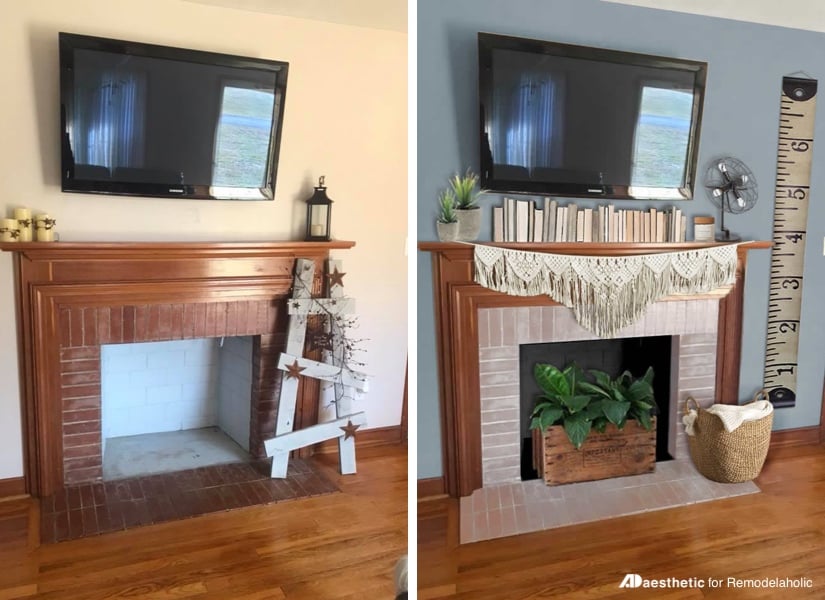
For most rooms, position the center of the screen near seated eye level or slightly above it. If the screen must be mounted higher, tilt it toward the seating position. Mounting a TV above a fireplace can work, but only after considering heat, reflections, neck comfort, and the location of the center speaker.
Understand Home Theater Speaker Layouts
Speaker-system numbers are easier to understand than they initially appear. In a 5.1.2 arrangement, the first number represents five ear-level speakers, the second represents one subwoofer channel, and the third represents two height channels. Dolby publishes layouts ranging from compact systems to elaborate configurations with multiple surrounds, subwoofers, and overhead speakers.
2.1 and 3.1 Systems
A 2.1 system uses left and right speakers plus a subwoofer. It is excellent for music and dramatically better than most built-in TV speakers.
A 3.1 system adds a center channel, which anchors dialogue to the screen. This is one of the smartest upgrades for viewers who frequently ask, “What did that character just mumble?”
5.1 Surround Sound
A 5.1 system adds two surround speakers beside or slightly behind the listening position. It provides convincing movement around the room without requiring ceiling speakers or a receiver with a small airport’s worth of terminals.
Dolby Atmos Layouts
Configurations such as 5.1.2, 5.1.4, and 7.1.4 add sound above the audience. Height effects can come from ceiling-mounted speakers, elevated speakers, or upward-firing modules that reflect sound from a suitable ceiling. Direct overhead speakers generally provide the most precise placement, but upward-firing modules can be useful when cutting holes is not an option.
Place the Front Speakers Carefully
The left and right speakers should frame the screen and form a balanced triangle with the main seat. Aim them toward the listener if the manufacturer recommends toe-in. Keep their tweeters near seated ear height whenever practical.
The center speaker should sit directly above or below the screen and point toward the audience. Crutchfield recommends keeping it as close to ear level as possible and tilting it when necessary. A center speaker aimed at your knees will produce dialogue, but your knees may appreciate it more than you do.
Try to use front speakers from the same product family. Matching tonal characteristics helps voices, music, and effects remain consistent as they move across the front soundstage.
Find the Best Subwoofer Location
Bass behaves differently from midrange and treble because low frequencies interact strongly with room dimensions. A subwoofer may sound powerful in one seat, weak in another, and suspiciously enthusiastic inside the hallway closet.
Front-corner placement can increase output, but it may also exaggerate certain frequencies. SVS recommends testing multiple positions because room shape and seating location determine the smoothness of the bass response.
Try the Subwoofer Crawl
- Temporarily place the subwoofer at the main listening position.
- Play a bass-heavy test track or repeating low-frequency sweep.
- Crawl around the room’s perimeter and listen for locations where bass sounds strong but controlled.
- Move the subwoofer to one of those locations.
- Run the receiver’s calibration process again.
In rooms with several seats, two properly positioned subwoofers can provide more consistent bass across the audience. The goal is not necessarily louder bass. It is fewer seats where the explosion disappears or turns into a one-note earthquake.
Improve Room Acoustics Without Building a Recording Studio
Hard, bare rooms reflect sound. Tile floors, large windows, empty walls, and low ceilings can make dialogue harsh and effects difficult to locate. Start with ordinary furnishings before purchasing professional acoustic treatment.
- Add a rug between the speakers and seating area.
- Use curtains over large windows.
- Place upholstered furniture in the room.
- Add bookshelves or irregular decorative surfaces to reduce repetitive reflections.
- Install purpose-built absorption panels at strong first-reflection points when necessary.
Do not cover every surface in thick foam. An overly dead room can sound unnatural. The objective is controlled reflections, clearer dialogue, and more accurate imagingnot recreating the acoustic personality of a winter coat.
For dedicated rooms involving construction, sound isolation, hidden wiring, multiple seating rows, or structural mounting, professional design can prevent expensive mistakes. CEDIA notes that trained home-cinema professionals follow performance and safety practices while also providing system tuning and ongoing support.
Connect Everything Without Creating Cable Spaghetti
A typical system routes streaming players, game consoles, and disc players into an AV receiver, then sends video from the receiver to the television or projector. A simpler soundbar system usually connects directly to the TV’s HDMI ARC or eARC port.
ARC Versus eARC
ARC sends television audio back to a compatible receiver or soundbar through HDMI. eARC expands that capability and supports higher-bandwidth audio formats when the connected devices and content are compatible. HDMI Licensing Administrator describes eARC as a way to return audio from TV apps and connected sources to an audio system through one HDMI connection.
Connect the audio system to the port specifically labeled ARC or eARC. Then enable ARC/eARC and HDMI-CEC in the device menus. Manufacturers give HDMI-CEC different brand names, because apparently one universal term would have been far too peaceful.
Use the Right HDMI Cable
You do not need a cable forged under a full moon and priced like jewelry. You do need a certified cable that supports the required bandwidth, especially for 4K HDR, high frame rates, variable refresh rate, and long cable runs.
If a 4K or HDR device produces a blank screen, flickering, or reduced resolution, check the cable, HDMI input mode, receiver compatibility, and content-protection support. Roku’s setup documentation similarly advises matching the cable and HDMI port to the required 4K or HDR capability.
Label both ends of every cable before hiding them. Future you will be delighted. Future you rarely receives gifts this thoughtful.
Give the AV Receiver Room to Breathe
AV receivers generate heat, especially when powering several speakers at higher volumes. Do not seal the receiver inside a tight cabinet or stack another hot component directly on top of it.
Crutchfield advises leaving approximately three inches of open space above a receiver and enough space behind it for cable bends and airflow. Active cabinet fans may be useful in enclosed furniture.
Excessive heat can cause shutdowns, shorten component life, and transform movie night into an unexpected troubleshooting seminar.
Calibrate the Audio System Properly
Most modern receivers include automated room correction. The system measures speaker distance, output level, timing, and frequency response using a supplied microphone.
- Place the microphone at seated ear height on a tripod or stable stand.
- Keep the room quiet during every measurement.
- Measure the main seat first.
- Take additional measurements around the actual listening area rather than across the entire room.
- Review the detected speaker sizes, distances, crossover settings, and levels before saving.
Denon’s Audyssey instructions recommend measuring several nearby positions, with six or more readings suggested for compatible models. The microphone should remain close to the primary listening area rather than traveling to random corners where nobody watches movies.
Room correction is a finishing tool, not a substitute for sensible placement. Move badly positioned speakers first; let software handle the smaller problems afterward.
Adjust the Picture for Movies, Sports, and Games
Begin with the television’s Cinema, Movie, Filmmaker, or similarly accurate preset. Vivid and Dynamic modes are designed to look bright under retail lighting and may exaggerate color, sharpening, contrast, and motion processing.
Adjust panel brightness for the room rather than copying one universal number from the internet. RTINGS’ calibration guidance likewise distinguishes between bright, average, and dark viewing environments because picture settings should reflect ambient light.
For films, reduce aggressive motion smoothing if it makes cinematic content resemble live television. For gaming, enable Game Mode to reduce input lag. Confirm that HDR, enhanced HDMI mode, and variable refresh rate are active on the correct inputs when supported.
Common Home Theater Problems and Quick Fixes
No Sound From the Receiver or Soundbar
- Confirm that the HDMI cable uses the ARC or eARC port on both devices.
- Enable ARC/eARC and HDMI-CEC in the menus.
- Select the external audio system as the TV’s output.
- Try changing digital audio output between Auto, Pass Through, and PCM.
- Restart every device after changing HDMI settings.
Dialogue Is Too Quiet
- Raise the center-channel level slightly.
- Aim the center speaker at ear height.
- Enable dialogue enhancement or a night-listening mode.
- Reduce strong reflections from floors, tables, and bare walls.
- Verify that the source is sending the expected surround format.
The Subwoofer Sounds Weak
- Confirm that the subwoofer is powered on and connected to the receiver’s subwoofer output.
- Check crossover settings and speaker configuration.
- Try another location using the subwoofer-crawl method.
- Inspect phase controls and rerun calibration.
Dolby Atmos Does Not Appear
- Check that the content actually includes an Atmos soundtrack.
- Use a compatible HDMI connection and audio device.
- Select bitstream or pass-through audio where appropriate.
- Confirm that height speakers are enabled in the receiver’s layout.
- Review the streaming device’s audio settings.
For example, Apple recommends checking the Video and Audio menu on Apple TV 4K and confirming that Dolby Atmos appears under the immersive-audio settings.
The Picture Flickers or Disappears
- Test a shorter certified HDMI cable.
- Connect the source directly to the display to isolate the receiver.
- Disable high-bandwidth features temporarily.
- Update device firmware.
- Verify that every component in the signal chain supports the selected resolution and refresh rate.
Upgrade in the Right Order
You do not need to replace the entire system at once. A sensible upgrade path prevents spending money on equipment that does not solve the current problem.
- Improve placement and settings. This costs nothing and may deliver the largest immediate improvement.
- Add or upgrade the center speaker. Better dialogue improves almost everything you watch.
- Add a capable subwoofer. Bass provides weight, scale, and impact that small speakers cannot reproduce.
- Treat major room reflections. A modest rug or curtain may outperform a surprisingly expensive cable.
- Upgrade the display. Choose based on viewing conditions, seating distance, and content.
- Add surround or height channels. Expand only after the front soundstage is working well.
Buy for the room you have, not the imaginary mansion your online shopping tabs seem to believe you own.
Conclusion
The most effective home theater tips are not secret tricks. Measure first, select equipment that fits the room, keep the screen comfortable, prioritize clear dialogue, experiment with subwoofer placement, control reflections, use suitable HDMI connections, provide ventilation, and calibrate from the actual seating area.
A carefully arranged 3.1 or 5.1 system can be more enjoyable than a badly installed collection of premium components. The goal is not to collect the most logos. The goal is to press Play and forget that the equipment is there.
Real-World Home Theater Experiences and Lessons
One of the most common home theater experiences begins with excitement and ends with someone holding four remote controls while the television insists that no signal exists. The lesson is simple: build the system in stages. Connect the display and one source first. Confirm that the picture works. Add the receiver or soundbar next. Test audio. Only then should you connect consoles, disc players, lighting controls, universal remotes, and the mysterious media box nobody remembers purchasing.
Another lesson involves screen height. Many first-time installers mount the television while standing, admire the result, and later discover that watching a two-hour movie feels like sitting in the front row of a planetarium. Mark the proposed screen position with painter’s tape, sit on the actual couch, and look at it for several minutes. This low-tech test catches more mistakes than a specification sheet.
Speaker placement also rewards patience. Moving a left or right speaker a few inches away from a wall can improve clarity. Tilting the center speaker upward may make dialogue easier to understand without increasing the volume. Pulling the couch slightly forward can change the bass dramatically. These adjustments are free, yet they are frequently postponed in favor of buying another device with a glowing logo.
Subwoofers provide the funniest surprises. A location that looks perfect may produce weak bass at the main seat, while an awkward corner may sound excellent. During a subwoofer crawl, you may find yourself kneeling beside a bookcase while replaying the same explosion twenty times. This looks ridiculous to anyone entering the room, but the result can be smoother bass without buying new equipment.
Automatic calibration is useful, but real-world results still require listening. A receiver may identify a full-size speaker as “large,” set a crossover unexpectedly low, or make the surrounds too quiet for personal preference. Treat the automated result as a strong starting point. Watch familiar scenes, listen to dialogue, and make small adjustments rather than changing ten settings simultaneously.
Cable management becomes important approximately five minutes after it is ignored. Labeling cables, leaving service loops, photographing connections, and keeping ventilation paths open make future upgrades easier. Without labels, replacing one streaming player can become an archaeological excavation conducted behind a cabinet with a flashlight held between your teeth.
Finally, the best home theater is the one the household can operate. A system that produces magnificent sound but requires a twelve-step startup ritual will eventually be bypassed. Simplify inputs, rename devices, configure HDMI control carefully, create easy activity buttons when possible, and write down unusual settings. Performance matters, but convenience determines whether the system is enjoyed every day or demonstrated only when technically curious guests visit.