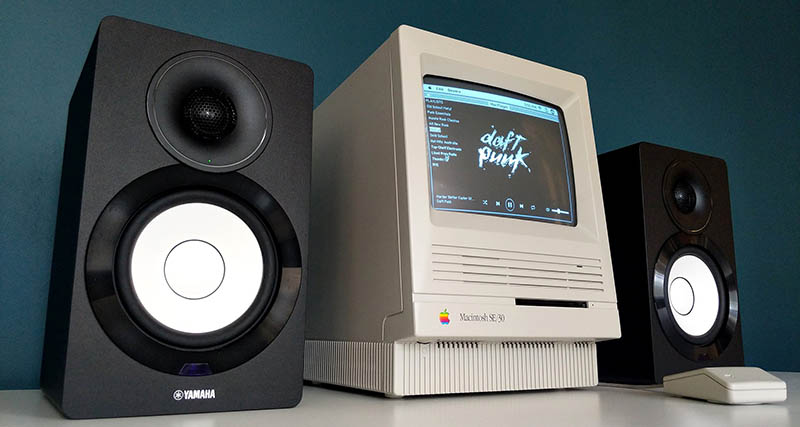
An old Mac can be a lot like a retired rock star: scratched, dramatic, occasionally warm to the touch, but still fully capable of filling a room with music. The problem is that modern streaming apps do not always share our sentimental attachment to aging aluminum. Spotify has moved forward, macOS has moved forward, browsers have moved forward, and your 2011 MacBook Pro may be sitting in the corner wondering why everyone left the party without it.
The good news is simple: giving an old Mac Spotify is still possible in many cases. The best method depends on the Mac’s age, the version of macOS it can run, the browser support available, and whether you want the machine to act as a full Spotify desktop player, a web-player jukebox, a local-music station, or a remote-controlled speaker. The bad news? There is no magic “make my ancient Mac young again” button. If there were, it would probably cost $129 and require a dongle.
This guide explains practical ways to revive an older Mac for Spotify, from checking compatibility and using the Spotify Web Player to upgrading macOS, improving performance, and turning the computer into a dedicated music machine. It is written for regular people, not lab technicians wearing anti-static wrist straps for fashion.
Why Old Macs Struggle With Spotify Today
Spotify is not just a lightweight music player anymore. The modern desktop app handles account syncing, lyrics, podcasts, ads or Premium features, downloads, recommendations, device handoff, security checks, and protected content. That means it depends on newer system libraries, browser-like components, and security frameworks. Older Macs may still boot, browse, and play MP3 files, but they may not meet the minimum requirements for the latest Spotify app.
As of current Spotify support information, the Spotify desktop app for Mac requires OS X/macOS 12.0 or newer. For an older Mac stuck on macOS Catalina, Mojave, High Sierra, or earlier, the official app may refuse to install, crash, show an unsupported-system warning, or stop receiving updates. This is not necessarily because the Mac is useless. It is because the software ecosystem has moved the velvet rope to the other side of the room.
The Spotify Web Player can be a strong workaround, but it also depends on browser support. If Safari, Chrome, Firefox, or Edge is too old, the web player may load poorly, complain about protected content, or fail to play tracks. Modern streaming uses digital rights management and browser security features that were not designed with a 2009 white MacBook in mind.
Step One: Identify Your Old Mac Before Trying Anything
Before downloading random installers like a raccoon rummaging through a tech forum, identify your Mac model and current macOS version. Click the Apple menu in the top-left corner, choose “About This Mac,” and write down three things: the model name, the model year, and the macOS version.
What to Check
- Mac model: For example, “MacBook Pro 13-inch, Mid 2012.”
- macOS version: For example, macOS Monterey 12, Catalina 10.15, or High Sierra 10.13.
- Processor type: Intel Macs have more upgrade and patching options than PowerPC Macs. Apple silicon Macs are newer and usually do not belong in the “old Spotify rescue” category yet.
- Memory and storage: A Mac with 4GB RAM and a spinning hard drive will feel different from one with 8GB RAM and an SSD.
If your Mac can officially upgrade to macOS Monterey 12 or newer, that is the cleanest path for installing the current Spotify desktop app. If it cannot, the next best options are the web player, a supported browser, an unofficial macOS patching route, or repurposing the machine as a local audio station.
Option One: Install Spotify Normally If Your Mac Supports It
If your old Mac can run macOS 12 Monterey or newer, try the official route first. Update macOS through Software Update, restart the machine, and then download Spotify directly from Spotify’s website. This gives you the most stable experience, including playlist syncing, Spotify Connect support, Premium downloads, and normal app updates.
Before installing, clean up the Mac a little. Remove old login items, clear unused apps, free storage space, and restart. Spotify does not need a luxury penthouse to run, but it does appreciate not sharing a cramped studio apartment with six abandoned printer utilities from 2014.
Best For
This method is best for old but not ancient Macs: many 2015-and-newer models, some upgraded Intel Macs, and any machine that can officially or reliably run macOS Monterey or later.
Potential Problems
If the installer says the operating system is unsupported, do not force it from shady download sites. Old third-party Spotify installers may be insecure, outdated, or broken. A music night should not end with malware doing backup vocals.
Option Two: Use the Spotify Web Player
The Spotify Web Player is often the simplest way to give an old Mac Spotify without installing the desktop app. Open a supported browser, visit the Spotify web player, sign in, and play music from your library. For casual listening, this is usually enough.
The web player works especially well when the Mac is used as a kitchen radio, garage soundtrack machine, office playlist screen, or background music station. You can bookmark the player, set the browser to reopen the last session, and keep the Mac plugged into speakers.
Browser Reality Check
Browser support is the catch. Current Chrome for Mac requires macOS 12 or newer. Current Firefox supports macOS 10.15 or later. Current Microsoft Edge versions require macOS 12 or newer. Safari updates are tied to macOS updates, so an old macOS usually means an old Safari. If the web player fails, Firefox may be the most realistic option for some older Catalina-era Macs, while Monterey-and-newer Macs have more choices.
Web Player Troubleshooting
- Update the browser to the newest version available for your macOS.
- Try a private or incognito window.
- Enable protected content or Widevine if the browser asks for it.
- Disable aggressive ad blockers or privacy extensions temporarily.
- Try another browser if playback stalls or buttons do nothing.
- Make sure the Mac’s date and time are correct, because security certificates dislike time travel.
The web player does have limitations. Offline downloads are a desktop-app and mobile-app feature for Premium users, not a normal web-player feature. If you want to download playlists to the old Mac for offline listening, you need the desktop app on a supported operating system.
Option Three: Turn the Mac Into a Spotify Connect Control Station
Spotify Connect lets one device control playback on another compatible device. If the old Mac can run Spotify, it can become part of a multi-device listening setup. If it cannot, you can still use the Mac as a browser-based controller while a phone, smart speaker, TV, receiver, or streaming box does the actual playback.
This is a smart strategy when the old Mac has a nice screen but weak internals. Instead of forcing it to handle everything, let a modern phone or speaker do the streaming while the Mac displays playlists, album art, or lyrics in the browser. It is like hiring the old Mac as the DJ booth manager rather than asking it to carry the entire sound system up three flights of stairs.
Option Four: Use AirPlay or a Wired Speaker Setup
Some Macs and Apple devices support AirPlay features that make music streaming easier around the house. Newer Macs can act as AirPlay receivers, while older Macs may still send audio to AirPlay-compatible speakers or Apple TV devices depending on the macOS version and hardware. If your old Mac is connected to a stereo, powered speakers, or a DAC, it can become a surprisingly pleasant music station.
For the most reliable old-school setup, use a cable. A 3.5mm headphone jack, USB audio interface, or external DAC can produce better results than Bluetooth on older machines. Bluetooth on vintage Macs can be charming in the same way a sleepy cat is charming: lovable, but not always responsive.
Option Five: Upgrade the Old Mac for Better Spotify Performance
If the Mac technically supports Spotify but runs like it is thinking through molasses, hardware upgrades can help. Many older non-Retina MacBook Pro and iMac models can benefit dramatically from replacing a mechanical hard drive with an SSD. Some models also allow RAM upgrades. These changes will not magically make an unsupported macOS supported, but they can make the machine far more usable for browsing, streaming, and general media playback.
Useful Upgrades
- SSD upgrade: The biggest practical speed boost for many older Macs with spinning drives.
- RAM upgrade: Helpful for running a modern browser with Spotify Web Player.
- Battery replacement: Useful if the Mac still needs to move around the house.
- Fan cleaning: Dust can make old Macs run hot, loud, and slow.
- Fresh macOS install: Sometimes years of old software clutter are the real villain.
Do not overspend. If the repair costs approach the price of a used newer Mac mini, Chromebook, iPad, or dedicated streamer, pause and do the math. Sentiment is wonderful, but your wallet deserves a chair at the meeting.
Option Six: Consider OpenCore Legacy Patcher Carefully
OpenCore Legacy Patcher is a community project that allows many unsupported Intel Macs to run newer versions of macOS. For some users, this can make it possible to run a newer browser or even the current Spotify app on hardware Apple no longer officially supports.
This route is powerful, but it is not for everyone. It can involve firmware considerations, post-install patches, possible graphics or Wi-Fi quirks, and extra maintenance after macOS updates. The project does not support PowerPC Macs or Apple silicon Macs, and model compatibility matters. If you are comfortable reading documentation, making backups, and troubleshooting, it can breathe new life into an old machine. If your idea of troubleshooting is whispering “please” at the screen, stick with the web player.
When Patching Makes Sense
Patching is most attractive when the old Mac has good hardware: an SSD, enough RAM, a healthy battery or power supply, and a processor that still handles daily tasks. A patched 2012 MacBook Pro with an SSD can be a useful music computer. A very old Mac with 2GB RAM and a tired hard drive may become a museum exhibit that happens to have Wi-Fi.
Option Seven: Use Local Files Alongside Spotify
Spotify includes a local files feature in the desktop app, allowing users to add folders of music stored on the computer. This is helpful if you have old MP3s, live recordings, rare albums, or personal audio files that are not available on Spotify. On a supported Mac, you can point Spotify to a local folder and use the app as a combined streaming-and-library player.
For unsupported Macs, consider using a separate lightweight music player for local files and Spotify Web Player for streaming. That gives the old Mac two jobs: play your saved music and stream Spotify when the browser cooperates. It is not as elegant as one shiny app, but it works, and “it works” is the official motto of old-computer rescue projects.
Security Tips for Streaming on an Old Mac
Old Macs can still be useful, but internet-facing software needs caution. Avoid downloading Spotify installers from random sites promising “legacy versions.” Do not use browsers that no longer receive security updates for regular banking, email, or shopping. If the Mac is only a music station, keep its job narrow: Spotify, local music, and maybe a trusted radio site.
- Use the newest macOS version your Mac can safely run.
- Use a browser that still receives updates for your operating system.
- Download apps only from official websites or trusted app stores.
- Use a strong Spotify password and two-factor protection on the linked email account.
- Do not store sensitive documents on a machine that no longer gets security updates.
- Keep the Mac on a trusted home network, not random public Wi-Fi.
Best Setups for Different Old Macs
For a Mac That Runs macOS 12 or Newer
Install the official Spotify desktop app. Add an SSD if the machine feels slow. Use Spotify Connect, offline downloads with Premium, and local files if needed. This is the closest to a modern experience.
For a Mac Stuck on macOS 10.15 Catalina
Try the Spotify Web Player in the newest Firefox version available. The desktop app may not be supported, but the browser route may still work. Keep expectations realistic and avoid using the machine for sensitive browsing.
For a Mac Stuck on Mojave, High Sierra, or Older
Test available browsers, but expect more problems with modern web playback. Consider using the Mac for local files, internet radio, or as a wired speaker station controlled by another device. If it is an Intel model supported by OpenCore Legacy Patcher, research that path carefully.
For PowerPC Macs
Modern Spotify is not realistic. Treat the Mac as a local music player, retro computing project, or decorative conversation starter. Add speakers, play old iTunes libraries, and enjoy the fact that it still turns on. That alone deserves applause.
Common Mistakes to Avoid
The first mistake is assuming that because a Mac can open a web page, it can run every modern streaming service. Music streaming relies on more than basic browsing. The second mistake is installing old apps from unverified download sites. The third is spending too much money upgrading a machine that will still be limited by software support.
Another common mistake is ignoring heat. An old Mac running a modern browser can get warm quickly, especially if dust blocks airflow. Put it on a hard surface, keep vents clear, and consider cleaning the fan if you are comfortable doing so. A Mac should play music, not attempt to become a panini press.
Experience Notes: What It Is Like Giving an Old Mac Spotify
Reviving an old Mac for Spotify is less like installing an app and more like negotiating with a tiny aluminum grandparent. You begin optimistically. You open the lid, hear the startup chime or fan spin, and think, “This machine has character.” Five minutes later, you are staring at a browser update message that basically says, “Character is not a supported operating system.”
The most satisfying setup I have seen is the dedicated music-station approach. Instead of trying to make the old Mac behave like a brand-new laptop, give it one job. Put it on a desk, shelf, kitchen counter, or garage workbench. Connect it to speakers with a simple cable. Open the Spotify Web Player or the desktop app if supported. Create a few playlists for different moods: morning coffee, cleaning mode, work focus, dinner, and “I am pretending to be productive but mostly reorganizing cables.” Once the Mac has a limited role, its age becomes less annoying and more charming.
There is also a strange pleasure in using older hardware for music. Modern devices are full of notifications, alerts, badges, and productivity guilt. An old Mac dedicated to Spotify feels calmer. It is not begging you to answer messages, approve calendar invites, or update seventeen apps named after abstract nouns. It just sits there and plays music. In a world of devices trying to become everything, an old Mac that becomes one good thing is refreshingly humble.
Performance varies widely. A 2012 MacBook Pro with an SSD can feel surprisingly capable as a Spotify machine. A pre-2010 Mac with limited RAM may struggle with modern browsers and protected playback. Some machines are excellent when wired to speakers but frustrating over Bluetooth. Others run the web player fine until one extra tab is opened, at which point the fan begins composing its own experimental jazz solo.
The biggest lesson is to match expectations to hardware. Do not expect a very old Mac to handle Spotify, 20 browser tabs, video streaming, cloud syncing, and photo editing at the same time. Give it breathing room. Disable unnecessary startup apps. Use one browser tab. Keep the desktop clean. If possible, use Ethernet or strong Wi-Fi. Plug it into power. Let it become a jukebox, not a multitasking hero.
There is also emotional value here. Many old Macs were expensive, well-built machines, and it feels wasteful to abandon them just because they no longer fit the newest software checklist. Repurposing one for Spotify gives it a second life. It keeps electronics out of the drawer of forgotten chargers. It creates a small ritual: open the lid, choose a playlist, and let an old machine do something genuinely useful again.
And when it works, it feels oddly triumphant. The playlist starts. The speakers wake up. The old screen glows. Suddenly that aging Mac is not obsolete; it is the house DJ. Maybe it cannot run the latest creative suite, maybe the battery lasts twelve heroic minutes, and maybe the trackpad has the emotional range of a cracker. But it can still bring music into the room, and honestly, that is a pretty good encore.
Conclusion: Is Giving an Old Mac Spotify Worth It?
Giving an old Mac Spotify is absolutely worth trying if you already own the machine and want a simple music setup. The easiest route is the official Spotify desktop app on macOS 12 or newer. The most flexible workaround is the Spotify Web Player in a supported browser. The most practical long-term setup may be turning the Mac into a dedicated music station with wired speakers, a clean browser profile, and realistic expectations.
If the Mac is too old for modern Spotify, it can still serve as a local music player, AirPlay-related station, retro jukebox, or controller for another streaming device. The secret is not forcing an old Mac to be young. The secret is giving it a job it can still do well. With a little patience, a few updates, and maybe an SSD, that retired Mac can go from dusty shelf ornament to playlist-powered comeback story.