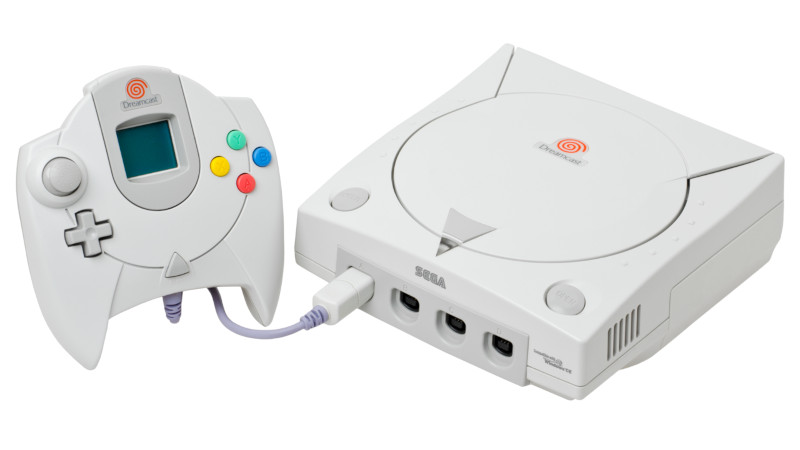
The Sega Dreamcast has been “dead” for more than two decades, which is a funny thing to say about a console that refuses to stop getting new tricks. Long after Sega left the hardware business, developers, modders, and weekend tinkerers are still coaxing fresh performance out of the little white box with the orange swirl. The latest kind of magic does not involve a secret GPU, a hidden Sega laboratory, or a VMU that suddenly becomes self-aware. It involves something far more ordinary: an SD card cache.
The phrase Dreamcast homebrew SD card cache may sound like a very niche spell from the Book of Retro Computing, but it represents a clever solution to one of the console’s biggest homebrew limitations: memory. The Dreamcast shipped with 16 MB of main RAM, 8 MB of video RAM, and 2 MB of sound RAM. That was respectable in 1998 and 1999, but modern homebrew ambitions can run into that ceiling quickly. Bigger levels, higher-resolution assets, mods, ports, screenshots, save data, and runtime file access all want space at the party. Unfortunately, the Dreamcast’s RAM party is more “tiny apartment” than “Las Vegas convention center.”
That is where SD card caching enters the scene. By using a serial-port SD card adapter, Dreamcast homebrew developers can stream or cache data from removable storage instead of packing every asset into memory at once. It is not a miracle cure, and it will not turn the console into a PlayStation 5 wearing a beige shell. But for homebrew projects, ports, mods, and experimental engines, it opens a useful door.
Why the Dreamcast Still Matters to Homebrew Developers
The Dreamcast was commercially short-lived, but technically fascinating. It had a 200 MHz Hitachi SH-4 CPU, a PowerVR2 graphics processor, VGA output support, online ambitions, and a GD-ROM format that felt futuristic at the time. It also arrived with a personality. The VMU beeped like a tiny digital pet demanding rent money. The controller looked like it had been designed during a passionate argument with ergonomics. And the games? Many of them still feel fresh.
For homebrew developers, the Dreamcast has another advantage: it is approachable. Unlike many later consoles, Dreamcast development has a long history of public tools, community documentation, and independent software support. Projects such as KallistiOS, commonly called KOS, gave developers a practical open-source development environment. DreamSDK made Windows-based setup easier. DreamShell provided a broader operating environment for launching applications and working with SD adapters. Together, these tools helped make the Dreamcast feel less like locked-down consumer electronics and more like a friendly old development board that happens to run Soulcalibur.
What Is an SD Card Cache on Dreamcast?
In simple terms, an SD card cache lets a Dreamcast program use an SD card as a place to read or write data while the software is running. Instead of loading every map, texture, sound, or mod file into RAM up front, the program can pull some data from the SD card when needed. Think of it like keeping extra snacks in the garage because your kitchen cabinet is full. Is the garage slower to reach? Yes. Is it better than not having snacks? Absolutely.
On the Dreamcast, the common SD card adapter connects through the console’s serial port. That port is not blazing fast. Reports around this technique commonly place usable throughput at roughly 600 KB/s under optimized conditions. That is far too slow to behave like true RAM expansion or swap memory. If a developer treats it like high-speed system memory, the Dreamcast will respond with the digital equivalent of a sigh. But as a controlled cache for assets, it can be extremely useful.
The Ian Micheal Breakthrough
The homebrew buzz around this idea gained attention when Dreamcast hacker Ian Micheal demonstrated SD card caching with a Dreamcast port of DOOM running at 640×480. The technical point was not merely “DOOM runs on another device,” because at this stage DOOM has probably run on a toaster, a pregnancy test, and someone’s smart refrigerator. The important part was that the Dreamcast could access additional data from an SD card during runtime in a way that could improve homebrew performance and flexibility.
In practical terms, this allows ports and mods to carry more content without asking the Dreamcast’s small main memory to hold everything at once. For games like DOOM, Quake, Hexen, or other classic-engine ports, that matters. Many of these engines thrive on external data: maps, WAD files, textures, sounds, demos, save files, and mods. With SD card caching, a developer can keep the core program in RAM while loading supporting files as needed.
Why 600 KB/s Can Still Be Useful
At first glance, 600 KB/s sounds painfully slow. Modern users are used to gigabytes flying around like caffeinated pigeons. But retro hardware development is about context. The Dreamcast’s GD-ROM drive is mechanical, disc-based, and not always friendly to rapid random access. Homebrew distributed on CD-R can face loading quirks. Meanwhile, SD cards are cheap, replaceable, easy to organize, and convenient for testing.
For homebrew, the speed does not have to be perfect. It only has to be good enough for the right job. If a game needs to stream large video files constantly, the serial SD adapter may not be ideal. If a game needs to load level chunks, configuration files, user mods, screenshots, or occasional assets, it becomes far more attractive. In other words, the SD card cache is not a fire hose. It is a very useful garden hose. And sometimes the garden is exactly what needs watering.
Dreamcast Hardware Limits Make Smart Caching Valuable
The Dreamcast’s 16 MB of main RAM is one of the main reasons this technique matters. Developers working on ports often have to choose between features, content size, graphical ambition, and runtime stability. Every texture, sound, data table, and engine feature competes for memory. A sloppy project can burn through available RAM faster than a VMU burns through button-cell batteries.
Smart caching changes the design conversation. Instead of asking, “Can everything fit?” developers can ask, “What must stay resident, and what can be loaded later?” That is a much healthier question. It encourages better asset management, smaller memory footprints, and more modular game structure. Developers can keep essential engine code and current gameplay data in RAM, while the SD card acts as a secondary storage layer for files that do not need instant access every frame.
How This Helps Dreamcast Ports and Mods
The most exciting application is not simply faster loading. It is broader compatibility with content that would otherwise be awkward or impossible. Classic PC game engines often assume access to file systems, expansion data, mod folders, and user-generated assets. Consoles of the late 1990s were not always designed around that kind of flexibility. The Dreamcast can run impressive homebrew, but it still has tight memory and storage assumptions.
With SD card cache support, a DOOM port could potentially support larger WAD files or easier mod loading. A Quake-style engine could experiment with more flexible asset access. A tool could save screenshots directly to the card. A development build could log debug information without rebuilding a disc image every five minutes. That last one may sound boring, but to programmers, good logging is basically a warm blanket and a cup of coffee.
Why This Is Different From an Optical Drive Emulator
It is important to separate serial SD card caching from optical drive replacement. Devices such as GDEMU-style optical drive emulators replace the Dreamcast’s GD-ROM drive and load disc images from flash storage. That is a different category of modification. It is powerful, popular, and useful for preservation, but it is not the same as using the serial port for a runtime cache.
The serial SD adapter is usually cheaper, simpler, and external. It does not require removing the optical drive. That makes it attractive for users who want to keep their console closer to stock. The trade-off is speed. The serial port cannot compete with more direct storage interfaces, but it can still serve homebrew needs when developers design around its strengths.
DreamShell, KallistiOS, and the Homebrew Toolchain
A hardware trick is only useful when software can use it. That is why the surrounding Dreamcast development ecosystem matters. KallistiOS provides a mature, open-source base for Dreamcast programming. It supports homebrew development without requiring Sega’s original proprietary development kits. DreamSDK packages tools for Windows developers who want a friendlier setup. DreamShell adds a practical environment for launching software and interacting with storage devices, including SD adapters.
This ecosystem is why a cache idea can travel beyond one demo. If developers have access to example code, FAT32 read/write support, and working libraries, they can adapt the concept for other projects. The best homebrew breakthroughs are not one-person magic tricks; they become shared techniques. Once the community understands how to use the SD card as a runtime asset source, the idea can spread into engines, ports, utilities, and experiments.
Practical Examples of What SD Card Cache Could Improve
1. Classic shooter ports
Games based on DOOM, Quake, Hexen, and similar engines are natural candidates. These projects often depend on external data files and mods. SD caching can help manage asset access without forcing every file into RAM.
2. Homebrew games with larger worlds
A 2D adventure game or small 3D exploration project could store level data, dialog, music, or art on the SD card. Instead of limiting the entire game to what comfortably fits into memory, the developer can stream or load sections as needed.
3. Development and debugging tools
During development, writing logs to an SD card can save time. Developers could test builds, capture performance notes, and review error output without constantly burning discs or relying on more complicated cable setups.
4. Screenshots and user-generated data
Saving screenshots, configuration files, replay data, or custom levels becomes easier when the program has writable storage. The VMU is charming, but it was not designed for bulky modern homebrew files.
The Limitations Are Real
SD card caching is exciting, but it is not magic. The serial port is still slow compared with RAM, modern SD interfaces, or direct optical-drive replacement solutions. Developers must design carefully. Large files should be organized efficiently. Access patterns should avoid constant tiny reads. Compression may help in some cases, but decompression also uses CPU time. The Dreamcast is powerful for its era, not infinitely patient.
Compatibility is another concern. SD adapter quality varies. SD card formatting can matter. FAT32 setup, allocation size, and file structure may affect reliability. Some users will have perfectly smooth results, while others will discover that their adapter behaves like it was assembled during a thunderstorm. That is retro hardware life: part engineering, part archaeology, part asking a forum post from 2014 for emotional support.
Why the Community Cares
The Dreamcast community cares because this technique respects the console’s spirit. The Dreamcast was always a machine full of “almost.” It almost changed online console gaming early. It almost gave Sega the comeback it needed. It almost had enough time to prove how forward-thinking it was. Homebrew keeps extending that “almost” into “look what it can still do.”
Every new development trick makes the platform more interesting. Better asset handling means more ambitious ports. More convenient file access means faster experimentation. Runtime writing means utilities become more practical. Even if only a fraction of Dreamcast users own a serial SD adapter, the technique gives developers another tool in the toolbox. And in retro development, one extra tool can unlock a surprising amount of creativity.
SEO-Friendly Technical Takeaway
The main keyword here is Dreamcast homebrew SD card cache, but the bigger story is about clever resource management. The Dreamcast does not need to become modern hardware to keep producing modern excitement. It only needs developers who understand its strengths and weaknesses. SD card caching works because it does not try to bully the console into being something else. It works with the machine’s limits.
That is the heart of good retro programming. You do not win by pretending constraints do not exist. You win by making constraints dance. Sometimes that dance involves a 200 MHz SH-4 CPU, a serial-port SD card reader, and a DOOM port that refuses to act its age.
Experience Notes: What Working With Dreamcast SD Card Cache Feels Like
Anyone who has spent time around Dreamcast homebrew knows the process has a certain ritual quality. First, you read documentation. Then you read forum posts. Then you discover that the forum posts disagree with the documentation. Then you format an SD card, adjust folders, rename files, burn a boot disc, plug in the adapter, power on the console, and stare at the screen like you are waiting for a lunar landing. When it works, the feeling is fantastic. When it fails, you suddenly become very interested in allocation units, adapter revisions, and whether the Dreamcast is judging you personally.
Using an SD card cache adds another layer to that experience. It encourages developers to think like old-school engine programmers. You stop assuming that storage is instant. You begin planning when files should load, how large they should be, and what happens if access takes longer than expected. That kind of discipline is valuable. Modern development can hide inefficient habits behind huge memory pools and fast SSDs. Dreamcast development does not hide anything. It taps you on the shoulder and says, “Excuse me, that texture is too large, and also your assumptions are showing.”
For players, the best experience is invisible. Nobody wants to think about cache reads during a firefight. If the technique is used well, the player simply notices that a port feels smoother, supports more content, or offers features that were previously missing. Maybe a mod loads correctly. Maybe screenshots save without drama. Maybe a level that once felt impossible now runs acceptably. The technology disappears behind the fun, which is exactly what good technology should do.
For developers, the most satisfying part is iteration. A removable SD card can make testing assets easier than rebuilding and burning disc images repeatedly. Even when a boot disc is still part of the setup, being able to adjust external files changes the workflow. You can test a new data file, tweak a configuration, or capture output without turning every experiment into a tiny manufacturing process. The Dreamcast may be retro, but nobody misses wasting a stack of CD-Rs because one file path had a typo.
The technique also creates a healthier design mindset. Instead of asking the Dreamcast to swallow an entire project at once, developers can divide content into manageable pieces. That is how many classic games were built in the first place. Levels, zones, maps, and stages were not just artistic units; they were memory-management strategies wearing fun costumes. SD card cache brings that same thinking back into focus for modern homebrew.
There is also a collector-friendly angle. Many Dreamcast fans prefer not to permanently modify their consoles. A serial SD adapter offers a way to experiment without removing the GD-ROM drive or opening the case. It is not the fastest solution, but it is approachable. For a hobby where original hardware can be precious, that matters. A reversible accessory gives curious users a lower-pressure way to join the homebrew world.
The funniest part is that this all feels very Dreamcast. The console was always slightly ahead, slightly odd, and extremely lovable. Using an SD card through the serial port to boost homebrew is not the most obvious solution, but it fits the machine’s personality perfectly. It is clever, community-driven, a little quirky, and surprisingly practical. In other words, it is exactly the kind of thing that keeps the Dreamcast alive long after the official story ended.
Conclusion
Dreamcast Homebrew Gets Boost From SD Card Cache is more than a catchy retro headline. It is a reminder that old hardware still has room for new ideas. By using a serial-port SD card adapter as a runtime cache, developers can work around memory limits, support larger assets, improve ports, enable mod-friendly workflows, and make development more convenient. The technique has limits, especially speed, but its usefulness comes from smart application rather than brute force.
The Dreamcast homebrew scene continues to thrive because developers keep treating the console not as a museum piece, but as a living platform. SD card caching will not solve every problem, but it gives creators another practical tool. For a console that supposedly bowed out years ago, the Dreamcast still has a wonderful habit of walking back onstage and saying, “One more thing.”
Note: This article is written as original web-publishing content based on publicly available technical information about Dreamcast hardware, homebrew development tools, SD card adapters, and community-reported caching experiments.