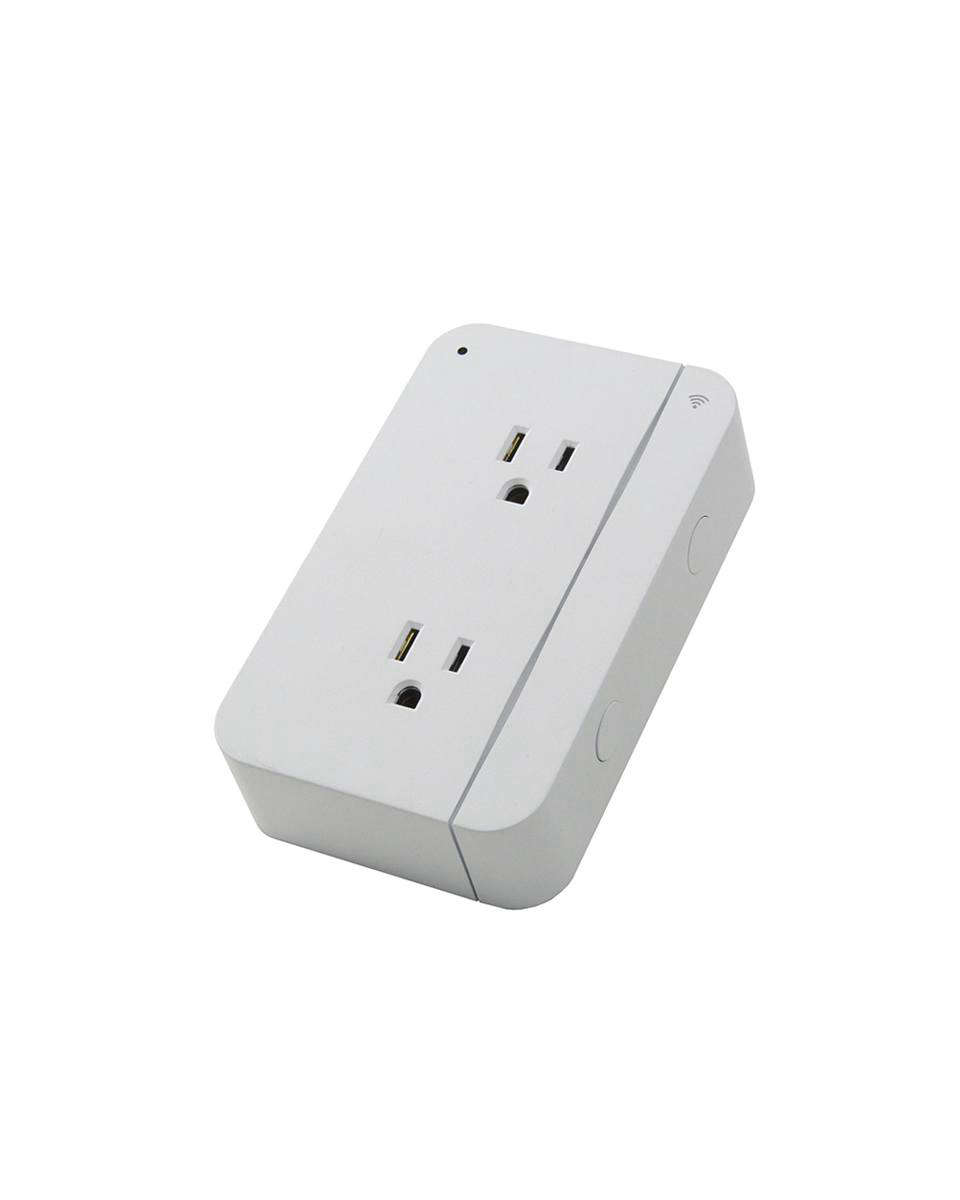
Some smart home gadgets arrive like tiny celebrities: flashy box, big promises, and then three weeks later they are unplugged in a drawer next to a mystery cable nobody can identify. The ConnectSense Smart Outlet with Apple HomeKit Technology is different. Its best trick is not looking futuristic. Its best trick is making ordinary plug-in devices behave like they finally attended smart-home finishing school.
At its core, the ConnectSense Smart Outlet turns lamps, fans, coffee makers, holiday lights, routers, and other plug-in devices into controllable Apple Home accessories. Instead of walking across the room to switch something off like it is 1997, you can use Siri, the Apple Home app, schedules, scenes, and automation. That is the appeal: less drama, fewer forgotten lights, and more “Hey Siri, turn off the living room lamp” from the couch, where civilization truly peaks.
What Is the ConnectSense Smart Outlet?
The ConnectSense Smart Outlet is a Wi-Fi smart plug designed for home automation. The best-known HomeKit version, including the Smart Outlet² family, is built around a simple idea: plug the device into a standard North American wall outlet, then plug your regular appliances or electronics into the ConnectSense unit. Once paired, those devices can be controlled from your phone, tablet, voice assistant, or automation system.
Unlike many basic smart plugs that control only one socket, the ConnectSense Smart Outlet design is especially useful because it offers two separately controlled outlets. That means a lamp on the left and a fan on the right can behave like two different smart accessories, even though they are connected through one wall device. Add energy monitoring and, on some models, a USB charging port, and the outlet becomes more than a glorified remote switch.
The phrase “with Apple HomeKit Technology” matters because HomeKit is Apple’s smart home framework. For iPhone, iPad, Apple Watch, HomePod, and Apple TV users, HomeKit is the neat little control center that lets different accessories speak the same language. When a smart outlet supports Apple HomeKit, it can appear inside the Home app and respond to Siri voice commands.
Why Apple HomeKit Compatibility Matters
There are many smart plugs on the market, but HomeKit compatibility gives the ConnectSense Smart Outlet a major advantage for Apple households. Instead of juggling one app for lights, another app for plugs, and a third app that looks like it was designed during a power outage, users can manage compatible accessories inside Apple’s Home app.
HomeKit also emphasizes privacy and secure communication. Apple’s Home platform uses encrypted communication between user devices, home hubs, and compatible accessories. For many homeowners, that security-first approach is a deciding factor. A smart outlet may seem harmless, but connected devices are still part of the home network. When your lamp joins the internet, you want it to behave like a polite guest, not a raccoon with Wi-Fi access.
With HomeKit, the ConnectSense Smart Outlet can become part of scenes. For example, a “Good Night” scene might turn off the living room lamp, stop a fan, and switch on a hallway nightlight. A “Work Mode” scene might power a desk lamp and monitor charger. A “Vacation” scene might make lighting appear lived-in while you are away. That is where smart plugs stop being novelty gadgets and start becoming practical tools.
Key Features of the ConnectSense Smart Outlet
Two Individually Controlled Outlets
The standout feature is independent outlet control. Many smart plugs offer one controllable socket. The ConnectSense Smart Outlet gives you two controllable sockets in one device. This is helpful in places where you want to automate two nearby items without buying two separate smart plugs. A table lamp and air purifier, a router and modem, or a fan and decorative light can each have their own name and control behavior.
Apple Home App and Siri Control
Once connected to Apple HomeKit, the outlet can be controlled from the Home app or by using Siri. Natural names make the experience better. Instead of “Outlet 1,” rename it “Reading Lamp.” Instead of “Outlet 2,” try “Bedroom Fan.” Then commands like “Hey Siri, turn off the bedroom fan” feel normal, not like you are negotiating with a tiny robot landlord.
Energy Monitoring
Energy monitoring is one of the most useful features for curious homeowners. The ConnectSense app can show power usage for connected devices, helping users understand which appliances quietly sip electricity and which ones treat the power bill like an all-you-can-eat buffet. Energy data is especially useful for fans, lamps, entertainment equipment, office gear, and always-on electronics.
Schedules and Automation
Schedules let devices turn on and off automatically. You can set a lamp to turn on before sunset, switch off decorative lighting at bedtime, or power cycle a device at a consistent time. The ConnectSense app has supported onboard schedules, meaning scheduled behavior can be stored locally on compatible devices. That is a helpful design because basic routines should not collapse just because the internet has decided to take a coffee break.
Remote Access With a Home Hub
For Apple users, remote control becomes more powerful when a HomePod, HomePod mini, or Apple TV is set up as a home hub. A home hub allows users to control accessories while away from home and run automations more reliably. Without a hub, local control may still work when you are on the same network, but a hub is the key to the full HomeKit experience.
USB Charging on Select Models
Some ConnectSense Smart Outlet models include a USB charging port, which is surprisingly handy. It keeps the two main outlets free while giving phones, tablets, or small accessories a place to charge. It is not the flashiest feature, but in real life, “one less charging brick” is a small domestic victory.
Setup: What to Know Before You Plug It In
Setup is generally straightforward, but smart home success depends on preparation. First, make sure the outlet is close enough to the router for a stable Wi-Fi signal. Smart plugs are not magical; if your phone barely gets Wi-Fi in that corner, the outlet probably will not suddenly become a networking wizard.
Second, many ConnectSense devices rely on 2.4GHz Wi-Fi. This is common for smart home accessories because 2.4GHz signals travel farther through walls than 5GHz signals. Before setup, connect your phone to the correct 2.4GHz network if your router separates bands. If your router combines 2.4GHz and 5GHz under one network name, setup may still work, but some users may need to adjust router settings temporarily.
Third, save the HomeKit pairing code. Tape it inside a drawer, store a photo in a secure folder, or keep the original card. Losing a HomeKit code can make future re-pairing more annoying than assembling flat-pack furniture with one missing screw.
Once installed, use the ConnectSense app for device setup, firmware updates, power monitoring, and custom schedules. Use Apple’s Home app for daily control, scenes, and Siri commands. This split works well: the manufacturer app handles device-specific settings, while Apple Home becomes the everyday dashboard.
Best Uses for the ConnectSense Smart Outlet
Smart Lighting Without Smart Bulbs
The easiest use case is a lamp. Smart bulbs are great, but they are not always the right solution. If a lamp uses unusual bulbs, decorative bulbs, or multiple bulbs, a smart outlet may be simpler. Plug the lamp into the ConnectSense Smart Outlet, rename it, and suddenly it behaves like a smart lamp.
Fans and Air Circulators
A fan is another perfect match. You can turn it off from bed, schedule it to stop overnight, or include it in a scene. For example, a “Movie Night” scene could dim lights and turn on a quiet fan. Congratulations: your living room now has opinions.
Holiday Decorations
Holiday lights are where smart outlets earn applause. Nobody enjoys crawling behind a tree to unplug lights every night. With a schedule, the ConnectSense Smart Outlet can turn decorations on in the evening and off before midnight. Your house looks festive, your electric bill gets some mercy, and your knees avoid a pine-needle wrestling match.
Office Gear
For home offices, the outlet can manage desk lamps, chargers, speakers, or accessories that do not need to stay on all day. A “Workday Start” scene can power up the workspace. A “Done for Today” scene can shut down nonessential gear. This is especially useful for people who work from home and want a clearer boundary between office time and actual living.
Routers, Modems, and Network Devices
Some users like smart outlets for power cycling networking equipment. However, use caution. If the smart outlet depends on Wi-Fi, turning off the router that provides that Wi-Fi can create a tiny technological comedy routine. For network equipment, a purpose-built rebooting device may be better. Still, for simple scheduled restarts of noncritical electronics, smart outlet control can be useful.
ConnectSense Smart Outlet vs. Basic Smart Plugs
A basic smart plug is usually smaller and cheaper. It turns one thing on and off. That may be enough for a single lamp or coffee maker. The ConnectSense Smart Outlet, however, is better suited for users who want more control from one wall location. Two independently controlled outlets can reduce clutter and make automation more flexible.
The tradeoff is size. Dual-outlet smart devices can be bulkier than mini smart plugs. Before buying or installing, look at the physical space around the wall outlet. Behind a couch, bed, cabinet, or entertainment stand, extra depth may matter. Smart home gear is fun until furniture starts refusing to cooperate.
The energy monitoring feature also separates ConnectSense from bargain smart plugs. Not everyone needs power data, but people who enjoy optimizing energy use will appreciate the insight. It is satisfying to discover that one forgotten device uses more power than expected. It is less satisfying to realize the culprit was your own “temporary” desk setup from three years ago.
Performance and Reliability Considerations
Smart outlet reliability depends heavily on Wi-Fi quality, router settings, firmware, and placement. If the device is near the edge of your Wi-Fi coverage, commands may lag or fail. If your router is overloaded with dozens of smart devices, performance can become inconsistent. This is not unique to ConnectSense; it is the grand bargain of Wi-Fi smart homes.
For best results, place the outlet in a strong Wi-Fi zone, keep firmware updated, and avoid using it with appliances that exceed the rated electrical load. Smart plugs are not a free pass to automate every heavy-duty device in the house. Space heaters, large appliances, and high-draw equipment require extra caution and should only be used if the outlet is specifically rated for that load.
Users should also remember that the best smart home setup is boring in the best possible way. The goal is not to open five apps per day. The goal is to set useful scenes, name devices clearly, and let automation quietly do its job. When a smart outlet works well, you stop thinking about it. That is not a lack of excitement; that is success.
Security, Privacy, and HomeKit
Security is one of the strongest reasons Apple users choose HomeKit-compatible accessories. Apple’s Home framework is designed around authenticated communication and encrypted data handling. Home data is stored and synchronized in ways intended to protect user privacy, and HomeKit accessories communicate using secure pairing and authentication methods.
For a smart outlet, this means the control path is more thoughtfully protected than many generic cloud-only devices. That does not mean users can ignore basic security habits. Keep your iPhone updated, use a strong Apple Account password, enable two-factor authentication, protect your Wi-Fi network, and update accessory firmware when updates are available.
Also, be selective with automations. A lamp is low risk. A device that controls heat, motors, or expensive electronics deserves more thought. Smart homes are convenient, but convenience should never outrun common sense while wearing roller skates.
Who Should Buy the ConnectSense Smart Outlet?
The ConnectSense Smart Outlet is a strong fit for Apple users who want HomeKit control over two nearby plug-in devices. It is especially appealing for living rooms, bedrooms, offices, entryways, and holiday decorations. It also works well for people who want energy monitoring without installing an in-wall electrical device.
It may not be the best choice for users who only need one tiny smart plug, people with weak Wi-Fi, or households that are not invested in Apple Home. If you use Google Home or Alexa as your main platform, check the exact model’s compatibility before buying. Some ConnectSense products support multiple ecosystems, while older models may be more Apple-focused.
Availability can also vary because smart home products evolve quickly. Before purchasing, confirm the exact model, supported platforms, electrical rating, app requirements, and return policy. That small pre-purchase check can save a large post-purchase sigh.
Practical Tips for Getting the Most From It
- Use clear names: “Left Outlet” is not helpful. “Desk Lamp” and “White Noise Fan” are better.
- Group by room: Put the outlet in the correct Home app room so Siri understands commands naturally.
- Create scenes: Build simple scenes like “Good Morning,” “Movie Night,” and “Good Night.”
- Monitor energy use: Check power data for devices that stay plugged in all day.
- Keep the app installed: Even if you prefer Apple Home, the ConnectSense app may be needed for firmware updates and device-specific settings.
- Protect the pairing code: Future-you will be grateful. Future-you is already dealing with enough passwords.
Real-World Experience: Living With a HomeKit Smart Outlet
The best way to understand the ConnectSense Smart Outlet with Apple HomeKit Technology is to imagine it in an ordinary home, not in a glossy product photo where nobody owns laundry. In daily life, a smart outlet shines when it removes tiny annoyances. Nobody buys a smart plug because walking six steps is impossible. People buy one because repeating the same six steps every night becomes surprisingly irritating.
One practical example is the bedroom. Plug a bedside lamp into one outlet and a fan into the other. Rename them “Bedside Lamp” and “Bedroom Fan” in the Home app. Now the bedtime routine becomes simple. Say, “Hey Siri, good night,” and the lamp turns off while the fan stays on. Set another automation to turn the fan off at 3:00 a.m. if you do not need it running until sunrise. That small change can make the room more comfortable and reduce unnecessary power use.
In the living room, the ConnectSense Smart Outlet can control a reading lamp and a decorative accent light. A sunset automation can turn both on before the room feels dark. Later, a “Movie Night” scene can switch off the reading lamp while leaving the accent light on. This is the kind of automation that feels luxurious without being ridiculous. It is not a robot butler. It is more like a very punctual roommate who never eats your leftovers.
The outlet also helps with family routines. A hallway nightlight can switch on automatically in the evening and turn off after everyone is asleep. Holiday lights can follow a schedule without someone crawling behind furniture. A child’s reading lamp can turn off at a set time, which is helpful if “one more chapter” has become a legally elastic phrase in your household.
Energy monitoring adds another layer of usefulness. After a few days, you may notice which devices run longer than expected. A fan left on all day, a lamp forgotten in a guest room, or a charger station that never sleeps can become visible through usage data. The savings may not buy a yacht, but they can encourage better habits. Also, yachts have terrible outlet placement anyway.
The experience is not perfect for every situation. Setup can be picky if your Wi-Fi network is complicated, especially when 2.4GHz and 5GHz bands are blended. The outlet may also be too bulky for tight spaces behind furniture. And if you enjoy ultra-minimal hardware, a dual smart outlet will look more noticeable than a tiny single plug. Still, once placed in the right location and paired properly, the device can become one of those smart home accessories you stop thinking about because it simply does its job.
The smartest approach is to start with one high-value location. Choose a lamp, fan, or decoration that you control often. Give it a clear name, build one or two useful scenes, and let it run for a week. If the outlet saves time, prevents forgotten devices, and makes the room feel more responsive, it has earned its place. That is the real promise of ConnectSense and HomeKit: not showing off technology, but making the home quietly easier to live in.
Conclusion
The ConnectSense Smart Outlet with Apple HomeKit Technology is a practical bridge between ordinary plug-in devices and a smarter Apple-powered home. Its strongest advantages are two independently controlled outlets, Siri and Home app integration, energy monitoring, scheduling, and the ability to fit into larger HomeKit scenes and automations.
It is not the smallest or cheapest smart plug, and users should pay attention to Wi-Fi strength, 2.4GHz setup requirements, electrical ratings, and model compatibility. But for Apple households that want to automate lamps, fans, decorations, office accessories, or everyday plug-in devices, it remains a thoughtful and useful smart home upgrade.
In the end, the best smart home products are not the ones that make your house feel like a spaceship. They are the ones that make daily routines smoother, safer, and slightly less annoying. The ConnectSense Smart Outlet does exactly that: it gives humble wall power a brain, a schedule, and just enough manners to listen when Siri tells it to turn off the lamp.