There is something wonderfully ridiculous about making a VGA monitor obey a tiny microcontroller with less code than a long restaurant menu. Yet that is exactly why the phrase “Bitbanging VGA Fits In Under 1 KB” grabs the attention of hardware hackers, retro-computing fans, embedded developers, and anyone who has ever looked at a 15-pin VGA connector and thought, “Surely this can be made harder.”
At first glance, VGA feels like it belongs to a different era: beige towers, humming CRTs, chunky cables, and desktops that took a full coffee break to boot. But under the hood, VGA is also beautifully simple. It needs red, green, and blue analog signals, plus horizontal and vertical sync pulses. No fancy packet protocol. No negotiation drama. No software stack the size of a refrigerator. Just timing, voltage, and discipline.
That simplicity is what makes bit-banged VGA possible. Instead of relying on a dedicated graphics chip, FPGA, or video controller, the microcontroller itself manually toggles pins at precisely timed intervals. It is a high-wire act performed in machine cycles. One late instruction, one poorly placed branch, one interrupt arriving like an uninvited raccoon, and the display may wobble, roll, or give up in protest.
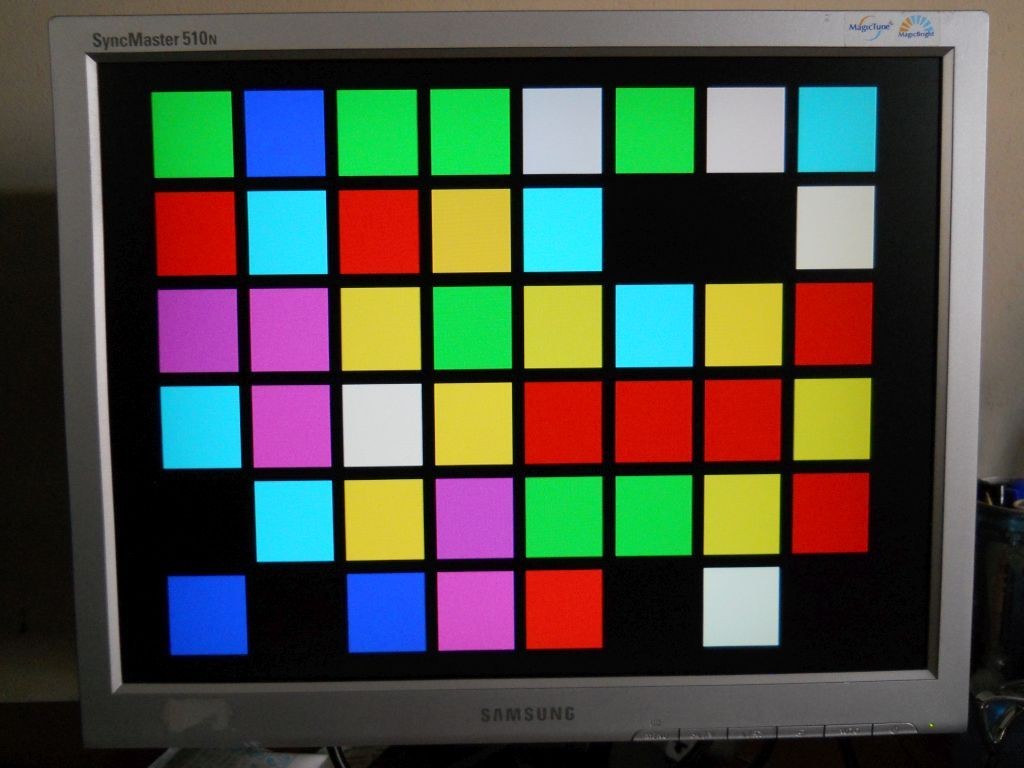
The famous tiny VGA experiments built around chips such as the PIC16F688 show how much can be accomplished with very little. A small 8-bit microcontroller, a handful of resistors, careful firmware, and a VGA monitor can produce colorful patterns, blinking squares, and surprisingly stable video output. It is not a gaming GPU. It will not run Cyberpunk. But as a demonstration of timing, minimalism, and creative engineering, it is a tiny masterpiece.
What Does “Bitbanging VGA” Mean?
Bitbanging means controlling a communication signal directly in software instead of using dedicated hardware peripherals. With UART, SPI, or I2C, bitbanging is common enough: the program manually sets pins high and low to imitate a hardware interface. With VGA, the same idea becomes much more intense because video timing is unforgiving.
A standard 640×480 VGA signal at 60 Hz is associated with a pixel clock around 25.175 MHz. That means the display expects a steady rhythm of visible pixels, blanking intervals, and sync pulses. Even if a tiny microcontroller does not generate every full-resolution pixel, it still has to respect the overall timing closely enough that the monitor can lock onto the signal.
In practical bit-banged VGA projects, the microcontroller often uses a lower effective resolution. Instead of drawing 640 unique pixels across a line, it may repeat pixels, display blocks, or create simple patterns. This is not cheating; it is engineering. The monitor receives a valid-enough signal, while the microcontroller survives the job without melting into a philosophical crisis.
Why Fitting VGA Output Under 1 KB Is Impressive
One kilobyte is tiny. In modern software terms, 1 KB is not an app. It is not a module. It is not even a respectable error message. A single web page icon can be dozens of times larger. Yet embedded programming has a different culture. In that world, 1 KB can be a playground, a puzzle, and occasionally a boxing ring.
When a VGA demo fits under 1 KB of compiled code, it means the design avoids almost every luxury. There is no bloated graphics library. No operating system. No frame buffer large enough to store a full image. No generous abstraction layer lovingly wrapping every operation in six levels of function calls. The code has to do only what matters.
The Constraints Make the Project Better
Under a 1 KB limit, every instruction earns its place. Timing loops are not decorative; they are architecture. Pin writes are carefully chosen. Repeated visual patterns are preferred over memory-heavy images. Randomness may be generated with compact pseudo-random logic rather than a large routine. The result is a project that feels closer to a mechanical watch than to ordinary software.
This is why tiny VGA demos are so educational. They force the builder to understand what the monitor actually needs. You learn that video is not magic. It is a sequence of electrical events happening at the right time. The microcontroller becomes a conductor, and the VGA monitor is a very picky orchestra.
How VGA Timing Works in Simple Terms
VGA timing can be understood as a raster scan. The display draws one horizontal line, moves to the next, and repeats until a full frame is complete. Between visible areas, it needs blanking periods and sync pulses. These tell the monitor when a line ends and when a new frame begins.
For the classic 640×480 at 60 Hz mode, each horizontal line includes visible pixels plus a front porch, sync pulse, and back porch. Vertically, the frame includes 480 visible lines plus similar non-visible timing intervals. These “porches” sound like architectural features, but they are really timing cushions inherited from CRT display behavior.
In a bit-banged design, the microcontroller must produce horizontal sync pulses at a steady rate and vertical sync pulses at the correct frame interval. The color outputs must be active only during the visible portion of the scan. If the timing is close enough, many monitors will display a stable image, even if the actual graphics are deliberately low resolution.
The Hardware: Small Chip, Big Attitude
Projects like VGA Blinking Lights show how minimal the hardware can be. A PIC16F688 or similar 8-bit microcontroller can drive the timing. Resistors form simple voltage dividers or crude digital-to-analog converters for the red, green, and blue channels. The VGA connector carries those analog color signals along with horizontal and vertical sync.
VGA color lines are analog, not digital. A monitor expects different voltage levels to represent brightness. Hobbyist circuits often use resistor networks to approximate the required levels. With only a few output pins, the color palette is limited, but limited color can still look lively when arranged into blinking squares, changing patterns, or abstract displays.
Why Resistors Matter
The resistor network is not an afterthought. It helps shape the signal so the monitor receives reasonable voltage levels and impedance. In a tiny project, this may be done with very few parts, but the principle is important. The microcontroller is not simply shouting into the VGA port; it is trying to speak in the monitor’s preferred electrical accent.
That is part of the charm. The whole circuit can be small enough to feel almost like a joke, yet it depends on real signal behavior. It is a reminder that electronics rewards both imagination and arithmetic.
The Software: Counting Cycles Like a Nervous Accountant
The software side is where bit-banged VGA becomes both beautiful and slightly terrifying. On a small PIC running at 20 MHz, each instruction cycle takes a specific amount of time. The program must count cycles carefully so that every line lasts the correct duration. A loop that is one instruction too long can shift the image. A branch path that takes different timing can cause visible artifacts.
That is why many bit-banged video routines are written in assembly or extremely careful C. The goal is not just to produce the right values. The goal is to produce them at the right exact moment. In normal programming, “almost immediately” is fine. In video generation, “almost” may be visible.
No Frame Buffer? No Problem
A full 640×480 frame buffer is far too large for many small microcontrollers. Even a one-bit monochrome buffer at that resolution would require tens of kilobytes. A tiny PIC simply does not have that kind of RAM. So compact VGA demos often generate graphics on the fly.
Instead of storing a picture, the program calculates or selects output values as the scan happens. For a grid of colored squares, the code only needs to know which region of the screen is currently being drawn and what color that region should be. This approach saves memory and makes the firmware much smaller.
In other words, the image is not so much stored as performed. The microcontroller plays the screen like sheet music, line by line, pulse by pulse.
Why Old VGA Monitors Are Perfect for Experiments
VGA monitors remain popular in hardware hacking because they are widely available, electrically approachable, and surprisingly tolerant. Many LCD monitors with VGA inputs can lock onto signals that are not perfectly textbook. Older displays may be even more forgiving in some situations, though results vary widely by model.
This makes VGA a friendly target for experiments. Unlike modern HDMI, VGA does not require high-speed differential signaling, encryption, or complex packet formats. It still demands accurate timing, but the basic concept is understandable with a datasheet, an oscilloscope, and enough patience to question one’s hobbies.
What Can You Display Under 1 KB?
The answer depends on how cleverly the program is written. Under 1 KB, you should not expect photo-realistic graphics, fonts, menus, sprites, or animation systems. But you can display patterns, color blocks, blinking grids, pseudo-random visuals, test screens, simple bars, and minimalist art.
The VGA Blinking Lights concept is a great example because it does not try to be a general-purpose graphics card. It has one job: generate an ever-changing visual pattern. By narrowing the goal, the project becomes small, reliable, and delightful.
Specific Example: Colored Square Displays
Imagine dividing the visible screen into a grid of large squares. Each square can be assigned a color. The microcontroller does not need to track individual pixels; it only needs to know which square corresponds to the current scan position. With a compact pseudo-random routine, the squares can blink or change over time. The result looks intentional, even though the code is extremely small.
This is the secret of many tiny demos: choose a visual style that matches the hardware. A low-resource system is not bad at everything. It is excellent at certain things if the design stops pretending to be a desktop computer.
Bitbanging VGA vs. Using Dedicated Hardware
Using a dedicated video chip, FPGA, or more powerful microcontroller makes VGA generation easier. An FPGA can generate precise pixel clocks and sync signals in parallel. A microcontroller with DMA and timers can offload much of the repetitive work. A dedicated graphics controller can store frame buffers and draw complex scenes.
Bitbanging does the opposite. It asks the CPU to do everything directly. That is usually inefficient, but it is also deeply educational. You see the timing. You feel the limitations. You understand why video hardware exists in the first place.
For production devices, bit-banged VGA may not be the best choice. For learning, art, retro projects, signal experiments, and “because it can be done” builds, it is fantastic.
Why This Kind of Project Still Matters
Modern computing often hides the machine under layers of software. That is useful, but it can make computers feel mysterious. A tiny VGA project removes the mystery. A pin goes high. A pulse begins. A line is drawn. A monitor responds.
For students and makers, this is powerful. You learn about timing, memory limits, voltage levels, assembly optimization, display standards, and hardware-software tradeoffs. You also learn humility. VGA will not negotiate with your feelings.
Common Challenges When Bitbanging VGA
Timing Jitter
Jitter happens when signal timing varies slightly from line to line or frame to frame. Monitors may tolerate small imperfections, but too much jitter can cause unstable images. Tight loops, disabled interrupts, and predictable instruction paths help reduce the problem.
Limited Memory
Small microcontrollers do not have enough RAM for full graphics. Successful designs avoid large buffers and generate visuals procedurally. This is why patterns, tiles, and repeated shapes are common in tiny VGA projects.
Voltage Levels
VGA color channels expect analog levels, so output resistors must be selected sensibly. Too high, too low, or poorly matched signals can reduce brightness, distort colors, or stress hardware. The circuit may be simple, but it should not be careless.
Monitor Compatibility
Not every VGA monitor reacts the same way. Some displays are tolerant of approximate timing. Others are picky and refuse to sync. Testing on multiple monitors is often the fastest way to discover whether the signal is truly robust or merely lucky.
Lessons for Embedded Developers
Bitbanged VGA under 1 KB teaches several useful embedded lessons. First, constraints can sharpen design. Second, hardware timing is part of software behavior. Third, memory is not just storage; it is a design budget. Fourth, choosing the right visual output can reduce complexity dramatically.
It also teaches that optimization is not always about making code faster after the fact. In tiny embedded projects, optimization begins with the concept. A grid of blinking squares is not a compromise if it is the intended artwork. A procedural pattern is not a workaround if it makes the project elegant.
Hands-On Experience: What It Feels Like to Build a Tiny VGA Demo
Working on a project like “Bitbanging VGA Fits In Under 1 KB” feels less like ordinary programming and more like tuning a musical instrument with a stopwatch. The first surprise is that the VGA connector is not as intimidating as it looks. Once the red, green, blue, horizontal sync, vertical sync, and ground pins are identified, the concept becomes clear. The challenge is not understanding what must happen. The challenge is making it happen on time, every time.
The first build usually starts with confidence. A microcontroller is wired to a resistor network, the sync pins are connected, and the firmware begins as a few timing loops. Then the monitor responds with a black screen, a flicker, or a message that politely says it has no idea what you are doing. This is the traditional greeting ceremony of video hacking.
Debugging is where the real learning begins. An oscilloscope becomes more useful than any inspirational quote. You measure the horizontal sync pulse. You check the line period. You compare your timing against the expected VGA mode. You discover that one innocent-looking instruction changed the whole rhythm. At that moment, the project stops being theoretical. You are no longer “writing code.” You are sculpting time.
Once the monitor finally locks onto the signal, the feeling is excellent. Even a crude block of color feels like a victory parade. A blinking square becomes proof that the entire chain works: firmware, GPIO, resistor ladder, cable, monitor, and timing. It is the embedded equivalent of hearing a homemade radio pick up its first station.
Adding color makes the project more playful. With only a few output pins, the palette may be small, but that limitation encourages bold visuals. Large red, green, blue, cyan, magenta, yellow, white, and black regions look surprisingly good on a monitor. A grid of changing blocks has a retro charm that feels halfway between a test pattern and a tiny electronic art installation.
The 1 KB limit changes the way you think. You stop reaching for convenience. You reuse logic. You remove anything that does not contribute to the display. Comments may live in the source file, but the compiled firmware must be lean. A function call may be too expensive. A lookup table may be too large. A clever loop may save enough bytes to add a new visual behavior.
One of the most useful experiences is learning to design graphics around timing. Instead of asking, “What do I want to draw?” you ask, “What can be drawn naturally while the scan is happening?” That shift is important. It encourages procedural thinking and makes the hardware feel like a collaborator rather than an obstacle.
There is also a practical joy in reusing old VGA monitors. Many people have one stored in a closet, waiting for either a purpose or a guilt-free trip to recycling. A tiny VGA generator gives that display a second life. It can become a bench test tool, a decorative blinkenlight panel, a teaching aid, or a conversation starter that begins with, “No, there is no graphics card in there.”
The biggest lesson is that small systems are not automatically primitive. They are focused. A 1 KB VGA demo cannot do everything, but what it does, it does with style. It reveals the bones of video generation in a way that modern graphics APIs never will. For anyone interested in embedded systems, retro hardware, or the satisfying art of making old technology dance, bitbanged VGA is a project worth studying.
Conclusion
Bitbanging VGA fits in under 1 KB because the project embraces limits instead of fighting them. It uses simple visuals, direct pin control, tight timing, and minimal hardware to produce a real video signal from a tiny microcontroller. The result is not only technically impressive; it is also a reminder that great engineering often comes from doing more with less.
In a world where software grows heavier every year, a sub-1 KB VGA demo feels refreshing. It proves that small code can still be clever, useful, and entertaining. It also proves that old VGA monitors are not obsolete junk. With the right timing and a few brave resistors, they can become windows into the wonderfully strange world of minimalist embedded graphics.
Note: This article is written for web publishing in clean HTML body format, based on real technical information about VGA timing, bit-banged video generation, PIC microcontrollers, resistor-based VGA output, and compact embedded demo design.