“`
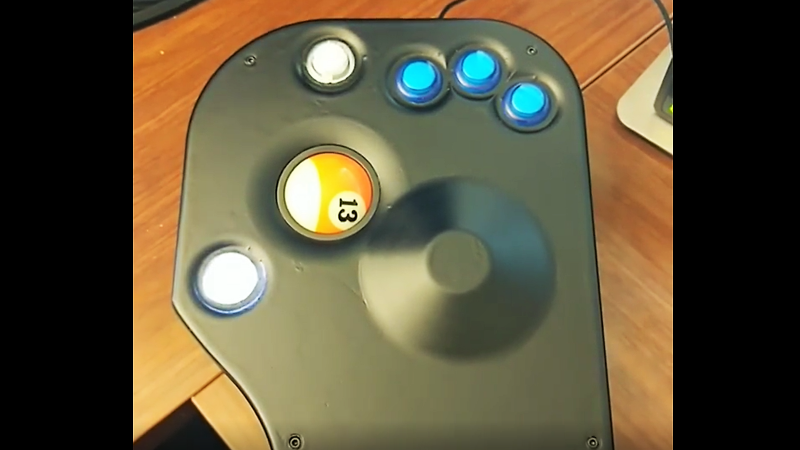
Some computer mice glide. Some click. Some politely sit on a desk and ask for absolutely no attention. And then there is the custom trackball mouse built around a full-size billiard ball: a desk accessory that looks like it escaped from an arcade cabinet, raided a pool hall, and enrolled in engineering school.
The idea sounds ridiculous until you think about it for more than three seconds. A billiard ball is smooth, round, durable, satisfyingly heavy, and already made to roll with precision. In other words, it is practically begging to become a trackball. The real trick is convincing a computer that this chunky pool-table celebrity is not just a novelty paperweight, but a useful pointing device.
That is exactly what happened in a memorable maker project: a billiard ball found a new home in a custom trackball mouse using arcade hardware, 3D printing, a microcontroller, custom electronics, and enough personality to make a normal mouse look like office furniture.
Why Put a Billiard Ball in a Mouse?
At first glance, using a billiard ball as a trackball feels like a joke with a USB cable. But it makes mechanical sense. Standard American pool balls measure about 2.25 inches in diameter and weigh roughly 5.5 to 6 ounces. That size gives the hand something substantial to control, while the polished surface makes movement smooth and predictable.
Most commercial trackball mice use smaller balls. A popular large trackball, for example, may sit around the 55 mm range, while a regulation billiard ball is closer to 57.3 mm. That difference sounds tiny on paper, but sensors and housings are not known for their sense of humor. A ball that is slightly too large can rub, sit incorrectly, or fail to align with optical tracking hardware. In trackball land, fractions of an inch can turn “perfect fit” into “why is my cursor breakdancing?”
The builder behind the project wanted the look and feel of a billiard-themed mouse, but not merely as a prop. The device had to work. It had to feel natural. It had to be usable for real daily computing, not just for taking one cool photo and then retiring to a shelf of unfinished maker dreams.
The Movie Spark Behind the Build
The inspiration came from pop culture. A character using a billiard-ball-style mouse on screen made the concept irresistible: a hacker-themed input device with a pool-table personality. But movie gadgets often have one problem: they only need to work for the camera. A real mouse needs to survive spreadsheets, browser tabs, CAD windows, email, and the occasional rage-click when a software update moves the button you needed.
Instead of copying the movie prop exactly, the project took the more useful route: build a trackball mouse around the one specification that mattered most, the billiard ball itself. From there, everything else had to bend around physics, electronics, hand comfort, and desk reality.
Arcade Hardware Solves the Big Mechanical Problem
The smartest part of the build was not reinventing the trackball mechanism from scratch. Arcade machines have used rugged trackballs for decades, especially in classics such as Centipede and Missile Command. Those systems were designed to survive enthusiastic players, sticky fingers, sudden wrist violence, and the kind of button-mashing normally reserved for emotional support.
Arcade trackball assemblies commonly come in sizes that match or closely support large balls, including 2.25-inch and 3-inch versions. That made an arcade-style unit a natural foundation for a billiard ball trackball mouse. Instead of fabricating rollers, shafts, bearings, and sensors from scratch, the builder could use a proven mechanical assembly and focus on the custom mouse body, electronics, and firmware.
How the Trackball Actually Reads Movement
The arcade trackball mechanism works through a wonderfully understandable idea. The ball rests against rollers. As the ball moves, the rollers spin. Each axis has an encoder system that converts that rotation into directional pulses. In this project, the old-school arcade hardware used optical slit-disc encoders, one for horizontal movement and one for vertical movement.
That is why the build feels delightfully retro and modern at the same time. The ball and rollers bring the mechanical charm of arcade input devices, while the microcontroller translates that motion into a USB mouse signal a modern computer can understand.
The Teensy Microcontroller Turns Motion Into USB
A custom trackball mouse needs a brain, and this one used a Teensy microcontroller. The job of the microcontroller is simple to describe and slightly fussier to execute: read the encoders, read the buttons, interpret movement, and send mouse commands over USB.
USB Human Interface Device support is what allows keyboards, mice, controllers, and other input gadgets to communicate with computers in a standardized way. In plain English, the computer does not need to know that a billiard ball is living inside the mouse shell. It only needs to receive familiar mouse movement, button, and scroll signals.
The firmware read the two encoder outputs for X and Y movement, monitored multiple buttons, and used USB mouse behavior to send movement and clicks. That makes the project more than a sculpture. It is a functional, computer-readable pointing device with a personality disorder in the best possible way.
Custom PCB: Because Hot Glue Deserves a Day Off
Could the builder have wired everything directly to the microcontroller? Absolutely. Would it have worked? Probably. Would it have looked like a small plate of electronic spaghetti? Also yes.
Instead, a custom PCB was designed to simplify wiring and mount the Teensy inside the mouse more cleanly. That decision is one of the small details that separates a weekend experiment from a polished custom peripheral. The PCB reduced clutter, organized button and encoder connections, and gave the electronics a more reliable home.
For DIY hardware projects, a custom PCB is not always required, but it often improves the finished device. It can make troubleshooting easier, reduce loose wires, and keep the inside from looking like a raccoon assembled it during a thunderstorm.
Arcade Buttons Complete the Theme
A billiard ball trackball deserves buttons with equal theatrical energy. This build used 24 mm LED arcade buttons, giving the mouse a bright, tactile, arcade-machine feel. The three main buttons handled standard left, middle, and right clicks. Additional buttons controlled special functions such as sensitivity and scrolling.
The LED buttons added style, but they also introduced a small electrical lesson. Not every LED color behaves the same at the same voltage. Red and yellow versions of certain LED arcade buttons may need more voltage than a 3.3V microcontroller output can comfortably provide, while other colors may glow acceptably. This is one of those practical maker reminders that the phrase “it has LEDs” is not a complete wiring plan.
The 3D-Printed Case Makes It Personal
The real magic of the custom trackball mouse is the case. The electronics make it work, but the shell makes it usable. The builder designed the body in CAD around his own hand, placing the billiard ball under the thumb and arranging the arcade buttons under the fingers.
That thumb-controlled layout matters. Trackball users often divide into two camps: thumb-ball users and finger-ball users. A center-mounted trackball can be excellent for fingertip control, while a thumb-operated trackball keeps the fingers free for buttons. This build leaned firmly into the thumb-control approach.
The case included a raised palm area to support the hand and a top face angled for comfort. Because the hardware was large, the final mouse was also large. There was no hiding the size of a 2.25-inch billiard ball and multiple arcade buttons. This was not a travel mouse. This was a desk creature.
Why Fit Matters More Than Looks
Custom input devices live or die by comfort. A mouse can look spectacular, but if it makes your hand feel like it is negotiating a hostage situation, it will not last on the desk. By designing around a hand photo and the actual component dimensions, the builder created a body that fit his grip rather than forcing his hand to adapt to generic plastic.
This is one of the biggest advantages of 3D printing in ergonomic projects. Commercial products must fit many people reasonably well. A custom device can fit one person extremely well. That difference is huge for makers, gamers, programmers, editors, and anyone who spends long days moving a pointer across a screen.
Finishing the Print: From Prototype to “Wait, You Made That?”
A raw 3D print can be charming, but it often looks like what it is: layered plastic with ambition. The builder improved the finish with coating, primer, paint, and clear enamel. That extra surface work transformed the case from “fresh off the printer” to a more refined object that looked intentionally designed.
This step is easy to underestimate. Sanding, priming, painting, and sealing take patience, and patience is not always the default setting in maker brains. Still, finishing matters because a mouse is touched constantly. A smoother surface feels better, cleans more easily, and makes the device look less like a prototype and more like a finished custom trackball mouse.
Smart Firmware Features: Sensitivity and Scroll Mode
The project included clever firmware touches to make the oversized trackball practical. Because the arcade encoder setup produced movement pulses that did not perfectly match normal desktop expectations, the firmware multiplied movement output. One mode moved the pointer faster, while another dropped the multiplier for more precise tracking.
That sensitivity toggle is important because large trackballs can feel both luxurious and stubborn. Fast movement is useful when crossing a wide monitor, but precision matters when editing images, selecting tiny UI elements, or trying not to accidentally close the wrong browser tab while twenty-seven other tabs stare in judgment.
The build also included a scroll mode. Holding a dedicated button changed the trackball’s behavior from pointer movement to scroll-wheel input. That turns the big rolling ball into a giant scroll control, which is exactly as satisfying as it sounds.
What Makes This Build So Appealing?
The appeal of the billiard ball trackball mouse is not only that it works. It is that it combines several maker instincts in one object: reuse a familiar part in an unexpected way, adapt old arcade hardware for modern computing, design around personal ergonomics, and make the final device funny without making it useless.
It also demonstrates a valuable engineering principle: start with one fixed design requirement and let the rest of the project evolve around it. Here, the fixed requirement was the billiard ball. That choice dictated the trackball assembly, case size, hand layout, button placement, and firmware behavior. Constraints did not ruin the design; they gave it direction.
Trackballs Still Have a Loyal Following
Trackballs never fully conquered the mainstream desktop, but they have never disappeared either. They remain popular among users who want a stationary pointing device, better control in tight desk spaces, or a different hand posture from a traditional mouse.
Modern trackballs from established brands often emphasize precision, programmable buttons, wireless connectivity, and ergonomic positioning. Some use large center balls, others use thumb balls, and many users become surprisingly loyal once they find a shape that works for them. Trackball fans may be a niche group, but they are a passionate niche. Like mechanical keyboard enthusiasts, they have opinions, spare parts, and probably a drawer full of “almost perfect” devices.
Ergonomic Lessons From the Billiard Ball Mouse
A custom trackball mouse does not automatically solve every wrist or hand issue, but it can reduce certain movements associated with traditional mice. Because the device stays in place, the user does not repeatedly lift and reposition it. Cursor movement comes from rolling the ball instead of sliding the entire hand across a pad.
That can be helpful for some users, especially those who work at crowded desks or prefer to keep the arm more stationary. However, comfort is personal. A thumb trackball may feel perfect to one person and awkward to another. A finger-operated trackball may feel precise to a designer but strange to a gamer. The lesson is not that trackballs are universally better; it is that input devices should fit the person, not the other way around.
What DIY Builders Can Learn From This Project
1. Use Existing Mechanisms When They Already Work
The arcade trackball assembly saved the project from becoming a mechanical engineering marathon. Sometimes the smartest DIY decision is not to build every part from scratch. If a durable, available mechanism already exists, use it and spend your energy on the parts that make your project unique.
2. Design Around the Hand Early
Button placement, ball position, palm height, and wrist angle should be planned before printing the case. A beautiful mouse that ignores hand anatomy is just a tiny sculpture with buttons.
3. Expect Electronics to Have Opinions
LED buttons, encoder signals, voltage levels, and USB behavior can all introduce surprises. Build a proof of concept before committing to a final shell. The earlier you test, the fewer times you will stare at a finished enclosure and whisper, “Well, that hole is in the wrong place.”
4. Firmware Can Fix a Lot
Movement multipliers, scroll modes, button mapping, and acceleration curves can all be handled in code. That means a custom mouse can evolve after the hardware is assembled. The best physical builds leave room for software refinement.
Could You Build Your Own Billiard Ball Trackball Mouse?
Yes, if you are comfortable with 3D printing, basic electronics, microcontroller programming, and patient tinkering. The core ingredients are approachable: an arcade trackball assembly, a billiard ball, a USB-capable microcontroller, buttons, wiring, a case design, and firmware to translate movement into mouse input.
The harder parts are fit, finish, and iteration. The first version of a custom ergonomic device rarely feels perfect. You may need to adjust button angles, palm height, sensitivity values, scroll behavior, and the position of special-function buttons. That is normal. The road to a comfortable mouse is paved with prototypes, questionable PLA scraps, and the occasional emotional support coffee.
Experience Section: Living With a Giant Billiard Ball Trackball Mouse
Using a billiard ball trackball mouse is not like using an ordinary mouse. The first few minutes feel slightly theatrical, as if your desk has developed a hobby. The ball has real mass, so every movement feels deliberate. Instead of flicking a tiny plastic sphere, you are guiding something with the presence of actual sporting equipment. It gives pointer control a physical confidence that small trackballs often lack.
The learning curve is real but not frightening. If you are used to a standard mouse, your first instinct is to move the whole device. With a trackball, the base stays still and your thumb does the work. After a while, that stationary feeling becomes one of the best parts. The mouse does not need a large pad. It does not care if the desk surface is glossy, dusty, cramped, or currently occupied by a notebook, coffee mug, and three cables pretending to be a family of snakes.
The large ball also changes how precision feels. Slow movements can be smooth and controlled, especially when the firmware sensitivity is tuned well. Fast movement takes more thought because the ball’s size and encoder behavior affect how far the cursor travels per roll. That is why the sensitivity toggle is more than a gimmick. It lets the user switch between cruising across the screen and making small, careful adjustments.
Scrolling with the ball is another surprisingly enjoyable experience. A normal scroll wheel is efficient, but a full-size ball used as a scroll control feels playful and mechanical. Long pages become something you physically roll through. It is not necessary, but neither are half the best things on a maker’s desk.
The biggest daily-use challenge is button placement. A custom mouse succeeds when the hand can rest naturally and every control is reachable without shifting grip. If a scroll button or mode switch requires hand movement, the interruption becomes noticeable. This is where personal ergonomic design matters. What works for one hand may be wrong for another, which is exactly why 3D-printed input devices are so compelling.
There is also the social experience. A billiard ball trackball mouse is a conversation starter whether you want it to be or not. Someone will notice it. Someone will ask if it works. Someone will roll the ball and grin. That is part of the charm. It turns a mundane office tool into a small demonstration of creativity, engineering, and joyful overbuilding.
After spending time with the idea, the most impressive part is not the novelty. It is how practical the concept becomes once the build is tuned. The billiard ball is not just decorative. The arcade mechanism is not just nostalgic. The 3D-printed shell is not just a container. Every part contributes to a device that is strange, usable, and unmistakably personal.
Conclusion
The custom billiard ball trackball mouse is the kind of project that reminds us why maker culture is fun. It starts with a slightly absurd question: “Can I turn a billiard ball into a computer mouse?” Then it answers with CAD modeling, arcade encoders, USB HID firmware, LED buttons, hand-shaped ergonomics, and a finished device that looks both ridiculous and completely reasonable.
In a world full of anonymous plastic peripherals, this build has character. It borrows from pool halls, arcade cabinets, and modern desktop computing, then combines them into a custom trackball mouse that is both a joke and a serious piece of functional design. The result proves that good DIY hardware does not have to be boring. Sometimes the best pointing device is the one that looks like it should be breaking a rack of nine-ball.