Choosing the best Wi-Fi router in 2021 felt a little like shopping for a family car, a spaceship, and a tiny blinking box of internet magic all at once. Suddenly, everyone needed stronger home Wi-Fi. Bedrooms became classrooms, kitchen tables became offices, living rooms became streaming theaters, and the poor old router in the corner was asked to behave like a corporate IT department with antennas.
The good news? 2021 was a fantastic year to upgrade. Wi-Fi 6 routers became more affordable, mesh systems became easier to install, and even non-technical users could finally get a home network that did not collapse every time someone joined a video call while another person streamed 4K video. The best Wi-Fi routers 2021 buyers considered were not just about raw speed. They were about coverage, stability, security, device handling, parental controls, gaming performance, and how peacefully your smart TV could coexist with a dozen phones, tablets, laptops, cameras, and smart speakers.
This guide breaks down the best router types and standout models from the 2021 era, including powerful standalone Wi-Fi 6 routers, simple mesh Wi-Fi systems, budget-friendly picks, and gaming-ready options. Think of it as a friendly map through the router aisleminus the panic, jargon headache, and mysterious salesperson who keeps saying “AX” like it explains everything.
Why 2021 Was a Big Year for Wi-Fi Routers
By 2021, Wi-Fi 6 was no longer only for early adopters with giant budgets and a deep emotional attachment to spec sheets. More laptops, smartphones, tablets, and gaming devices supported Wi-Fi 6, also known as 802.11ax. Compared with Wi-Fi 5, Wi-Fi 6 was designed to improve network efficiency, reduce congestion, and handle multiple devices more gracefully.
The most important improvements included OFDMA, MU-MIMO, beamforming, stronger WPA3 security support, and better performance in busy homes. In simple English: Wi-Fi 6 helped your router stop acting shocked when more than three devices wanted attention at the same time. For households with remote workers, online students, gamers, streamers, and smart-home gadgets, that mattered.
Best Wi-Fi Routers 2021: Quick Picks
| Router | Best For | Why It Stood Out in 2021 |
|---|---|---|
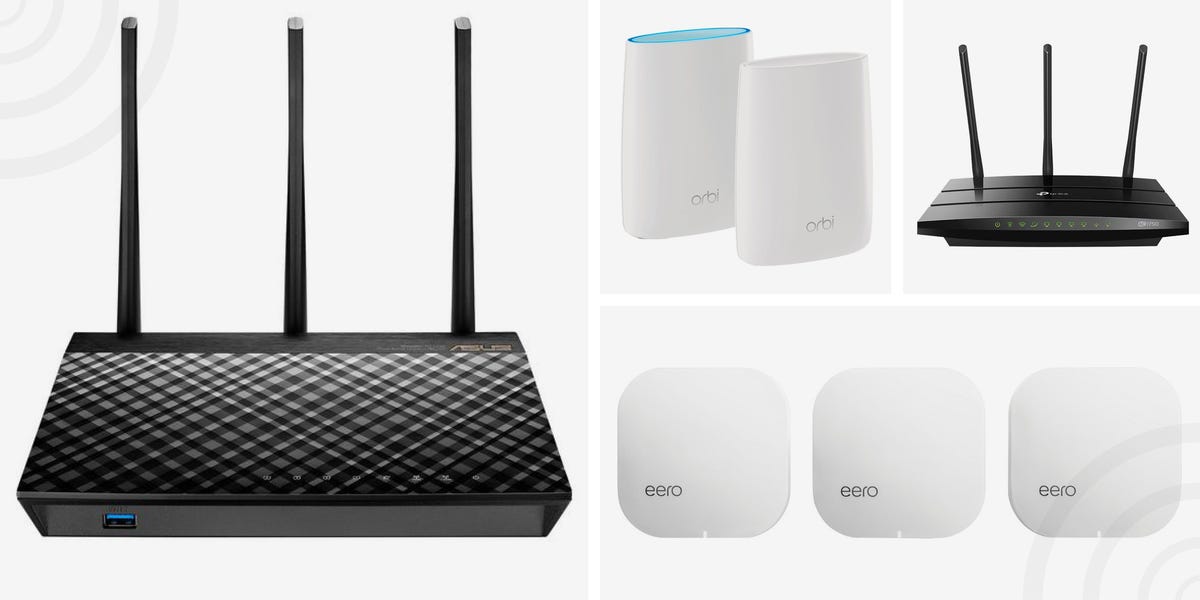
| ASUS RT-AX86U | Best overall Wi-Fi 6 router | Excellent performance, gaming features, strong coverage, and advanced controls |
| TP-Link Archer AX50 | Best value Wi-Fi 6 router | Affordable AX3000 performance, easy setup, and useful home network features |
| NETGEAR Orbi RBK752 | Best mesh router for large homes | Tri-band Wi-Fi 6 mesh coverage with strong whole-home performance |
| Amazon eero 6 | Best simple mesh system | Easy app setup, compact design, and smooth expansion for average homes |
| Google Nest Wifi | Best user-friendly Wi-Fi 5 mesh option | Simple management, clean design, and reliable everyday coverage |
| TP-Link Archer GX90 | Best gaming-focused router | Tri-band Wi-Fi 6 design, gaming band, and strong performance features |
1. ASUS RT-AX86U: Best Overall Wi-Fi Router for 2021
The ASUS RT-AX86U was one of the most impressive Wi-Fi 6 routers of the 2021 buying cycle. It had the right mix of speed, range, features, and long-term value. It was powerful enough for demanding households but not so intimidating that you needed a networking certification just to change the Wi-Fi name.
This router appealed strongly to gamers, streamers, and families with many connected devices. It supported Wi-Fi 6, offered strong 5 GHz performance, and included features such as adaptive QoS, security tools, and ASUS AiMesh compatibility. AiMesh was especially useful because it allowed owners to expand coverage later with compatible ASUS routers instead of throwing the whole setup into the “why did I buy this?” drawer.
Why It Was a Strong Pick
The RT-AX86U was ideal for users who wanted a premium router without going completely overboard. It offered excellent wireless performance, flexible software, and enough wired connectivity for consoles, PCs, or smart TVs. For a medium to large home, it could deliver fast speeds and strong reliability when placed correctly.
Who Should Choose It?
Choose the ASUS RT-AX86U if you want one of the best Wi-Fi routers 2021 had to offer for gaming, streaming, remote work, and long-term Wi-Fi 6 performance. It was not the cheapest option, but it felt like a smart investment rather than a decorative plastic spider with antennas.
2. TP-Link Archer AX50: Best Budget Wi-Fi 6 Router
The TP-Link Archer AX50 earned attention because it brought Wi-Fi 6 features to a more reasonable price range. Not everyone needed a router that looked like it could launch satellites. Some people just wanted faster Wi-Fi, better capacity, and fewer family debates about why the video call froze again.
As an AX3000 dual-band router, the Archer AX50 delivered good everyday speed for apartments, small homes, and moderate-size households. It supported OFDMA and other Wi-Fi 6 features designed to improve efficiency when multiple devices were connected. It also included helpful extras such as parental controls and security-focused tools, depending on region and firmware version.
Why It Was a Strong Pick
The Archer AX50 stood out for value. It gave many users a practical path into Wi-Fi 6 without requiring a premium mesh kit or a high-end gaming router. For families with several phones, laptops, tablets, and streaming devices, it offered a noticeable upgrade over older Wi-Fi 4 or Wi-Fi 5 routers.
Who Should Choose It?
Choose the TP-Link Archer AX50 if you want a budget-friendly Wi-Fi 6 router for everyday browsing, streaming, online classes, and work-from-home use. It was especially attractive for users with internet plans below gigabit speeds who wanted better local Wi-Fi performance without spending like a small business.
3. NETGEAR Orbi RBK752: Best Mesh Wi-Fi Router for Large Homes
For large homes, thick walls, multi-floor layouts, and mysterious dead zones where Wi-Fi goes to retire, a single router is not always enough. That is where the NETGEAR Orbi RBK752 became one of the strongest mesh Wi-Fi options around 2021.
The Orbi RBK752 was a tri-band Wi-Fi 6 mesh system designed to spread coverage across a larger area. Instead of forcing one router to shout across the entire house, the Orbi system used a router and satellite to create broader, more consistent coverage. The dedicated backhaul approach helped keep communication between units efficient, which is one reason Orbi systems became popular among users who cared about both range and speed.
Why It Was a Strong Pick
The RBK752 delivered the kind of coverage that made sense for larger homes, busy families, and users who were tired of seeing one Wi-Fi bar in the upstairs bedroom. It was more expensive than a basic router, but for the right home layout, the difference could feel dramatic.
Who Should Choose It?
Choose the NETGEAR Orbi RBK752 if your biggest problem is coverage, not just speed. It was a great fit for homes with multiple floors, long hallways, detached workspaces, or places where your current router seems personally offended by walls.
4. Amazon eero 6: Best Simple Mesh Wi-Fi System
The Amazon eero 6 was built for people who wanted Wi-Fi that just worked. It was not the most customizable router system, and advanced users sometimes wanted more manual control. But for everyday households, that simplicity was part of the charm.
Setup was app-based, the hardware was compact, and expanding coverage was easy by adding more eero units. The eero 6 supported Wi-Fi 6 and worked well for users who valued convenience over deep technical settings. In 2021, when many people were upgrading home networks for remote work and school, that “plug it in and move on with your life” approach had real appeal.
Why It Was a Strong Pick
The eero 6 made mesh Wi-Fi feel approachable. It was especially useful for smaller to medium homes where users wanted better coverage without manually configuring channels, bands, and advanced router menus. It also fit nicely into smart-home environments.
Who Should Choose It?
Choose Amazon eero 6 if you want a clean, simple mesh system with easy setup and low maintenance. It is best for users who prefer convenience and automatic optimization over advanced tweaking.
5. Google Nest Wifi: Best Easy Wi-Fi 5 Mesh Option
By 2021, Google Nest Wifi was not the newest or fastest system because it was based on Wi-Fi 5 rather than Wi-Fi 6. Still, it remained popular because it was simple, attractive, and easy to manage. Not every household needed bleeding-edge speed. Some needed stable Wi-Fi, simple controls, and hardware that did not look like a prop from a robot invasion movie.
Nest Wifi worked well for everyday browsing, video streaming, smart-home devices, and casual work-from-home setups. Its app-based management made it friendly for non-technical users, and the design blended into home decor better than many traditional routers.
Why It Was a Strong Pick
Nest Wifi was a good fit for people who wanted a friendly mesh experience and were not chasing maximum Wi-Fi 6 performance. It was especially appealing in homes already using Google services or smart-home products.
Who Should Choose It?
Choose Google Nest Wifi if ease of use matters more than top speed. For basic to moderate internet plans, streaming, browsing, and smart-home management, it remained a practical 2021 option.
6. TP-Link Archer GX90: Best Gaming-Focused Router
The TP-Link Archer GX90 was the kind of router that looked like it drank energy drinks, but underneath the dramatic design was a serious gaming-focused Wi-Fi 6 router. It used a tri-band setup and offered a dedicated gaming band, giving gamers a way to prioritize performance-sensitive traffic.
For online gaming, speed is only part of the story. Stability, latency, prioritization, and reliable signal quality matter just as much. The Archer GX90 targeted users who wanted strong wireless performance for gaming consoles, PCs, and high-demand households where multiple people might be streaming while one person is trying very hard not to lag during a match.
Why It Was a Strong Pick
The Archer GX90 combined Wi-Fi 6, tri-band capacity, and gaming-friendly software at a price that was often lower than some ultra-premium gaming routers. It was not subtle, but neither is yelling at lag, so fair enough.
Who Should Choose It?
Choose the TP-Link Archer GX90 if gaming performance is a top priority and you want a router that can handle multiple demanding devices at once. It was best for gamers, streamers, and households with heavy internet use.
How to Choose the Best Wi-Fi Router in 2021
1. Match the Router to Your Internet Plan
If your internet plan is 200 Mbps, buying the most expensive multi-gig router will not magically turn your connection into fiber-powered lightning. A better router can improve coverage, reduce congestion, and boost local network performance, but it cannot create speed your internet provider does not deliver. For gigabit internet, a stronger Wi-Fi 6 router or mesh system made more sense.
2. Consider Your Home Size and Layout
A standalone router can work beautifully in an apartment or medium-size home, especially if placed near the center. But large homes, long layouts, and multi-story buildings often benefit from mesh Wi-Fi. If your router sits downstairs and your office is upstairs behind three walls and a laundry room, do not blame the router alonephysics is also being rude.
3. Count Your Devices
In 2021, the average home had far more connected devices than a decade earlier. Phones, laptops, tablets, smart TVs, cameras, thermostats, speakers, consoles, printers, watches, and smart bulbs all wanted network access. Wi-Fi 6 routers were better suited for crowded device environments because they were designed for efficiency, not just peak speed.
4. Look for Security Features
Good router security matters. Look for WPA2 or WPA3 encryption, firmware update support, guest network options, and the ability to change default admin credentials. A router is the front door to your home network. Leaving it unsecured is like putting a welcome mat outside that says, “Please inspect my personal data.”
5. Think About Controls and Ease of Use
Some users want advanced settings: port forwarding, VPN tools, QoS controls, channel selection, and detailed device management. Others want an app with three buttons and zero emotional damage. Neither approach is wrong. The best Wi-Fi router is the one that fits your comfort level.
Wi-Fi 6 vs. Wi-Fi 5: Was Wi-Fi 6 Worth It in 2021?
For many users, yes. Wi-Fi 6 was especially worth it if you owned newer phones or laptops, had many devices, used a fast internet plan, or lived in a dense area with lots of neighboring networks. It improved efficiency and helped routers manage traffic more intelligently.
However, Wi-Fi 5 routers and mesh systems were not suddenly useless. A quality Wi-Fi 5 mesh system could still outperform a cheap Wi-Fi 6 router in a large home if coverage was the main issue. That is why Google Nest Wifi remained relevant even as Wi-Fi 6 gained momentum.
Setup Tips for Better Router Performance
- Place the router centrally: Avoid hiding it in a cabinet, basement corner, or behind a television.
- Use Ethernet for key devices: Gaming PCs, consoles, and smart TVs often perform better with wired connections.
- Create a guest network: Keep visitors and smart-home gadgets separate from your main devices when possible.
- Update firmware: Router updates can improve security, stability, and performance.
- Use WPA2 or WPA3: Avoid outdated security modes such as WEP.
- Restart occasionally: It is not glamorous, but sometimes the classic “turn it off and on again” still earns its reputation.
Common Mistakes People Made When Buying Routers in 2021
The first mistake was buying based only on the biggest speed number printed on the box. Router speed labels such as AX3000 or AX5700 are theoretical combined ratings, not a promise that every device will reach that number while sitting behind two brick walls and a refrigerator.
The second mistake was ignoring coverage. A very fast router in the wrong location can still lose to a well-placed mesh system. The third mistake was forgetting about wired ports. If you have gaming consoles, desktop PCs, network storage, or smart TVs, Ethernet ports still matter. Wireless is convenient, but wires remain wonderfully boring and reliable.
The fourth mistake was never changing the default admin password. A good router with bad security habits is like a fancy front door with the key taped to it. Always set a strong admin password, use modern encryption, and keep firmware updated.
Real-World Experience: Living With the Best Wi-Fi Routers 2021
Using a good Wi-Fi router in 2021 could completely change the mood of a home. Before upgrading, many households had the same familiar problems: the bedroom had weak signal, the video meeting froze at the worst possible moment, the game console complained about connection quality, and someone always blamed someone else for “using all the internet.” The router, meanwhile, sat quietly in the corner blinking like it had no idea it was the villain of the family drama.
After moving to a stronger Wi-Fi 6 router such as the ASUS RT-AX86U or TP-Link Archer AX50, the first noticeable improvement was often consistency. Pages loaded faster, but more importantly, they loaded reliably. Video calls became less fragile. Streaming apps stopped dropping quality as often. Phones stayed connected when moving from room to room. In homes with newer Wi-Fi 6 devices, the network felt smoother because the router handled traffic more efficiently.
Mesh systems created a different kind of “aha” moment. With a system like NETGEAR Orbi RBK752 or eero 6, the biggest improvement was not always maximum speed near the router. It was usable Wi-Fi everywhere. The upstairs office, back bedroom, or far corner of the living room suddenly became normal internet territory instead of a digital wilderness. For remote workers and students, that mattered more than bragging about speed test numbers.
Gaming households noticed another practical lesson: low latency and stable signal were more important than giant advertised speeds. A router with QoS controls or a dedicated gaming band could help keep gameplay smooth even when other people were watching movies or downloading files. Of course, Ethernet was still the king for serious gaming. Running a cable to a console or PC was not glamorous, but it often delivered the most stable experience.
Parents also found value in routers with app controls, device naming, schedules, and guest networks. Being able to pause a device or see what was connected made home networking feel less mysterious. Small businesses and home offices benefited from stronger security settings, firmware updates, and better coverage for printers, laptops, and video conferencing devices.
The biggest lesson from 2021 was simple: the best router was not always the most expensive one. A small apartment might be perfectly happy with a TP-Link Archer AX50. A large house might need Orbi or eero mesh. A gamer might prefer the ASUS RT-AX86U or TP-Link Archer GX90. A casual user might enjoy Nest Wifi because it was friendly and simple. The right choice depended on home size, internet speed, number of devices, and how much control the user wanted.
Another real-world lesson was placement. Even the best Wi-Fi routers 2021 buyers loved could perform badly when stuffed behind furniture or placed next to interference-heavy appliances. Raising the router, moving it toward the center of the home, and reducing obstacles often improved performance immediately. In other words, before blaming the router, rescue it from the dusty cave behind the TV.
Overall, upgrading in 2021 was worth it for many households. Better routers did not just make Wi-Fi faster; they made the internet feel less annoying. And honestly, fewer Wi-Fi arguments may be the most underrated tech feature of all.
Conclusion: What Was the Best Wi-Fi Router in 2021?
The best Wi-Fi router of 2021 depended on what your home actually needed. For overall performance, the ASUS RT-AX86U was one of the strongest choices thanks to its Wi-Fi 6 speed, gaming features, range, and software controls. For value, the TP-Link Archer AX50 gave many users an affordable Wi-Fi 6 upgrade. For large homes, the NETGEAR Orbi RBK752 delivered excellent mesh coverage. For simplicity, Amazon eero 6 and Google Nest Wifi made home networking much less intimidating.
If you were shopping in 2021, the smartest move was to avoid chasing specs alone. Instead, choose based on your home layout, internet plan, number of connected devices, security needs, and comfort with router settings. A great router should disappear into the background and quietly make everything work better. That may not sound exciting, but when your movie streams smoothly, your video call stays clear, and your game does not lag at the final boss, boring becomes beautiful.