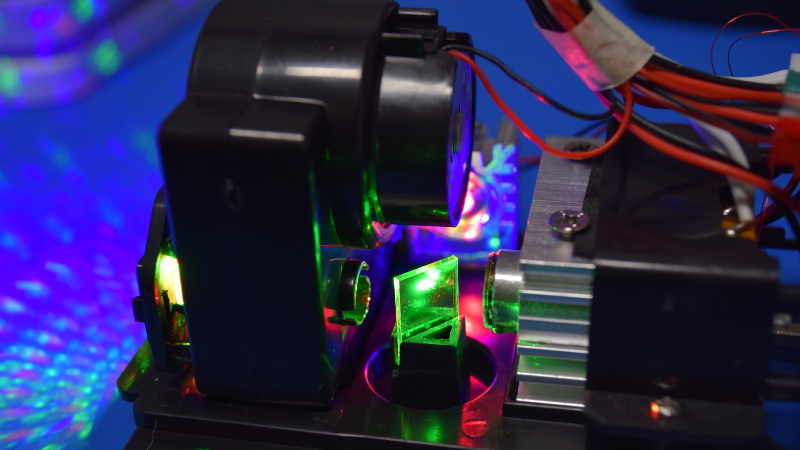
Every December, neighborhoods suddenly develop a mysterious case of sparkling red and green freckles. One small gadget in the yard paints thousands of tiny stars across the garage, the oak tree, the fence, the neighbor’s inflatable reindeer, and possibly the family dog if he stands still long enough. That gadget is the Christmas laser projector: a compact holiday decoration that looks simple from the outside but hides a surprisingly clever mix of optics, electronics, motors, heat control, and safety engineering inside.
This teardown-style guide opens the imaginary shell of a typical outdoor Christmas laser projector and explains what each part does. We are not recommending that you crack yours open like a holiday walnut. Laser products can be dangerous when disassembled, especially because the safety housing, lenses, gratings, and beam spreaders are part of what keep the light within safer limits. Instead, think of this as a guided tour: no stripped screws, no lost springs, no “why is there smoke?” moments.
By the end, you will understand how a Christmas laser projector works, why it can cover a large wall with tiny dots, why the green laser often looks brighter than the red one, what usually fails first, and why aiming one into the sky is a terrible idea with legal and aviation consequences. Festive? Yes. Harmless toy? Absolutely not.
What Is a Christmas Laser Projector?
A Christmas laser projector is an outdoor decorative lighting device that uses one or more laser diodes to create patterns on a surface. Instead of hanging dozens of string lights from the roof while questioning every life choice that led you to a ladder in winter, you place a projector in the yard, angle it toward the house, plug it in, and let optics do the heavy lifting.
Most consumer models project red, green, or multicolor patterns such as stars, snowflakes, dots, firefly effects, moving sparkles, or simple holiday shapes. Some models include LEDs for background washes, but the classic “laser shower” effect comes from coherent laser light split into many beams by diffraction optics.
The typical package includes the projector body, a ground stake, a mounting bracket, a low-voltage power adapter, sometimes a remote control, and occasionally a timer function. Outdoor models often advertise weather resistance, though the exact rating varies. A projector body may be splash-resistant or water-resistant, but that does not mean the adapter should be buried in snow like a tiny electrical potato.
The Outer Shell: Weatherproofing, Heat, and Alignment
The first thing you notice in a teardown is the housing. Many Christmas laser projectors use a metal or rugged plastic enclosure with a front optical window. The enclosure is not just cosmetic. It protects the optics from dust, moisture, accidental fingers, and curious children who believe every object is improved by poking it.
Outdoor projectors often include rubber gaskets, sealed cable exits, and screw-down covers. These parts help resist rain and splashing, but they also trap heat. That creates a design challenge: laser diodes and driver circuits need protection from weather, yet they also need a way to shed heat. Better models use metal housings or internal heat sinks to pull warmth away from the laser modules.
The mounting system matters too. The stake or bracket sets the projector angle, and the angle determines whether the beams terminate on a wall, tree, or fence. Proper aiming is part of safe operation. A laser display should not point into open sky, windows, streets, or flight paths. The safest setup is boring in the best possible way: stable, low, aimed at a solid surface, and not visible to aircraft.
The Power Supply: Small Adapter, Big Responsibility
Inside the box, the projector itself usually runs on low-voltage DC power, commonly supplied by an external adapter. A 5-volt or 12-volt adapter is common in small consumer electronics, though specific values depend on the model. The adapter converts household AC power into safer low-voltage DC for the projector electronics.
That power supply has several jobs. It must provide enough current for the laser diodes, motor, control board, infrared receiver, and any LEDs. It also needs to handle outdoor holiday conditions: cold air, dew, extension cords, and the occasional homeowner who plugs everything into one outlet because “it worked last year.”
For outdoor use, the electrical side deserves respect. Use outdoor-rated extension cords, keep connections off wet ground, and plug decorations into GFCI-protected outlets whenever possible. A laser projector may look tiny, but electricity plus moisture is still a partnership nobody invited to the Christmas party.
The Control Board: The Projector’s Little Brain
After removing the housing in a typical teardown, one of the central pieces is a small printed circuit board. This board controls power distribution, switching modes, remote-control input, timers, and sometimes motor speed. In cheaper projectors, the board may be delightfully minimal: a few driver components, a microcontroller or logic chip, resistors, capacitors, and connectors for the laser modules.
The control board decides which lasers turn on and when. If the projector has modes such as red only, green only, red and green together, flashing, fading, or moving patterns, the board is orchestrating the show. In remote-controlled models, an infrared receiver picks up commands from the remote and sends them to the controller.
The board may also provide pulse-width modulation, which rapidly switches the laser or LED channels on and off to create dimming or flashing effects. In basic units, the control can be crude but effective. After all, the goal is not cinematic color grading. The goal is “make the garage look like Santa’s disco wall.”
Laser Diodes: The Real Stars of the Show
The heart of a Christmas laser projector is the laser diode. A laser diode is a semiconductor device that emits coherent light in a narrow beam. Consumer holiday projectors often use red and green laser modules, and some newer decorative models add blue or combine lasers with LED projection patterns.
Red laser diodes are generally inexpensive, compact, and efficient. Green laser modules have historically been more complex because some older designs used infrared light converted into green through nonlinear crystals. Many modern green diode designs are simpler than older systems, but green still tends to appear brighter to human eyes because our vision is highly sensitive in the green portion of the visible spectrum.
Each laser module may include the diode itself, a tiny lens for collimation, a metal barrel or mount, wiring, and thermal contact to a heat sink. The module turns electrical power into a bright, narrow beam. Without the rest of the optical system, that beam would be too concentrated for safe decorative use. The magic comes from splitting, shaping, and moving it.
Laser Driver Circuit: Why You Cannot Treat a Laser Like a Light Bulb
A laser diode is not a regular bulb. It does not appreciate being connected directly to a random power source. It needs controlled current. Too little current and it will not lase properly. Too much current and it can fail quickly, sometimes in the dramatic “well, that was expensive” style.
That is why laser products use driver circuitry. A laser diode driver regulates current through the diode and may include feedback, protection components, and switching control. In simple consumer projectors, the driver section may be built into the main board rather than appearing as a fancy separate module.
The driver matters for brightness, lifespan, and safety. Stable current helps keep the output predictable. It also helps reduce stress on the diode. Because holiday projectors may run for hours in cold outdoor conditions, the electronics must handle startup surges, temperature changes, and repeated timer cycles.
Diffraction Gratings: How One Beam Becomes Hundreds of Dots
If laser diodes are the stars, diffraction gratings are the choreographers. A diffraction grating is an optical element with microscopic patterns or grooves that split incoming light into multiple paths. In a Christmas laser projector, this is how one laser beam can become a field of dots or shapes spread across the front of a house.
Some projectors use simple gratings to create a dot matrix. Others use diffractive optical elements that generate more complex patterns. Instead of mechanically scanning a single beam across the wall, many consumer holiday projectors split the beam into many smaller beams at once. This approach is compact, inexpensive, and ideal for static or gently moving star fields.
When a grating splits the beam, the power is distributed across many points. That is part of how decorative laser projectors can produce broad patterns rather than one dangerously intense dot. However, this does not make the device safe to stare into, disassemble, modify, or aim carelessly. The factory optical path is part of the safety design.
The Beam Combiner: Mixing Red and Green Without Making Soup
In projectors with multiple laser colors, the optical section may include a beam combiner or angled optical elements that align red and green beams into a shared path. A beam combiner allows separate laser modules to contribute to one projected pattern or related patterns.
Alignment is critical. If the red and green channels are slightly offset, the pattern may look charmingly layered. If they are badly misaligned, the projection looks messy, dim, or uneven. In teardown photos of basic projectors, the optical path often appears surprisingly tiny: a few laser modules, a combiner, a grating wheel or plate, and a motorized assembly.
This is where the device becomes more impressive than its price tag suggests. A small collection of inexpensive optical parts can create a large and visually rich display, provided the parts are aligned correctly. It is a little like a holiday orchestra where every musician is a laser and the conductor is a plastic gear.
The Motor and Gearbox: Motion Without Movie Projector Complexity
Many Christmas laser projectors include motion effects. The dots swirl, drift, pulse, or slowly rotate across the wall. This motion usually comes from a small motor and gear assembly that rotates a grating, lens, mirror, or patterned optical disc.
The motor does not need to be powerful. It only has to move lightweight optical parts at a controlled speed. A small DC motor with plastic gears is common. Some models use a slow geared motor, while others vary speed electronically. The result is movement that feels lively without requiring complex galvos like professional laser show systems.
Motors are also a common failure point. Cold weather can thicken grease. Plastic gears can wear. Dust or moisture can add friction. A projector with working lasers but frozen patterns may have a weak motor, jammed gear train, or slipping optical wheel. If the lights still appear but no longer move, the tiny holiday hamster inside the gearbox may have retired.
Heat Sinks and Temperature Control
Laser diodes dislike excessive heat. Heat reduces efficiency, shifts performance, and shortens component life. That is why many projectors include small heat sinks attached to laser modules or driver components. A heat sink gives thermal energy more metal to spread through, lowering hot spots.
Some designs may include a temperature sensor or thermal pad. This is especially useful when multiple laser modules run in a sealed enclosure. In cold weather, heat may seem like a minor issue, but the device can still warm up internally. In warm climates or indoor use, thermal management becomes even more important.
A good practical habit is to follow the manufacturer’s duty-cycle recommendations. Some manuals suggest letting the unit rest after long operation. Timers are not just convenient; they reduce wear, save energy, and prevent your house from looking like a laser planet at 4 a.m.
The Front Window: More Than a Clear Cover
The front optical window protects internal parts from moisture and dust. It also keeps users away from the direct optical path. If it becomes dirty, scratched, fogged, or cracked, projection quality suffers. Dots may blur, dim, or scatter in odd ways.
Cleaning should be gentle. Use the method recommended by the manufacturer, usually a soft dry or slightly damp cloth. Avoid solvents unless the manual specifically allows them. A cloudy window can make the projector look weak even when the lasers are fine.
Never run a projector with the optical cover removed. The pretty pattern depends on controlled optics. Removing parts can expose stronger beams before they are spread or shaped. In other words, the housing is not just a container; it is part of the safety system.
Remote Control, Timers, and Modes
Modern Christmas laser projectors often include a small remote control. The remote may switch colors, change flashing modes, set timers, or adjust motor speed. Infrared remotes need line of sight, so if the remote works only when you aim it like a TV remote from 1998, that is normal.
Timer modes are especially useful. A five-hour or six-hour cycle can turn the projector off automatically and repeat the schedule the next day. This saves energy and prevents unnecessary overnight operation. It also reduces the risk of annoying neighbors who prefer sleep over a full-scale North Pole landing simulation.
More advanced products may offer app control or preset scenes, but many simple laser projectors still rely on basic electronics. The simplicity is part of the appeal. Less setup. Fewer ladders. More sparkle per minute.
Why Green Looks Brighter Than Red
One common question is why green dots often dominate the display even when the red laser is working properly. The answer is human vision. Our eyes are more sensitive to green light than deep red light under many viewing conditions. A green laser with the same measured power as a red laser can appear much brighter.
This is why many holiday projectors use green as the main “star field” color and red as an accent. On a dark wall, green dots pop sharply. Red dots can look warmer but less intense. On brick, dark paint, or trees, the difference becomes even more noticeable.
Surface color matters too. A white garage door reflects more light than dark siding. Wet leaves scatter differently than painted wood. The same projector may look spectacular on one house and underwhelming on another, which is the holiday lighting equivalent of “it depends.”
Safety: The Part Nobody Should Skip
Christmas laser projectors are decorative devices, not toys. Avoid looking directly into the beam. Keep children and pets away from the projector. Do not aim it at people, cars, streets, windows, aircraft, or reflective surfaces. Do not modify the optics or bypass safety features.
Federal safety rules limit certain visible laser products, and consumer laser displays must be designed to stay within applicable emission limits. But safe operation still depends on the user. A properly manufactured projector can become dangerous if placed at the wrong angle or opened while powered.
The biggest public safety warning is aviation. Holiday laser lights aimed into the sky can distract or temporarily blind pilots. The safe rule is simple: every beam should terminate on a fixed surface such as a house wall, dense tree line, fence, or ground area. If you can see beams traveling freely upward, change the angle immediately.
Common Failure Points in Christmas Laser Projectors
Christmas laser projectors are exposed to cold, moisture, dirt, vibration, and long run times. Eventually, something may fail. The most common issues include weak projection, no movement, dead colors, remote-control problems, and moisture inside the housing.
Weak or Dim Projection
Weak projection may come from a dirty front window, poor wall color, long throw distance, failing laser diode, weak power adapter, or internal optical misalignment. Start with the simple fixes: clean the window, shorten the distance, and test the outlet or adapter if safe to do so.
One Color Stops Working
If red works but green does not, or green works but red does not, the issue may be a failed diode, driver circuit problem, loose connector, or damaged module. Because laser repair requires safety knowledge and proper equipment, replacement is usually wiser than amateur repair.
The Pattern No Longer Moves
A stationary pattern with working light often points to the motor or gear train. Cold-thickened grease, worn gears, or a stuck rotating grating can cause this. If the unit is under warranty, use the warranty instead of performing kitchen-table surgery with a screwdriver and optimism.
Remote Does Not Work
Check the battery, line of sight, and receiver window. Infrared remotes cannot work through solid objects and may struggle in bright light. Sometimes the remote is fine; the projector is simply not receiving commands because it is aimed away from you.
Should You Open a Christmas Laser Projector?
For most people, no. A teardown is educational, but opening a laser projector can expose beams before they are spread by the optical system. It can also break seals, ruin weather resistance, void warranties, and create alignment problems. The inside is interesting, but eyesight is more interesting.
If you are studying electronics or optics, use proper laser safety eyewear rated for the wavelengths involved, power the device responsibly, and avoid looking into any optical path. Even then, many consumer projectors are not designed to be serviced. They are sealed seasonal appliances, not modular lab instruments.
In practical terms, cleaning the exterior, checking the adapter, using proper placement, and storing the unit dry after the season will do more good than opening it. The best teardown is often the one you read, not the one that ends with three mystery screws and a dead projector.
Buying Tips: What to Look For
When shopping for a Christmas laser projector, look for clear safety labeling, outdoor-use rating, a stable mounting system, a reputable seller, timer functions, and weather-resistant construction. The product should include warnings about eye exposure and proper aiming. Be suspicious of vague listings with exaggerated claims, missing specifications, or photos that look like they were generated by an elf with a graphics tablet.
Coverage area is often advertised, but real performance depends on distance, surface color, ambient light, and angle. A projector that claims huge coverage may look best only on a dark, flat surface. For a typical home, placement matters more than raw claims. Set the unit far enough to spread the pattern but close enough to keep it bright.
Also consider whether you want static dots, moving stars, themed shapes, remote control, app control, or mixed LED-and-laser effects. A simple red-and-green dot projector can be elegant. A multi-pattern projector can be fun. A projector with every mode known to civilization may impress children and confuse adults.
Real-World Experience: Living With a Christmas Laser Projector
The first time you set up a Christmas laser projector, it feels almost suspiciously easy. You push the stake into the yard, aim the head at the house, plug in the adapter, and suddenly the front wall looks like it has been sprinkled with cosmic candy. Compared with untangling string lights, testing dead bulbs, and balancing on a ladder while the wind discusses your mortality, the projector feels like cheating. Wonderful, sparkly cheating.
The biggest lesson from real use is that placement changes everything. A projector too close to the wall creates a dense, bright patch. Move it farther back and the pattern spreads wider but becomes dimmer. Aim it too high and you risk sending beams where they should not go. Aim it too low and half the pattern lands on the shrubs, which may be charming if the shrubs are emotionally ready for fame.
Surface texture also matters. A flat white garage door makes laser dots sharp and bright. Brick breaks the pattern into warm, uneven fragments. Trees create a magical depth effect because dots land on leaves, branches, and gaps at different distances. Dark siding can absorb a lot of the red channel, leaving green to do most of the visual work. Snow, when present, can make everything look brighter, but it can also cover the projector if you place it too low.
Weather teaches another lesson. Even weather-resistant units benefit from common sense. Keep the adapter protected, lift connections off the ground, avoid puddles, and inspect cords before use. After a heavy rain or freeze, check that the projector is still aimed correctly. Stakes can loosen in soft soil, and a small tilt can move the pattern from your wall to your neighbor’s upstairs window. Nobody wants to explain at breakfast why their bedroom looked like a UFO runway.
Timers quickly become a favorite feature. Without a timer, it is easy to forget the projector and let it run all night. With a timer, the display turns off after the evening crowd has enjoyed it. This reduces energy use, lowers wear, and keeps the neighborhood vibe festive rather than “abandoned theme park.” If the projector remembers the last mode, even better. Set it once, and it repeats the routine like a tiny holiday professional.
Another practical experience is that less can look better. A simple red-and-green moving star field can feel classy and cheerful. Too many modes, colors, flashes, and shapes can turn the house into a visual fruitcake. The best displays usually combine a laser projector with a few traditional elements: warm porch lights, a wreath, maybe a tree in the window. The laser adds motion and sparkle without needing to carry the whole holiday show on its tiny optical shoulders.
Storage matters after the season. Wipe the housing, let the unit dry, coil the cord gently, remove remote batteries if storing for months, and keep everything in a labeled box. The following December, you will thank yourself. Future-you does not want to dig through a mystery bin labeled “miscellaneous festive chaos” while holding a power adapter that may or may not belong to the projector.
The most important experience, though, is respect. A Christmas laser projector is fun because it makes advanced optics feel simple. But inside that friendly housing are real lasers, real electronics, and real safety considerations. Use it correctly and it is a brilliant shortcut to holiday atmosphere. Use it carelessly and it can become a hazard. The best approach is simple: aim low, terminate beams on solid surfaces, protect the power connections, avoid direct viewing, and let the projector do what it does bestturn a dark winter wall into a cheerful field of light.
Conclusion
A Christmas laser projector may look like a simple yard gadget, but inside it is a compact optical system built around laser diodes, driver circuits, diffraction gratings, beam combiners, motors, heat sinks, seals, and control electronics. The genius of the design is efficiency: a few small components can create a huge decorative effect with very little setup.
The teardown reveals why these projectors are popular. They are fast, bright, reusable, and surprisingly clever. It also reveals why they deserve careful handling. The same focused light that creates crisp holiday stars can become unsafe if misdirected, modified, or disassembled. Keep beams on your home, not in the sky. Keep power connections dry. Keep curious eyes away from the aperture. Do that, and your Christmas laser projector can deliver plenty of sparkle without turning the season into a safety lecture from the FAA, your electrician, or your very disappointed future self.