Some tech projects are practical. Some are beautiful. A precious few are both, and the Cluster Deck lands squarely in that sweet spot like it knows exactly how cool it looks. At first glance, it seems like a cyberdeck prop that wandered off a movie set and found a day job in distributed computing. Look closer, though, and this machine is more than a handsome box full of Raspberry Pis. It is a compact lesson in cluster design, cable management, thermal planning, edge computing, and the eternal truth that engineers will absolutely build a tiny server farm if you leave them alone with a 3D printer.
The idea behind the Cluster Deck is simple and delightfully nerdy: pack four Raspberry Pi boards into one portable enclosure, give them networking, cooling, power, and a display, then turn the whole thing into a self-contained lab for experimentation. That sounds like overkill until you remember what Raspberry Pi clusters do best. They are not here to replace real enterprise servers, conquer every benchmark, or make your laptop cry in fear. They are here to teach, prototype, demo, and let curious people get hands-on with distributed workloads without needing a server room, a forklift, or a second mortgage.
In other words, the Cluster Deck is not trying to be a supercomputer in a lunchbox. It is trying to be a smarter way to learn how modern systems work. And honestly, that might be even cooler.
What the Cluster Deck Actually Is
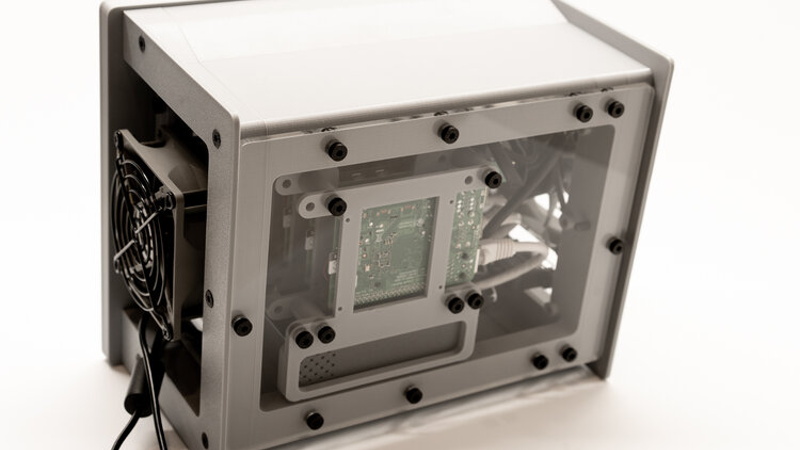
The Cluster Deck is a portable multi-node Raspberry Pi setup built around four Raspberry Pi 4 boards housed in a compact custom enclosure. The project grew out of a need for a small research cluster, but its appeal goes way beyond one niche workload. It combines several ideas makers and home-lab fans love: a 3D-printed case, a built-in screen, tidy internal networking, Power over Ethernet support, active cooling, and enough style to make ordinary desktop hardware look like it needs its own soundtrack.
What makes this build stand out is not just that it uses four Pis. Plenty of people have stacked Raspberry Pis before. The magic is in the packaging. Rather than leaving a pile of boards, cables, and adapters sprawled across a desk like a spaghetti-based art installation, the Cluster Deck turns the cluster into a single object. That matters more than it sounds. Once a cluster becomes compact, transportable, and easier to power, it stops being a messy experiment and starts becoming a real tool.
That is the difference between “I built a thing” and “I can actually take this thing somewhere and use it.” The Cluster Deck lives in the second category.
Why Four Pis in One Box Is More Than a Party Trick
A lot of people see a Raspberry Pi cluster and ask the same question: why not just use one more powerful computer? It is a fair question, and it deserves a fair answer. If your only goal is raw performance per dollar, a cluster of small boards is often not the cheapest route. Once you add switches, storage, power hardware, cooling, and enclosures, the budget fairy starts looking nervous.
But that misses the point. A Raspberry Pi cluster is valuable because it teaches the architecture behind bigger systems. You learn how nodes communicate, how services are distributed, how storage becomes a design problem instead of an afterthought, and why orchestration tools exist in the first place. Building a cluster forces you to think in terms of workloads, failure, networking, and automation. That is exactly why clusters built from Pis keep showing up in educational environments, home labs, and edge-computing demos.
Four Pis are also a sweet spot. One board is a toy, two boards are a taste, but four boards start to feel like a real cluster. You can dedicate roles, spread services across nodes, test orchestration, and even simulate failure recovery without needing a warehouse full of hardware. Four nodes are enough to be useful and small enough to carry, which is basically the hardware equivalent of having your cake and SSH-ing into it too.
Hardware Choices That Make the Cluster Deck So Clever
1. The staggered internal layout
The physical arrangement is one of the smartest parts of the design. Instead of a simple stack that turns into a tiny heat tower, the boards are mounted in a staggered pattern that saves space while still leaving room for airflow. This is the kind of detail that separates a concept from a well-thought-out machine. Packing computers close together is easy. Packing them close together without cooking them is where the grown-up engineering starts.
2. Power and networking over Ethernet
Using PoE HATs and a small switch is a huge win. In multi-board builds, cable clutter becomes the villain almost immediately. Separate power bricks, extra adapters, and short patch cables can turn a neat idea into a frustrating maintenance puzzle. Running power and data together over Ethernet reduces that mess dramatically. It also makes the whole build more deployable. One neat cluster is charming. One neat cluster that is easy to reboot, relocate, and rewire is useful.
3. Cooling that acknowledges reality
Portable clusters do not get to ignore thermals. Raspberry Pi 4 boards are capable little machines, but they are not immune to heat, especially when you squeeze four of them into one enclosure and ask them to behave like serious citizens. The Cluster Deck uses dual fans and deliberate airflow to keep temperatures under control. That may not sound glamorous, but cooling is one of the reasons this build works as more than a desktop sculpture. No airflow plan means no reliable cluster. It is that simple.
4. A display that makes the cluster feel self-contained
The built-in display pushes the project from “compact stack” into “portable package.” A screen is not strictly necessary for cluster computing, but it changes the experience. It lets the system stand alone, makes demos easier, and gives the machine a polished identity. There is also a psychological benefit here: hardware that looks complete gets used more often. People are more likely to experiment when the machine feels ready to go rather than halfway assembled.
Why Raspberry Pi 4 Works Well for This Kind of Build
Raspberry Pi 4 remains a strong choice for cluster experiments because it hits a very practical balance. It offers a quad-core ARM processor, Gigabit Ethernet, USB 3, and enough memory for lightweight server workloads, testing, automation, and container experiments. Earlier Pi models made clusters fun. The Pi 4 made them meaningfully more capable.
That extra networking and I/O headroom matters. Clusters are not just about CPU cycles. They are about moving data, coordinating services, and handling overhead from the software stack sitting on top. A weak network or slow storage path can turn a cluster into four computers politely waiting on each other. The Pi 4 does not eliminate all bottlenecks, but it makes a four-node portable cluster much more believable as a serious learning platform.
And because the Raspberry Pi ecosystem is enormous, you are not working in a vacuum. Documentation, cases, HATs, tutorials, and community support all lower the barrier to entry. That is a big reason Pi clusters keep surviving trends that should have killed them years ago. They are approachable, and approachable tools get used.
What a Portable Pi Cluster Is Actually Good For
Learning distributed systems without renting a data center
This is the Cluster Deck’s home turf. Want to understand how nodes coordinate? How to break work into smaller tasks? How orchestration changes deployment? A four-node cluster gives you a live lab where all of those ideas stop being abstract. Reading about distributed computing is useful. Breaking your own tiny cluster and then fixing it is unforgettable.
Lightweight Kubernetes and container experiments
Tools such as K3s and MicroK8s made Raspberry Pi clusters far more compelling for modern home-lab work. Suddenly, the cluster was not just for MPI experiments and bragging rights. It could run lightweight Kubernetes, host services, simulate edge deployments, and act as a compact platform for demos. That is one reason portable Pi clusters keep appearing in trade-show builds, development demos, and private cloud experiments. They are visual, understandable, and surprisingly capable when the workload fits the hardware.
Edge computing and field demos
The Cluster Deck format shines when you need something small, self-contained, and easy to move. A portable multi-node device is handy for showing off orchestration, resilience, service discovery, or distributed applications in places where hauling a rack server would be ridiculous. This is where the build becomes more than a hobby object. It becomes a demonstration platform.
Automation, testing, and ARM-native experimentation
A cluster of ARM boards is useful for testing container images, deployment scripts, monitoring setups, and automation workflows. If you want to learn Ansible, try service placement, or validate how software behaves across multiple nodes, a four-Pi package is a very friendly playground. It also gives you real hardware behavior, which is often much more educational than spinning up a few virtual machines and declaring victory.
Where the Dream Meets Physics
Now for the part where we let reality into the room. The Cluster Deck is brilliant, but it is not magic.
First, a compact Pi cluster is still not the cheapest answer to every computing problem. Once you add premium parts, PoE hardware, custom enclosures, cooling, and accessories, the per-node cost climbs. That does not make the project bad. It just means the value is educational, modular, and experiential as much as computational.
Second, storage and networking still matter more than many beginners expect. A cluster can be held back by slow media, shared links, or poorly planned data flow. You do not get distributed speed just by stacking boards like tech pancakes. The software architecture has to cooperate.
Third, thermals and acoustics are always negotiating with you. Compact enclosures save space, but they also trap heat and amplify small cooling problems. A portable cluster that looks elegant on a desk may still need tuning for fan curves, airflow, and workload behavior. Building the hardware is only the opening act. Living with it is the sequel.
Why the Cluster Deck Idea Still Matters
What makes the Cluster Deck memorable is not just its portability. It is the way it captures a bigger shift in computing culture. People are learning infrastructure in smaller, more personal environments. They are building cloud-like labs at home. They are experimenting with Kubernetes, edge services, ARM workloads, and distributed applications without waiting for access to expensive enterprise gear. In that world, a four-node portable Raspberry Pi cluster makes perfect sense.
It is also a reminder that form factor influences behavior. The moment a cluster becomes portable, organized, and visually coherent, it becomes easier to teach with, easier to demo, and easier to keep using. A pile of boards in the corner is a weekend project. A compact multi-Pi deck is an invitation to keep exploring.
That is why the Cluster Deck works so well as a concept. It respects both sides of the maker brain: the part that wants to learn distributed systems and the part that wants the machine to look like it belongs on the bridge of a spaceship.
Experiences Related to “Cluster Deck Packs Four Pis Into One Portable Package”
Using a portable four-Pi cluster feels different from using a normal computer almost immediately. A laptop invites you to think in terms of one machine doing one job. A Cluster Deck invites you to think like a systems builder. The first experience most people have is not speed. It is perspective. You stop asking, “Can this board run my app?” and start asking, “Which node should run which part, and what happens when one drops out?” That is a much more interesting question, and honestly, it is one of the biggest reasons projects like this are so addictive.
There is also something unexpectedly satisfying about the portability. A lot of home-lab gear is powerful but awkward. It lives on shelves, under desks, or in corners where it quietly gathers dust and drama. A portable Cluster Deck changes that relationship. You can set it on a desk, carry it to another room, bring it to a meetup, or use it for a demo without turning the event into an improvised moving company. That convenience makes experimentation more frequent. When hardware is easy to reach, people use it more. Simple, but true.
Then there is the setup experience, which teaches humility in the best possible way. On paper, four Raspberry Pis do not look intimidating. In practice, the moment you start dealing with power, thermals, operating system images, hostnames, SSH keys, network configuration, storage decisions, and container orchestration, you realize you are building a tiny version of the same logic that powers much larger systems. Nothing here is impossible, but everything is educational. Even little mistakes become memorable. Assign the wrong static IP once and you will suddenly become very passionate about documentation.
Noise and heat are also part of the lived experience. Portable clusters look clean in photos, but real use reminds you that compact computing is a negotiation. Fans matter. Airflow matters. Workload placement matters. A cluster under light load feels almost playful. A cluster running serious jobs feels like a small machine with opinions. That is not a flaw. It is part of the charm. The device lets you see infrastructure behaving like infrastructure, rather than hiding all the interesting parts behind a glossy interface.
One of the best experiences with a setup like this is showing it to other people. Even nontechnical folks tend to understand the appeal right away. Four small computers in one case, all working together, is visually intuitive. It sparks questions. What does each one do? Why not just use one bigger machine? Can it keep running if one node fails? Those questions lead naturally into conversations about distributed systems, redundancy, edge computing, and modern application design. That makes the Cluster Deck a great teaching tool, because it turns invisible software ideas into something people can point at.
There is also a creative satisfaction to the object itself. The Cluster Deck is not only about compute. It is about craftsmanship. The enclosure, the layout, the display, the cable discipline, and the cooling strategy all add up to a machine that feels intentional. That matters. Plenty of makers have had the experience of building something technically successful that still feels unfinished. A portable four-Pi package avoids that trap when it is done well. It feels complete, and that gives the project staying power.
In the end, the experience of living with a Cluster Deck is less about owning a tiny cluster and more about owning a tiny laboratory. It becomes a place to test ideas, learn tools, break deployments, fix them, and slowly build confidence in how clustered systems behave. That is why a project like this sticks with people. It is not just hardware you admire. It is hardware that teaches.
Conclusion
The Cluster Deck proves that a Raspberry Pi cluster does not have to be messy, stationary, or purely experimental. By packing four Pis into one portable package, it turns a familiar home-lab concept into something more elegant and more usable. The build shows how thoughtful design can solve the usual cluster headaches: too many wires, awkward power delivery, weak airflow, and the general tendency of small computers to spread across a workspace like they are paying rent by the square inch.
More importantly, it shows why Raspberry Pi clusters still matter. They are not the fastest option, and they are not always the cheapest once accessories enter the chat. But they are one of the most approachable ways to learn distributed computing, lightweight orchestration, edge deployment patterns, and practical infrastructure design. The Cluster Deck takes all of that value and wraps it in a form factor people actually want to use.
If you are the kind of person who enjoys learning by building, the Cluster Deck is the sort of project that keeps paying you back. Part portable lab, part teaching tool, part cyberpunk desk candy, it manages to be both useful and wildly fun. And in the world of maker hardware, that is a pretty excellent trick.