Somewhere in a closet, basement, attic, or suspiciously overstuffed shoebox, there is probably a stack of 35mm slides waiting for its comeback tour. These tiny transparencies once ruled family storytelling: vacations, weddings, newborns, national parks, questionable 1970s furniture, and that one uncle who believed every vacation required a plaid shirt. The problem is simple: slides are beautiful when properly backlit, but awkward to enjoy in a world where the projector bulb is missing, the carousel is dusty, and the screen has been replaced by a 65-inch TV.
That is why a 3D printed slide adapter is such a satisfying little invention. It takes a modern digital camera, a macro-friendly lens, a clean light source, and a printed holder, then turns the whole setup into a compact DIY slide scanner. Instead of buying a dedicated film scanner or mailing precious family originals to a service, you can photograph mounted slides directly and build a high-quality digital archive at home.
The idea behind “3D Printed Adapter Puts Slides In Their Best Light” is not complicated, which is exactly why it works. A slide is placed in a printed holder in front of a camera lens. A diffused light source glows behind it. The camera captures the image. The slide gets a second life. No séance, no projector smoke, no mysterious clicking noises from ancient equipment.
Why Digitizing 35mm Slides Is Worth the Effort
Slides are positive transparencies, meaning the image already looks like the final photograph when light passes through it. That makes them rewarding to digitize because there is no orange negative mask to reverse, no complicated color inversion, and no guessing whether Aunt Linda’s sweater was actually neon green or merely the victim of bad chemistry. With a good light source and a sharp lens, slides can reveal rich color, fine grain, and surprising detail.
Digitization also protects memories from slow physical decline. Color film dyes can fade, mounts can warp, dust can settle into every tiny corner, and storage conditions are rarely perfect. Once a slide is captured properly, you can create backup copies, share images with family, edit carefully, print favorites, and organize the collection without repeatedly handling the original. The slide can retire gracefully instead of being shoved through a projector gate like it is still 1978.
What the 3D Printed Adapter Actually Does
A slide adapter solves three annoying problems at once: alignment, distance, and handling. To photograph a slide sharply, the camera must face the film squarely, the slide must sit flat, and the film must be positioned at the correct focusing distance. Trying to hold a slide by hand in front of a lens is a recipe for blur, fingerprints, and mild emotional collapse.
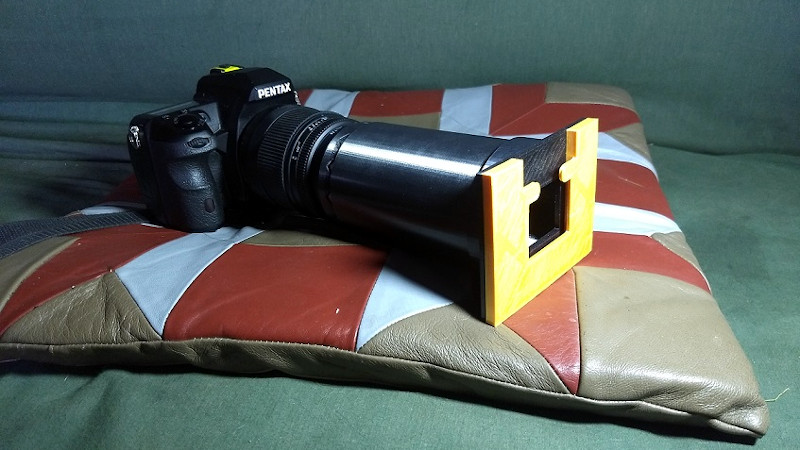
A well-designed 3D printed adapter holds the slide in a repeatable position. It can slide over a lens barrel, attach through filter threads, or work with step-up rings depending on the design. The best versions include a snug but gentle fit, a stable slide slot, a spacer to keep the mount from wobbling, and a path for clean backlighting. Some builds use foam or flexible printed parts to grip without scratching the lens. Small details like those make the difference between “clever weekend project” and “why is there a crescent-shaped scratch on my favorite lens?”
The basic parts
A practical adapter usually includes a lens-side sleeve or threaded mount, a slide carrier sized for standard 2×2-inch mounted slides, a light-facing opening, and sometimes a diffusion panel. Many makers print the body in matte black filament to reduce internal reflections. A shiny white adapter may look cheerful on the printer bed, but inside an optical path it behaves like a tiny disco ball with bad judgment.
The Camera Setup: DSLR, Mirrorless, or Bust?
The phrase DSLR slide scanner is common, but mirrorless cameras can work just as well. The real requirements are a camera with enough resolution, a lens that can focus close enough, stable manual or autofocus control, and the ability to capture RAW files if quality matters. A macro lens is ideal because it is designed for close focusing and flat-field sharpness. Extension tubes can help some lenses focus closer, although they add another variable to the alignment dance.
For many home collections, a 20-megapixel or higher camera is already plenty. A 35mm slide is small, but not magical. Once the slide fills the frame and the capture is sharp, you can create files suitable for family sharing, web galleries, and moderate prints. Higher-resolution cameras give more room for cropping and restoration, but poor focus or uneven light will ruin a 45-megapixel image just as efficiently as a 12-megapixel one. Pixels are not fairy dust.
Lighting: The “Best Light” Part Is Not Just a Cute Phrase
The backlight is the secret sauce. A slide needs even illumination from edge to edge. A bare LED pointed directly at the film can create hot spots, color shifts, and uneven brightness. A small LED light panel, lightbox, tablet screen, or diffused lamp can work, but the goal is always the same: steady, neutral, soft light.
A high color-rendering light source is helpful because slides depend heavily on subtle color. If the light is too warm, too blue, or uneven across the frame, the captured file starts with a color problem before editing even begins. Diffusion matters too. Frosted acrylic, a diffuser sheet, or the adapter’s own translucent panel can smooth the light so the image does not look like it was photographed in front of a tiny sun having a tantrum.
Simple lighting checklist
- Use a stable LED light source that does not flicker at your shutter speed.
- Diffuse the light before it reaches the slide.
- Block stray light around the adapter to improve contrast.
- Set a consistent white balance before capturing a full batch.
- Keep the light source far enough away to avoid visible texture or hotspots.
Printing the Adapter: Design Choices That Matter
The beauty of 3D printing is customization. Lenses vary in diameter, filter threads, minimum focusing distance, and barrel shape. A printed adapter can be adjusted to fit your exact gear instead of forcing you into a one-size-fits-most accessory. That said, a slide adapter is an optical tool, not a decorative gnome. Accuracy matters.
Print orientation should preserve the roundness of the lens sleeve and the flatness of the slide slot. Layer lines inside the optical path should be minimized or painted matte black. Tolerances should be slightly generous on first prints, especially if the design slides over a lens barrel. A too-tight adapter can scratch equipment; a too-loose adapter can wobble and ruin alignment. The ideal fit is secure, centered, and removable without a dramatic sound effect.
PLA is fine for many indoor scanning setups, especially if the light source is cool LED. PETG may be tougher and more heat tolerant. Avoid leaving the adapter in direct sun or near hot lamps, unless you enjoy abstract sculpture. Black filament is preferred, and a light sanding or matte paint inside the tube can help reduce flare.
How to Capture Slides Cleanly
Once the adapter is printed and mounted, the workflow becomes wonderfully mechanical. Insert a slide, align the image, focus carefully, expose correctly, capture, repeat. After the tenth slide, you will feel like a tiny museum technician. After the hundredth, you may start talking to the slides. This is normal. Probably.
Use the camera’s live view or electronic viewfinder to zoom in on film grain or a high-contrast detail. Focus manually if autofocus hunts. Keep ISO low to reduce noise. A mid-range aperture such as f/5.6 or f/8 often balances sharpness and depth of field, but test your lens because every optical setup has its own personality. Use a remote shutter, timer, or tethered capture to avoid vibration.
Exposure should protect highlights. Slides have dense shadows and bright highlights, so check the histogram rather than trusting the rear screen. If the light source is consistent, manual exposure makes the batch easier to edit later. Capture RAW files when possible; export TIFF masters for preservation and JPEG copies for sharing. That way you get both the archival steak and the social-media potatoes.
Dust: The Tiny Villain in Every Slide Project
Dust is the monster under the scanning bed. It floats, clings, sparkles, and appears only after you have packed everything away. Before capturing, handle slides by the mount, work on a clean surface, and use a blower to remove loose particles. Avoid aggressive rubbing, mystery liquids, or improvised cleaning methods that sound like they came from a forum argument at 2 a.m.
Some dust can be removed digitally, but it is better to prevent it. Every speck you clean before capture is a speck you do not have to clone out later while muttering into your coffee. If a slide is valuable, damaged, moldy, or sticky, stop and consider professional conservation advice before attempting heroic cleaning.
3D Printed Adapter vs. Film Scanner: Which Is Better?
A dedicated film scanner can deliver excellent results, especially models with infrared dust detection, precise film transport, and calibrated software. Flatbed scanners can handle multiple formats and batches. Commercial services are convenient if you have thousands of slides and a budget. So why bother with a printed adapter?
Speed and flexibility are the big reasons. Camera scanning can be fast once the setup is dialed in. You already own much of the required equipment if you have a good camera and macro lens. The adapter itself costs little in filament. It is also repairable, remixable, and wonderfully local: if a slot is too tight, you edit the model and print another. Try doing that with a proprietary film holder and a small screwdriver while maintaining inner peace.
The tradeoff is that the DIY route demands careful setup. You are responsible for alignment, lighting, focus, exposure, file handling, and color correction. The adapter does not magically make bad technique disappear. It simply gives good technique a stable stage.
Common Mistakes to Avoid
1. Letting the slide sit crooked
If the slide is not parallel to the camera sensor, one side may be sharp while the other side looks like it left early for lunch. Improve the holder, check the mount, and make test captures before starting a full batch.
2. Using uneven light
Hot spots are easy to miss at first and painful to fix later. Shoot a blank white diffuser frame and inspect the brightness across the image. If it looks uneven, move the light farther back or add diffusion.
3. Over-editing the file
Old slides often need contrast, color balance, and dust cleanup, but heavy sharpening, artificial saturation, and aggressive “restoration” can make memories look like they were processed inside a vending machine. Keep a faithful master file, then make edited versions for display.
4. Forgetting backups
A digitizing project is not finished when the images are on one computer. Use at least two backup locations, and ideally one off-site or cloud copy. The only thing sadder than losing old slides is losing the digital scans after spending three weekends capturing them.
Best Use Cases for a 3D Printed Slide Adapter
This project is perfect for families with a few boxes of mounted 35mm slides, photographers who enjoy hands-on workflows, makers who like practical prints, and archivists working on small, controlled batches. It is also ideal for testing a slide collection before deciding whether to invest in a dedicated scanner or service.
If you have tens of thousands of slides, an automated carousel digitizer or commercial workflow may be more realistic. But for many people, the homebuilt adapter hits a sweet spot: affordable, fast enough, customizable, and genuinely fun. It turns a stack of forgotten transparencies into a weekend project with a meaningful payoff.
File Organization: Future You Deserves Kindness
Good captures are only half the project. The other half is naming and organizing files so they do not become a digital junk drawer. Use folders by year, event, family branch, or original slide tray. Create filenames that include sequence numbers and short descriptions. Keep RAW files or TIFF masters separate from edited JPEG exports.
A simple structure might look like this: “Slides_Master/1976_Yellowstone/TIFF” and “Slides_Share/1976_Yellowstone/JPEG.” Add notes when you know names, dates, locations, or stories. Metadata is not glamorous, but neither is asking twelve relatives, “Was this Grand Canyon or just a very dramatic ditch?”
Preserving the Originals After Digitizing
Digitization does not mean the slides should be tossed into a drawer like retired confetti. Store them in clean, photo-safe boxes or sleeves, away from heat, humidity, dust, and direct light. Keep them in a stable indoor environment rather than an attic, garage, or damp basement. Slides are small, but they are still physical historical records.
If the collection contains rare family history, local history, or professional work, consider making a basic inventory and storing the originals separately from the digital copies. The digital archive gives access; the slide remains the source.
Experience Notes: What This Project Teaches You at the Workbench
The first experience most people have with a 3D printed slide adapter is surprise. The print may look almost too simple to matter. It is just a tube, a slot, a window, maybe a spacer, maybe a diffuser. Then you place the first slide in front of a clean light source, zoom into live view, and suddenly a forgotten image fills the screen with detail. That moment is addictive. It feels less like scanning and more like discovering a tiny illuminated time capsule.
The second lesson is humility. A slide adapter will immediately reveal every weakness in your setup. If the lens is slightly off-axis, the corners complain. If the light source is too close, the center glows brighter than the edges. If the slide holder has too much play, each frame lands in a slightly different position. These are not failures; they are tuning steps. Add a thin foam shim. Reprint the spacer. Move the LED panel back. Paint the inside matte black. The project rewards small improvements with visible results, which is exactly the kind of feedback loop makers love.
The third lesson is that speed comes after discipline. At first, digitizing one slide may take several minutes because you are checking focus, exposure, framing, dust, and color. After the setup is locked down, the rhythm changes: blower, insert, capture, remove, next. A batch that looked intimidating becomes manageable. The trick is not to rush the setup. A sloppy beginning creates a large pile of files that all need fixing. A careful beginning lets the workflow cruise.
Another useful experience is learning how emotional these projects can become. The adapter is plastic, but the images are not. You may start with a technical goal and end up staring at a holiday table, a lost pet, a childhood house, or relatives younger than you have ever seen them. That is the hidden value of home digitizing: you are not only converting film into pixels; you are reopening a family archive one frame at a time.
There is also a practical satisfaction in making the tool yourself. Commercial film holders can be excellent, but a printed adapter has personality. It fits your lens, your light source, your desk, your collection, and your patience level. Maybe version one is clunky. Version two is better. Version three has a smoother slide channel and a clever stop that centers each mount. By version four, you are using words like “tolerance stack” at dinner and frightening the guests. That is how you know the project has worked.
In the end, the experience is a blend of photography, 3D printing, archiving, and gentle detective work. You learn that lighting matters more than brag-worthy gear, that dust has the persistence of a movie villain, and that a small printed part can unlock decades of images. For a project that may cost only a few cents in filament, a 3D printed slide adapter delivers an impressive return: cleaner captures, faster workflow, and the quiet joy of bringing old memories back into view.
Conclusion
A 3D printed adapter for slides is a small tool with a big mission. It helps transform a digital camera into a practical slide digitizer, giving old 35mm transparencies the bright, even, carefully controlled light they need to look their best. The project is affordable, customizable, and approachable, yet it still teaches real lessons about optics, archival care, lighting, and workflow.
For a few boxes of family slides, it may be the perfect solution. For larger collections, it can serve as a test rig, proof of concept, or companion to an automated setup. Either way, the adapter proves a classic maker truth: sometimes the smartest tool is not the most expensive one. Sometimes it is the little black plastic thing you printed on a Saturday afternoon that finally lets Grandma’s national park photos escape the closet.
Note: This article is an original, source-informed SEO draft based on real camera digitization, 3D printing, maker, and archival preservation practices. External source links are intentionally omitted from the article body.