There is something wonderfully dramatic about Morse code. A tiny beep, a flashing LED, a pause, another beepand suddenly your desk looks like mission control for a very polite submarine. Add an Arduino, and this classic communication system becomes more than a historical curiosity. It becomes a hands-on electronics lesson, a programming exercise, a rhythm trainer, and a surprisingly fun weekend project that makes you say, “Wait, did I just build a machine that speaks in dots and dashes?” Yes. Yes, you did.
Arduino teaches Morse code beautifully because Morse is simple enough for beginners but deep enough to reward tinkering. You can start with one LED blinking “SOS,” then add a piezo buzzer, a button, an LCD screen, random practice words, serial input, speed controls, or even a full Morse trainer that quizzes you like a tiny electronic schoolteacher with no patience for sloppy timing.
This guide explores how an Arduino Morse code project works, what parts you need, how the code is structured, why Morse still matters, and how to turn a basic blinking circuit into a practical learning tool. No prior radio license, secret-agent trench coat, or dramatic candlelit telegraph room required.
What Is Morse Code, Really?
Morse code is a communication system that represents letters, numbers, and punctuation using short and long signals. The short signal is called a dot, or “dit.” The long signal is called a dash, or “dah.” The magic is not only in the beeps themselves, but also in the silence between them.
A dot is one time unit. A dash is usually three time units. The space between parts of the same letter is one unit, the space between letters is three units, and the space between words is seven units. That timing structure is why Morse code sounds like language instead of someone angrily testing a microwave button.
Historically, Morse code grew from the electric telegraph work associated with Samuel F. B. Morse and Alfred Vail in the 1830s and 1840s. The famous 1844 message “What hath God wrought?” helped mark a turning point in long-distance communication. Today, Morse is no longer required for most amateur radio licensing in the United States, but it remains popular among radio operators, makers, educators, emergency communication enthusiasts, and people who simply enjoy learning a compact auditory code.
Why Use Arduino to Learn Morse Code?
An Arduino board is basically a small programmable controller that can read inputs and control outputs. That makes it perfect for Morse code. Morse is built from only two active signal lengthsdot and dashplus timed silence. Arduino is excellent at timing, blinking, buzzing, and repeating patterns without complaining, which already gives it an advantage over most humans before coffee.
With Arduino, learners can see and hear Morse at the same time. A flashing LED gives visual feedback. A piezo buzzer provides audio feedback. A pushbutton can act as a telegraph key. A display can show letters, scores, or practice prompts. The project naturally teaches electronics, coding, timing, arrays, functions, loops, conditionals, and user interaction.
Arduino Makes Abstract Timing Visible
One of the hardest parts of learning Morse code is feeling the rhythm. Reading a chart is not enough. You need to hear the difference between “dit-dah” and “dah-dit,” and you need to internalize the spaces. Arduino helps by turning timing rules into physical signals. When the LED stays on longer for a dash, the concept becomes obvious.
It Is Beginner-Friendly
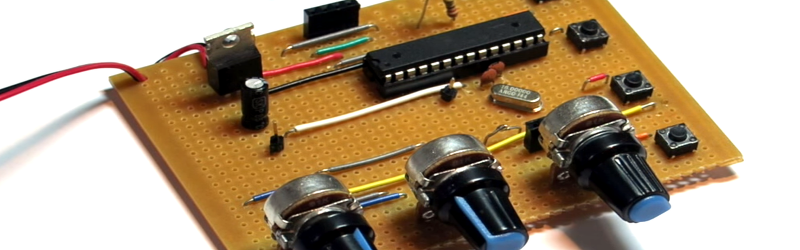
A basic Arduino Morse code circuit can be built with an Arduino Uno or compatible board, one LED, one resistor, a piezo buzzer, jumper wires, and a breadboard. That is a small parts list with a big payoff. The project builds on the classic Blink example, one of the most common first Arduino lessons, and extends it into something more meaningful.
It Encourages Experimentation
Once the first version works, the project practically begs for upgrades. Can the Arduino translate typed text from the Serial Monitor into Morse? Can it generate random practice characters? Can it quiz the user? Can it adjust words per minute? Can it send Morse with light only? Can it decode a button press? Yes, yes, yes, yes, yes, and yeswith varying amounts of “why is my semicolon missing?” along the way.
Basic Parts for an Arduino Morse Code Trainer
You do not need a fancy lab to build this project. A beginner-friendly setup includes:
- Arduino Uno or compatible board: The brain of the project.
- USB cable: Used for power and uploading code.
- LED: Flashes dots and dashes visually.
- 220-ohm resistor: Protects the LED from too much current.
- Piezo buzzer: Produces Morse tones.
- Breadboard: Makes temporary wiring easy.
- Jumper wires: Connect everything without soldering.
- Pushbutton: Optional, but useful for practicing manual keying.
- LCD or OLED display: Optional, for showing characters, prompts, or scores.
A very simple version can use the built-in LED on many Arduino boards. That means you can begin with no external LED at all. But adding a separate LED and buzzer makes the project feel more like a real Morse practice device and less like your board is blinking because it remembered an old dream.
How the Circuit Works
The LED connects to a digital output pin through a resistor, then to ground. When the Arduino sets the pin HIGH, current flows and the LED turns on. When the pin goes LOW, the LED turns off. The piezo buzzer connects to another digital pin and ground. The Arduino can use the tone() function to generate a square wave at a selected frequency, producing an audible beep.
For example, a common setup might use pin 13 for the LED and pin 8 for the buzzer. The exact pins can vary, as long as the code matches the wiring. This is one of the golden rules of Arduino projects: the circuit and the sketch must agree. If the buzzer is on pin 8 but the code is shouting at pin 12, nothing useful happens. This is not a hardware failure. It is an electronics version of texting the wrong person.
The Logic Behind Morse Timing
The code usually starts by defining a basic time unit. For beginner practice, that might be 150 milliseconds, 200 milliseconds, or even 300 milliseconds. A dot lasts one unit. A dash lasts three units. After each dot or dash, the program waits one unit. After a letter, it waits three units. After a word, it waits seven units.
Here is the core idea:
This structure is simple, but it teaches an important programming concept: abstraction. Instead of writing separate delays everywhere, you define one timing unit and build everything around it. Want slower practice? Increase the unit. Want faster practice? Decrease it. The Arduino does the rest, because microcontrollers are wonderfully obedient little timing goblins.
A Simple Arduino Morse Code Example
A basic Morse sketch needs three main ideas: a function for dots, a function for dashes, and a way to map letters to Morse patterns. For example, the letter A is dot-dash. The letter B is dash-dot-dot-dot. The number 5 is dot-dot-dot-dot-dot. The classic distress signal SOS is three dots, three dashes, and three dots.
In a beginner project, you might hard-code SOS first:
Then the loop can call the functions in order:
That is not the most elegant final version, but it is a great learning step. The student sees that functions reduce repetition and make the program easier to understand. After all, writing dot(); is much nicer than rewriting the same LED, buzzer, and delay commands over and over like a person trapped in copy-paste jail.
Turning the Project Into a Real Morse Trainer
Once the Arduino can send SOS, the next step is translation. A more advanced sketch stores Morse patterns for letters and numbers in arrays or lookup tables. When the user types a message into the Serial Monitor, the Arduino reads each character, finds its Morse equivalent, and plays it through the buzzer while flashing the LED.
This is where the project becomes especially educational. Students learn how characters are represented in code, how strings are processed, and how data structures can connect one type of information to another. The letter “C” becomes “dash-dot-dash-dot.” The Arduino becomes a translator. The learner becomes the proud operator of a very tiny telegraph office.
Add Random Practice Mode
A strong Morse code trainer should not only send known messages. It should generate random practice. The Arduino can randomly choose letters, numbers, or short words, play them, and then show the answer after a pause. This helps learners recognize Morse by sound rather than memorizing a visual chart.
Add Speed Control
A potentiometer or buttons can control speed. Turn the knob one way and the Morse slows down for beginners. Turn it the other way and the code speeds up for serious practice. This introduces analog input, mapping values, and user interface design.
Add a Display
An LCD or OLED display can show the current mode, speed, letter, answer, or score. A display also makes the project feel polished. Suddenly, it is not just wires on a breadboard. It is a device. It has a face. It has opinions. It may judge your copy accuracy, but only because it wants you to grow.
Why Morse Code Still Matters
Morse code may seem old-fashioned, but it still has practical value. It can be sent with sound, light, radio signals, electrical pulses, or even touch. It works with minimal bandwidth and simple equipment. In amateur radio, continuous wave operation, often called CW, remains valued because it can perform well under weak-signal conditions where voice communication may be difficult.
Morse also builds useful mental skills. It trains listening, memory, pattern recognition, and timing. For students, it connects history with electronics and coding. Instead of reading about communication technology as a distant invention, they build a working model and hear the logic for themselves.
Classroom Uses for Arduino Morse Code
An Arduino Morse code project fits naturally into STEM education. It combines computer science, electrical engineering, physics, history, and language. Teachers can introduce circuits, resistance, digital output, frequency, sound waves, binary-like signaling, and the evolution of communication networks.
Students can begin with a simple LED flasher and gradually add complexity. One group can build a transmitter. Another can build a decoder. Another can design a user interface. A final challenge might require teams to send messages across the room using only light. This creates a classroom activity that is technical, collaborative, and just theatrical enough to keep everyone awake after lunch.
Common Mistakes and How to Fix Them
The LED Does Not Light
Check the LED polarity. The longer leg is usually positive, and the shorter leg usually goes toward ground. Also confirm that the resistor is in series with the LED and that the code uses the correct pin.
The Buzzer Is Silent
Make sure the buzzer is connected to the pin used in the code. If you are using a passive piezo element, the tone() function is usually appropriate. If you are using an active buzzer, simple HIGH and LOW signals may be enough. The difference matters.
The Morse Sounds Too Fast
Increase the base time unit. Beginners should start slowly. Speed comes later. Trying to learn Morse too fast is like trying to learn piano by falling down stairs in rhythm.
The Spacing Feels Wrong
Check the gaps. Many beginner sketches make dots and dashes correctly but forget proper spacing between letters and words. Morse depends on silence as much as sound.
Project Upgrade Ideas
After the basic Arduino Morse code trainer works, try these upgrades:
- Serial text input: Type a message on your computer and let Arduino send it as Morse.
- Practice quiz mode: Arduino plays a random letter, then reveals the answer.
- Pushbutton key: Practice sending Morse manually.
- Decoder mode: Measure button press lengths and translate them into letters.
- LCD feedback: Display speed, current character, and practice results.
- Battery power: Make the trainer portable.
- Radio interface: For advanced users, connect the output to appropriate transmitter keying circuitry with proper isolation and care.
The best upgrade depends on the learner. A beginner may benefit most from visual feedback. A ham radio student may want realistic CW tone practice. A coding student may enjoy building a full text-to-Morse translator. A tinkerer may immediately ask whether the Arduino can blink Morse through a desk lamp. That person should be supervised, but encouraged.
Best Practices for Learning Morse With Arduino
First, learn by sound, not by counting dots and dashes on paper. Visual charts are helpful at the beginning, but real fluency comes from recognizing each character as a sound pattern. Second, practice in short sessions. Ten focused minutes can be better than one heroic hour of beeps that ends with you hearing phantom dahs in the refrigerator hum.
Third, keep the tone comfortable. Many Morse trainers use a tone around 600 to 800 Hz, but personal preference matters. Fourth, separate character speed from overall spacing if you want a more realistic learning method. Some learners benefit from hearing characters at a decent speed while leaving extra space between them.
Finally, make the project personal. Program your name. Send jokes. Encode classroom clues. Build a small “secret message box.” The more playful the project feels, the more likely learners are to keep practicing.
Example Learning Path: From Blink to Morse Master
A practical learning path might look like this:
- Upload the basic Blink sketch and understand digital output.
- Connect an external LED with a resistor.
- Add a piezo buzzer and generate a tone.
- Create dot and dash functions.
- Send SOS automatically.
- Store Morse patterns for letters and numbers.
- Translate typed text into Morse.
- Add random practice mode.
- Add speed control and display feedback.
- Build a manual key or decoder.
This sequence turns one small project into a complete mini-course. It starts with blinking an LED and ends with interactive communication. That is the beauty of Arduino: the first step is simple, but the staircase keeps going.
Experiences With Building an Arduino Morse Code Trainer
Building an Arduino Morse code trainer is one of those projects that looks almost too simple on paper. You think, “It just blinks and beeps. How hard can it be?” Then you start wiring, uploading, adjusting timing, and suddenly you are having a serious conversation with a piezo buzzer that sounds like it has strong opinions about your programming style.
The first satisfying moment usually comes when the LED blinks SOS correctly. Three quick flashes, three longer flashes, three quick flashesit feels instantly recognizable. Even people who do not know Morse code often know SOS, so the project has a built-in “look what I made” moment. That matters, especially for beginners. A project that produces a clear result quickly builds confidence.
The next lesson tends to be timing. At first, many makers set dots and dashes correctly but make the spaces too short. The result is technically Morse, but it sounds rushed and muddy, like a squirrel trying to send a telegram during a thunderstorm. Adjusting the pauses teaches an important truth: communication is not just about signals. It is also about the gaps between signals. In Morse code, silence carries meaning.
Adding a buzzer changes the experience completely. A blinking LED is useful, but sound makes Morse feel alive. You begin to recognize characters by rhythm. The letter A, dot-dash, has a different personality from N, dash-dot. S sounds quick and light. O sounds slower and heavier. After a while, the learner stops thinking in individual dots and dashes and starts hearing shapes. That shift is the real beginning of Morse literacy.
One of the most enjoyable upgrades is serial input. Typing a word into the Arduino Serial Monitor and hearing it come back as Morse feels almost magical. Try simple words first: “HELLO,” “RADIO,” “ARDUINO,” or your name. Then try short jokes. A Morse trainer that sends “SEND SNACKS” is educational and emotionally honest.
Another memorable experience is building a manual key with a pushbutton. This reverses the relationship. Instead of the Arduino teaching you, you try to teach the Arduino what you meant. Press briefly for a dot, hold longer for a dash, and let the code measure the duration. This is where beginners learn that human timing is messy. The Arduino is very literal. It does not care that you “felt” like that press was a dot. If it was too long, it becomes a dash. The machine is fair, but not sentimental.
In a classroom or makerspace, this project often becomes social. Students send each other short messages, challenge friends to decode words, and compete to build the clearest trainer. Some focus on clean wiring. Others customize enclosures. Some add displays, knobs, or batteries. A few immediately want to connect it to radio gear, which is when the adult in the room should gently introduce words like isolation, safety, and “please do not transmit random beeps into the universe without knowing the rules.”
The biggest practical tip is to build in stages. Do not start with a full-featured Morse tutor, LCD menu, random word generator, decoder, and portable enclosure all at once. Start with one LED. Then add sound. Then add translation. Then add controls. Each stage should work before the next stage begins. This keeps troubleshooting manageable and prevents the classic maker tragedy known as “I changed nine things and now nothing works.”
Another useful habit is to label timing values clearly in the code. Use names like dotLength, dashLength, letterGap, and wordGap. This makes the sketch easier to adjust and easier for beginners to read. Clean code is not just prettier; it is kinder to your future self, who will otherwise stare at delay(600) three weeks later and wonder what past-you was trying to summon.
The best part of the Arduino Morse code experience is that it connects old and new technology in a very direct way. Morse code belongs to the age of telegraphs, ships, keys, operators, and radio rooms. Arduino belongs to the world of open-source hardware, USB cables, sensors, and rapid prototyping. Put them together, and the result is more than nostalgia. It is a working lesson in how information can be encoded, transmitted, received, and understood.
That is why Arduino teaches Morse code so well. It does not merely explain the code. It performs it. It lets learners slow it down, speed it up, hear it, see it, break it, fix it, and improve it. And somewhere between the first blinking SOS and the first decoded message, a beginner realizes that communication systems are not mysterious. They are patterns, timing, hardware, and logicplus a little patience and maybe a buzzer that sounds like a tiny robot bird.
Conclusion
Arduino Teaches Morse Code is more than a clever maker project. It is an accessible way to learn electronics, programming, communication history, signal timing, and problem-solving through one compact build. A simple LED can introduce the rhythm of dots and dashes. A piezo buzzer can turn that rhythm into sound. A few functions can become a translator. A few upgrades can become a complete practice trainer.
For beginners, the project offers quick success and plenty of room to grow. For educators, it creates a memorable STEM lesson. For amateur radio fans, it provides practical CW practice. For curious makers, it proves that even a tiny board and a handful of components can revive one of the most iconic communication systems ever invented.
In the end, Morse code and Arduino make an excellent pair because both are built on simple ideas used creatively. One uses dots and dashes. The other uses pins and code. Together, they turn a blinking light and a humble beep into a small but powerful lesson: technology does not have to be complicated to be fascinating.