Pulse-width modulation, usually shortened to PWM, is one of those electronics ideas that sounds more intimidating than it really is. The phrase has the energy of a lab coat, a locked cabinet, and a warning label. In practice, PWM is beautifully simple: turn a signal on and off very quickly, then control how much time it spends on. Do that fast enough, and an LED appears dimmer or brighter, a motor seems to slow down or speed up, and a digital output suddenly behaves like it has learned subtlety.
Now put PWM on the Lattice iCEstick, a small USB-stick-shaped FPGA development board built around the Lattice iCE40HX1K FPGA, and things get genuinely fun. Instead of writing software that runs line by line on a microcontroller, you describe hardware in Verilog. The FPGA becomes the circuit. It is not pretending to be a PWM generator; it physically configures itself into one. That is the magic trick, minus the smoke machine and questionable top hat.
The Lattice iCEstick is popular because it is approachable, compact, and friendly to open-source FPGA workflows. It includes a 12 MHz oscillator, user LEDs, Pmod expansion, USB programming through an FTDI device, SPI flash, and enough I/O to make a beginner feel powerful without making the desk look like a space agency control room. For learning PWM, it is almost ideal: the board has visible LEDs, a predictable clock, and an FPGA small enough to force clean thinking.
What PWM Actually Does
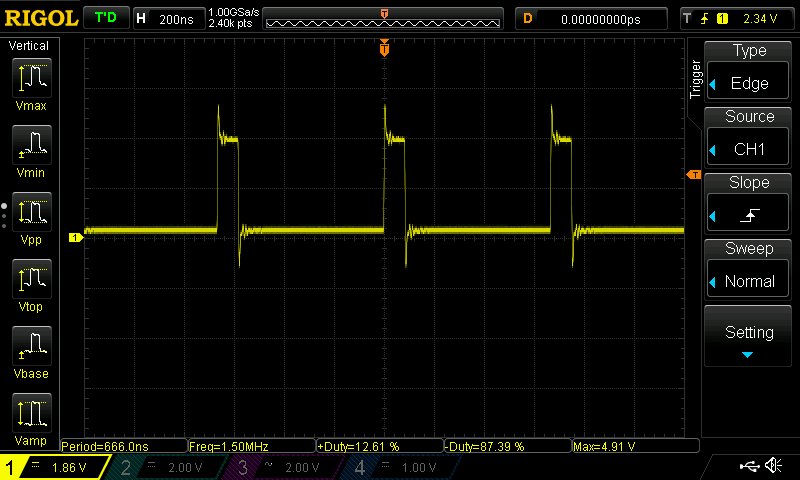
PWM creates a rectangular waveform that alternates between high and low states. The key measurement is the duty cycle, which tells you what percentage of one period the signal remains high. A 10 percent duty cycle means the signal is on briefly and off most of the time. A 50 percent duty cycle means it is on and off equally. A 90 percent duty cycle means it is mostly on, taking only tiny naps between pulses.
For an LED, PWM works because human vision averages fast changes. If the LED switches faster than your eye can comfortably track, you do not see individual flashes. You see brightness. The LED at 25 percent duty cycle looks dimmer than the same LED at 75 percent duty cycle, even though the LED is still only ever fully on or fully off. PWM is not analog output in the strict sense. It is digital output with excellent acting skills.
Why Use an FPGA Instead of a Microcontroller?
A microcontroller can generate PWM easily. Many chips include dedicated PWM peripherals, and even when they do not, timers can often do the job. So why use an FPGA like the Lattice iCEstick? Because an FPGA lets you build hardware that runs in parallel. One PWM channel is simple. Eight PWM channels are still simple. Add a UART interface, multiple registers, a brightness ramp, phase offsets, or a custom control protocol, and the FPGA keeps doing everything at the same time.
That parallelism is the main mental shift. In microcontroller code, you usually think in sequence: do this, then do that, then loop forever and hope interrupts behave. In Verilog, you describe logic that exists all at once. A counter counts. A comparator compares. An output toggles. Nothing has to stand in line behind a slow function call. There is no tiny digital waiting room.
Meet the Lattice iCEstick
The iCEstick Evaluation Kit is a small FPGA board from Lattice Semiconductor designed for quick prototyping with the iCE40 FPGA family. Its centerpiece is the iCE40HX1K, a low-power FPGA with enough logic resources for educational projects, small digital controllers, communication experiments, LED drivers, simple processors, and, of course, PWM generators.
The board’s USB-thumb-drive form factor is part of its charm. Plug it into a computer, build a bitstream, program the flash, and your Verilog design becomes real hardware. The five onboard LEDs are especially helpful for PWM experiments because they give immediate visual feedback. You can make one LED breathe, fade, blink, pulse, or communicate its emotional state like a very tiny robot having a dramatic moment.
The 12 MHz onboard oscillator is another important feature. PWM requires a clock, and the iCEstick gives you one without needing external components. With that clock, a Verilog counter can divide time into small slices. The more bits in the counter, the more duty-cycle resolution you can achieve, but the lower the PWM frequency becomes. This is the classic engineering trade-off: more smoothness versus faster repetition. Electronics loves trade-offs the way cats love cardboard boxes.
The Basic PWM Design
A simple FPGA PWM module usually has three ingredients: a clocked counter, a duty-cycle value, and a comparator. On every rising edge of the clock, the counter increments. The output stays high while the counter value is less than the duty-cycle value, then goes low for the rest of the cycle. When the counter rolls over, the pattern repeats.
Example Verilog Concept
This little design creates 8-bit PWM, meaning it supports 256 duty-cycle steps. If the duty value is 0, the LED is off. If the duty value is 128, the output is high about half the time. If the duty value is 255, the LED is nearly always on. The FPGA does this continuously in hardware, with no software loop checking brightness like an anxious stage manager.
PWM Frequency on a 12 MHz Clock
Frequency matters. If PWM is too slow, an LED visibly flickers. If it is fast enough, brightness appears steady. On the iCEstick’s 12 MHz clock, an 8-bit PWM counter rolls over every 256 clock cycles. That gives a PWM frequency of roughly 46.875 kHz. For LED dimming, that is comfortably above visible flicker for most use cases.
If you use a 16-bit counter, the frequency drops to about 183 Hz, which may still work for some LED effects but can become more noticeable depending on the LED, viewer, movement, and environment. A 10-bit counter gives 1,024 levels and a frequency around 11.7 kHz. That is a strong practical compromise for smooth LED dimming. In other words, 8 to 10 bits is often the “sweet spot” before you start polishing a doorknob nobody is looking at.
Using the iCEstick LEDs
The onboard LEDs make the iCEstick a friendly PWM laboratory. A beginner can start by controlling one LED with a fixed duty cycle. Next, the duty cycle can be changed slowly over time to create a breathing effect. Then multiple LEDs can be assigned different duty-cycle values, producing gradients, chasers, status indicators, or the classic “I have discovered blinking lights and now I am unstoppable” demo.
A breathing LED usually requires a slower counter or accumulator that changes the duty value over time. The PWM itself may run at tens of kilohertz, while the brightness ramp updates perhaps dozens of times per second. That layered timing is important. One clock domain can generate the PWM carrier, while another derived enable pulse updates the visual animation. The FPGA handles both jobs side by side.
Turning PWM Into a Peripheral
The famous Hackaday-style approach to PWM on the iCEstick goes beyond simply dimming an LED. It connects a PWM block with a UART interface so a computer can send values to the FPGA and adjust the PWM output. That transforms the project from a blinking demo into a tiny hardware peripheral. The PC sends a command, the FPGA receives it, updates a register, and the PWM duty cycle changes.
This is a powerful learning pattern. A UART receiver teaches serial communication. A register teaches state. A PWM block teaches timing and comparison. Put them together, and you have a real digital system. It is still small, but it contains the same architectural ideas found in larger FPGA designs: input interface, control logic, registers, and output hardware.
Open-Source FPGA Toolchains
One reason the Lattice iCEstick became beloved in the maker and FPGA learning community is its compatibility with open-source tools. Project IceStorm documented the iCE40 bitstream format and provided tools for working with the device. Yosys can synthesize Verilog into a gate-level representation. nextpnr can place and route the design for supported FPGA families, including iCE40 devices. Finally, IceStorm tools can create and upload the bitstream.
A typical flow looks like this: write Verilog, write a PCF constraints file for pin assignments, synthesize with Yosys, place and route with nextpnr-ice40, pack the bitstream, and program the board. It feels strange at first, especially if you come from Arduino-style development, but the process quickly becomes satisfying. You are not compiling software. You are manufacturing a custom digital circuit from text. That sentence deserves a tiny round of applause.
Pin Constraints Matter
Verilog describes the logic, but the FPGA still needs to know which physical pins connect to LEDs, clocks, or external headers. That is the job of the constraints file. On the iCEstick, the clock input and LED pins must be mapped correctly. If the design looks right but the LED refuses to cooperate, the constraints file is one of the first places to check.
This is a common beginner trap. The PWM module can be perfect, the toolchain can produce a valid bitstream, and the FPGA can be programmed successfully, yet nothing appears to happen because the output is assigned to the wrong pin. Hardware debugging is humbling. It teaches patience, careful reading, and the spiritual discipline of not blaming the compiler within the first 30 seconds.
Common Mistakes When Building PWM on the iCEstick
Choosing the Wrong Counter Width
A very small counter gives high PWM frequency but coarse brightness steps. A very large counter gives smoother resolution but lower PWM frequency. If the LED flickers, the counter may be too wide for the clock rate. If brightness changes look chunky, the counter may be too narrow.
Forgetting Active-Low LED Behavior
Some boards wire LEDs so that driving the pin low turns the LED on. If the output appears inverted, the PWM logic may need to be flipped. This is not a cosmic betrayal; it is just board wiring being board wiring.
Updating Duty Cycle Unsafely
If duty-cycle values come from another module, such as a UART receiver, think about when and how those values update. In simple projects, this may not matter much. In cleaner designs, registers and enable signals make behavior predictable.
Expecting Analog Voltage
PWM does not automatically create a smooth analog voltage. It creates a fast digital waveform. To turn PWM into a smoother analog-like signal, you typically need filtering, such as an RC low-pass filter. For LED dimming, the eye performs the averaging. For audio or control voltages, physics demands more paperwork.
Practical Applications
PWM on the Lattice iCEstick is not limited to blinking LEDs. The same technique applies to motor speed control, servo-style timing experiments, LED matrix brightness control, RGB color mixing, simple audio tones, DAC-like filtered outputs, and hardware control peripherals. The iCEstick is not a giant FPGA board, but that limitation is useful. It encourages lean designs and clear thinking.
For example, an RGB LED controller may use three PWM channels: one for red, one for green, and one for blue. Change the duty cycle of each channel, and you mix colors. A multi-channel LED dimmer may use one shared counter and several comparators. That is efficient because the counter is reused while each output gets its own duty register. This is exactly where FPGAs shine: repeated logic, parallel outputs, and precise timing.
Why This Project Is a Great FPGA Lesson
PWM on the iCEstick is small enough to understand but rich enough to matter. It teaches counters, registers, comparators, clocks, pin constraints, synthesis, place-and-route, and real-world debugging. It also demonstrates why HDL design is different from conventional programming. You are not asking a processor to perform a task. You are designing the task as hardware.
That is why PWM is such a good first or second FPGA project. A simple LED blink proves the toolchain works. PWM proves that you can create useful timed behavior. Add UART control, and suddenly the FPGA becomes interactive. Add multiple channels, and you start thinking like a hardware designer. Add a register map, and congratulations: you are now dangerously close to building your own peripheral architecture.
Experience Notes: Working With PWM on the Lattice iCEstick
The most valuable experience with PWM on the iCEstick is learning to trust simple hardware blocks. Beginners often overcomplicate PWM because they expect the design to need a large framework. It does not. A counter and a comparator are enough. Once that truth clicks, FPGA design becomes less mysterious. Many useful circuits are just small, reliable blocks connected carefully.
One practical habit is to start with a fixed duty cycle before adding controls. Set the LED to about 25 percent brightness, program the board, and confirm that the output behaves as expected. Then test 50 percent, 75 percent, and nearly full brightness. This basic ladder test catches pin mistakes, active-low confusion, and counter-width issues before the design grows more complicated.
Another helpful habit is to separate the PWM carrier from the animation logic. Let the PWM counter run continuously at a stable rate. Then use a slower tick to change brightness. This makes a breathing LED smoother and easier to reason about. If everything is controlled by one giant block, debugging becomes a swamp. If each module has one clear responsibility, the project stays pleasant. Hardware design rewards tidy thinking.
Simulation is also worth using, even for a tiny PWM block. A waveform viewer can show the counter, duty value, and output relationship clearly. You can verify that duty 0 stays off, duty half produces a half-width pulse, and high duty values stay on for most of the period. Simulation will not catch every board-level issue, but it can confirm that the logic is sane before you start interrogating the hardware with suspicious facial expressions.
When moving to UART-controlled PWM, test the communication path separately. First confirm that the UART receiver can capture bytes. Then connect those bytes to a duty register. Finally connect the duty register to the PWM comparator. This staged approach prevents the classic problem where three things are broken and each one is politely blaming the other two.
It is also smart to document the pin mapping directly in the project folder. Keep the Verilog files, PCF constraints, build commands, and notes together. FPGA projects can become confusing when a design depends on a board-specific pin file that lives in a forgotten directory with a name like “final_final_really_final.” Future you deserves better.
The iCEstick teaches a particularly satisfying lesson: small hardware can feel big when the design is clean. A PWM demo may look like a fading LED, but underneath it is a complete timing system. You are dividing a clock, creating a waveform, mapping logic to real pins, and programming nonvolatile configuration memory. That is a lot of engineering hiding inside one little glow.
Perhaps the best part is how quickly PWM invites experimentation. Try changing the resolution. Try changing the frequency. Try driving multiple LEDs with different phase offsets. Try using a lookup table for gamma correction so brightness appears more natural to the human eye. Try building a command interface so a PC can update values live. Each experiment adds one concept without requiring a completely new board or toolchain.
In the end, PWM on the Lattice iCEstick is more than a beginner exercise. It is a compact introduction to digital design discipline. It teaches that clocks matter, constraints matter, small modules matter, and hardware does exactly what you described, not what you meant while drinking coffee at midnight. That lesson is occasionally painful, but always useful.
Conclusion
PWM on the Lattice iCEstick is one of the best ways to learn practical FPGA development. It begins with a simple ideaswitch a signal on and off quicklyand grows into a complete hardware design lesson involving Verilog, counters, comparators, duty cycles, clock timing, pin constraints, and open-source FPGA tools. The iCEstick’s compact size, onboard LEDs, 12 MHz oscillator, and iCE40HX1K FPGA make it a friendly platform for experimenting without feeling buried under unnecessary complexity.
Whether you are dimming an LED, building a breathing light effect, experimenting with UART-controlled duty cycles, or preparing for more advanced FPGA projects, PWM gives you a clear and rewarding path. It is visual, measurable, expandable, and just complicated enough to teach real engineering judgment. Best of all, when the LED finally fades smoothly for the first time, it feels like the board is nodding politely and saying, “Yes, you are starting to understand hardware.”