
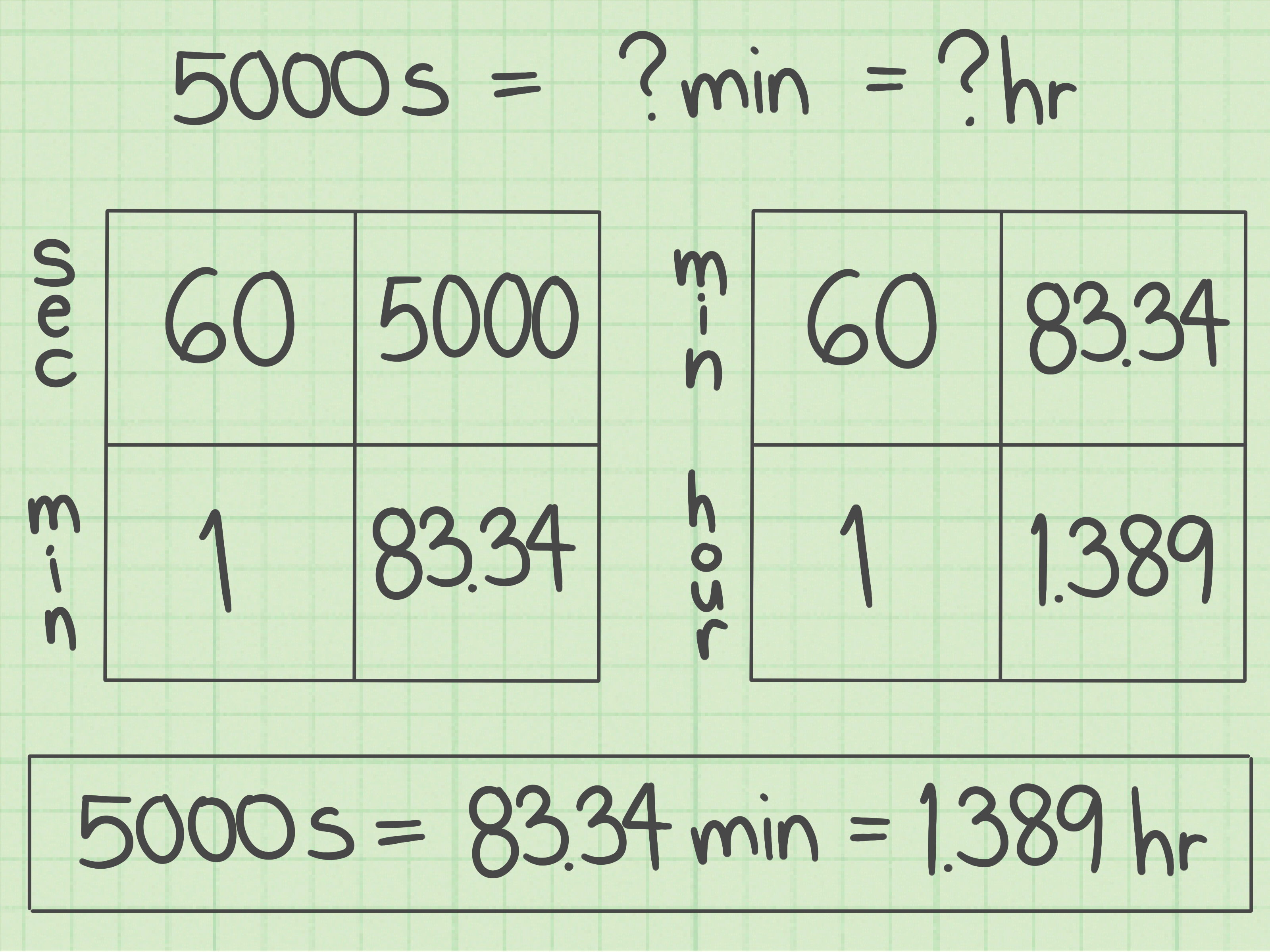
Converting seconds into hours sounds like the kind of math problem that waits patiently in a textbook until you are least emotionally prepared for it. Then it appears in real life: a video duration, a work log, a fitness tracker, a science assignment, a payroll sheet, a coding project, or a customer support report that proudly says something like “Total handling time: 18,450 seconds.” Wonderful. Very human-friendly.
The good news is that converting seconds to hours is much easier than it looks. Once you remember one key fact, the rest falls into place: 1 hour equals 3,600 seconds. That number comes from 60 minutes in an hour multiplied by 60 seconds in a minute. In other words, 60 × 60 = 3,600. No wizard robe required.
In this guide, you will learn 4 ways to convert seconds into hours, including the simple division method, the two-step minutes method, the unit-canceling method, and the hours-minutes-seconds breakdown. Each method has its own use case, so you can choose the one that fits your task, whether you are solving homework, building a spreadsheet, checking time data, or trying to understand why your “quick” meeting lasted 5,400 seconds.
Why Converting Seconds Into Hours Matters
Seconds are precise. Hours are easier to understand. That is why both units are useful. A stopwatch may record time in seconds because it needs accuracy, but most people prefer schedules, work shifts, project timelines, and travel estimates in hours. Saying “7,200 seconds” is technically correct. Saying “2 hours” keeps everyone from staring at the ceiling while doing mental math.
Seconds-to-hours conversion appears in many everyday and professional situations. Software teams convert runtime logs into readable time reports. Teachers use time conversion to help students understand measurement. Athletes compare workout intervals. Employers calculate billable hours. Video editors estimate total footage length. Customer service teams review call duration. Even home cooks may convert cooking or resting times when scaling recipes, although anyone who has waited for dough to rise knows time moves differently near fresh bread.
The core idea is always the same: you are converting a smaller unit of time into a larger unit of time. Since hours are larger than seconds, you divide instead of multiply.
The Basic Rule: Seconds to Hours Formula
The standard formula is simple:
That is the foundation of nearly every seconds-to-hours calculator, conversion table, and math lesson. If you know the total number of seconds, divide by 3,600 to get the number of hours.
Example: Convert 10,800 Seconds Into Hours
So, 10,800 seconds equals 3 hours.
Easy enough, right? That is the “plain toast” version of the conversion. Reliable, quick, and unlikely to cause drama. But depending on how you want the answer displayed, you may need a slightly different approach. Let’s look at four practical methods.
Method 1: Divide Seconds by 3,600
The fastest way to convert seconds into hours is to divide the number of seconds by 3,600. This method gives you the answer in decimal hours. Decimal hours are useful when you need a clean number for spreadsheets, payroll calculations, time tracking apps, scientific data, or programming.
Formula
Example 1: Convert 3,600 Seconds Into Hours
Answer: 3,600 seconds equals 1 hour.
Example 2: Convert 5,400 Seconds Into Hours
Answer: 5,400 seconds equals 1.5 hours.
This means 5,400 seconds is one and a half hours, or 1 hour and 30 minutes. Decimal hours are compact, but they can be a little sneaky. For example, 1.25 hours does not mean 1 hour and 25 minutes. It means 1 hour plus 0.25 of an hour. Since 0.25 × 60 = 15, 1.25 hours equals 1 hour and 15 minutes.
When to Use This Method
Use the divide-by-3,600 method when you want a fast answer in decimal form. It is especially helpful for calculators, spreadsheets, time billing, data analysis, and any task where a decimal value is easier to process than separate hours and minutes.
For example, if a freelancer tracks 12,600 seconds of work, the conversion looks like this:
That means the freelancer worked 3.5 hours, or 3 hours and 30 minutes. If the hourly rate is $40, the payment calculation is simple:
So the total bill is $140. Suddenly, unit conversion is not just math. It is money math, which tends to get everyone’s attention.
Method 2: Convert Seconds to Minutes, Then Minutes to Hours
If dividing by 3,600 feels too abrupt, you can convert seconds into hours in two smaller steps. First, convert seconds to minutes by dividing by 60. Then convert minutes to hours by dividing by 60 again.
Formula
This method works because there are 60 seconds in a minute and 60 minutes in an hour. You are simply walking up the time-unit ladder one rung at a time.
Example: Convert 9,000 Seconds Into Hours
Step 1: Convert seconds to minutes.
Step 2: Convert minutes to hours.
Answer: 9,000 seconds equals 2.5 hours.
This method is useful for students because it shows exactly how seconds, minutes, and hours connect. It is also helpful when the number of seconds converts neatly into minutes, making the work easier to follow.
Why This Method Helps You Avoid Mistakes
The two-step method is slower than dividing by 3,600, but it can be clearer. Many mistakes happen when people memorize a formula without understanding it. If you forget whether to multiply or divide, think about the size of the units. Seconds are smaller than hours, so it takes many seconds to make one hour. When moving from a smaller unit to a larger unit, divide.
Here is a quick mental check: if your answer gets bigger when converting seconds to hours, something has gone off the rails. For example, 7,200 seconds should not become 25,920,000 hours unless your calculator has joined a science-fiction franchise. Since hours are larger units, the number should get smaller.
Method 3: Use Dimensional Analysis
Dimensional analysis is a fancy name for a very practical idea: use conversion factors so the unwanted units cancel out. It is popular in math, physics, chemistry, engineering, and other fields where units matter. And units do matter. Ignore them, and suddenly your recipe, lab report, or spacecraft navigation gets very exciting for all the wrong reasons.
Formula
The seconds cancel with seconds. The minutes cancel with minutes. The only unit left is hours.
Example: Convert 14,400 Seconds Into Hours
Now multiply the denominators:
So the expression becomes:
Answer: 14,400 seconds equals 4 hours.
Why Dimensional Analysis Is Powerful
Dimensional analysis helps you see the logic behind the conversion. Instead of blindly plugging numbers into a formula, you track the units from start to finish. This is especially useful when working with rates, such as miles per hour, meters per second, calls per hour, or dollars per minute.
For example, suppose a machine processes one item every 45 seconds. How many items can it process in an hour? Since one hour has 3,600 seconds, you can calculate:
The machine can process 80 items per hour. This is not just converting seconds into hours; it is using time conversion to understand productivity.
Dimensional analysis is also a great way to catch errors. If your units do not cancel correctly, your setup probably needs adjustment. Think of units as tiny math detectives. They do not wear hats, but they do expose suspicious calculations.
Method 4: Convert Seconds Into Hours, Minutes, and Seconds
Sometimes decimal hours are not the most readable answer. If someone asks how long a movie, workout, meeting, or download took, they probably prefer a format like 2 hours, 15 minutes, and 20 seconds instead of 2.2556 hours. Both can be correct, but one is friendlier to actual humans.
This method breaks total seconds into whole hours, leftover minutes, and leftover seconds.
Step-by-Step Formula
The percent sign here means “remainder” in many programming and spreadsheet contexts. If you are doing this by hand, it simply means you keep what is left after removing the whole hours.
Example: Convert 8,245 Seconds Into Hours, Minutes, and Seconds
Step 1: Find the whole hours.
Step 2: Find the remaining seconds.
Step 3: Convert the remaining seconds into minutes.
Step 4: Find the seconds left.
Answer: 8,245 seconds equals 2 hours, 17 minutes, and 25 seconds.
When to Use This Method
Use this method when readability matters. It is ideal for video timestamps, race results, cooking timers, study sessions, meeting lengths, podcast episodes, and app dashboards. The hours-minutes-seconds format is also easier to compare in daily life. Most people instantly understand “1 hour, 20 minutes,” while “1.333 hours” may cause unnecessary blinking.
Quick Conversion Table: Seconds to Hours
| Seconds | Decimal Hours | Readable Time |
|---|---|---|
| 60 seconds | 0.0167 hours | 1 minute |
| 300 seconds | 0.0833 hours | 5 minutes |
| 900 seconds | 0.25 hours | 15 minutes |
| 1,800 seconds | 0.5 hours | 30 minutes |
| 3,600 seconds | 1 hour | 1 hour |
| 7,200 seconds | 2 hours | 2 hours |
| 10,800 seconds | 3 hours | 3 hours |
| 86,400 seconds | 24 hours | 1 day |
How to Convert Seconds Into Hours in a Spreadsheet
Spreadsheets are one of the most common places where seconds-to-hours conversion appears. If cell A1 contains the number of seconds, you can use this formula:
If A1 contains 18,000 seconds, the result is:
So the answer is 5 hours.
For time tracking, payroll, or reporting, decimal hours are often preferred because they are easy to multiply by rates. However, if you want the result displayed as clock-style time, spreadsheet formatting may be needed. The important thing is to know whether your output should be a number of hours or a time duration format.
Common Mistakes When Converting Seconds to Hours
Mistake 1: Dividing by 60 Only Once
Dividing seconds by 60 gives you minutes, not hours. For example:
That is correct, but it is not the final answer in hours. You still need to divide by 60 again:
Mistake 2: Confusing Decimal Hours With Minutes
Decimal hours are based on fractions of 60 minutes. For example, 2.75 hours means 2 hours plus 0.75 of an hour. Since 0.75 × 60 = 45, the readable time is 2 hours and 45 minutes, not 2 hours and 75 minutes.
Mistake 3: Rounding Too Early
Rounding can be helpful, but rounding too soon can make your final answer less accurate. For schoolwork, business reports, or technical calculations, keep extra decimal places until the end. Then round based on the level of precision needed.
Mistake 4: Forgetting the Context
If you are converting seconds for a casual explanation, “about 2.3 hours” may be fine. If you are calculating payroll, lab results, sports timing, or software performance, you may need a more exact answer. Math is polite like that: it wants to know the occasion before deciding what to wear.
Real-Life Examples of Seconds-to-Hours Conversion
Example 1: Video Length
A training video is 6,750 seconds long. To convert it to hours:
As a readable duration, that is 1 hour, 52 minutes, and 30 seconds.
Example 2: Work Time
An employee logs 28,800 seconds on a task.
That is a full 8-hour workday. Coffee not included, but strongly implied.
Example 3: Running Time
A runner finishes a long training session in 5,130 seconds.
In hours, minutes, and seconds, that equals 1 hour, 25 minutes, and 30 seconds.
Example 4: Website Uptime
A server monitoring report shows downtime of 12,960 seconds.
That equals 3 hours and 36 minutes of downtime. For a website owner, that number is not just math. It is a tiny thundercloud wearing a spreadsheet costume.
Which Method Should You Choose?
Choose the method based on the answer you need. If you need speed, divide by 3,600. If you are learning the concept, convert seconds to minutes and then minutes to hours. If you are working in science, engineering, or math class, dimensional analysis gives you a clean setup with units. If you need a reader-friendly duration, break the number into hours, minutes, and seconds.
Here is the simplest way to decide:
- For decimal hours: divide seconds by 3,600.
- For learning: divide by 60, then divide by 60 again.
- For unit accuracy: use dimensional analysis.
- For readable time: convert into hours, minutes, and seconds.
Experience-Based Tips for Converting Seconds Into Hours
After working with time conversions in writing, spreadsheets, math explanations, and everyday planning, one thing becomes clear: the calculation is simple, but the presentation matters. The same number of seconds can be perfectly accurate in several formats, yet each format feels different to the reader. A project manager may prefer 4.25 hours because it fits neatly into a report. A student may understand 4 hours and 15 minutes faster. A programmer may need total seconds because software logs often store time that way. Good conversion is not only about getting the right answer; it is about giving the right answer in the right shape.
One useful habit is to pause before converting and ask, “Who needs this number?” If the answer is a calculator, spreadsheet, or payroll system, decimal hours are usually best. If the answer is a person reading instructions, a schedule, or a summary, hours and minutes are often clearer. For example, saying a lesson takes 0.75 hours is accurate, but saying it takes 45 minutes feels more natural. Unless your audience is made entirely of calculators, readability matters.
Another practical lesson is to watch decimal hours carefully. Many people see 1.5 hours and understand it as 1 hour and 50 minutes because the decimal looks like a clock value. That is a common mistake. Decimal time is not clock time. In decimal hours, the digits after the decimal represent a fraction of an hour, not minutes. So 1.5 hours means 1 hour and 30 minutes. Likewise, 2.25 hours means 2 hours and 15 minutes. This is the kind of tiny detail that can quietly cause big confusion in invoices, schedules, and reports.
For spreadsheets, the best experience-based tip is to label your columns clearly. A column named “Time” can become confusing fast. Use labels such as “Total Seconds,” “Decimal Hours,” or “Readable Duration.” Clear labels prevent mistakes later, especially when someone else opens the file and tries to understand your work without sending you a message that begins, “Sorry, quick question…” which is rarely quick.
When doing conversions by hand, estimation is your friend. Since 3,600 seconds equals 1 hour, 7,200 seconds equals 2 hours, and 1,800 seconds equals half an hour, you can often check whether your answer makes sense. If 18,000 seconds converts to 50 hours, you know something went wrong because 18,000 is only five groups of 3,600. Estimation is like a seatbelt for math: it does not drive the car, but it can save you from a crash.
Finally, choose consistency. In one article, report, dashboard, or worksheet, avoid switching randomly between decimal hours and hours-minutes-seconds unless there is a reason. Consistent formatting helps readers compare values quickly. If you use decimal hours, round consistently. If you use readable time, keep the same style throughout. Time conversion may be basic math, but clean presentation makes it look professional.
Conclusion
Learning how to convert seconds into hours is a small skill with surprisingly wide use. The main rule is easy: divide seconds by 3,600. From there, you can adapt the answer based on what you need. Decimal hours work well for calculations. The two-step method helps with learning. Dimensional analysis keeps units organized. The hours-minutes-seconds method makes time easier to read.
Whether you are reviewing work logs, solving homework, building a spreadsheet, checking a video duration, or decoding a time report that seems written for robots, seconds-to-hours conversion gives you a practical way to turn raw time into useful information. And once you know that 3,600 seconds equals 1 hour, the whole process becomes much less mysterious. Still math, yesbut friendly math. The kind that brings snacks.
Note: This article is based on standard time-conversion principles used in educational math resources, measurement references, and online conversion tools. For payroll, legal, laboratory, or technical reporting, always follow the required rounding and formatting rules for your specific organization or project.











