
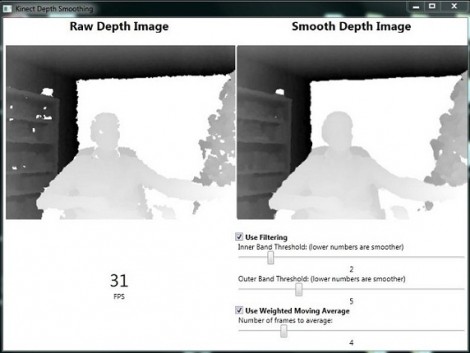
Note: This article is written for web publication and explains Kinect depth smoothing from a practical, implementation-focused perspective, using established depth-camera concepts, RGB-D processing techniques, and real-world development experience.
Real-time depth smoothing for the Kinect sounds like something only a robotics lab with a suspicious number of cables would care about. In reality, it matters anywhere Kinect depth data is used: gesture control, 3D scanning, motion capture, augmented reality, robotics, physical therapy apps, interactive installations, and even those delightfully chaotic weekend projects where someone tries to control a game with their elbows.
The Kinect depth camera does something magical-looking: it turns a scene into a depth map, where each pixel stores distance from the sensor. Instead of seeing “red shirt” or “wooden table,” the depth stream sees “this point is about 1.2 meters away, that point is 2.4 meters away, and that shiny coffee mug is apparently a portal to another dimension.” That last part is why smoothing is needed.
Raw depth data is useful, but it is rarely perfect. Depth maps can contain jitter, holes, edge noise, flying pixels, flicker, shadows, and unstable readings on reflective, transparent, dark, thin, or distant surfaces. A good real-time depth smoothing system reduces noise while preserving the shape of the real world. The goal is not to make the image “pretty.” The goal is to make depth data stable enough for tracking, scanning, recognition, and interaction without turning a human hand into a melted marshmallow.
What Is Depth Smoothing?
Depth smoothing is the process of cleaning a depth frame so nearby distance values become more consistent over space and time. In simple terms, it helps the Kinect stop panicking when a pixel changes from 1,134 mm to 1,151 mm to 1,120 mm while the object has barely moved.
Unlike ordinary photo smoothing, depth smoothing must be careful with edges. In a color photo, blurring a background edge may only look slightly soft. In a depth map, blurring an edge can invent false geometry. A wall and a person standing in front of it may get blended into a slanted ghost surface if the filter is too aggressive. That is not smoothing; that is digital soup.
The Main Goals of Real-time Kinect Depth Smoothing
A strong Kinect depth smoothing pipeline usually tries to achieve four things. First, it reduces random depth jitter. Second, it fills small missing regions when doing so is safe. Third, it preserves object boundaries so hands, faces, furniture, and props keep their actual shape. Fourth, it runs fast enough to keep up with the Kinect depth stream, typically around interactive frame rates.
That last requirement is the reason this topic is interesting. Offline smoothing is easy compared with real-time smoothing. If you can process one frame for ten seconds, you can use expensive algorithms and enjoy a nice cup of coffee. Real-time Kinect applications do not have that luxury. A gesture-controlled display, robot navigation system, or live 3D scanner needs clean data now, not after the user has gone home.
Why Kinect Depth Data Gets Noisy
The Kinect family includes different depth-sensing technologies. The original Kinect used structured light, projecting an infrared pattern into the scene and estimating depth from how that pattern deforms. Kinect v2 and later Azure Kinect-style devices use time-of-flight principles, measuring how long light takes to travel to surfaces and back. Both approaches are clever. Both also have quirks.
Depth errors can happen for several reasons. Surfaces may reflect infrared light poorly. A glossy object can bounce light in strange directions. Thin objects may occupy only part of a pixel. Edges can create mixed measurements because one pixel may receive information from foreground and background surfaces. Bright sunlight or infrared interference can also cause trouble. Add sensor quantization, motion, distance-related uncertainty, and multi-path reflections, and the depth map begins to look like it had too much caffeine.
Noise is especially noticeable on flat surfaces. A wall should ideally appear as a smooth plane, but raw depth values often sparkle slightly from frame to frame. For a person-tracking app, this may not matter much. For 3D reconstruction, robotics, or measurement, that sparkle becomes a problem. Smoothing turns the raw stream into something more reliable.
The Basic Real-time Smoothing Pipeline
A practical real-time depth smoothing system is usually built as a pipeline rather than a single filter. Each stage solves a different problem. Trying to fix everything with one giant blur is tempting, but it usually creates more problems than it solves.
1. Read the Raw Depth Frame
The first step is receiving the depth frame from the Kinect sensor. A depth frame is commonly represented as a two-dimensional array of distance values, often in millimeters. Invalid pixels may be stored as zero or another special value, depending on the SDK and processing environment.
At this stage, the system should avoid guessing too much. The raw frame is valuable because it contains the original sensor measurement. Before filtering, mark invalid pixels, outliers, and suspicious values. A simple validity mask can save the rest of the pipeline from treating “missing depth” as “an object sitting at zero millimeters,” which would be a very bold interpretation of reality.
2. Apply a Small Median Filter
A median filter is often used as an early cleanup step. It looks at a small neighborhood around each pixel and replaces the center value with the median value. This is helpful for removing isolated spikes, also known as salt-and-pepper noise.
For Kinect depth smoothing, a small kernel such as 3×3 is usually safer than a large one. Large median filters can damage edges and erase small details like fingers, chair legs, or cable-like objects. The median filter should be treated like a broom, not a bulldozer.
3. Fill Small Holes Carefully
Depth holes are missing regions where the Kinect cannot confidently measure distance. Some holes are tiny and can be repaired using neighboring valid depth values. Other holes are large or caused by reflective, transparent, or occluded surfaces. Those should not be filled blindly.
A common approach is to fill only small holes when nearby pixels strongly agree. For example, if a missing pixel is surrounded by valid pixels at similar depths, it is probably safe to estimate the missing value. If one side of the hole belongs to a person and the other side belongs to the wall behind them, filling the gap by averaging both sides will create a fake ramp. That fake ramp may confuse body tracking, collision detection, or point cloud reconstruction.
4. Use Edge-preserving Spatial Smoothing
Spatial smoothing reduces noise within a single frame. The key is preserving depth discontinuities. This is where bilateral filtering and joint bilateral filtering become useful.
A basic blur averages nearby pixels without asking whether they belong to the same surface. A bilateral filter is smarter. It considers both spatial closeness and depth similarity. Nearby pixels influence each other more when their depth values are similar. Pixels across a sharp depth edge influence each other less. The result is smoother surfaces with cleaner boundaries.
Joint bilateral filtering can use another guide image, often the color or infrared image, to help preserve edges. This can improve results when color boundaries align with depth boundaries. However, it must be used with care. A shirt pattern should not create fake depth edges, and a plain white object should not lose its real geometric boundary just because the color image is boring.
5. Add Temporal Filtering
Temporal smoothing uses previous frames to stabilize the current frame. This is essential for real-time Kinect applications because many depth problems appear as flicker rather than constant noise.
A simple temporal filter may blend the current depth value with the previous smoothed value. If the new measurement is close to the old one, the filter smooths the change. If the new measurement is very different, the filter allows faster movement so the output does not lag behind reality.
This adaptive behavior is important. Too much temporal smoothing creates latency. A user waves a hand, but the virtual hand follows like it just woke up from a nap. Too little temporal smoothing leaves visible jitter. The best solution depends on the application. Gesture interfaces can tolerate light smoothing. 3D scanning may use heavier smoothing. Robotics often needs conservative filtering because wrong geometry can lead to wrong navigation decisions.
Common Algorithms Used for Kinect Depth Smoothing
Median Filtering
Median filtering is simple, fast, and useful for isolated noisy pixels. It is not enough on its own for high-quality smoothing, but it works well as a first pass. Developers often use it to remove tiny outliers before applying more advanced filters.
Bilateral Filtering
Bilateral filtering is one of the most important techniques for depth images because it smooths while respecting edges. It is especially useful for Kinect depth maps where surfaces should become cleaner but object boundaries must remain sharp.
Joint Bilateral Filtering
Joint bilateral filtering uses a guidance image, such as an RGB or infrared frame, to improve depth filtering. It can help align depth edges with visible object boundaries, but it may fail when color and geometry do not match. A striped shirt is colorful, but it is not a staircase.
Temporal Exponential Smoothing
Temporal exponential smoothing blends current and past values using a weighting factor. A higher weight on the past gives more stability but more lag. A higher weight on the current frame gives quicker response but less smoothness. Many real-time systems make this factor adaptive, changing it based on motion or confidence.
Confidence-based Filtering
Confidence-based filtering gives less influence to questionable pixels. If the sensor or algorithm can estimate confidence, low-confidence depth values can be ignored, replaced, or blended more cautiously. Even without a formal confidence map, developers can create practical confidence rules using validity, neighbor agreement, distance range, and sudden frame-to-frame jumps.
Real-time Performance: Speed Matters
Real-time depth smoothing must balance quality and speed. A filter that produces beautiful results but cuts the frame rate in half may ruin the user experience. Kinect applications are often interactive, so latency is just as important as visual quality.
Performance can be improved by using small kernels, separating filters into horizontal and vertical passes when possible, avoiding repeated memory allocation, processing only valid regions, and using GPU acceleration for larger workloads. For many projects, a CPU implementation is enough if the filter is modest. For dense 3D reconstruction or high-resolution depth processing, the GPU becomes very attractive.
Developers should benchmark the entire pipeline, not just the smoothing function. Reading frames, transforming depth to color space, generating point clouds, rendering, tracking bodies, and sending data to another system all take time. The smoothing stage may look fast in isolation but become expensive when combined with everything else.
Practical Example: Smoothing for Gesture Tracking
Imagine building a Kinect app that lets users swipe through a museum exhibit without touching a screen. The raw hand position jitters slightly, especially when the hand is far from the sensor or near the body. If the app reacts to raw depth data, the cursor may shake. Visitors will blame the installation, the museum, the weather, and possibly modern technology as a whole.
A practical solution is to smooth depth around the tracked hand region, apply temporal smoothing to the hand position, and reject sudden impossible jumps. The system should still respond quickly to intentional swipes, so the temporal filter must relax when motion is strong. This kind of adaptive smoothing can make the interface feel stable without making it feel sluggish.
Practical Example: Smoothing for 3D Scanning
For 3D scanning, the challenge is different. The goal is to create a clean surface from many depth frames. If each frame contains noise, the final model may look rough. Spatial smoothing helps reduce surface noise, while temporal fusion across multiple views can improve geometry. However, over-smoothing can erase fine details, such as facial features, carved edges, or fabric folds.
A good 3D scanning pipeline often combines depth filtering with pose tracking and surface fusion. The depth map is cleaned, transformed into a point cloud, aligned with previous frames, and integrated into a larger model. Each step benefits from cleaner depth data, but each step also punishes bad smoothing. If a filter changes edges too much, alignment can drift and the reconstructed model may become bloated or soft.
Best Practices for Kinect Depth Smoothing
Preserve Edges First
Depth edges define object shape. A filter that destroys edges may look smooth, but it damages the geometry. Edge-preserving methods should be preferred over ordinary blur for most Kinect applications.
Do Not Fill Every Hole
Some missing pixels are better left missing. Filling a small hole on a flat wall is reasonable. Filling a large unknown area behind a chair is guesswork wearing a lab coat.
Tune by Application
There is no universal smoothing setting. A dance game, a robot, a medical motion-analysis tool, and a 3D scanner all care about different trade-offs. Tune smoothing strength, temporal response, and hole filling according to the final use case.
Measure Latency
A stable signal is not useful if it arrives too late. Test smoothing with real motion, not just static scenes. Ask whether the output feels responsive. A technically clean depth map can still make an interaction feel sticky.
Keep the Raw Data Available
Always keep access to the original depth frame. Debugging is much easier when you can compare raw depth, filtered depth, validity masks, and final output. Without that comparison, you may spend hours blaming the Kinect when the real villain is a filter parameter named something innocent like “smoothFactor.”
Common Mistakes to Avoid
The first mistake is using a regular Gaussian blur across the entire depth image. It may reduce noise, but it also blends foreground and background surfaces. The second mistake is applying heavy temporal smoothing to fast-moving objects. This makes motion trail behind the user. The third mistake is filling holes without checking whether neighboring pixels belong to the same surface. The fourth mistake is tuning filters only on one scene. A filter that works beautifully on a flat wall may fail on hair, glass, furniture, hands, or shiny objects.
Another common problem is assuming that smoother always means better. In depth processing, “too smooth” can be just as bad as “too noisy.” Good smoothing preserves useful geometry while removing unreliable variation. Think of it as editing a sentence: you want to remove typos, not delete half the paragraph because it looked untidy.
Where Kinect Depth Smoothing Still Matters
Although Kinect is no longer the hottest gadget on every store shelf, its ideas remain important. Depth cameras are still used in robotics, volumetric capture, accessibility interfaces, industrial inspection, research, education, and interactive media. The same smoothing principles apply to many RGB-D sensors beyond Kinect.
Modern systems may use neural networks, sensor fusion, or advanced reconstruction pipelines, but they still face the same basic challenge: real-world depth data is messy. Whether the sensor is a Kinect, Azure Kinect, Intel RealSense-style device, stereo camera, or another RGB-D camera, the pipeline must decide which measurements to trust, which to smooth, and which to ignore.
Conclusion
Real-time depth smoothing for the Kinect is not just a cosmetic upgrade. It is the difference between jittery measurements and usable spatial understanding. A strong smoothing pipeline cleans noise, stabilizes frames, fills only safe holes, preserves edges, and stays fast enough for interactive applications.
The best results usually come from combining techniques: a small median filter for isolated noise, edge-preserving spatial smoothing for surfaces, careful hole filling for small gaps, and adaptive temporal filtering for frame-to-frame stability. The magic is not in one algorithm. The magic is in balancing accuracy, speed, and responsiveness so the Kinect can understand the room without hallucinating furniture.
For developers, the practical advice is simple: protect edges, respect invalid pixels, tune for the application, and test with real motion. A clean depth map should help the final experience feel natural. If users stop noticing the sensor and simply interact with the system, the smoothing is doing its job.
Experience Notes: What Real Projects Teach About Kinect Depth Smoothing
After working with Kinect-style depth data, one lesson becomes obvious very quickly: the sensor is honest, but not always calm. In a quiet scene, the depth map may look stable enough. Then someone steps into the frame wearing dark clothing, waves a hand near a shiny table, and suddenly the data starts behaving like it heard thunder. This is where real-time depth smoothing becomes less of an academic topic and more of a survival skill.
One practical experience is that the best filter settings rarely come from the first test scene. A developer might tune smoothing on a person standing in the center of a room and get beautiful results. Then the same app is tested in a classroom, gallery, or office with mixed lighting, reflective floors, chairs, backpacks, and moving people in the background. The filter that looked perfect now either jitters too much or smears object boundaries. Real environments are rude like that. They refuse to behave like demo videos.
Another lesson is that user experience matters more than numerical smoothness. In one gesture-control scenario, heavy temporal smoothing made the hand cursor look stable when the user stood still. Unfortunately, when the user moved quickly, the cursor lagged behind. The data was technically smoother, but the app felt worse. Reducing the smoothing strength and adding motion-aware adaptation produced a better result. The cursor had a little more noise, but it felt alive and responsive. That trade-off is common in Kinect development: perfect stability is not always the goal. Believable responsiveness often wins.
Depth smoothing also teaches humility around hole filling. It is tempting to repair every missing pixel because holes look ugly in a visualization. But some holes contain useful information: the sensor could not confidently measure that region. Filling all of them can create false surfaces that later stages treat as real. In 3D scanning, this can produce swollen edges or strange patches. In interaction systems, it can cause phantom obstacles. A conservative hole-filling strategy usually performs better than an enthusiastic one.
For real-time performance, small choices matter. Reusing buffers, avoiding unnecessary conversions, limiting processing to active regions, and keeping filter kernels modest can make the difference between smooth interaction and dropped frames. Developers sometimes focus only on the smoothing algorithm, but the full pipeline matters. Depth acquisition, coordinate mapping, body tracking, rendering, networking, and logging all compete for time. A filter that is fast alone may still be too expensive inside a complete application.
The most useful workflow is visual debugging. Show the raw depth frame, the invalid mask, the filtered depth frame, and the final tracked result side by side. This makes problems obvious. If an edge disappears, the spatial filter is too strong. If motion trails, temporal smoothing is too heavy. If false surfaces appear, hole filling is too aggressive. Debug views may not look glamorous, but they save hours of guessing.
In the end, successful Kinect depth smoothing feels almost invisible. Users do not praise the bilateral filter. They do not applaud the adaptive temporal threshold. They simply notice that the system works. Hands track cleanly, scans look solid, surfaces behave, and interaction feels natural. That quiet reliability is the real reward. When the depth data stops wobbling and starts supporting the experience, the Kinect becomes less like a noisy sensor and more like a practical window into 3D space.











