Note: This article is based on publicly available technical documentation, real maker-project details, Bluetooth Low Energy references, and practical electronics prototyping guidance from reputable engineering and hobbyist sources.
A Bluetooth Chip You Can Actually Touch With a Soldering Iron
Most Bluetooth chips look as if they were designed by someone who deeply dislikes human fingers. They arrive in tiny QFN or BGA packages, hide their pads underneath the body, demand controlled-impedance PCB traces, and generally behave like miniature black rectangles with trust issues. That is why the idea of a Super Simple Deadbuggable Bluetooth Chip feels so refreshing. It suggests a Bluetooth Low Energy circuit that can be built almost like old-school electronics: chip flipped upside down, legs in the air, short wires, a few passives, and just enough bravery to make the solder flow.
The star of this tiny drama is the WCH CH571K, a compact Bluetooth-capable RISC-V microcontroller from the CH57x family. The unusual appeal is not just that it supports Bluetooth Low Energy. Many chips do that. The real magic is its package: roughly a SO-10-style ESSOP10 part with ten leads and a 1.27 mm pitch. In plain American English, that means it is small but not absurdly small. You do not need a microscope, a four-layer PCB, and the emotional support of three senior RF engineers just to blink an LED over Bluetooth.
What “Deadbuggable” Actually Means
Deadbug construction is a classic prototyping method where an integrated circuit is mounted upside down, usually on copper-clad board, with its pins sticking upward like the legs of a very unlucky insect. Components are soldered directly to those pins or connected with short wires. It looks chaotic to beginners, but when done carefully, it can be electrically tidy. Short connections, close decoupling capacitors, and a solid ground reference can make a hand-built prototype surprisingly reliable.
For radio circuits, deadbugging is usually treated with caution. Bluetooth operates in the 2.4 GHz band, where wire length, grounding, antenna placement, and nearby metal objects can all affect performance. A beautiful schematic can turn into a sulky radio if the layout is sloppy. That is why a deadbuggable Bluetooth chip is interesting: it lowers the barrier for experimentation without pretending that RF physics took the afternoon off.
Why the CH571K Is Getting Attention
It Combines a RISC-V MCU and Bluetooth LE
The CH571K is not merely a radio front end. It is a microcontroller with a RISC-V core and built-in Bluetooth Low Energy support. That means it can run application code, handle GPIO, talk over UART or SPI, read analog signals through ADC features, and communicate wirelessly with phones or computers. For simple IoT projects, that combination is powerful: one chip can sense, decide, and transmit.
This is the same design philosophy that made chips such as Nordic’s nRF52 family so popular: combine the microcontroller and radio so developers do not have to stitch together a separate MCU and Bluetooth module. The CH571K pushes that idea toward extreme simplicity. Instead of a dense, many-pin package, it gives makers a tiny package that can still be approached with hand tools.
It Needs Very Few External Parts
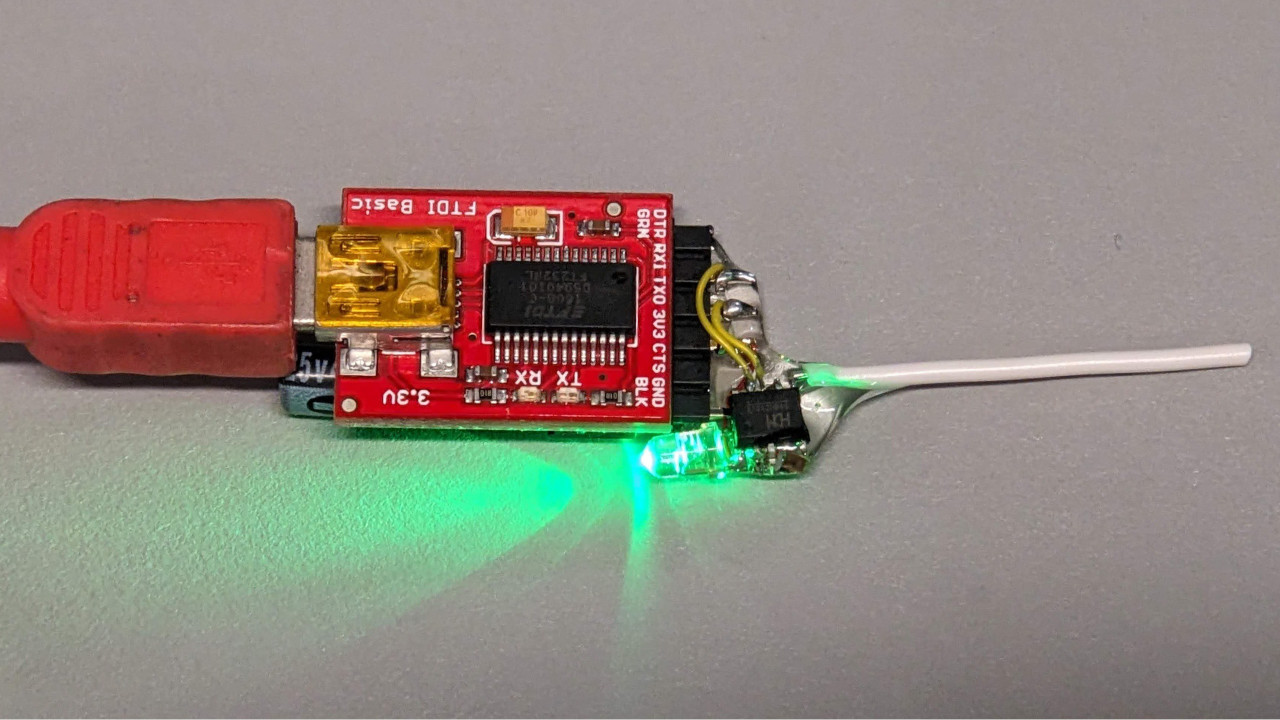
A minimal deadbug build reported by the maker community used only a CH571K, two 1 uF capacitors, a 32 MHz crystal, an LED with an embedded resistor, and a short wire antenna around 3 cm long. That is not a shopping list; that is practically a haiku. For anyone used to radio modules surrounded by matching networks, crystals, regulators, headers, and mystery components labeled “do not remove or the magic escapes,” the minimalism is delightful.
Of course, “minimal” does not mean “ideal for every product.” A professional BLE design often benefits from a carefully tuned antenna, ground plane control, matching components, test points, ESD protection, and regulatory planning. But for a bench demo, a sensor experiment, or a quick proof of concept, the CH571K’s simple support circuit is exactly the kind of thing that makes a hardware hacker grin at 1:37 a.m.
It Can Be Programmed Without Exotic Equipment
Another major reason this chip is appealing is the programming path. The CH571K can enter a bootloader and be programmed over UART. Maker examples also show Arduino IDE support through a forked CH32-style Arduino core. That matters because toolchains are often the hidden tax on inexpensive microcontrollers. A chip can cost pennies, but if programming it requires a week of broken drivers, a haunted SDK, and one forum thread from 2019 written in half-English and half-riddle, the bargain disappears.
Arduino support does not automatically make a platform perfect, but it does make it approachable. A developer can start with a simple BLE example, flash the chip, and test communication with a phone or browser-based Web Bluetooth demo. That is a much friendlier first step than opening a 600-page reference manual and whispering, “Please be kind.”
Bluetooth Low Energy: Small Data, Big Convenience
Bluetooth Low Energy, usually called BLE, was built for devices that need short-range wireless communication without draining a battery like a tiny vampire. It is commonly used in fitness trackers, smart locks, beacons, sensors, tags, medical accessories, keyboards, and IoT gadgets. Instead of maintaining a heavy continuous data stream, BLE is great at waking up, advertising, exchanging small packets, and going quiet again.
That makes the CH571K especially interesting for projects such as battery-powered temperature sensors, smart labels, presence beacons, small controllers, and phone-connected gadgets. You probably would not use this little chip to stream lossless audio to studio headphones. That would be like asking a bicycle to tow a cargo ship. But for “send a value,” “toggle a light,” “advertise an ID,” or “let a phone configure a small device,” BLE is exactly the right tool.
Deadbug Bluetooth vs. Bluetooth Modules
Bluetooth modules remain the easiest path for many builders. A certified module usually includes the RF chip, antenna, crystal, matching network, and regulatory paperwork. Companies such as Silicon Labs, Microchip, Texas Instruments, Adafruit, SparkFun, and others offer BLE boards and modules that are friendly, documented, and often supported by mobile apps or standard profiles.
So why bother with a bare chip? Because modules trade flexibility and cost for convenience. They are wonderful for fast development, but they can be physically larger and more expensive than a chip-down design. A deadbuggable Bluetooth chip sits at the opposite end of the spectrum. It says, “Here is the raw part. Build what you need.” For learning, hacking, ultra-small experiments, and cost-sensitive designs, that is exciting.
What You Can Build With a Super Simple Deadbuggable Bluetooth Chip
1. A Phone-Controlled LED or Relay
The classic first project is a Bluetooth LED blinker. It sounds humble, but it proves the whole chain: power, clock, firmware, radio, antenna, phone connection, and GPIO control. Once an LED works, replacing it with a transistor, MOSFET, optocoupler, or relay driver is a natural next step. Suddenly the tiny chip can control lamps, buzzers, model trains, or a small automation circuit.
2. A BLE Sensor Tag
Add a low-power temperature sensor, light sensor, reed switch, or accelerometer, and the CH571K can become a small BLE sensor tag. It could advertise readings periodically or wait for a phone to connect and request data. This is a natural fit for small environmental monitors, cabinet-open sensors, mailbox alerts, plant-care reminders, or “did my freezer door stay open?” projects.
3. A Wireless Debug Button
A tiny Bluetooth button can trigger events on a phone, laptop, or nearby gateway. It could act as a camera shutter, presentation remote, accessibility switch, or macro button. Because BLE is widely supported, the receiving device does not have to be exotic. Sometimes the best hardware project is just one button that saves a lot of annoying clicks.
4. A Smart Business Card
A BLE-enabled business card is delightfully unnecessary and therefore irresistible. The chip could advertise a custom name, URL hint, or small payload. Add an LED animation, touch pad, or button and it becomes a conversation starter. Is it overkill? Absolutely. Is that the point? Also absolutely.
5. A Retrofit Board for Old Electronics
Many older devices have buttons, LEDs, serial ports, or simple logic lines that can be enhanced with wireless control. A deadbuggable BLE chip can be used to prototype an add-on before committing to a PCB. Think garage gadgets, lab tools, toys, clocks, appliances, or vintage electronics that deserve a second life with a tiny modern radio riding shotgun.
The Antenna: Where the Fun Gets Real
The short wire antenna is one of the most charming parts of the CH571K deadbug build. A 3 cm wire is easy to cut, easy to solder, and easy to bend accidentally while reaching for coffee. At 2.4 GHz, antenna behavior is sensitive to length, orientation, nearby ground, hand proximity, enclosure material, and metal objects. A wire antenna can work for a demo, but range and reliability may vary.
Professional BLE designs often use PCB antennas such as inverted-F antennas, chip antennas, or tuned trace antennas. These designs usually need a defined ground plane, keep-out area, and sometimes a matching network. The deadbug version is more experimental. It is excellent for learning because you can see how moving the antenna, shortening a wire, or changing ground placement affects signal strength. It is also a gentle reminder that RF design is not dark magic; it is physics with a mischievous personality.
Power and Decoupling Matter More Than They Look
With tiny wireless chips, power stability matters. BLE radios draw bursts of current during transmit and receive events. If the supply droops or the decoupling is far away, the chip may reset, misbehave, or refuse to connect at the exact moment you are proudly showing the project to someone. This is a law of electronics: demos fail in front of witnesses.
The two 1 uF capacitors in the minimal design are not decoration. They help keep the supply stable near the chip. In a deadbug layout, place decoupling capacitors as physically close as possible to the relevant pins. Use short leads. Keep ground connections low impedance. If you are powering from a USB-to-serial adapter, remember that not all adapters provide clean 3.3 V power under dynamic load.
Software: The Hidden Half of the Hardware
The hardware may be simple, but Bluetooth projects still need software structure. A BLE device usually advertises itself, exposes services and characteristics, and responds to read, write, or notify operations. In the simplest case, a phone writes a value to a characteristic and the chip toggles a pin. In a more useful project, the chip might notify a phone whenever a sensor changes.
Web Bluetooth demos are particularly fun because they let compatible browsers communicate with BLE devices without installing a dedicated mobile app. That is a powerful development shortcut. A maker can create a small browser interface, press a button, connect to the chip, and send commands. It makes the whole experiment feel less like embedded development and more like building a tiny wireless appliance with a webpage for a remote control.
Where This Chip Fits in the BLE Landscape
The CH571K is not trying to replace every Bluetooth system-on-chip. Premium BLE SoCs from major vendors may offer newer Bluetooth versions, richer SDKs, better documentation, stronger security features, certified modules, higher performance radios, integrated USB, larger memory, or advanced development tools. Those strengths matter for commercial products.
The CH571K wins in a different category: approachable weirdness. It is cheap, compact, minimal, and hand-solderable enough to inspire experiments. It invites people to try BLE at the component level rather than treating wireless connectivity as a sealed module. That is valuable because learning accelerates when hardware stops being intimidating.
Limitations You Should Respect
A deadbuggable Bluetooth chip is exciting, but it is not a license to ignore engineering reality. First, RF layout is still important. A working bench demo does not guarantee reliable range in an enclosure or near a battery. Second, regulatory rules still apply if you turn a prototype into a sellable product. Using a bare radio chip usually creates more certification responsibility than using a pre-certified module.
Third, software support may be less polished than ecosystems from larger BLE vendors. Arduino examples are helpful, but advanced features may require reading datasheets, exploring libraries, or debugging lower-level code. Finally, hand-built deadbug circuits are fragile. A wire can flex, a solder joint can crack, and an antenna can become “reconfigured” by a sleeve, a cat, or a careless oscilloscope probe.
Practical Tips for Building One
Keep the Wiring Short
Short point-to-point wiring reduces unwanted inductance and noise pickup. Long wires might look neat in photos, but at radio frequencies they can become accidental antennas, delay lines, or tiny chaos noodles. Keep power, ground, crystal, and decoupling connections compact.
Respect the Crystal
The 32 MHz crystal is important for radio timing. Place it close to the chip, keep its connections short, and avoid routing noisy wires near it. If the oscillator is unhappy, the BLE link will be unhappy too, and unhappy BLE links are not known for writing polite error messages.
Start With a Known Example
Before writing custom firmware, flash a known BLE example. Verify that the device advertises, connects, and responds. Once the basic system works, modify one thing at a time. Change the device name. Toggle a different pin. Add a sensor. This slow method feels boring until it saves three hours of detective work.
Use a Phone App or Browser Tool for Testing
BLE scanner apps and Web Bluetooth demos are excellent debugging companions. They can show whether the device is advertising, what services are visible, and whether characteristics can be read or written. When the LED does not blink, knowing whether the phone can even see the device helps narrow the problem quickly.
Do Not Judge Range Too Early
A deadbug prototype on a bench is not a finished RF product. Range may improve or worsen dramatically depending on antenna orientation, power source, ground plane, nearby objects, and enclosure. Test in several positions before blaming the chip. Sometimes the “bug” is literally your hand detuning the antenna.
Why Makers Love This Kind of Part
The maker community gets excited about parts that remove friction. A chip like the CH571K removes several kinds at once. It reduces package intimidation. It reduces the component count. It reduces cost. It allows direct experimentation. It also creates a funny mental image: Bluetooth, one of the great modern conveniences, running from a chip glued upside down like a tiny electronic beetle.
That combination matters. Not every project needs a polished development board. Sometimes the best learning happens when the circuit is exposed, imperfect, and understandable. You can follow every wire. You can touch every node with a probe. You can see the antenna. You can smell the flux. That is the opposite of a sealed black-box module, and for many builders, it is exactly the point.
Experience Notes: What Building With a Deadbuggable Bluetooth Chip Feels Like
Working with a Super Simple Deadbuggable Bluetooth Chip is a different experience from plugging in a finished BLE development board. A polished board feels like using a kitchen appliance: connect USB, open an example, upload code, and everything behaves politely. A deadbug Bluetooth build feels more like cooking over a campfire. It is more hands-on, occasionally smoky, and strangely satisfying when it works.
The first lesson is patience. The circuit may only need a few components, but those components need to be placed with care. The chip should be fixed securely before soldering, because a tiny part sliding around under the iron can turn a simple build into a comedy sketch with tweezers. A dot of glue, a stable base, and good lighting make the process far less dramatic. Magnification helps too, not because the pins are impossibly small, but because confidence is easier when you can actually see what you are doing.
The second lesson is that power problems often pretend to be software problems. If the chip does not advertise, it is tempting to blame the firmware, the bootloader, the Arduino core, the BLE stack, the phone, the browser, the moon phase, or all of the above. But many early failures come from weak power, missing ground, reversed assumptions, or a capacitor that is technically connected but electrically living in another zip code. Before rewriting code, check voltage at the chip, inspect solder joints, and confirm that the crystal and capacitors are placed correctly.
The third lesson is that Bluetooth debugging rewards small steps. A good workflow is to flash the simplest known example first, then confirm advertising with a BLE scanner. After that, test connection. Then test a single characteristic. Then test one GPIO. Only after those pieces work should you add sensors, sleep modes, or fancy browser controls. This approach may feel slow, but it prevents the classic embedded mistake of changing five things at once and then discovering that six things are broken.
The fourth lesson is antenna humility. A short wire antenna looks almost too simple, but it has opinions. Moving the prototype from a wooden desk to a metal laptop stand can change behavior. Holding it in your hand can change behavior. Putting it near a USB cable can change behavior. The best attitude is curiosity rather than frustration. Try different orientations, keep metal away from the antenna area, and remember that a deadbug prototype is a learning instrument as much as a functioning device.
The fifth lesson is that this kind of project is fun because it is visible. On a finished module, Bluetooth feels abstract. On a deadbug CH571K build, Bluetooth becomes physical. You see the crystal that gives the radio timing. You see the capacitors stabilizing power. You see the wire antenna launching tiny packets into the room. When a browser button toggles an LED on that little upside-down chip, the result feels almost magicalnot because the technology is mysterious, but because you built enough of it by hand to understand why it works.
That is the real charm. A deadbuggable Bluetooth chip is not just a cheaper way to make a BLE gadget. It is a reminder that modern wireless electronics can still be playful, approachable, and wonderfully weird. In an era where so much hardware is hidden behind modules, shields, and sealed products, flipping a Bluetooth chip upside down and making it talk to a phone feels like a tiny rebellion with a soldering iron.
Conclusion
The Super Simple Deadbuggable Bluetooth Chip is exciting because it brings Bluetooth Low Energy closer to the workbench. The WCH CH571K shows that a BLE-capable RISC-V microcontroller does not have to be locked inside a difficult package or hidden on a finished module. With a tiny support circuit, a short antenna, and accessible programming options, it becomes a practical playground for makers, students, hackers, and engineers who enjoy learning by building.
It is not a replacement for certified modules or professionally laid-out RF designs, especially for commercial products. But as a learning tool and rapid experiment platform, it is excellent. It teaches power integrity, antenna behavior, bootloaders, BLE communication, and embedded firmware in one tiny package. Best of all, it proves that even modern wireless chips can still have that old-school electronics charm: a little solder, a little wire, and a big grin when the LED finally blinks.