Giving someone a book is already a classy move. Giving someone a Kindle book on Amazon is the same classy move, except you do not have to wrap anything, find tape, pretend tissue paper is your artistic medium, or stand in line behind someone returning twelve throw pillows. A Kindle book gift is fast, thoughtful, and wonderfully practical for birthdays, holidays, graduations, thank-you gestures, book club surprises, and those “I saw this and immediately thought of you” moments.
Still, if you have ever tried to gift a Kindle book on Amazon, you may have noticed that the process is not always as obvious as buying one for yourself. Amazon’s Kindle Store has its own little rules, buttons, and country restrictions. The good news? Once you know where to click, sending a Kindle book as a gift is simple.
This guide explains how to gift a Kindle book on Amazon in seven clear steps, what to check before you buy, what happens after the recipient receives the gift, and how to avoid common digital-gifting headaches. No ceremonial scroll required.
Can You Gift a Kindle Book on Amazon?
Yes, you can gift many Kindle books on Amazon using the Buy for Others option on eligible Kindle eBook product pages. When you purchase a Kindle book as a gift, Amazon sends the recipient an email with redemption instructions. The recipient can then redeem the Kindle book and add it to their Amazon account.
There are a few important limitations. Not every Kindle title is eligible for gifting. Free Kindle books and pre-order titles are generally not eligible. Kindle book gifts also usually need to be redeemed by someone in the same country or marketplace as the buyer. For example, if you buy from Amazon.com in the United States, the recipient typically needs to be able to redeem the gift through the U.S. Amazon store.
Also, the recipient does not need to own a Kindle e-reader. That surprises many people. Kindle books can be read on Kindle devices, the Kindle app for iPhone, iPad, Android, tablets, and computers, or through Kindle for Web in a browser. In other words, you can gift a Kindle book to someone who owns only a phone and a questionable amount of free time.
How to Gift a Kindle Book on Amazon: 7 Steps
Step 1: Go to Amazon and Search for the Kindle Book
Start by going to Amazon and searching for the book you want to gift. You can search by title, author, topic, genre, or even a phrase like “best mystery Kindle books” or “leadership books Kindle edition.” Once you find the book, open the product page.
Before you do anything else, make sure you are looking at the Kindle edition, not the paperback, hardcover, audiobook, or collectible edition that costs more than your monthly grocery budget. Amazon often displays multiple formats on the same page. The Kindle option may appear as “Kindle,” “Kindle Edition,” or “eBook.”
This matters because the gifting process is tied to the Kindle format. If you accidentally select the paperback format, you are no longer gifting an instant digital book. You are entering the magical world of shipping dates, delivery addresses, and hoping the package does not arrive while the recipient is standing next to you.
Step 2: Check Whether the Kindle Book Is Eligible for Gifting
On the Kindle book product page, look for a button or section labeled Buy for Others. This is the main option used to send Kindle books as gifts. It may appear near the regular purchase area, sometimes below or near the “Buy now” section.
If you do not see “Buy for Others,” the Kindle book may not be eligible for gifting. This can happen with certain titles, free books, pre-orders, region-restricted books, or books with special publisher limitations. Amazon’s buttons also shift around from time to time, so check carefully before assuming the option is missing.
A smart move is to read the product page details before buying. Look at the price, author, edition, publication date, and customer reviews. If the book is part of a series, make sure you are sending book one unless you are intentionally gifting emotional confusion. Few things say “happy birthday” like accidentally sending volume seven of a fantasy saga with 42 kingdoms and no recap.
Step 3: Click “Buy for Others”
Once you have confirmed that the Kindle edition is eligible, click Buy for Others. This tells Amazon you are not buying the book for your own Kindle library. You are purchasing it as a digital gift for another reader.
Depending on the title and marketplace, Amazon may ask you to choose a quantity. For a normal one-person gift, choose one copy. Some authors, businesses, teachers, and book club organizers may buy multiple copies, but for a personal gift, one is usually all you need.
This step is also where you should pause and double-check the book. Is it the right title? Is it the right author? Is it the Kindle edition? Is it a gift your recipient will actually enjoy, or are you secretly trying to convert them to your favorite 900-page historical biography? A thoughtful Kindle gift should match the recipient’s taste, not just your enthusiasm.
Step 4: Enter the Recipient’s Email Address
Next, enter the recipient’s email address. Amazon uses this email to send the Kindle book gift notification and redemption instructions. This is the digital equivalent of writing their name on a gift tag, except spelling matters even more.
Take your time here. A typo in the email address can send your carefully chosen book into the void, which is not currently a recognized literary genre. Check for common mistakes like missing periods, swapped letters, outdated email addresses, or using a work email when the recipient prefers personal email.
Amazon may also allow you to add the recipient’s name and a personal message. Use the message box. It makes the gift feel warmer and less like an automated receipt wandered into their inbox. A simple note works beautifully: “I thought you would love this one. Happy reading!” or “For your next cozy weekend. Tea not included, but strongly recommended.”
Step 5: Choose the Delivery Date
One of the best parts of gifting a Kindle book on Amazon is that you can often schedule delivery. You may be able to send it immediately or choose a future date, such as a birthday, holiday, anniversary, graduation day, or the morning after your friend says, “I have nothing to read.”
If the gift is time-sensitive, schedule it carefully and consider time zones. A midnight birthday surprise sounds charming until it lands at 3 a.m. and the recipient thinks Amazon is trying to communicate through literature. For most occasions, morning or early afternoon delivery is a safe choice.
Scheduling also helps if you are buying gifts in advance. Instead of waiting until the last second and panic-buying a title called How to Forgive People Who Forgot Your Birthday, you can set everything up early and let Amazon handle the delivery.
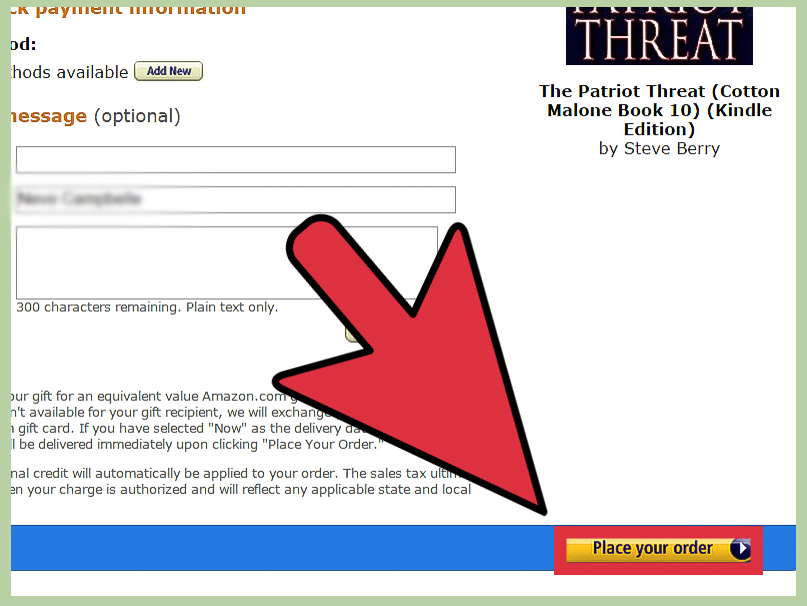
Step 6: Review the Order and Complete Your Purchase
Before checking out, review every detail: the Kindle book title, quantity, recipient email address, delivery date, gift message, and price. If you have a default payment method on Amazon, confirm that it is the one you want to use.
After you complete the purchase, Amazon typically sends the gift by email on the selected date. The recipient receives instructions to redeem the Kindle book. Once redeemed, the book becomes part of their Kindle library and can be read on compatible Kindle devices, Kindle apps, or Kindle for Web.
Keep your order confirmation email until you know the gift has been received and redeemed. If the recipient says they cannot find it, ask them to check spam, promotions, updates, and other filtered inbox tabs. Digital gifts are fast, but email filters can be dramatic little gatekeepers.
Step 7: Help the Recipient Redeem the Kindle Book
The recipient should open the Amazon gift email and select the redemption option. They may need to sign in to their Amazon account. After redeeming, the Kindle book is added to their digital library.
If the recipient already owns the book, the available options may vary depending on the marketplace and gift type. In the United States, some Kindle gift situations may allow an exchange for an Amazon gift card or other redemption option, depending on Amazon’s current rules and the type of Kindle gift purchased.
If the gift email does not arrive, the buyer may be able to manage the order through Amazon’s order history or digital orders area. If the Kindle book remains unredeemed, Amazon’s rules may allow the purchaser to request a refund within a limited time window, commonly within 60 days for unredeemed Kindle book gifts. Always review the current order page because policies can change.
What to Know Before You Send a Kindle Book Gift
The Recipient Usually Must Be in the Same Country
Kindle gifting is not always border-friendly. Amazon’s Kindle eBook gifts typically need to be redeemed by recipients in the same country or marketplace as the buyer. If you buy a Kindle book from Amazon.com, sending it to someone using a different Amazon country store may not work.
If your recipient lives abroad, consider an Amazon gift card for their local marketplace instead. It is less specific than choosing the exact book, but it avoids the awkward moment where your beautiful literary gift turns into a digital shrug.
Not Every Kindle Book Can Be Gifted
Some Kindle books do not show the “Buy for Others” button. This may happen because of publisher restrictions, regional availability, price rules, free title status, pre-order status, or marketplace limitations. If gifting is unavailable, you can still send a recommendation, buy a physical copy, or give an Amazon gift card with a note naming the book.
The Recipient Does Not Need a Kindle Device
A Kindle e-reader is lovely, but it is not required. The recipient can read Kindle books on a smartphone, tablet, computer, or web browser using Amazon’s Kindle reading options. This makes Kindle books flexible gifts for students, commuters, travelers, minimalists, and people whose bookshelves are already making structural threats.
Kindle Unlimited Is Different from a Kindle Book Gift
Gifting a Kindle book is not the same as gifting Kindle Unlimited. A Kindle book gift sends one specific eBook. Kindle Unlimited is a subscription service that allows eligible readers to borrow from a large rotating catalog. If you want to give someone one title, gift the Kindle book. If you want to give them months of browsing, consider a Kindle Unlimited gift subscription if available in your marketplace.
Best Occasions for Gifting Kindle Books
Kindle books work well for almost any occasion because they are instant, personal, and clutter-free. They are especially useful when shipping would be slow, expensive, or impractical.
For birthdays, choose a book tied to the recipient’s hobbies or favorite genre. For graduation, consider career guides, personal finance books, inspirational memoirs, or practical books about adulthood, which is basically a group project nobody fully prepared for. For holidays, cozy mysteries, cookbooks, romance novels, thrillers, and reflective nonfiction all make strong choices.
Kindle books are also excellent “just because” gifts. Sending a friend a novel after a hard week can feel more thoughtful than another “hope things get better” text. A book says, “I thought about what might comfort, entertain, or inspire you,” which is a pretty good message to deliver for the price of an eBook.
How to Pick the Right Kindle Book as a Gift
Match the Book to the Person, Not the Bestseller List
Bestseller lists are useful, but they are not personality tests. A popular thriller may be perfect for one reader and nightmare fuel for another. Think about what your recipient already enjoys. Do they read romance, fantasy, memoirs, business books, cookbooks, self-help, literary fiction, true crime, or history?
If you are unsure, look for a book with broad appeal and strong reviews. Short story collections, humorous memoirs, practical guides, and highly rated novels are often safe choices. Avoid gifting books that feel like assignments unless the recipient specifically asked for them. “Here is a book about fixing your life” may not land as lovingly as intended.
Consider Reading Length
A huge book can be a wonderful gift for a serious reader. For a casual reader, it may feel like you handed them a digital brick. Check the page count or estimated reading length. A shorter book may be better for busy parents, students, or friends who already have fourteen unfinished books judging them from the nightstand.
Read the Sample First
Amazon often provides a sample for Kindle books. Reading a sample helps you check the writing style, tone, formatting, and whether the opening pages feel engaging. This is especially useful for nonfiction, where a strong title can sometimes hide a book that reads like a PowerPoint trapped in paragraph form.
Common Problems When Gifting Kindle Books
The “Buy for Others” Button Is Missing
If you cannot find the gifting button, make sure the Kindle edition is selected. If it is still missing, the book may not be gift-eligible. Try another title, send an Amazon gift card, or purchase a physical edition instead.
The Recipient Never Got the Email
Ask the recipient to check spam, junk, promotions, and social tabs. Also verify that you entered the correct email address. If needed, check your Amazon order history for options to manage the gift or contact Amazon customer service.
The Recipient Is in Another Country
This is one of the most common Kindle gifting issues. Kindle book gifts often cannot be redeemed across different Amazon country stores. For international recipients, a local Amazon gift card is usually safer.
You Sent the Wrong Book
If the gift has not been redeemed, check whether Amazon allows you to cancel or refund the unredeemed gift. If it has already been redeemed, your options may be more limited. This is why reviewing the title before checkout is not just responsibleit is emotional damage prevention.
Experience Notes: What It Is Actually Like to Gift a Kindle Book
In real life, gifting a Kindle book feels less like a grand event and more like sending a tiny reading adventure through the internet. That is part of the charm. You can be sitting at your kitchen table, remember that your sister loves cozy mysteries, find a promising title, add a cheerful note, schedule it for her birthday, and be done before your coffee cools. Compared with wrapping a physical book, finding a box, printing a label, and hoping delivery does not interpret “two-day shipping” as a philosophical suggestion, Kindle gifting is refreshingly painless.
The best experiences usually come from choosing a book with a specific reason behind it. For example, sending a travel memoir to a friend planning a big trip feels personal. Giving a beginner-friendly cookbook to someone moving into a first apartment feels useful without being boring. Sending a funny essay collection to a stressed coworker can be a gentle way to say, “Please laugh before your inbox eats you alive.” The gift works because it shows you paid attention.
One practical lesson is to avoid guessing too boldly. If someone never reads horror, gifting them a haunted-house novel may not awaken a new passion. It may awaken their desire to stop taking your recommendations. When in doubt, look for clues: books they mention, authors they follow, movies they enjoy, hobbies they talk about, or problems they are trying to solve. A Kindle book about container gardening is perfect for a balcony gardener. It is less perfect for someone whose last plant filed for emotional abandonment.
Another useful habit is writing a personal gift message. A Kindle book gift can feel slightly invisible because there is no package to hold. A warm note gives it personality. Instead of writing only “Happy Birthday,” try something like, “This made me think of your love for clever mysteries and strong coffee.” That one sentence turns a digital transaction into a thoughtful present.
It also helps to warn less tech-comfortable recipients that the gift will arrive by email. Some people see an Amazon redemption message and assume it is spam, especially if they were not expecting a digital book. A quick text saying, “I sent you a Kindle bookcheck your email later today,” can prevent confusion. For surprise gifts, you can wait until after the delivery time and then ask, “Did a little book-shaped surprise arrive?” Mysterious, but not suspicious.
The biggest lesson is that Kindle books are excellent last-minute gifts, but they should not feel last-minute. The speed is convenient; the thoughtfulness still matters. A well-chosen eBook can be more meaningful than an expensive generic gift because it gives the recipient something to enjoy quietly, privately, and on their own schedule. It is entertainment, encouragement, and a tiny escape hatch all in one.
So yes, gifting a Kindle book on Amazon is easy. But the real magic is not the button. It is the moment the recipient opens the email and realizes you sent them a story, an idea, a laugh, a skill, or a little vacation from ordinary life. Not bad for a gift that requires no wrapping paper and cannot be stolen by the dog.
Final Thoughts
Learning how to gift a Kindle book on Amazon takes only a few minutes, but it can save you from common mistakes. The basic process is simple: choose the Kindle edition, click “Buy for Others,” enter the recipient’s email, add a message, schedule delivery, review the order, and help the recipient redeem it if needed.
The most important things to remember are eligibility, country restrictions, and email accuracy. Not every Kindle book can be gifted, recipients usually need to redeem gifts in the same country marketplace, and a mistyped email address can make your thoughtful present temporarily disappear into cyberspace wearing a tiny invisibility cloak.
When done well, a Kindle book gift is personal, instant, affordable, and clutter-free. It is perfect for readers, travelers, students, friends, family members, coworkers, and anyone who enjoys having a whole library available from a pocket-sized screen. Choose thoughtfully, add a sincere note, and you will give more than an eBookyou will give someone their next great read.