Converting minutes to hours is one of those tiny math skills that quietly saves the day. It helps when you are tracking work hours, planning a trip, logging exercise, managing study time, calculating payroll, following a recipe, or trying to understand why a “quick” 180-minute movie somehow ate your entire evening. The good news? You do not need a calculator with 47 buttons, a math degree, or a dramatic soundtrack. You only need one simple rule: 1 hour equals 60 minutes.
Once you know that, every minutes-to-hours conversion becomes easy. To convert minutes to hours, you divide the number of minutes by 60. That is the whole secret. It is not hidden behind a paywall, guarded by a dragon, or available only to people who loved fractions in school. Divide by 60, and you are on your way.
In this guide, you will learn how to convert minutes to hours using decimal hours, hours-and-minutes format, quick mental math, formulas, charts, and real-life examples. We will also cover common mistakes, including the classic “1.5 hours means 1 hour and 50 minutes” error. Spoiler: it does not. Poor little decimal point gets blamed for everything.
What Does It Mean to Convert Minutes to Hours?
To convert minutes to hours, you are changing a smaller unit of time into a larger unit of time. Minutes and hours both measure time, but they use different scales. Since 60 minutes make 1 hour, minutes are grouped into sets of 60.
For example, 120 minutes equals 2 hours because 120 divided by 60 equals 2. In the same way, 30 minutes equals 0.5 hours because 30 is half of 60. This is why a half-hour appointment is written as 0.5 hours in decimal form.
The basic formula is:
That formula works for every conversion from minutes to hours, whether you are converting 15 minutes, 90 minutes, 480 minutes, or the amount of time you spent trying to remember where you parked.
The Easiest Method: Divide Minutes by 60
The simplest way to convert minutes to hours is to divide the total number of minutes by 60. This gives you the answer in decimal hours.
Example 1: Convert 120 Minutes to Hours
So, 120 minutes equals 2 hours.
Example 2: Convert 90 Minutes to Hours
So, 90 minutes equals 1.5 hours. In regular time language, that is 1 hour and 30 minutes.
Example 3: Convert 45 Minutes to Hours
So, 45 minutes equals 0.75 hours. Since 45 minutes is three-fourths of an hour, the decimal form is 0.75.
Minutes to Hours Formula
The main conversion formula is short, sweet, and surprisingly useful:
You can use this formula in math homework, spreadsheets, payroll systems, time tracking tools, scheduling apps, and simple everyday planning.
Here are a few quick conversions:
| Minutes | Decimal Hours | Hours and Minutes |
|---|---|---|
| 15 minutes | 0.25 hours | 0 hours 15 minutes |
| 30 minutes | 0.5 hours | 0 hours 30 minutes |
| 45 minutes | 0.75 hours | 0 hours 45 minutes |
| 60 minutes | 1 hour | 1 hour 0 minutes |
| 75 minutes | 1.25 hours | 1 hour 15 minutes |
| 90 minutes | 1.5 hours | 1 hour 30 minutes |
| 120 minutes | 2 hours | 2 hours 0 minutes |
| 150 minutes | 2.5 hours | 2 hours 30 minutes |
How to Convert Minutes to Hours and Minutes
Sometimes decimal hours are useful. Other times, they look a little weird. If someone asks how long a meeting lasted, “1.75 hours” may be correct, but “1 hour and 45 minutes” sounds more natural. Unless you are talking to a payroll spreadsheet, humans usually prefer hours and minutes.
To convert minutes into hours and minutes, use division with a remainder:
- Divide the total minutes by 60.
- The whole number is the number of hours.
- The leftover amount is the remaining minutes.
Example: Convert 135 Minutes to Hours and Minutes
So, 135 minutes equals 2 hours and 15 minutes.
Why? Because 60 minutes fit into 135 minutes twice. That accounts for 120 minutes. Then 15 minutes are left over.
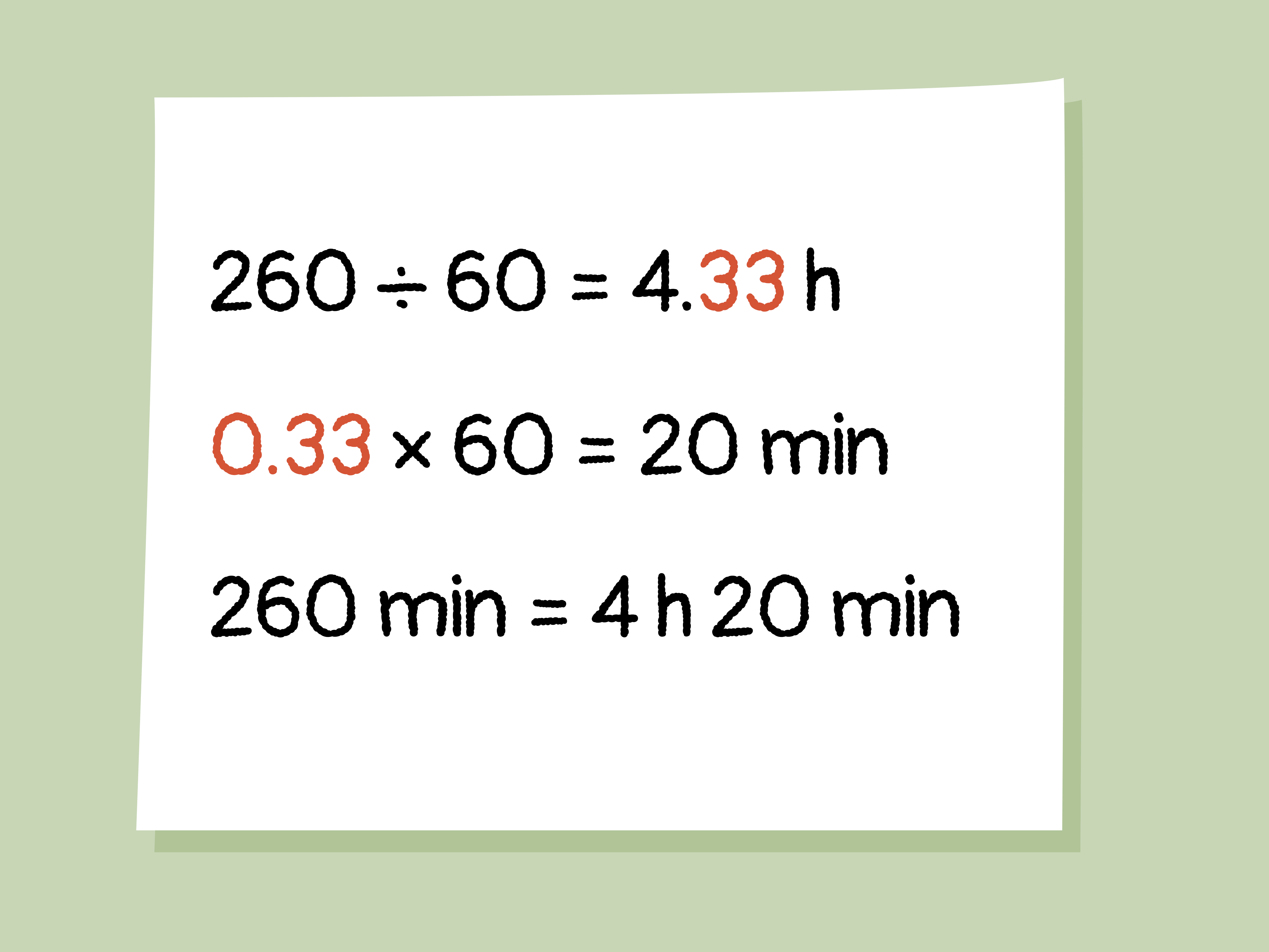
Example: Convert 250 Minutes to Hours and Minutes
So, 250 minutes equals 4 hours and 10 minutes.
Decimal Hours vs. Hours and Minutes
One of the biggest sources of confusion is the difference between decimal hours and clock-style hours. Decimal time is based on parts of 1 whole hour. Clock-style time is based on 60 minutes per hour.
For example, 1.5 hours does not mean 1 hour and 5 minutes. It means 1 and a half hours, or 1 hour and 30 minutes.
Here is a simple way to remember it:
- 0.25 hours = 15 minutes
- 0.5 hours = 30 minutes
- 0.75 hours = 45 minutes
- 1.25 hours = 1 hour and 15 minutes
- 1.5 hours = 1 hour and 30 minutes
- 1.75 hours = 1 hour and 45 minutes
If the decimal part confuses you, multiply only the decimal part by 60. For example, in 2.75 hours, the whole number is 2 hours. The decimal part is 0.75.
So, 2.75 hours equals 2 hours and 45 minutes.
Quick Mental Math Tricks for Minutes to Hours
You do not always need a calculator. Some conversions are easy to do in your head once you know the common fractions of an hour.
Use Common Benchmarks
These are the time conversions worth memorizing:
- 15 minutes = 0.25 hours
- 30 minutes = 0.5 hours
- 45 minutes = 0.75 hours
- 60 minutes = 1 hour
- 90 minutes = 1.5 hours
- 120 minutes = 2 hours
Once you know these, many conversions become easier. For example, 150 minutes is 120 minutes plus 30 minutes. That means 2 hours plus 0.5 hours, or 2.5 hours.
Break Big Numbers Into Smaller Pieces
Suppose you need to convert 210 minutes to hours. You can divide by 60, or you can break it down:
So, 210 minutes equals 3.5 hours, or 3 hours and 30 minutes.
How to Convert Minutes to Hours in a Spreadsheet
Spreadsheets are great for converting minutes to hours, especially when you are working with work logs, invoices, project timelines, or employee schedules. The basic spreadsheet formula is the same:
If cell A1 contains the number of minutes, this formula converts those minutes into decimal hours. For example, if A1 contains 480, the result is 8.
However, if you want to display the result as hours and minutes, such as 8:00 or 2:45, spreadsheet formatting matters. Many spreadsheet programs treat time as a fraction of a day. Since one day has 24 hours and 1,440 minutes, you may need to divide minutes by 1,440 and then apply a time format.
Then format the cell as:
The bracketed hour format is especially useful when the total is more than 24 hours. Without brackets, some spreadsheets may roll the time into the next day, which is not helpful when you are trying to show total hours worked.
Real-Life Examples of Converting Minutes to Hours
Minutes-to-hours conversions show up more often than people realize. Here are practical examples from everyday life.
Work Hours
If you worked 450 minutes, divide by 60:
You worked 7.5 hours, or 7 hours and 30 minutes.
Exercise Time
If your weekly workout total is 180 minutes:
You exercised for 3 hours that week. Your sneakers may still accuse you of neglect, but the math is solid.
Travel Time
If a road trip takes 275 minutes, first divide by 60:
That is about 4.58 decimal hours. To express it as hours and minutes, use the remainder method:
So, 275 minutes equals 4 hours and 35 minutes.
Movie Length
A 165-minute movie equals:
That means the movie is 2.75 hours, or 2 hours and 45 minutes. Add trailers, popcorn negotiations, and the walk to the car, and congratulations: you have booked an evening.
Cooking and Baking
If a recipe says something needs to cook for 95 minutes, you can convert it like this:
So, 95 minutes equals 1 hour and 35 minutes. That sounds much friendlier than standing in the kitchen asking, “How long is 95 minutes in actual life?”
Common Minutes to Hours Conversions
Use this quick reference chart when you need fast answers:
| Minutes | Hours | Time Format |
|---|---|---|
| 10 | 0.17 | 0:10 |
| 20 | 0.33 | 0:20 |
| 30 | 0.5 | 0:30 |
| 40 | 0.67 | 0:40 |
| 50 | 0.83 | 0:50 |
| 60 | 1 | 1:00 |
| 100 | 1.67 | 1:40 |
| 180 | 3 | 3:00 |
| 240 | 4 | 4:00 |
| 480 | 8 | 8:00 |
How to Convert Minutes to Hours for Payroll
Payroll often uses decimal hours because decimal numbers are easier to multiply by hourly pay rates. For example, if someone works 7 hours and 30 minutes, payroll may record that as 7.5 hours.
Here is an example:
If the hourly rate is $20, then:
The total pay would be $150 before taxes or deductions.
This is why it is important not to confuse decimal hours with minutes. If you write 7.30 hours thinking it means 7 hours and 30 minutes, payroll math may become inaccurate. In decimal form, 7 hours and 30 minutes is 7.5 hours, not 7.30 hours.
How to Convert Hours Back to Minutes
To reverse the process, multiply hours by 60.
For example:
So, 2.5 hours equals 150 minutes.
This reverse formula is helpful when you are checking your work. If you convert 150 minutes to 2.5 hours, multiply 2.5 by 60. If you get 150 again, your conversion is correct. Math has given you a tiny thumbs-up.
Common Mistakes When Converting Minutes to Hours
Mistake 1: Treating Decimals Like Minutes
The decimal part of an hour is not written in base 60. That means 1.25 hours is not 1 hour and 25 minutes. It is 1 hour and 15 minutes because 0.25 of an hour equals 15 minutes.
Mistake 2: Forgetting to Divide by 60
Some people try to move decimal points around, but time does not work like metric units. Since an hour has 60 minutes, not 100 minutes, you must divide by 60.
Mistake 3: Rounding Too Early
If you are calculating pay, billing, or project time, rounding too early can change the final result. For example, 95 minutes equals 1.5833 hours. If you round that to 1.6 too soon, your later calculations may shift. For casual use, rounding is fine. For money, reports, or official records, be more precise.
Mistake 4: Mixing Time Format and Decimal Format
Clock time and decimal time look similar but behave differently. The time format 1:30 means 1 hour and 30 minutes. Decimal 1.30 hours means 1.3 hours, which equals 1 hour and 18 minutes. Same digits, different meaning. Sneaky? Absolutely.
Practice Problems: Convert Minutes to Hours
Try these examples before looking at the answers:
- Convert 75 minutes to hours.
- Convert 240 minutes to hours.
- Convert 315 minutes to hours and minutes.
- Convert 525 minutes to decimal hours.
- Convert 1,440 minutes to hours.
Answers
- 75 minutes = 1.25 hours, or 1 hour and 15 minutes.
- 240 minutes = 4 hours.
- 315 minutes = 5 hours and 15 minutes.
- 525 minutes = 8.75 hours.
- 1,440 minutes = 24 hours.
Best Method to Use: Decimal Hours or Hours and Minutes?
The best method depends on your purpose. Use decimal hours when you are doing calculations, especially for payroll, billing, productivity tracking, or spreadsheets. Decimal hours are easier to multiply, divide, compare, and total.
Use hours and minutes when you want the time to be easy to understand in everyday conversation. People usually say “2 hours and 20 minutes,” not “2.333 hours,” unless they are trying to make lunch plans sound like a physics lecture.
Here is a simple rule:
- For math: use decimal hours.
- For people: use hours and minutes.
- For spreadsheets: use the format your report requires.
- For payroll: follow your company’s rounding and timekeeping rules.
Real-World Experience: Why This Simple Conversion Matters
In real life, converting minutes to hours is less about showing off math skills and more about avoiding tiny mistakes that become annoying later. Anyone who has tracked work time, planned a schedule, or filled out a timesheet knows that minutes can pile up quickly. Ten minutes here, 25 minutes there, 45 minutes after lunch, and suddenly the day looks like a puzzle designed by a calendar with trust issues.
One of the most common experiences is converting work minutes into billable hours. Freelancers, consultants, tutors, designers, virtual assistants, and contractors often track time in minutes but invoice in hours. If a project takes 185 minutes, writing “185 minutes” on an invoice may be technically correct, but “3.08 hours” is often more useful for billing. The formula makes it simple: 185 divided by 60 equals 3.0833 hours. Depending on billing rules, that might be recorded as 3.08 hours, 3.1 hours, or 3 hours and 5 minutes.
Another practical experience comes from studying. Many students plan study sessions in minutes because tasks feel easier to manage that way. “Study biology for 90 minutes” sounds more specific than “study for a while and hope knowledge happens.” But when reviewing weekly progress, hours are clearer. Four 90-minute sessions equal 360 minutes. Divide that by 60, and you get 6 hours of study time. That number is easier to compare across weeks and subjects.
Fitness tracking is another place where this conversion becomes useful. Health and activity goals are often measured in weekly minutes. If someone walks 35 minutes a day for five days, that is 175 minutes. Converted into hours, it is about 2.92 hours, or 2 hours and 55 minutes. Seeing the total in hours can feel more rewarding. It turns scattered short walks into a meaningful weekly achievement. Your shoes may not applaud, but they should.
Travel planning also benefits from minutes-to-hours conversions. Navigation apps often show travel time in minutes, especially for shorter routes. A commute of 50 minutes each way may not sound huge at first, but round trip it becomes 100 minutes per day. Over five workdays, that is 500 minutes. Divide by 60, and you get about 8.33 hours per week. That is basically a full workday spent commuting. Suddenly, moving closer to work or finding a better route starts to look less like a luxury and more like time rescue.
Cooking is another surprisingly useful example. Recipes often list cooking or resting times in minutes, but when several steps are combined, hours become easier to understand. A roast may need 25 minutes of prep, 110 minutes of cooking, and 15 minutes of resting. That is 150 minutes total, or 2.5 hours. Knowing that ahead of time can prevent the classic dinner problem: realizing at 6:30 p.m. that the food will be ready sometime around bedtime.
Parents, teachers, office managers, event planners, and content creators also convert minutes to hours regularly. Lesson plans, meeting agendas, podcast lengths, video editing sessions, event schedules, and childcare routines all become easier when time is expressed clearly. The skill is simple, but the payoff is practical: better planning, fewer surprises, cleaner reports, and less mental juggling.
The biggest lesson from everyday experience is this: use the format that matches the situation. Decimal hours are great for calculations, but hours and minutes are better for communication. If you are multiplying by a pay rate, use decimal hours. If you are telling someone how long a drive takes, use hours and minutes. And if you are trying to explain why a “quick task” took 240 minutes, just say 4 hours and bring snacks.
Conclusion
Converting minutes to hours is simple once you remember the golden rule: divide minutes by 60. That gives you decimal hours. If you want hours and minutes, divide by 60, keep the whole number as hours, and use the remainder as minutes.
This conversion is useful for work logs, payroll, invoices, workouts, travel plans, study schedules, recipes, school assignments, and daily time management. Decimal hours are best for calculations, while hours-and-minutes format is easier for everyday communication. The only real trick is not mixing them up. Remember, 1.5 hours means 1 hour and 30 minutes, not 1 hour and 5 minutes. The decimal is doing its job; we just have to read it correctly.
Note: This article is based on standard time conversion rules and reputable educational, measurement, math, and productivity references. It is written for general learning, publishing, and practical everyday use.