Some DIY computer projects are designed to solve a problem. Others are designed to ask a question so strange that the only reasonable answer is, “Yes, absolutely, please continue.” The Comprinter belongs proudly in the second category. It is a laptop hidden inside a printer, a portable computer disguised as an all-in-one inkjet machine, and a wonderfully unnecessary reminder that the maker world is at its best when curiosity grabs a screwdriver and ignores common sense for a few hours.
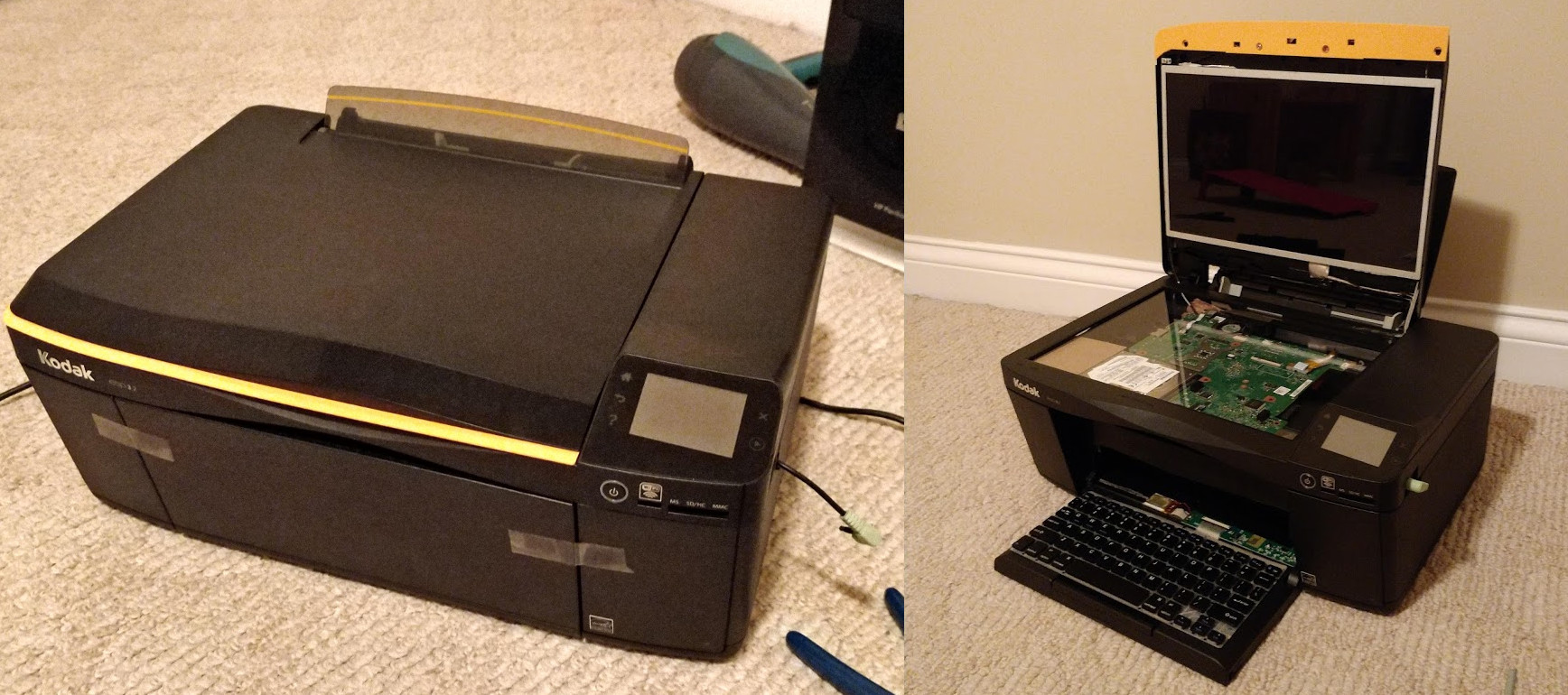
The project, created by Mason Stooksbury, started with old hardware: a Dell Inspiron 1440 laptop and a nonfunctioning Kodak ESP 3.2 printer. Instead of sending both devices toward the usual retirement plandusty closet first, recycling center laterStooksbury combined them into one oddball machine. The result looked like a printer, opened like a scanner, and behaved like a laptop. It was part case mod, part conversation starter, and part public performance art for anyone brave enough to use it in a coffee shop.
At first glance, the Comprinter seems like a joke. Look closer, though, and it becomes a surprisingly smart lesson in electronics reuse, creative design, and the emotional power of “because I can.” It is not the most practical computer ever built. It will not replace a MacBook, gaming PC, or sensible office workstation. But it does something better: it makes people notice the invisible machines around them and wonder what else could be hiding inside ordinary plastic boxes.
What Is the Comprinter?
The Comprinter is exactly what its name suggests: a computer-printer hybrid. More specifically, it is a laptop rebuilt inside the shell of an all-in-one printer. The original build used the internal parts of a Dell Inspiron 1440, including the motherboard, hard drive, keyboard, and 14-inch display. Those parts were removed from the laptop and rearranged inside the printer’s body and scanner lid.
The screen sat where the scanner lid would normally be, giving the machine a strange but workable laptop-style display. The keyboard was mounted near the printer’s front paper tray, creating a typing surface that looked both ridiculous and oddly believable. The motherboard and storage were tucked into the body of the printer. From the outside, it still looked like a printer. From the inside, it was a small Linux computer wearing office equipment cosplay.
A Broken Printer Becomes a New Computer Case
The Kodak printer used in the first Comprinter was already broken, which is an important detail. This was not a case of destroying a perfectly good device just to make internet strangers say, “Why?” The printer shell became a recycled enclosure. That gives the project a more thoughtful angle. Old printers are often bulky, oddly shaped, and frustrating to repair, but they also contain roomy plastic housings, hinges, trays, vents, and flat surfaces that can be repurposed.
In other words, the printer was not garbage. It was a computer case that had not yet discovered its true calling.
Why Hide a Laptop Inside a Printer?
The honest answer is simple: because it is funny. Stooksbury reportedly liked the idea of taking the device somewhere public, plugging headphones into what appeared to be a printer, and casually using it while everyone nearby questioned reality. That motivation may not appear in a business plan, but it is a perfectly valid reason to build something.
Maker culture has always had room for practical inventions and playful experiments. The Comprinter is not trying to become the future of mobile computing. It is closer to a hardware joke told with real engineering effort. The punchline works because the build is not lazy. The parts had to be stripped, measured, mounted, routed, and tested. Anyone can imagine a laptop in a printer. Actually making it boot is where the fun becomes craftsmanship.
The Joy of Useless Inventions
A so-called useless invention can still teach useful skills. Building the Comprinter involves the same fundamentals found in more serious projects: disassembly, component layout, thermal planning, cable management, mounting design, electrical safety, and operating system setup. The silly outer shell lowers the pressure. Instead of asking, “Will this product disrupt the market?” the project asks, “Can I make this weird thing work?” That is a healthier question than it looks.
Many great makers learn by working on projects that have no commercial purpose. A printer-laptop hybrid gives permission to experiment. If something fails, the world keeps spinning. If it works, congratulations: you now own a computer that looks like it might demand cyan ink before opening a browser.
How the Comprinter Build Works
The basic process is easy to describe and much harder to execute. First, the donor laptop is disassembled. That means removing the display panel, keyboard, motherboard, storage drive, Wi-Fi card, power components, and any useful internal cables. Next, the printer is gutted carefully enough to preserve the case, lid, hinges, exterior buttons, and any structural plastic needed for strength.
After that comes the real puzzle: fitting laptop parts into a printer shell that was never designed to hold them. Laptop components are compact, but they are still shaped around the original laptop chassis. The printer has different geometry. It may have ribs, posts, rollers, empty ink paths, and awkward internal walls. Some plastic has to be trimmed. Some brackets may need to be improvised. The display cable must reach the screen without being crushed by the lid. The keyboard must sit at a usable angle. The motherboard needs airflow. The power button needs to remain accessible. Suddenly, the joke has a project manager.
Why the Scanner Bed Makes Sense
The scanner portion of an all-in-one printer is the secret ingredient. It provides a wide, flat lid that naturally resembles a display mount. It also gives the builder a hinged section, which is convenient for positioning a laptop screen. In the original Comprinter, this scanner area made it possible to place the display where a user could actually see it.
This is why a printer case can work better than many other odd enclosures. A toaster may be fun, but typing on toast is ergonomically tragic. A printer, on the other hand, already sits on a desk, has a front-facing control area, and includes a lid that opens. It is not a normal laptop case, but it is weirdly close enough to be tempting.
Specs: Modest Hardware, Maximum Personality
The donor laptop was not a modern powerhouse, but it did not need to be. The Dell Inspiron 1440 hardware included a dual-core Intel Pentium T4400 processor, 6GB of DDR2 RAM, a 500GB hard drive, a 14-inch LCD, and integrated graphics. That specification list will not make a gaming desktop nervous, but it is enough for lightweight Linux use, browsing, writing, basic media, terminal work, and showing off at a hackerspace.
The software choice matters. A lightweight Linux distribution such as Xubuntu is a practical match for older hardware because it can run smoothly without demanding the resources of a modern, animation-heavy operating system. This is one reason old laptops remain valuable for experiments. They may be too slow for someone’s daily workflow, but they can still power a kiosk, media terminal, retro gaming box, workshop computer, or, apparently, a printer in witness protection.
The Comprinter II: When the Joke Learned to Print
The original Comprinter was delightful, but there was one obvious catch: the printer portion did not actually print. That made the project funnier, but it also left a challenge hanging in the air. Later, Stooksbury built the Comprinter II, using an HP Envy 5660 printer and a smaller Toshiba netbook. This time, the actual printing mechanism remained functional.
The second version made the idea more complete. It could work as a computer and still produce documents, which moved it from “glorious nonsense” toward “absurdly functional.” That does not mean everyone needs one. It does mean the idea had more engineering depth than the first laugh suggested. Preserving printer functionality while hiding a computer inside requires more careful spatial planning, especially around paper paths, moving parts, power supply placement, and heat.
What the Comprinter Teaches About E-Waste
Beyond the comedy, the Comprinter touches a real issue: electronic waste. Laptops, printers, phones, and monitors contain valuable materials, including metals, plastics, and glass. When they are discarded carelessly, those materials are lost and can create environmental problems. When they are reused, repaired, donated, or recycled properly, they stay useful longer.
A project like the Comprinter is not a large-scale e-waste solution. Nobody is suggesting cities should convert every broken printer into a laptop case and hand them out at tax offices, although that would make government buildings much more entertaining. But it does model an important mindset: before throwing electronics away, ask whether parts can be reused.
Old laptops can donate screens, keyboards, drives, speakers, wireless cards, screws, hinges, and power supplies. Broken printers can donate motors, rods, gears, springs, sensors, plastic panels, and surprisingly sturdy shells. Even when the full device is not worth repairing, components may still have a second life.
Why Printers Are Perfectly Annoying Project Donors
Printers are famous for causing emotional damage at the exact moment a document is due. They run out of ink, complain about cartridges, jam paper, lose Wi-Fi, update firmware, and occasionally refuse to print black text because magenta is having a personal crisis. This reputation makes them especially funny as computer cases. Turning a printer into a computer feels like revenge, but classy revengethe kind with a keyboard.
Their size also helps. Many all-in-one inkjet printers are larger than they need to be for the actual electronics inside. The scanner bed, paper tray, and cartridge areas create unused or reusable space once broken mechanisms are removed. For a case modder, that internal volume is an invitation.
The All-in-One Irony
Manufacturers often call printer-scanner-copier devices “all-in-one” machines. The Comprinter takes that phrase personally. A printer that also contains a computer is, in a very literal sense, more all-in-one than most all-in-ones. It may not be elegant in the showroom sense, but it wins points for commitment.
There is also a subtle critique here. Modern printers can be surprisingly dependent on ink systems, software rules, and vendor ecosystems. A DIY build flips the relationship. Instead of the user adapting to the printer’s limitations, the printer is forced to become useful in a completely new way. That is the kind of power move only a maker with spare parts and a free afternoon can appreciate.
Design Challenges Behind a Printer-Laptop Hybrid
A laptop inside a printer sounds simple until heat enters the chat. Laptop motherboards are designed around specific airflow paths and heatsink placement. When those parts are moved into a plastic printer body, cooling can become a serious concern. Builders need to keep vents clear, avoid trapping hot air, and make sure the CPU heatsink and fan can do their job.
Power is another issue. Old laptop power adapters are generally manageable, but the wiring should be secured and insulated. Loose cables near hinges, trays, or moving printer mechanisms can create failures. Batteries deserve extra caution. If a laptop battery is swollen, damaged, or unknown, it should not be reused casually. A funny project stops being funny when lithium-ion chemistry starts auditioning for a disaster movie.
Structural strength matters, too. A laptop chassis normally supports the screen, keyboard, and motherboard. Remove those parts and the builder must create new support points. The keyboard cannot flex like a diving board. The display cannot wobble every time someone breathes. The motherboard cannot rattle around like a coin in a dryer. Good case mods are half electronics and half furniture making, only smaller and with more panic.
Could You Build Your Own Comprinter?
Yes, but the best version starts with patience, not power tools. Choose a broken printer with a large scanner bed and a laptop you can afford to sacrifice. Before cutting anything, disassemble both devices and measure everything. Place components inside the case without mounting them first. Check cable lengths. Confirm that the screen can open and close safely. Think about airflow before deciding where the motherboard goes.
A beginner-friendly approach is to use a small netbook, mini PC, or single-board computer rather than a full-size laptop motherboard. Smaller boards create fewer layout problems. However, using an actual laptop has charm because the keyboard, screen, Wi-Fi, storage, and power system already belong together. It is like transplanting one creature into the shell of another, except with fewer ethics committees.
Useful Parts and Tools
A project like this may require precision screwdrivers, plastic pry tools, a rotary tool, small files, double-sided mounting tape, standoffs, zip ties, insulating tape, and patience measured in buckets. A multimeter is helpful. So is a camera, because taking photos during disassembly can save you from the ancient ritual of staring at seventeen screws and whispering, “Where did you come from?”
The most important tool is planning. Many case mods fail because the builder cuts first and thinks later. The Comprinter worked because the internal layout was considered carefully. The parts had to fit, the screen had to be usable, and the final device had to survive being moved around. That is the difference between a clever mod and a plastic bin full of regret.
Why People Love Builds Like This
The internet loves the Comprinter because it is instantly understandable. You do not need an electrical engineering degree to appreciate the absurdity of opening a printer and finding a laptop. The joke lands in one second. Then the craftsmanship keeps your attention.
It also triggers nostalgia. Older computer users remember luggable PCs, chunky portable terminals, beige desktops, and office machines that looked like they could survive a small earthquake. The Comprinter feels like it belongs to that lineage. It is portable in the same way a suitcase full of soup is portable: technically yes, but questions will be asked.
More importantly, it celebrates playful technical confidence. The builder looked at two unwanted machines and imagined a third thing. That is the heart of DIY culture. Not every project must be sleek, commercial, or efficient. Sometimes the best project is the one that makes someone laugh, learn, and pick up a screwdriver.
Real-World Uses for a Printer Computer
Even though the Comprinter began as a joke, the concept has practical cousins. A printer-computer combo could serve as a dedicated document station in a workshop, classroom, makerspace, or small office. It could run scanning software, label tools, inventory lists, or print queues. A repaired version with working print functionality could become a self-contained paperwork terminal.
For makerspaces, a device like this could be used as a check-in station, a novelty demo machine, or a workshop teaching tool. Students could learn about computer architecture by seeing the laptop components spread across a larger enclosure. The unusual case makes the internal parts easier to discuss. It turns hidden electronics into visible storytelling.
That said, nobody should pretend this is the most efficient way to build an all-in-one PC. A used mini PC and monitor would be easier, smaller, and probably less likely to make airport security blink twice. But efficiency is not always the point. Sometimes a project earns its place by being memorable.
Hands-On Experience: What a Comprinter-Style Build Feels Like
Building something like the Comprinter is a strange mix of confidence and confusion. At the beginning, everything feels possible. You put the broken printer on the table, remove a few screws, lift the scanner lid, and think, “There is so much room in here.” This is the optimistic stage. Enjoy it. It will not last.
The second stage begins when the laptop comes apart. Suddenly, the neat portable computer becomes a delicate spread of boards, cables, brackets, and tiny screws that appear to reproduce when you look away. The screen cable is shorter than expected. The keyboard ribbon feels like it was designed by a nervous origami master. The Wi-Fi antenna wants to be everywhere except where you need it. At this point, the project becomes less about brute force and more about negotiation.
The printer shell adds its own personality. Inside, it may contain ribs, clips, rollers, ink channels, and plastic towers that made sense to the original engineers but now stand between you and glory. Cutting them away feels powerful, but every cut should be deliberate. Remove too little and nothing fits. Remove too much and the case loses strength. A good builder spends more time test-fitting than cutting. The printer becomes a puzzle box, and the reward is a boot screen.
The first successful power-on is the magical moment. The machine may look ridiculous, the keyboard may be sitting at a questionable angle, and the lid may creak like a haunted office supply cabinet, but when the display lights up, the entire project changes. It is no longer junk. It is a computer. More specifically, it is your deeply impractical computer, and that makes it better.
Using it in public would be the final experience. Imagine setting a printer on a cafe table, opening the scanner lid, and typing an email. Someone nearby would glance once, look away, then look back with the face of a person who has just discovered a new category of problem. That reaction is part of the design. The Comprinter is not only hardware; it is social theater. It turns routine computing into a small event.
The project also teaches humility. Old hardware has limits. Hinges wobble. Fans whine. Plastic cracks. Cable routing becomes a tiny civil engineering project. But those struggles are the point. A Comprinter-style build gives you a deeper respect for product designers who make real laptops thin, durable, cool, and repairable. It also gives you permission to stop treating electronics as sealed mysteries. Once you have seen a laptop motherboard living inside a printer, ordinary gadgets feel less intimidating.
Most of all, the experience reminds you that making things does not always need a practical excuse. The best reason to build a laptop inside a printer is that it makes you curious enough to learn. It encourages reuse, rewards problem-solving, and leaves you with a machine that has a story. A normal laptop says, “I can run software.” The Comprinter says, “I have made peace with chaos, and yes, I might still print.”
Conclusion
The Comprinter hides a laptop inside a printer, but the real magic is what it reveals. It shows that old electronics can become raw material, that humor can drive serious learning, and that a broken printer does not have to spend eternity sulking in a closet. Mason Stooksbury’s project works because it is both absurd and thoughtful. It takes familiar objects and recombines them in a way that makes people laugh first and think second.
Is the Comprinter practical? Barely. Is it efficient? Not especially. Is it unforgettable? Absolutely. In a world full of sealed gadgets and disposable devices, a laptop hiding in a printer is a cheerful reminder that technology is still something we can open, modify, misunderstand, fix, and transform. Sometimes innovation looks like a sleek new product. Sometimes it looks like an inkjet printer running Linux in public while everyone nearby quietly reconsiders the boundaries of reality.