
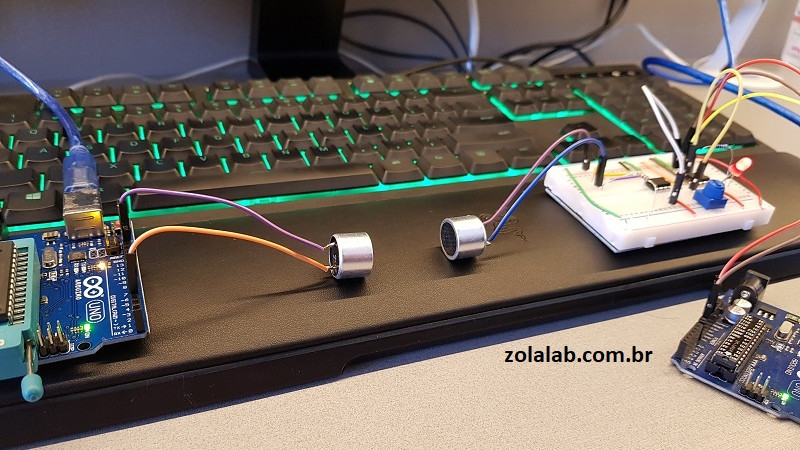
Ultrasonic data communication sounds like something a bat would invent after taking an electrical engineering course. In reality, it is one of the most delightfully simple ways to send small amounts of information between nearby devices without Wi-Fi, Bluetooth, cellular service, QR codes, NFC stickers, or the awkward ritual of typing a 47-character password while pretending not to be annoyed.
At its core, dead simple ultrasonic data communication means using sound wavesusually near or above the upper edge of human hearingto carry digital information from a speaker to a microphone. One device “chirps” a coded message, another device listens, and software turns those tones back into data. That data might be a device ID, a Wi-Fi setup token, a payment confirmation, a sensor reading, or a short text string. It is not magic. It is a modem wearing invisible tap shoes.
The idea is not new. Old dial-up modems used audible tones to move data through telephone lines. Ultrasonic communication takes the same basic concept and moves it into higher-frequency audio bands, often around 18 kHz to 22 kHz for consumer hardware. Those frequencies are close to or just beyond what many adults can hear, which makes them useful for short-range, low-distraction communication. Your phone, laptop, smart speaker, TV, or microcontroller project may already have the two essential parts: a speaker and a microphone.
What Is Ultrasonic Data Communication?
Ultrasound generally refers to sound above 20 kHz, the approximate upper limit of human hearing. In practical consumer-device projects, “ultrasonic” often includes the near-ultrasonic range, such as 17 kHz to 22 kHz, because many ordinary speakers and microphones struggle to reproduce much higher frequencies cleanly. That range is not perfectly silent for everyonechildren, teenagers, and people with especially sensitive high-frequency hearing may notice itbut it is far less intrusive than sending data as a squealing robot serenade in the middle of a living room.
Digital information is made of bits: ones and zeros. Sound is made of pressure waves. Ultrasonic data communication works by mapping bits onto sound patterns. For example, a simple system might send one frequency for a binary 1 and another frequency for a binary 0. A receiver records the sound, analyzes the frequencies, and reconstructs the original message. That basic method is called frequency shift keying, or FSK. It is popular because it is easy to understand, easy to implement, and surprisingly sturdy for small payloads.
The Simplest Version: Beep Means One, Boop Means Zero
Imagine a transmitter that sends a 19 kHz tone for 50 milliseconds to represent a 1, and an 18.5 kHz tone for 50 milliseconds to represent a 0. A message begins with a known “wake up” pattern, followed by the actual data, then perhaps a checksum so the receiver can confirm that it heard correctly. The receiver does not need to understand English. It only needs to ask, “Which frequency was strongest during this slice of time?”
That is the charm of the dead simple approach. You do not need a radio license. You do not need special networking chips. You do not need to pair devices through a settings menu designed by someone who clearly enjoys watching people suffer. You need audio output, audio input, and a little signal processing.
How Ultrasonic Communication Works Step by Step
1. Encode the Message
The sender begins with a small piece of data. It might be the text “HELLO,” a device serial number, a short URL token, or a command such as “turn on lamp.” The software converts that data into binary, adds framing information, and may include error detection. Framing tells the receiver where the message starts and ends. Error detection helps catch mistakes caused by noise, echoes, distance, or the family dog choosing that exact moment to bark at a delivery truck.
2. Convert Bits Into Sound
Next, the transmitter turns bits into tones. With FSK, different frequencies represent different symbols. With on-off keying, the presence of a tone may represent one state and silence may represent another. More advanced systems can use phase shift keying, chirps, spread spectrum, or OFDM-style methods, but the dead simple version usually favors reliability and understandability over raw speed.
3. Play the Signal Through a Speaker
The sender plays the encoded signal through a normal speaker, piezo buzzer, phone speaker, laptop speaker, or dedicated ultrasonic transducer. Consumer speakers are not always great at high frequencies, especially tiny ones that were designed mainly for voice calls and notification sounds. Still, for short messages across a desk, the humble built-in speaker can often do enough.
4. Capture the Signal With a Microphone
The receiving device samples the audio with a microphone. Most phones and laptops can record at common sampling rates such as 44.1 kHz or 48 kHz. A 48 kHz sampling rate can theoretically capture frequencies up to 24 kHz, which is why many near-ultrasonic systems live below that ceiling. In practice, microphone filters, automatic gain control, compression, and operating system audio processing can make the usable band narrower.
5. Decode and Verify
The receiver analyzes the recorded audio, often using frequency detection or a Fourier transform. It identifies the tone sequence, converts it back into bits, checks the framing, validates the checksum, and outputs the recovered message. If the checksum fails, the receiver can ignore the message or ask for a retransmission, assuming the system supports two-way communication.
Why Use Sound Instead of Radio?
Radio technologies such as Wi-Fi, Bluetooth, Zigbee, and NFC are excellent. They are fast, mature, and built into billions of devices. Ultrasonic communication does not replace them. Instead, it shines in narrow but useful situations where sound offers a clever shortcut.
First, audio hardware is everywhere. A device that has no Wi-Fi chip may still have a buzzer. A phone that cannot access a local network can still listen through its microphone. Second, sound is naturally local. Ultrasonic signals fade quickly, bounce around rooms, and generally do not travel through walls as conveniently as radio. That limitation becomes a feature when you want proximity-based communication.
Third, ultrasonic communication can simplify onboarding. A smart device with no screen and no keyboard can receive Wi-Fi credentials or setup data through sound. Instead of asking users to connect to a temporary access point, open an app, paste a password, reboot the device, and sacrifice a small goat to the networking gods, the app can chirp the configuration directly to the device.
Common Applications of Ultrasonic Data Communication
Smart Device Setup
One of the strongest use cases is IoT provisioning. A phone app can encode a short setup token or network credential and play it to a nearby sensor, appliance, or development board. The receiving device listens, decodes the message, and joins the right system. This works especially well when the payload is small and the devices are close together.
Device Pairing and Presence Detection
Ultrasonic tones can prove that two devices are physically near each other. For example, a laptop could emit a short code that a phone hears, confirming that the user is in the same room. This kind of acoustic copresence has been explored for nearby-device discovery, authentication flows, and context-aware applications.
Accessibility and Hearing-Aid Communication
High-frequency audio and ultrasonic links have been studied for communication between personal electronic devices and hearing aids. In this environment, low data rates may be perfectly acceptable if the goal is to send simple commands or configuration data while preserving battery life and avoiding more complex radio hardware.
Wearable and Medical Sensors
Researchers have also explored near-ultrasonic networking for wearable devices. The appeal is obvious: body-area devices may need short-range links, low power, and flexible software-defined communication. Ultrasonic systems can be tuned for specific environments, although real-world medical applications require careful safety, reliability, and regulatory evaluation.
Air-Gapped or Offline Data Transfer
Sound can move small data payloads between devices that are not connected to the same network. Open-source data-over-sound libraries demonstrate that a laptop can send a short text message to a phone, or one phone can chirp data to another, using only speakers and microphones. It will not replace a USB cable for moving a video file, unless your weekend plans involve aging rapidly, but it is handy for tokens, keys, identifiers, and tiny messages.
Popular Modulation Methods Explained Simply
On-Off Keying
On-off keying is the flashlight method. Tone on means one thing; tone off means another. It is simple, but silence can be confused with a weak signal, background noise, or a missed detection. It works best in controlled conditions where timing is clear.
Frequency Shift Keying
Frequency shift keying is the workhorse of simple acoustic communication. One frequency represents one symbol, another frequency represents another symbol, and the receiver watches for which one appears. FSK can be implemented on modest microcontrollers and is a favorite for DIY ultrasonic data links because it is forgiving and easy to debug with a spectrum analyzer.
Phase Shift Keying
Phase shift keying carries data by changing the phase of a signal. It can be more efficient than simple FSK, but it also requires more precise synchronization. In a room full of echoes, moving phones, and bargain-bin speakers, phase can become a slippery little gremlin.
Chirps and Spread Spectrum
A chirp sweeps across frequencies instead of staying on one tone. Chirps are useful for synchronization, ranging, and robust detection in noisy environments. Some systems use chirp-like signals because they are easier to spot against background noise and can tolerate distortion better than a single fragile tone.
The Main Benefits of Dead Simple Ultrasonic Data Communication
It Uses Hardware You Already Have
The biggest benefit is availability. Speakers and microphones are already built into phones, tablets, laptops, TVs, smart displays, and many embedded devices. For prototypes, an Arduino-style board with a piezo buzzer and a microphone module can demonstrate the concept without expensive RF hardware.
It Feels Effortless to Users
When designed well, ultrasonic data transfer can feel almost invisible. A user taps “connect,” the phone emits a short tone, the device receives it, and setup continues. No scanning. No pairing code. No “hold the button until the light blinks purple, unless it blinks amber, in which case unplug it and consider your life choices.”
It Is Naturally Short Range
For some applications, short range is an advantage. Ultrasonic communication is typically intended for nearby devices in the same physical space. That makes it useful for proximity confirmation, local discovery, and quick configuration tasks where a room-scale communication channel is enough.
It Is Great for Small Payloads
Ultrasonic links are best at small messages. A device ID, command, nonce, coupon token, setup code, or short encrypted payload is a natural fit. The technology becomes less attractive when you need high throughput, long distance, or constant two-way networking.
The Limitations Nobody Should Ignore
Data Rates Are Usually Low
Dead simple ultrasonic communication is not a speed demon. Depending on the hardware and protocol, practical systems may transmit only a few bytes per second to a few kilobits per second. That is enough for setup codes and commands, but not enough for rich media. If you try to stream a movie through ultrasonic chirps, the movie may finish sometime after the heat death of the universe.
Consumer Audio Hardware Is Messy
Phone speakers, laptop microphones, browser audio APIs, and operating system filters were not designed primarily for ultrasonic modems. Some devices roll off high frequencies. Some add compression. Some microphones quietly filter out near-ultrasonic sound. A protocol that works beautifully on one phone may act like it has never heard of physics on another.
Rooms Create Echoes
Sound bounces off walls, desks, windows, and ceilings. These reflections create multipath interference, where the receiver hears delayed copies of the same signal. Good protocols use preambles, guard intervals, checksums, and robust modulation to survive this acoustic pinball machine.
It Is Not Always Truly Inaudible
Near-ultrasonic audio can be audible to some people, especially younger listeners. It can also create artifacts, clicks, or intermodulation distortion through cheap speakers. A responsible design should keep volume moderate, test across listeners, and avoid continuous high-frequency transmission.
Privacy Matters
Ultrasonic communication can be useful, but it can also be abused. Ultrasonic beacons have raised privacy concerns because apps with microphone access may detect inaudible signals from ads, stores, or websites. Ethical systems should be transparent, permission-based, limited in purpose, and respectful of users. Invisible communication should not mean invisible consent.
How to Build a Simple Ultrasonic Data Link
Choose a Frequency Band
For phones and laptops, a practical near-ultrasonic band often sits between 18 kHz and 20 kHz, or slightly above 20 kHz if the hardware supports it. For dedicated transducers, higher ultrasonic frequencies may be possible. The key is to test the actual speaker and microphone pair instead of trusting the spec sheet like it is a sacred scroll.
Start With a Tiny Payload
Begin with something small, such as a one-byte command or a short text token. Add a preamble, payload length, and checksum. Keep the first prototype boring. Boring prototypes work. Flashy prototypes generate mysterious bugs and dramatic sighing.
Use FSK First
FSK is a sensible starting point. Pick two or more frequencies that the receiver can distinguish reliably. Send each symbol for a fixed duration. Use a sample rate high enough to capture the frequencies. On the receiver, perform frequency analysis over each symbol window and choose the strongest expected tone.
Add Error Detection
A checksum or CRC is essential. Without it, the receiver may confidently decode nonsense. Error detection lets the system reject corrupted packets. For extra robustness, repeat the message several times or add forward error correction if the application needs it.
Test Like the Real World Is Rude
Test at different distances, angles, volumes, rooms, device models, and noise levels. Try it near a fan, a TV, a laptop keyboard, and a person talking. Move the receiver while transmitting. Put the phone in a case. Turn on automatic gain control if the platform forces it, then design around it. Real rooms do not behave like clean lab diagrams, because real rooms have furniture and opinions.
Specific Example: Sending a Sensor Reading
Suppose you have a small environmental sensor that measures temperature and humidity. It has a microcontroller, a temperature sensor, and a piezo speaker, but no Wi-Fi. Every minute, it converts the reading into a compact payload: device ID, temperature, humidity, battery level, and checksum. Then it emits a short ultrasonic packet.
A phone app listens for the packet. When it hears the preamble, it decodes the FSK tones, verifies the checksum, and displays the reading. The sensor does not need a network stack. The phone does the heavy lifting. This is the kind of application where ultrasonic communication makes practical sense: low data volume, close distance, cheap hardware, and quick interaction.
Security Tips for Ultrasonic Communication
Do not treat ultrasonic signals as secret just because most people cannot hear them. A microphone can record them. A laptop can analyze them. A determined attacker can replay them. For anything sensitive, use cryptographic protections such as signed messages, time-limited tokens, nonces, and encryption where appropriate.
Also, avoid using ultrasonic communication for silent tracking without clear user permission. A respectful product explains when the microphone is active, what the signal does, and how the user can disable it. Transparency is not just good ethics; it is good product design. Users are much more forgiving of technology when it does not behave like a spy movie prop.
Best Practices for Reliable Ultrasonic Data Transfer
- Keep messages short and repeat important packets.
- Use a preamble so the receiver can synchronize before decoding.
- Add checksums or CRCs to detect corrupted messages.
- Choose frequencies that work on the weakest target device.
- Test across phones, laptops, speakers, and microphones.
- Avoid excessive volume and continuous high-frequency output.
- Respect microphone permissions and user privacy.
Experiences and Practical Lessons From Ultrasonic Data Communication Projects
The first lesson from working with dead simple ultrasonic data communication is that “simple” does not always mean “effortless.” The concept is beautifully simple: play tones, detect tones, recover bits. The real world, however, enjoys adding garnish. A laptop speaker may produce 19 kHz just fine at one volume level and distort at another. A phone microphone may hear the signal clearly when placed flat on a desk, then fail when the user holds it at a slight angle. A quiet office may produce clean packets, while a kitchen with an exhaust fan can turn your elegant signal into digital soup.
A useful development experience is to begin with audible frequencies before moving ultrasonic. Yes, the test tones will be annoying. Yes, nearby humans may question your hobbies. But audible tones help you confirm that the transmitter is actually playing something and that timing is correct. Once the system works at audible frequencies, shift upward into the near-ultrasonic range and compare performance. This staged approach saves time because it separates basic logic bugs from high-frequency hardware limitations.
Another practical lesson is that visualization is your best friend. A spectrogram can show exactly what the receiver hears. Instead of guessing whether your 19 kHz tone is present, you can see it as a bright line. You can spot echoes, clipping, background noise, and frequency roll-off. Many failed prototypes become obvious once viewed as a frequency plot. The code may be perfect, while the speaker is quietly whispering, “I do not do 20 kHz, my friend.”
Packet design also matters more than beginners expect. A good preamble makes decoding dramatically easier. A fixed packet length simplifies synchronization. A checksum prevents embarrassing false positives. Repeating the same short packet three times may outperform a clever but fragile high-speed design. In ultrasonic communication, reliability often beats elegance. The best system is not the one that impresses other engineers on a whiteboard; it is the one that works when a user’s phone is upside down on a cluttered table beside a humming refrigerator.
Volume control is another underrated detail. Too quiet, and the receiver misses bits. Too loud, and the speaker distorts, producing harmonics and clicks. Distortion can spill energy into audible frequencies, which defeats the purpose of “inaudible” communication and annoys everyone within earshot. Moderate volume, clean waveforms, and smooth transitions between symbols usually produce better results than simply cranking the output.
Finally, user experience should guide the technical design. Most people do not care whether the system uses FSK, chirps, or phase-continuous modulation. They care that it works quickly, does not make unpleasant noises, does not drain the battery, and does not secretly listen to them. A great ultrasonic communication feature should feel like a tiny convenience, not a science experiment escaping from the lab. When the technology is honest, limited, and well-tested, it becomes a surprisingly elegant tool for nearby data exchange.
Conclusion
Dead simple ultrasonic data communication is a clever reminder that innovation does not always require new hardware. Sometimes the speaker and microphone already sitting inside ordinary devices are enough to move useful data across a room. By encoding small messages into near-ultrasonic tones, developers can create lightweight links for setup, pairing, presence detection, sensor reporting, accessibility tools, and offline transfers.
The tradeoffs are clear. Ultrasonic communication is short-range, low-bandwidth, and sensitive to hardware differences. It needs careful testing, thoughtful packet design, and responsible privacy practices. But when used for the right job, it is wonderfully practical. It turns sound into a tiny invisible courierone that can carry just enough information to make devices feel smarter, simpler, and a little more magical.
Note: This article is based on synthesized technical information from reputable engineering, acoustic communication, accessibility, research, and privacy resources. Source links are intentionally omitted to keep the article clean for web publishing.











