
Deleting your eBay account is kind of like cleaning out your garage: you start with confidence,
then you uncover a mysterious box labeled “Pending Transactions” and suddenly you’re sweating.
The good news? eBay does let you close your accountyou just have to do it the eBay way.
Quick translation: eBay typically calls this closing your account. People say “delete”
because that’s what it feels like (and because you’re done-done), but the official flow is an
account closure request that leads to your account being permanently closed and your data
being deleted to the extent eBay is legally required to delete it.
Before You Hit “Close”: What “Delete” Really Means on eBay
Once your account is closed, you’re not just logging out foreveryou’re giving up access to
My eBay, losing your feedback, and losing your purchase and sales history.
If you ever return, you’ll need a brand-new account. So this isn’t a “take a break” button.
It’s a “farewell, old friend” button.
Common reasons people close an eBay account
- You’re done buying/selling and want less digital clutter
- You had a seller “side quest” and it’s completed
- Security or privacy concerns (aka “my inbox can’t take it anymore”)
- You’re switching platforms and want a clean break
- You want to reduce risk from unused accounts (good cyber-hygiene)
12 Steps to Delete (Close) Your eBay Account
These steps are written for the standard desktop website flow because it’s the most consistent.
If you’re using the mobile app, you’ll often end up routed to the same account closure help page anyway.
-
Step 1: Decide if you’re closing the whole accountor just stopping selling
If you want to stop selling but keep buying, you might not need full account closure.
Many sellers simply remove payment methods used for seller fees and cancel selling tool subscriptions,
while keeping the account active for shopping. (Think: “retired seller,” not “wiped from existence.”) -
Step 2: Make sure your balance is settled (fees paid, funds at zero)
eBay generally won’t let you close an account if there’s money owed, unresolved seller fees,
or leftover available funds waiting to move. Handle any outstanding charges first so you’re not
stuck in closure limbo.Example: If you sold a few items last week and payouts are still processing to your bank,
wait until those payouts are completed and your available funds are cleared. -
Step 3: End active selling activity (listings, offers, or anything still “live”)
If you’re a seller, double-check you don’t have active listings, open offers, or orders mid-flight.
If you’re running an eBay Store, your Store subscription is a separate thing you should cancel (next step). -
Step 4: Cancel bids and finish buyer-side activity
If you have open bids or pending purchases, the system may block closure. Wrap up auctions,
cancel bids where allowed, and make sure there aren’t pending payments or returns.
Basically: no loose ends. -
Step 5: Resolve pending transactions, returns, disputes, or claims
“Pending” is the enemy of “Delete.” Returns in progress, payment disputes, claims, or any transaction
still being processed can extend (or prevent) account closure. Close or complete them first.Pro tip: Look for anything that says “action needed,” “pending,” “on hold,” or “in review.”
eBay’s closure flow is basically a bouncer checking IDs for unfinished business. -
Step 6: Cancel subscriptions (especially eBay Store subscriptions)
eBay requires subscriptions to be canceled before you close your account. This includes Store subscriptions
and any add-ons tied to your Store tools. If you cancel an eBay Store, your current listings typically stay active
until they end or sell out, but your Store benefits and Store fee structure stop applying after the next billing cutoff.Heads-up: Subscription timing matters. Depending on whether you’re monthly or yearly, you may be billed through
a period or face an early termination fee under certain yearly plans. Read your subscription terms so you don’t get surprised
by a last-minute charge. -
Step 7: Download anything you’ll want later (orders, invoices, tax records)
After closure, you typically lose easy access to your history. So before you delete:
- Save invoices/receipts for big-ticket purchases (warranties love paperwork)
- Export sales data if you sold items (tax time is not the moment to improvise)
- Screenshot important messages tied to disputes or proof-of-purchase situations
Example: If you bought a laptop on eBay and it’s still under a manufacturer warranty, keep the
receipt details somewhere safe before closing. -
Step 8: Log in on a desktop browser and go to your Account settings
Sign in to eBay on a computer browser. Then navigate to My eBay and open the Account area.
You’re looking for the section often labeled Account preferences. -
Step 9: Find “Close account” and open the closure page
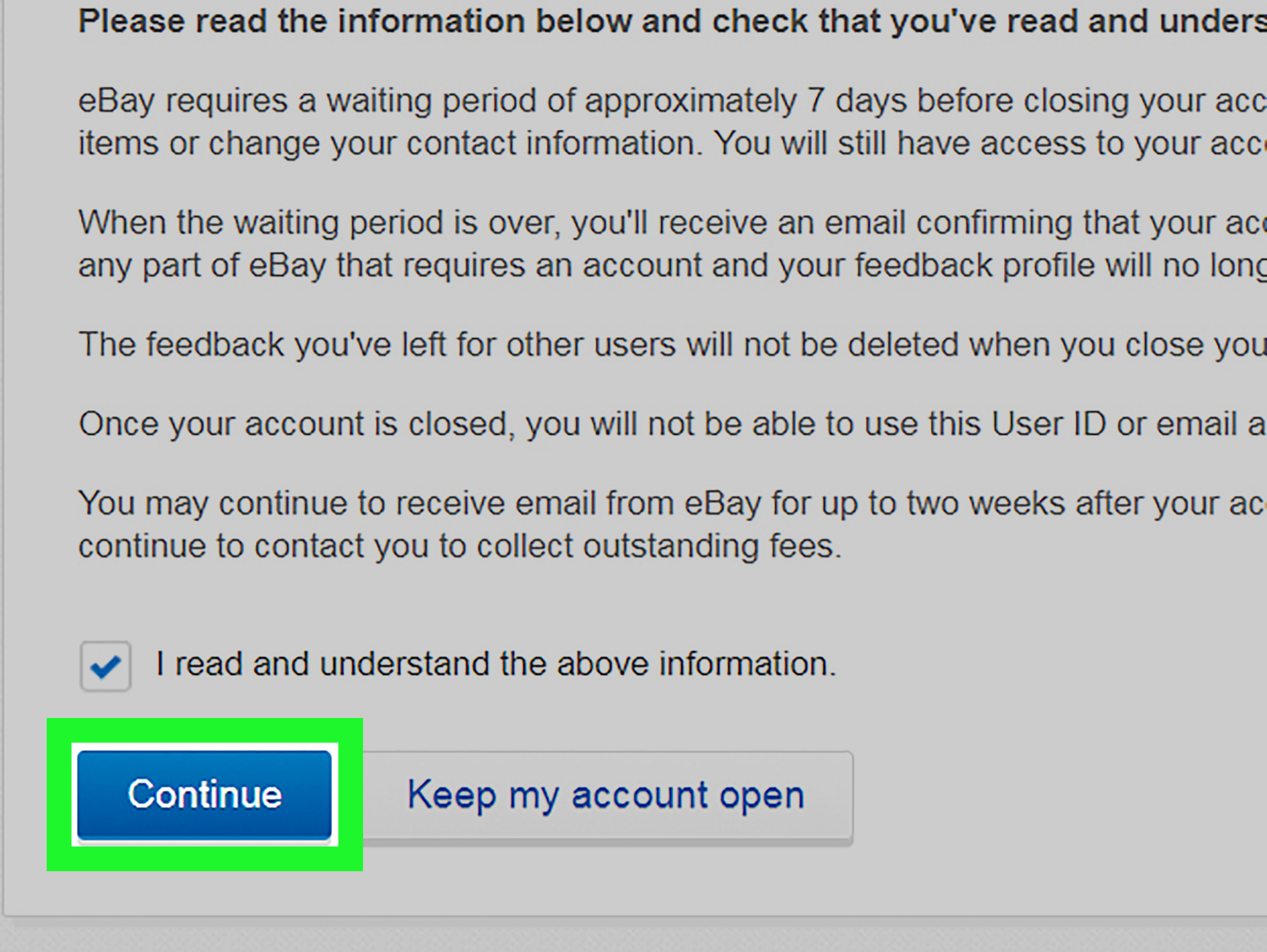
On the Account preferences page, select Close account. This opens eBay’s closure flow, which will remind you
of prerequisites and what you’ll lose (feedback/history). They’re not judging. They’re just… dramatically reading the consequences aloud. -
Step 10: Choose your reason for leaving (and ignore the guilt trip, politely)
eBay will ask you to pick a category and a reason for closing. Select what best fits.
Sometimes the site suggests alternatives (like fixing an issue instead of leaving). Read if relevant,
then continue if you’re still set on closure. -
Step 11: Confirm the closure request and submit
Check the confirmation box (commonly phrased like “I want to close my eBay account”), then submit the request.
After submission, assume you may lose access quicklyso make sure you already downloaded what you needed. -
Step 12: Watch your email/messages and wait for closure to complete
eBay typically sends a status update within about 24 hours. The full closure often takes around
two weeks, but it can take longerup to 60 days in some cases (for example, if there were
recent transactions, disputes, payments, or claims). During processing, respond quickly if eBay asks for more info.Once closure is final, eBay will confirm the account is permanently closed. If you change your mind during the processing window,
you may be able to request reopening (assuming your account is in good standing).
Special Situations (Because eBay Is a Real Place With Real Drama)
If you have an eBay Store
Closing an eBay Store subscription isn’t the same as closing your entire eBay account. If you just want to stop paying Store fees,
cancel the Store subscription first. Your listings generally remain active until they end or sell, while Store benefits and Store pricing
stop applying after the next billing cutoff. If you only need a break, consider putting your Store on vacation rather than closing it.
If your account is restricted/suspended (or not meeting seller standards)
If there are restrictions or performance issues, eBay may require you to contact support to close the account.
In other words: you might not be able to self-serve your way out the door.
If you’re doing this for privacy/security reasons
Closing the account is one layer. Add these “belt and suspenders” steps:
- Change your eBay password before closing if you suspect compromise
- Enable two-factor authentication while you’re still active (if available)
- Clear browser cache/cookies and delete the mobile app from devices you used
- Remove saved passwords from your browser/password manager if you won’t reuse them
- Be suspicious of “Your account was created!” emailsgo directly to eBay, don’t click random links
What Happens to Your Data After You Delete Your eBay Account?
After your closure request is accepted and the account is permanently closed, eBay deletes personal data it is legally obligated to delete.
However, eBay may retain certain data it is legally required or allowed to keepsuch as records needed for legal, financial, fraud prevention,
security, contractual, or tax-related reasons. This is normal for large marketplaces, even when you “delete” an account.
Will eBay delete everything instantly?
Noaccount deletion is permanent, but not immediate. Expect a processing period. If you had recent activity, the process can be longer
to allow transactions and obligations to settle.
Quick FAQ
Can I “deactivate” instead of delete?
eBay’s consumer-facing language focuses on closing accounts rather than “deactivation.” If your goal is simply to stop selling
or stop receiving charges, you may be able to cancel subscriptions and remove certain payment methods while keeping the account active.
If your goal is a full break, account closure is the direct path.
Can I reopen my account after submitting the request?
Sometimes, yesduring the processing window you may be able to contact eBay and ask to reopen, assuming the account is in good standing.
Once permanently closed, you typically need to create a new account if you return.
Will closing my account remove my feedback?
Yesexpect to lose feedback and your purchase/sales history. If your feedback score is your pride and joy, take a screenshot so you can
reminisce like it’s a high school yearbook.
Experiences & Real-World Lessons (The Extra You Actually Want)
Since you’re publishing this on the web, let’s add what people tend to experience in the real worldthe “stuff nobody tells you until
you’re already three clicks deep.” These are composite scenarios based on common patterns users run into, not a promise that eBay will
behave the same way every single time (because the internet is a living organism and it craves chaos).
Experience #1: “I tried to delete my eBay account and got blockedwhy?”
The most common surprise is that eBay won’t let you close an account if anything is still in motion: an open bid, a pending payment,
a return request, or even an unresolved payout that hasn’t reached your bank yet. People often think “I’m not selling anything right now,”
but forget about a pending return label or an auction they bid on two days ago at midnight (you know who you are). The fix is boring but effective:
clear the pipeline. Finish the return, close the dispute, wait for the payout to complete, cancel the bid if allowed, and then try again.
Experience #2: The eBay Store “why am I still being billed?” moment
Sellers who subscribe to an eBay Store sometimes assume closing the store is like canceling a streaming service: click once, billing stops,
end of story. In reality, subscriptions have billing cycles and terms. Many users report that the benefits continue through a period,
and billing may run through the month (and, on some yearly plans, there may be early termination fees). The best move is to check your
subscription type, cancel at a time that minimizes cost, and screenshot the cancellation confirmation for peace of mind.
Experience #3: “I deleted my account… and then needed a receipt”
This one is painfully common. Someone closes their account, then a month later needs proof of purchase for a warranty claim,
a charge dispute, or taxes. Suddenly, “digital minimalism” becomes “digital regret.” The lesson:
download or save what matters before you close. If you bought a collectible, electronics, or anything expensive, keep the invoice,
the seller details, and the transaction confirmation. If you sold items, keep your sales summaries and fee records.
Future You is a demanding client, and they will absolutely request documentation at 6:00 PM on a Friday.
Experience #4: Security concerns and sketchy emails
Many people decide to delete accounts after receiving suspicious emails like “New device added” or “Account created,” especially around
big shopping seasons. Whether it’s a phishing attempt or a misfire, the safer habit is always the same:
don’t click email linksgo directly to eBay in your browser/app and check your account status from there. If you can’t access it or suspect compromise,
change your password (and enable extra security) before taking the final step of account closure. Closing the account helps reduce exposure,
but good habits stop the next problem from popping up elsewhere.
Experience #5: The emotional curve of closing an account (yes, really)
This sounds dramatic, but it’s real: people often underestimate how “sticky” marketplace accounts are. Maybe you sold your first guitar on eBay.
Maybe you found that out-of-print book you still brag about. Closing the account can feel like deleting a tiny archive of your life.
That’s why a smart approach is to treat it like packing: save the meaningful stuff (records, receipts, screenshots of feedback if it matters),
then close confidently. Minimalism doesn’t mean amnesiait means keeping what you need and letting the rest go without a guilt spiral.
Bottom line: deleting an eBay account is less like pushing a big red “DELETE” button and more like completing a short checklist so eBay can
responsibly shut the door behind you. Do the prep, follow the steps, watch your email, and you’ll be out cleanno loose ends, no surprise fees,
and no “wait… I needed that receipt” plot twists.
Conclusion
If you’re ready to move on, closing your eBay account is straightforward once you handle the prerequisites: settle balances, wrap up bids and
transactions, cancel subscriptions, and then submit the closure request through Account settings. Take five extra minutes to save records
you may need later, and your future self won’t send you a strongly worded memo.











