Note: Body-only HTML for direct publishing.
Home routers are supposed to be the quiet, boring adults in the room. They hand out Wi-Fi, move packets around, and ideally avoid drama. But when a production router ships with a live debug pathway, that quiet adult suddenly looks like the guy who taped the spare house key to the front door and labeled it “for maintenance.” That is the heart of the story behind TP-Link Device Debug Protocol, often shortened to TDDP, and why the phrase “gives up keys to kingdom” is more than just a spicy headline.
Over the years, security researchers, vendors, and incident responders have repeatedly shown the same uncomfortable pattern: if a router exposes privileged management or debug functionality in production firmware, and that functionality is weakly authenticated, poorly segmented, or backed by brittle cryptography, the router can go from trusted gatekeeper to network liability in a hurry. In plain English, that means the little plastic box under your TV can become the reason your passwords, DNS settings, firmware integrity, and internal network visibility all take a very bad day.
This is not a one-bug story. It is a design-story. The original TDDP research made the problem vivid, but later TP-Link issues made the lesson louder. The recurring message is simple: a debug interface that survives the trip from engineering bench to living room is not a feature. It is a future incident report wearing a name tag.
What Is TDDP, and Why Did It Raise So Many Eyebrows?
TDDP stands for TP-Link Device Debug Protocol. As the name politely implies, it is not really meant for grandma checking the Wi-Fi password. It is a low-level mechanism used to query, configure, and in some implementations control device behavior. Researchers documented TDDP as a UDP-based protocol used across multiple TP-Link product categories, including routers and other embedded devices.
That alone is not automatically scandalous. Vendors use debug and service protocols all the time during manufacturing, testing, recovery, and diagnostics. The problem begins when those mechanisms remain accessible in shipping firmware, especially when they are exposed on the LAN, run with elevated privileges, or rely on weak assumptions such as “only friendly users are on the local network.” History has been extremely clear on this point: local networks are not magical trust bubbles. They are messy, shared, and often one sketchy IoT gadget away from chaos.
The 2016 Wake-Up Call
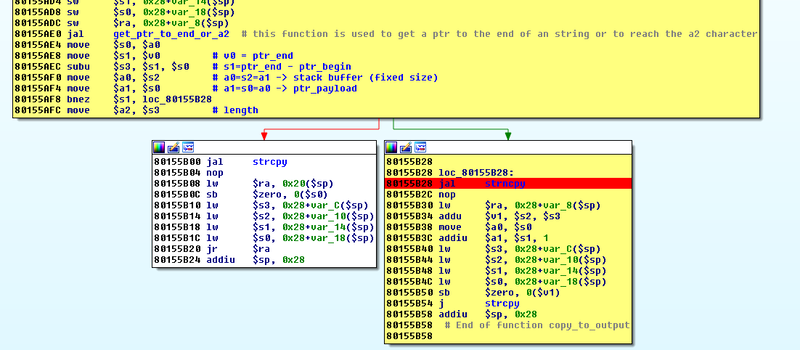
The most memorable public spotlight on TDDP came from research published in late 2016 and amplified by security coverage soon after. Core Security described multiple vulnerabilities in TP-Link’s TDDP implementation, including missing authentication for critical functions and classic buffer overflow behavior. One especially ugly detail was that TDDP version 1 lacked authentication in some cases, and if the message handler supported a configuration retrieval function, it could leak the web interface configuration file, including login credentials. That is not a tiny paper cut. That is the digital equivalent of finding the office safe open and the combination taped inside the door.
Hackaday’s coverage of the research gave the story its wonderfully dramatic title, and frankly, the drama was earned. The protocol was described as listening on UDP port 1040 on the LAN interface in affected devices, and the vulnerabilities could lead to remote code execution or information leaks. The practical scope mattered too: the original public framing emphasized that this was primarily reachable from the local network rather than the public internet. That caveat is real, but it is not especially comforting. Once an attacker gets a foothold on the LAN, the router is exactly where they want to be.
Why “Keys to the Kingdom” Is the Right Metaphor
When security writers talk about the router as the “keys to the kingdom,” they are not trying to sound like a medieval reenactment society. They mean the router sits at a strategic choke point. It decides where traffic goes. It can influence DNS. It sees device relationships. It often stores administrator credentials, wireless configuration, and service settings. In some environments, it also helps define segmentation between trusted systems, guest devices, smart home junk, and business traffic.
If that device is compromised, the attacker may not need to smash every laptop individually. They can manipulate the plumbing instead. Redirect traffic. Harvest credentials. Stage further attacks. Disrupt connectivity. Reset defenses. In other words, compromising the router is often more valuable than compromising one random endpoint because the router lives at the center of the network’s daily life. It is not just another device. It is the traffic cop, the map keeper, and occasionally the gossip columnist.
Debug Interfaces Turn Infrastructure Into Opportunity
Production devices should minimize privileged attack surface. A live debug daemon does the opposite. It creates a high-value target that already expects unusual commands and often runs with broad authority. That is why researchers get nervous when they see debugging pathways left enabled by default. Debug surfaces tend to be powerful by design. They are built to inspect, recover, validate, or control systems. Give an attacker that same power, and you do not have a bug anymore. You have an express lane.
The Problem Did Not Stay in 2016
If the TDDP story had ended as a quirky old embedded-security tale, it would still be interesting. Unfortunately, later disclosures suggested the broader lesson was not fully learned.
2019: The SR20 Example Made It Personal Again
In 2019, reporting from SecurityWeek and BleepingComputer highlighted a zero-day affecting the TP-Link SR20 smart hub/router. Google security researcher Matthew Garrett described how the device’s TDDP-related behavior could be abused for arbitrary command execution as root. The writeups explained that while TDDP version 2 required administrator credentials, version 1 commands remained exposed without authentication. One of those commands appeared to support configuration validation in a way that allowed the router to fetch a file over TFTP, load it into a Lua interpreter, and pass user-controlled input into it. Since the interpreter ran as root, the result was the sort of sentence security teams hate reading before coffee.
The default firewall rules reportedly blocked exploitation from the WAN side, which again kept the attack in the “same local network” bucket by default. But that is still plenty dangerous. A malicious insider, an infected local device, a compromised IoT toy, or even a user tricked into running something ugly on the LAN can make local-only router flaws matter very quickly. “Only exploitable on the local network” is not a get-out-of-jail-free card. It is more like saying the tiger is only dangerous once it gets into the house.
2024: TDDP Was Still Showing Up in Vulnerability Reports
Fast-forward to 2024, and Cisco Talos published a roundup describing vulnerabilities in a TP-Link AC1350 router, including issues in the TP-Link Device Debug Protocol. One bug could trigger a denial of service and factory reset; another could allow arbitrary code execution. Talos noted that the TDDP window on that model was available only for roughly 15 minutes after reboot, which is certainly better than always-on exposure, but still not the kind of surprise any admin wants from a home router. The larger takeaway remained the same: debug pathways keep resurfacing as meaningful risk.
And Then There Is the Broader TP-Link Security Pattern
TDDP is the headline hook, but the bigger story is that management and cryptographic weaknesses in consumer routers keep repeating in different costumes. Sometimes the issue is a debug protocol. Sometimes it is command injection in a web endpoint. Sometimes it is hardcoded encryption material. The technical names change, but the operational result keeps rhyming with “attacker gets too much power too easily.”
AX21: Web Management Flaw, Real-World Exploitation
In 2023, the TP-Link Archer AX21 drew heavy attention for CVE-2023-1389, a command injection bug in the router’s web management interface. The vulnerability allowed an unauthenticated attacker to inject commands that would execute as root. BleepingComputer reported active exploitation by Mirai botnet operators, and CISA added the issue to its Known Exploited Vulnerabilities catalog. F5 later observed that the flaw remained one of the most scanned CVEs in its telemetry for months. That is what happens when consumer infrastructure bugs are both useful and common: they stop being theoretical very fast.
Hardcoded Keys: The Oldest Bad Idea Keeps Winning
In 2025, CERT/CC and TP-Link published information about CVE-2025-6982 affecting certain Archer C50 models. The issue involved hardcoded DES decryption keys protecting configuration files. CERT/CC warned that this could expose administrative credentials, Wi-Fi passwords, DNS settings, and internal network details. TP-Link’s own U.S. advisory confirmed the hardcoded DES decryption key issue and recommended moving to supported models, especially because the affected device had reached end-of-life status.
This matters in the TDDP conversation because it reinforces the same design failure mode: routers should not depend on static, broadly reusable secrets to protect high-value configuration data. Hardcoded keys and production debug services belong to the same family of engineering shortcuts. They assume the inside of the device will stay private forever. Security history laughs at that assumption on a regular schedule.
2026: Router Weaknesses Still Feed Real Campaigns
By 2026, reporting on state-linked campaigns showed how router weaknesses can become part of larger credential theft operations. Dark Reading described a campaign in which attackers targeted vulnerable TP-Link and MikroTik SOHO routers to modify DNS settings and route traffic through attacker-controlled infrastructure. The theme should sound familiar by now: once the router’s trust is broken, the attacker does not always need flashy malware. Sometimes one quiet configuration change is enough to turn a network appliance into a credential-harvesting assistant.
Why This Matters to Real People, Not Just Reverse Engineers
It is easy to hear “debug protocol” and imagine a niche conversation between researchers wearing black hoodies in a room full of logic analyzers. But the impact lands squarely on ordinary users and small organizations. Consumer routers sit in homes, apartments, classrooms, clinics, coffee shops, and tiny offices that do not have enterprise security teams. They often run old firmware for years. They are rarely monitored. And when they fail quietly, users tend to blame the internet, the ISP, mercury retrograde, or the moon.
A compromised or weakly protected router can lead to a long list of downstream problems: credential theft, malicious DNS redirection, botnet enlistment, device inventory leakage, administrative lockout, factory resets, and lateral movement into more sensitive systems. The attacker does not even need to be dramatic. Sometimes the best compromise is the boring one that nobody notices for months.
What Users and Small Businesses Should Do
First, replace end-of-life hardware. This is the least glamorous security advice on Earth, which is exactly why it gets ignored. An unsupported router is not “still working fine.” It is simply still blinking. Second, apply firmware updates and verify the exact hardware revision when checking advisories. Third, disable remote administration unless it is truly needed. Fourth, segment untrusted devices using guest networks or separate VLANs where available. Fifth, audit DNS and administrative settings if anything feels strange, especially after suspicious activity or router instability. And finally, treat the router as a critical system, not as a toaster with antennas.
The Vendor Lesson Is Even Simpler
If a device ships to consumers, privileged debug pathways should be removed, strongly gated, or cryptographically bound in ways that are unique per device and impossible to abuse casually. Production firmware should not expose service mechanisms that assume a benevolent LAN. Security researchers should receive meaningful response channels. End-of-life status should be visible, not hidden in fine print. And configuration secrecy should never depend on static, recoverable, shared keys. None of this is exotic. It is the security equivalent of fastening the seat belt before starting the car.
Final Take
TP-Link Debug Protocol Gives Up Keys To Kingdom is memorable because it captures a truth that applies far beyond one vendor and one protocol: when debugging power leaks into production, trust leaks with it. The original TDDP issues were alarming not only because of the specific bugs, but because they revealed a larger design instinct that consumer networking has struggled with for years. Too much authority, too little isolation, and too much faith in the local network.
The real lesson is not “never buy a router again and go live in a cave.” Caves have terrible Wi-Fi. The lesson is that routers deserve the same skepticism we already apply to browsers, phones, and cloud services. They are part of your security boundary. If they expose hidden service doors, weak crypto, or brittle management surfaces, the kingdom is not very well guarded.
Experience and Lessons From the Field
In real-world environments, stories like this usually do not begin with someone announcing, “Good news, I have discovered an exposed debug daemon.” They begin with weird symptoms. A home user notices that certain sites feel off. A small office starts seeing random disconnects, changed settings, or a router that seems to “heal itself” and then break again. Someone resets the device, changes the admin password, and calls it fixed. Then the problem comes back, and the router becomes the digital version of that one smoke detector that chirps only when guests are over.
People who have spent time around small networks know the pattern well. The router is often the least loved but most important device in the room. Laptops get updates. Phones get attention. Cameras get replaced because they look old. The router? It sits there collecting dust and moral authority. That is why debug-protocol stories hit so hard. They remind us that the box silently holding the whole network together can also quietly hold the whole network open.
One common experience in troubleshooting is discovering just how much trust has been piled onto a consumer router without anyone really meaning to do it. It is handling Wi-Fi, maybe parental controls, maybe DNS forwarding, maybe a guest network, maybe a smart-home hub role, maybe port forwarding for something nobody remembers setting up. Over time, the router becomes less of a router and more of a family junk drawer with blinking lights. When a security flaw touches that pile of responsibilities, the impact feels bigger than the original bug description suggests.
Another lesson from the field is that “local network only” vulnerabilities rarely stay as small as they sound on paper. Homes and small offices are full of semi-trusted gadgets: smart TVs, cameras, speakers, old tablets, budget Android devices, bargain-bin printers, and laptops that have seen things. Once any one of those devices is compromised, the local network is no longer a trusted neighborhood. It is a shopping mall food court. A router flaw that requires LAN access can suddenly become the attacker’s next logical step, not an unrealistic edge case.
There is also a human lesson here. Most users do not ignore router security because they are careless. They ignore it because the industry trained them to. Consumer networking gear is marketed around speed, range, easy setup, and maybe how many rooms it can conquer. Security maintenance is treated like vegetables at a birthday party: technically present, but not why anyone showed up. So people keep old hardware, skip firmware notes, and assume the vendor would never leave powerful debug behavior exposed on a retail product. Security researchers keep proving that assumption a little too optimistic.
The most useful takeaway from experiences around issues like TDDP is not panic. It is posture. Treat the router like infrastructure. Know the model. Know whether it still receives updates. Check advisories once in a while. Replace end-of-life gear before it becomes a liability with antennas. And if a story about a debug protocol handing over “the keys to the kingdom” sounds dramatic, remember this: on a network, the drama usually starts only after someone forgot that the router was the kingdom gate in the first place.