
Deleting TikTok sounds simple until the app asks whether you want to deactivate, delete, download data, verify your identity, confirm again, and then quietly reminds you that you still have 30 days to change your mind. In other words, TikTok does not let you slam the door dramatically without first asking, “Are you sure?” several times.
The good news: learning how to permanently delete a TikTok account is still quick once you know where to tap. Whether you are leaving because of privacy concerns, screen-time overload, a fresh digital detox, or because your “quick five-minute scroll” has somehow become a nightly documentary series about raccoons opening refrigerators, this guide walks you through the cleanest ways to delete your account.
Below, you will find four practical methods: deleting your TikTok account from the mobile app, deleting it from a desktop browser, deleting it when you need to recover access first, and cleaning up the leftover app data from your device after submitting the deletion request. You will also learn what happens during the 30-day waiting period, what to save before you leave, and what not to do if you want the deletion to become permanent.
Before You Delete TikTok: Know What “Permanent” Really Means
When you choose to delete your TikTok account permanently, the account is not erased instantly. TikTok typically places it into a deactivated state first. During this grace period, your profile and content are no longer visible to other users, but you can still reactivate the account by logging back in. After the waiting period ends, the deletion becomes permanent, and you lose access to your profile, videos, drafts, followers, likes, and account history.
This matters because many people think tapping “Delete” is the final goodbye. It is more like mailing a breakup letter and then having 30 days to grab it from the mailbox. If you log in again during that period, you may reactivate the account and interrupt the deletion process. So if your goal is permanent deletion, submit the request, log out, uninstall the app if you want, and do not sign back in.
Deleting TikTok vs. Deactivating TikTok
Deactivation is temporary. It hides your profile and pauses your account, but TikTok keeps your data so you can return later. Permanent deletion is meant for users who are ready to remove the account and do not want to come back. If you only need a break from the endless scroll, deactivation may be enough. If you want your account gone for good, choose deletion, not deactivation.
What to Save Before You Delete Your Account
Before deleting TikTok, download anything you might regret losing. That includes your posted videos, favorite clips, saved sounds, comment history, and account information. TikTok allows users to request a copy of their data from the app. The file may take a few days to prepare, and once it is ready, it is usually available for a limited time.
To request your data, open TikTok, go to Profile, tap the Menu icon, choose Settings and privacy, tap Account, then select Download your data. Choose the data you want and the file format, then submit the request. This is the digital equivalent of checking your pockets before sending jeans through the washing machine.
Quick Way 1: Delete Your TikTok Account in the Mobile App
The TikTok mobile app is the fastest and most direct way to delete your account. This method works well if you are already logged in on your iPhone or Android device and can access your account settings.
Steps to Delete TikTok on iPhone or Android
- Open the TikTok app.
- Tap Profile at the bottom right of the screen.
- Tap the Menu icon, usually shown as three horizontal lines in the top right corner.
- Select Settings and privacy.
- Tap Account.
- Choose Deactivate or delete account.
- Select Delete account permanently.
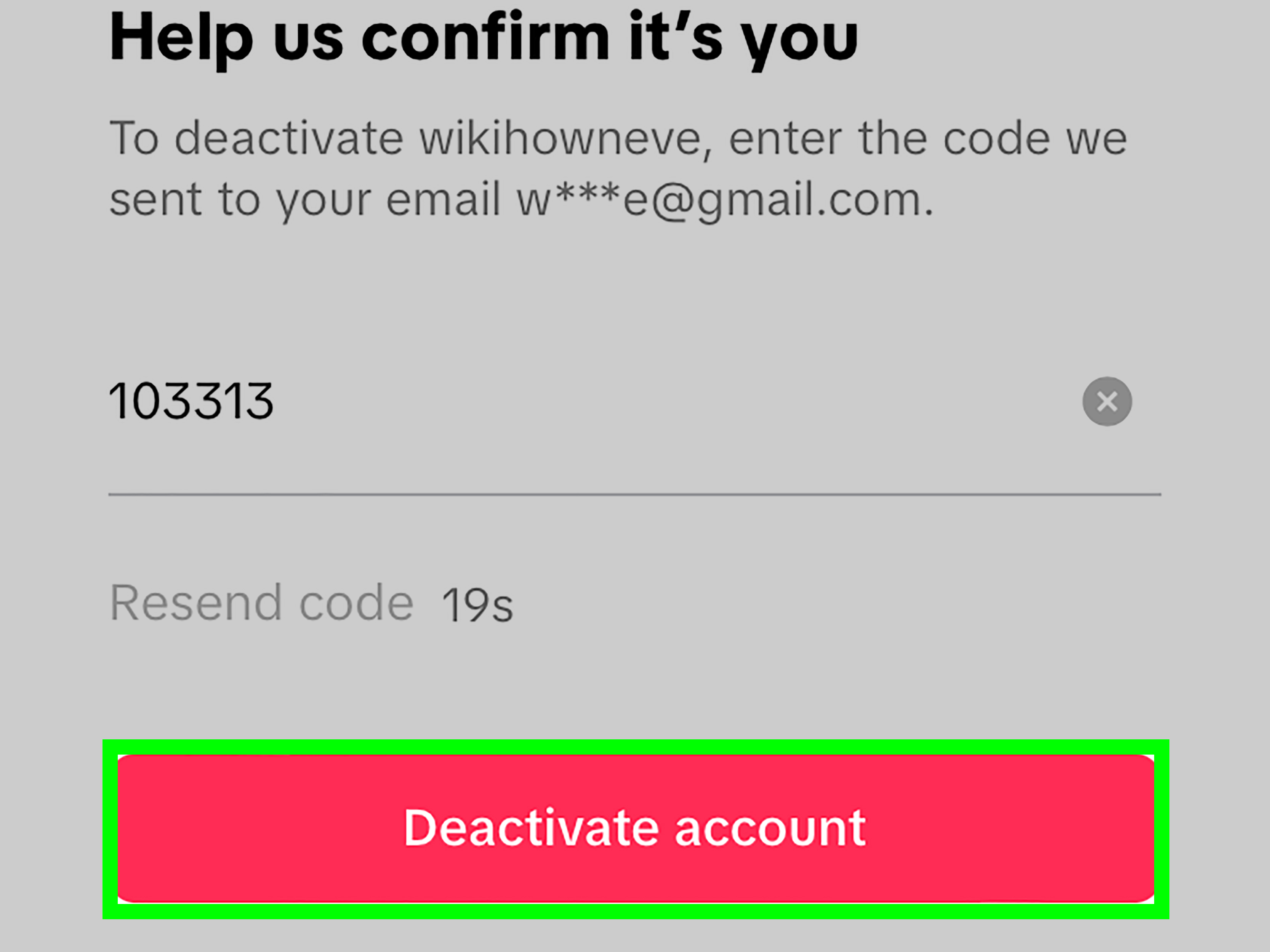
- Follow the prompts, choose a reason if asked, review the data download reminder, and confirm.
- Verify your identity if TikTok asks for a password, email code, phone code, or linked login method.
- Tap Delete account and confirm one final time.
After you confirm, TikTok starts the deletion process. Your account enters the waiting period, during which it is usually hidden from public view. Do not log back in unless you want to reactivate it. Yes, TikTok may tempt you. Stay strong. The algorithm can survive without you.
Best For
This method is best for users who still have the app installed, remember their login information, and want the simplest route. It is also the easiest option if your account uses two-factor authentication or a phone number because you can complete the verification steps directly from your device.
Quick Way 2: Delete Your TikTok Account from a Computer Browser
You can also delete your TikTok account from a laptop or desktop browser. This is useful if your phone is unavailable, the app is glitching, or you simply prefer handling important account settings on a bigger screen where buttons do not hide under your thumb.
Steps to Delete TikTok on Desktop
- Open TikTok in a web browser.
- Log in to the account you want to delete.
- Click your profile icon in the top right corner.
- Select Settings.
- Find the Manage account section.
- Look for the delete account option.
- Click Delete and follow the verification prompts.
- Confirm the deletion request.
The browser method is especially handy if you deleted the TikTok app too early but still need to close the account. Remember, deleting the app from your phone does not delete your TikTok account. It only removes the app from your device. Your profile can remain active unless you submit the deletion request through your account settings.
Best For
This method is best for people who cannot or do not want to use the mobile app. It is also helpful for users managing multiple accounts, creators who use TikTok from a computer, or anyone who wants to download account information before leaving.
Quick Way 3: Delete TikTok After Recovering Account Access
What if you want to delete TikTok but cannot log in? Maybe you forgot your password, lost access to your old phone number, or created the account years ago with an email address that now feels like an archaeological artifact. In that case, your first step is to recover access.
Steps If You Forgot Your Password
- Open TikTok or visit TikTok in a browser.
- Choose Log in.
- Select Use phone / email / username.
- Tap Forgot password?.
- Choose email or phone verification.
- Reset your password using the code TikTok sends you.
- Log in, then follow the deletion steps under Account settings.
If you signed up through Apple, Google, Facebook, or another linked account, try logging in with that same method. Many TikTok login problems happen because people forget which door they originally used to enter the building.
Steps If You No Longer Have Your Phone Number
If your TikTok account is linked to an old number, try logging in with your email, username, or a connected social account instead. Once inside, update your contact information before requesting deletion. If you cannot verify ownership, you may need to contact TikTok support and provide identifying information such as your username, linked email, phone number, birthday, or other details associated with the account.
Best For
This method is best for users who still own the account but cannot pass the first login screen. It takes longer than deleting from the app, but it is often the only secure way to prove that you are the rightful account owner.
Quick Way 4: Delete the App and Clear Leftover Device Data After Requesting Account Deletion
This step does not delete your TikTok account by itself, but it is an important cleanup move after you have submitted the account deletion request. Think of it as taking out the trash after canceling the party.
Once your deletion request is submitted, you can remove TikTok from your phone to reduce temptation and clear local app files. This helps you avoid accidentally logging in during the waiting period and reactivating the account.
On iPhone
- Touch and hold the TikTok app icon.
- Tap Remove App.
- Choose Delete App.
- Confirm by tapping Delete.
You can also go to Settings, tap General, choose iPhone Storage, select TikTok, and delete the app from there. Avoid choosing only an offload option if your goal is a clean break, because offloading may keep some documents and data for easier reinstallation later.
On Android
- Open Settings.
- Tap Apps or Apps & notifications.
- Select TikTok.
- Tap Storage.
- Clear cache and storage if available.
- Return to the app info screen and tap Uninstall.
On some Android phones, menu names vary by manufacturer. Samsung, Google Pixel, Motorola, and other devices may arrange settings slightly differently, but the idea is the same: clear local storage first, then uninstall the app.
Best For
This method is best for users who have already submitted a deletion request and want to avoid reactivating the account by accident. It also helps remove temporary files from your phone, which is a small but satisfying way to reclaim digital space.
What Happens After You Delete Your TikTok Account?
After you request permanent deletion, your account usually enters a deactivated period. During this time, your profile and public content are generally hidden, but the account is not fully erased yet. If you log back in, TikTok may offer a reactivation option. If you accept it, your account can return with its videos, followers, and settings restored.
Once the waiting period ends, deletion becomes permanent. You will not be able to log in, recover your videos, restore your followers, or access your old profile. Some information may not disappear from other people’s devices or conversations immediately. For example, direct messages you previously sent may still appear in another user’s inbox. Duets, Stitches, or shared content may also have limitations depending on how they were created and saved.
Common Mistakes to Avoid When Deleting TikTok
Mistake 1: Deleting the App Instead of the Account
Uninstalling TikTok from your phone does not delete your account. It only removes the app. Your profile, videos, comments, likes, and messages may still exist. Always delete the account from TikTok’s account settings first.
Mistake 2: Logging Back In Too Soon
If you log back in during the grace period, you may reactivate the account. If you are serious about leaving, do not test whether your account is “still there.” That curiosity can undo the process.
Mistake 3: Forgetting to Download Your Data
Once permanent deletion is complete, you may lose access to your videos, saved information, comments, and profile data. Download your TikTok data before you delete the account if you want a record.
Mistake 4: Deleting the Wrong Account
Many users have more than one TikTok account. Check the username before deleting anything. This is especially important if you manage a personal profile, a business account, or a creator account from the same phone.
Should You Delete TikTok or Just Make It Private?
Permanent deletion is not the only option. If your main concern is visibility, you can make your TikTok account private. A private account lets you approve followers and limit who sees your videos. You can also remove followers, restrict comments, turn off downloads, disable profile view history, and adjust personalized ad settings.
If your issue is screen time, try setting app limits first. iPhone users can use Screen Time, and Android users can use Digital Wellbeing. If your issue is privacy or you no longer trust the platform with your data, deletion may feel more appropriate.
Privacy Checklist Before Leaving TikTok
- Download your TikTok data before requesting deletion.
- Save any videos you want to keep.
- Cancel active subscriptions or TikTok-related payments if applicable.
- Check whether your TikTok login is connected to Google, Apple, Facebook, or another account.
- Remove TikTok permissions from your phone settings.
- Uninstall the app after submitting the deletion request.
- Avoid logging in during the waiting period.
Frequently Asked Questions About Deleting TikTok
Can I Permanently Delete TikTok Without Waiting 30 Days?
In most cases, no. TikTok uses a waiting period before permanent deletion. This gives users time to change their minds. If you want deletion to become permanent, submit the request and do not log back in.
Can I Delete TikTok Without the App?
Yes. You can use a desktop or mobile browser to log in to TikTok and delete the account through account settings. This is helpful if the app is no longer installed on your phone.
Will My TikTok Messages Disappear?
Your account may be deleted, but messages you sent to other users may still be visible to them. Deleting your account does not guarantee that every message disappears from someone else’s inbox.
Can I Create a New TikTok Account Later?
Yes. After deleting one TikTok account, you can create a new one later. However, you may not be able to reuse the same username immediately, and your old content, followers, likes, and analytics will not return after permanent deletion.
What If TikTok Will Not Let Me Delete My Account?
Check your internet connection, update the app, verify your email or phone number, and make sure you can complete any identity confirmation steps. If the problem continues, try using a browser or contact TikTok support for account assistance.
Real-World Experiences: What Deleting TikTok Actually Feels Like
Deleting TikTok is not always a dramatic privacy protest. Sometimes it starts with a small, honest realization: “I opened this app to watch one recipe and somehow learned the entire history of celebrity breakups, sourdough starters, and tiny-house plumbing.” For many users, the decision is less about hating TikTok and more about wanting their attention back.
One common experience is the reflex tap. After deleting the app, people often find their thumb still moving toward the old TikTok spot on the home screen. That tiny muscle-memory moment says a lot. Apps are designed to become habits, and TikTok is particularly good at it because the For You feed removes friction. You do not have to search, choose, or commit. You simply scroll, and the next video appears. Deleting the account can feel oddly quiet at first, like turning off a TV that has been playing in the background for months.
Another experience is the “what about my videos?” panic. Even users who rarely post may suddenly remember a funny clip, a vacation video, or a saved draft they never exported. That is why downloading your data and saving favorite videos before deletion matters. Once the permanent deletion finishes, your account is not a scrapbook you can casually reopen. It is gone, and future-you may be surprisingly sentimental about a seven-second video of your dog sneezing.
Some people delete TikTok for productivity and notice the biggest change during small gaps in the day. Waiting in line, sitting on the bus, eating lunch alone, or avoiding a difficult email suddenly feels different without the automatic scroll. At first, those spaces can feel boring. Then they become useful. You may start reading articles, answering messages, planning your day, or simply doing nothing without feeling digitally pulled by the sleeve.
Privacy-focused users often describe a different kind of relief. For them, deleting TikTok is part of a larger cleanup: removing old apps, reviewing permissions, turning off unnecessary location access, deleting unused accounts, and reducing how much personal data sits across the internet. TikTok may be only one piece of that puzzle, but deleting it can create momentum. Once you remove one account, you may look at other forgotten apps and think, “Why does this coupon app still know my birthday?”
Creators may have a more complicated experience. If you used TikTok for business, entertainment, community, or income, deletion should be more deliberate. Save analytics, export videos, notify followers, and redirect people to your website, newsletter, YouTube channel, Instagram, or another platform. A permanent deletion can erase not just content but also audience pathways. For creators, leaving TikTok is less like deleting an app and more like closing a storefront. You want to pack the inventory before locking the door.
The most practical lesson from people who successfully delete TikTok is simple: remove temptation after submitting the deletion request. Uninstall the app, clear shortcuts, and avoid logging in “just to check.” The 30-day window is useful if you change your mind, but it can also become a trap if you are trying to quit a habit. If your goal is permanent deletion, treat the waiting period like a no-contact rule. TikTok may still exist, but you do not need to answer the door.
Conclusion
Knowing how to permanently delete a TikTok account saves time, prevents confusion, and helps you avoid the classic mistake of deleting the app while leaving the account alive. The fastest method is through the mobile app: go to Profile, open Settings and privacy, choose Account, and select Deactivate or delete account. If the app is not available, use a desktop browser. If you are locked out, recover access first or contact support. After submitting the request, uninstall the app and do not log back in during the waiting period.
Deleting TikTok can be a privacy choice, a productivity choice, or simply a personal reset. Whatever your reason, the key is to save what matters, confirm you are deleting the right account, and let the deletion period finish without reactivation. Your attention span may not throw a parade, but it will probably send a thank-you note.
Note: TikTok menus and account settings may change over time. Always review the on-screen prompts carefully before confirming permanent account deletion.











