
Traffic reports can tell you that visitors left. Behavior analytics can show you why they fled as if the “Buy Now” button had started asking personal questions. Crazy Egg and Mouseflow both turn clicks, scrolling, movement, and sessions into visual evidence, but they approach website optimization from different angles.
Crazy Egg is especially attractive to marketers who want simple heatmaps, recordings, surveys, and built-in A/B testing in one approachable workspace. Mouseflow goes deeper into session replay, conversion funnels, form analytics, journey analysis, and automated friction detection. The right choice depends less on which dashboard looks shinier and more on how your team actually improves pages.
Crazy Egg vs. Mouseflow at a Glance
| Category | Crazy Egg | Mouseflow |
|---|---|---|
| Best for | Marketers, small businesses, agencies, and teams that want visual insights plus built-in experimentation | CRO, UX, product, analytics, and e-commerce teams that need deeper behavioral diagnosis |
| Core tools | Heatmaps, scrollmaps, session recordings, surveys, web analytics, error tracking, popup CTAs, and A/B testing | Session replay, multiple heatmap types, friction detection, funnels, form analytics, surveys, and journey analytics |
| Experimentation | Built-in visual A/B testing | Usually paired with an external A/B testing platform |
| Pricing model | Tracked pageviews, recording allowances, report limits, and retention | Monthly recorded sessions, projects, funnels, features, and retention |
| Free access | Time-limited free trial | Free-forever plan with limited sessions and features |
| Learning curve | Very approachable | User-friendly but broader and more analytical |
What Is Crazy Egg?
Crazy Egg is a website optimization platform built around visual reporting. Its classic strength is the “Snapshot,” which can generate several views of a page, including heatmaps, scrollmaps, confetti-style reports, overlays, and list-based click data.
These reports help answer practical questions. Are visitors noticing the primary call to action? Are they clicking a decorative image that is not linked? Does the important content sit below the point where most people stop scrolling?
The platform now includes session recordings, surveys, error tracking, conversion analysis, web analytics, popup calls to action, and A/B testing. Installation uses a JavaScript snippet or common tools such as Google Tag Manager, Shopify, and WordPress. Unlimited seats and domains can also help agencies and multi-site businesses.
Where Crazy Egg Stands Out
Its greatest advantage is workflow simplicity. A marketer can inspect a landing-page heatmap, form a hypothesis, create a variation, and launch an A/B test without assembling a miniature analytics orchestra.
Reviewers often praise the intuitive reports and quick setup. The trade-off is depth: recording allowances, filtering, and journey analysis may feel restrictive for teams investigating large, complicated funnels.
What Is Mouseflow?
Mouseflow is a broader behavior analytics platform focused on identifying friction throughout the user journey. It combines session replay, click and scroll heatmaps, conversion funnels, form analytics, feedback surveys, journey analytics, and friction detection.
Instead of merely showing that a page underperformed, Mouseflow is designed to help teams isolate the behavior behind the problem. For example, a SaaS company might see a drop in trial registrations. Mouseflow can help the team filter recordings around that flow, inspect rage clicks or errors, review the funnel stage where abandonment spikes, and analyze which form fields cause hesitation or failure.
Where Mouseflow Stands Out
Mouseflow’s main strength is connected analysis. Heatmaps sit beside recordings, funnels, forms, feedback, segmentation, and journey views. It also supports integrations across analytics, advertising, e-commerce, customer service, notifications, and testing tools.
Mouseflow says it records without sampling within the account’s monthly session allowance. Friction tools can surface rage clicks, click errors, and hesitation, reducing the need to watch random recordings until your coffee develops trust issues.
Reviewers often praise the replays, funnels, and easy implementation, while noting that costs can rise with traffic and large recording libraries still require disciplined filtering.
Feature-by-Feature Comparison
Heatmaps
Both products cover the fundamentals, including click behavior and scroll depth. Crazy Egg’s reporting is especially easy to explain to nontechnical stakeholders, while its confetti report can segment clicks by dimensions such as traffic source or device.
Mouseflow offers a wider behavior-analysis context, with plan-dependent options that may include movement, attention, interactive, and friction-oriented heatmaps.
Winner for simplicity: Crazy Egg. Winner for analytical variety: Mouseflow.
Session Recordings
Both tools replay real visitor sessions, allowing teams to observe navigation, clicking, scrolling, and moments of confusion. Crazy Egg’s recordings work well for straightforward page optimization.
Mouseflow has the advantage when recordings must be filtered, scored for friction, connected to funnels, or examined as part of a longer customer journey.
Winner: Mouseflow, especially for research-heavy teams.
Funnels and Form Analytics
Crazy Egg includes conversion and funnel-oriented capabilities, but Mouseflow is more naturally positioned for detailed funnel and form diagnosis.
Form analytics can reveal where users abandon, repeat fields, encounter errors, or spend unusual amounts of time. For lead-generation sites, quote requests, account creation, and checkout flows, those details can turn “the form is bad” into a fixable list of specific problems.
Winner: Mouseflow.
A/B Testing and On-Page Changes
This is Crazy Egg’s clearest victory. Its built-in A/B testing lets users create and compare page variations without requiring a separate experimentation subscription. Popup CTAs, sticky bars, and similar on-page elements also help marketers test messaging quickly.
Mouseflow is excellent for finding what should be tested and analyzing behavior across test variations, but the experiment itself is typically run through an integrated testing platform. In other words, Mouseflow plays detective; Crazy Egg is more willing to move the furniture.
Winner: Crazy Egg.
Surveys and Voice of Customer
Both platforms support on-site feedback. Crazy Egg offers targeted surveys and a substantial template library, making deployment approachable. Mouseflow connects feedback with its broader behavior analytics environment, which can be valuable when teams want to compare what visitors say with what they actually do.
Winner: Tie. Crazy Egg favors ease; Mouseflow favors context.
Integrations
Crazy Egg covers common needs such as Google Analytics, Google Tag Manager, Shopify, and WordPress. Mouseflow offers a broader catalog spanning analytics, advertising, e-commerce, testing, notifications, and customer service.
Winner: Mouseflow for breadth; Crazy Egg is sufficient for many smaller technology stacks.
Crazy Egg vs. Mouseflow Pricing
The pricing models look similar until traffic grows, at which point the calculators begin wearing tiny villain mustaches.
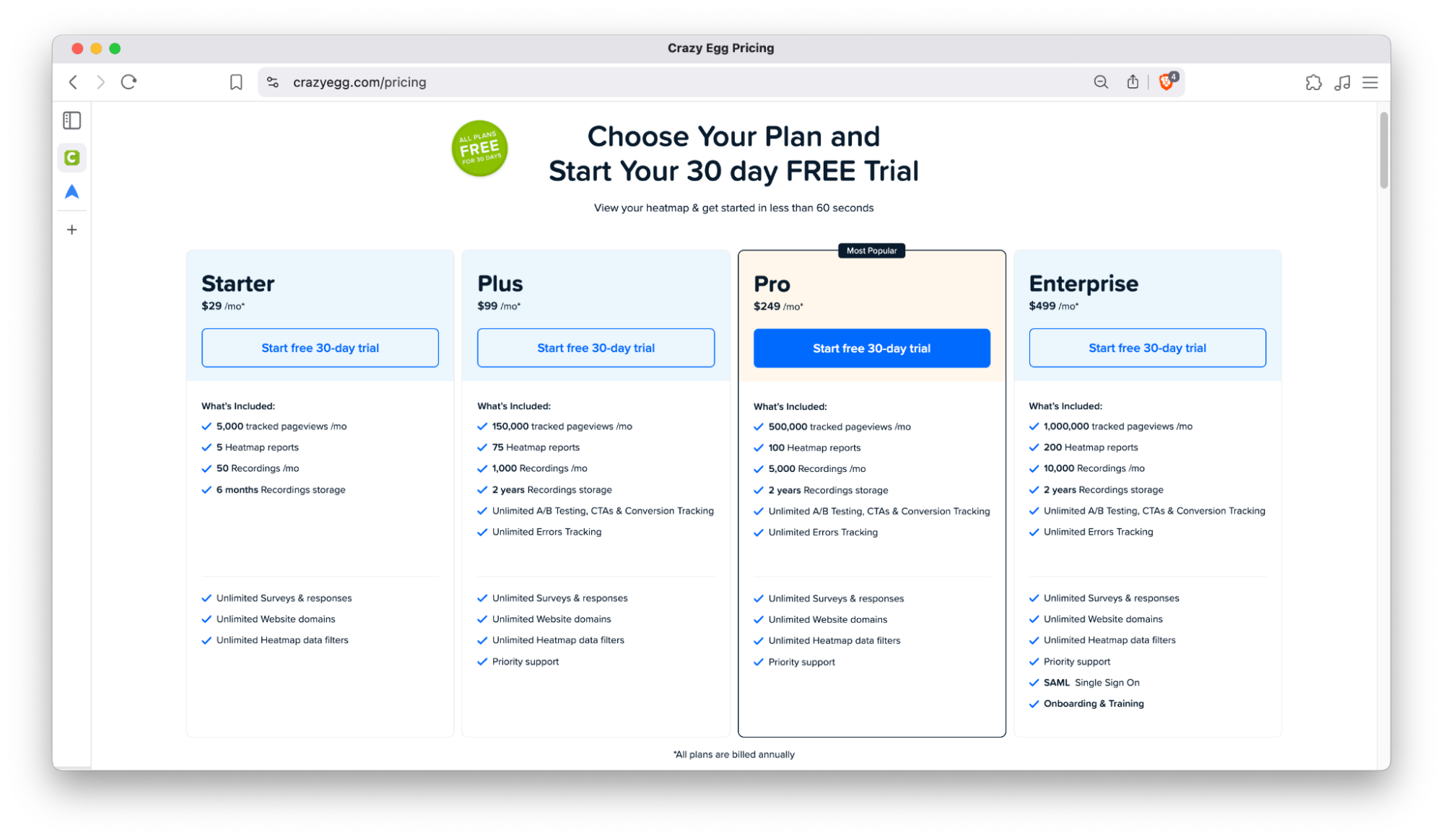
Public 2026 pricing information for Crazy Egg shows paid plans beginning at $29 per month, followed by higher tiers with larger pageview, recording, report, and storage allowances. Crazy Egg offers a 30-day trial but does not position itself around a permanent free plan.
Entry-level limits can be suitable for targeted landing-page analysis, but teams should calculate how many recordings and tracked pageviews they genuinely need. A low advertised price loses some sparkle when the recording allowance covers only a tiny fraction of actual traffic.
Mouseflow’s official pricing page lists a free plan with 500 monthly sessions, one website project, one funnel, and one month of retention. Paid tiers begin at 25 per month on the displayed pricing page and increase through Advanced, Premium, and custom Enterprise levels.
Higher tiers add more sessions, projects, funnels, retention, form analytics, exports, API access, journey analytics, single sign-on, and advanced privacy or support features. Currency and discounts may vary according to location and annual-versus-monthly billing.
Do not compare pageviews directly with sessions. A Mouseflow session represents a visitor’s journey across multiple pages, while Crazy Egg’s structure combines tracked pageviews with separate recording and report allowances. Estimate cost using actual traffic, the percentage of visits you intend to analyze, retention requirements, and the number of active sites.
Privacy and Compliance
Session replay tools require deliberate privacy configuration. Crazy Egg automatically masks common input elements such as email, password, numeric, and text fields. It also provides controls for masking or excluding sensitive pages.
Mouseflow emphasizes alignment with GDPR, CCPA, and LGPD requirements, along with regional data-center options, IP masking in relevant contexts, and enterprise security controls. Its United States data-center offering also supports HIPAA-related enterprise arrangements, including business associate agreements for eligible customers.
Neither platform makes the website owner’s legal responsibilities disappear in a puff of compliance-colored smoke. Teams should review consent requirements, privacy notices, data-processing agreements, masking rules, retention settings, and regional regulations before recording visitors.
Sensitive portals, healthcare workflows, financial applications, and authenticated dashboards deserve especially careful configuration.
Which Tool Is Better for Different Users?
Choose Crazy Egg If You:
- Want heatmaps and A/B testing in one platform.
- Need a tool that marketers can learn quickly.
- Manage several websites and value unlimited seats or domains.
- Run landing-page, content, or call-to-action experiments regularly.
- Prefer clear visual reports over a complex research environment.
Choose Mouseflow If You:
- Need deeper session replay, funnel, journey, and form analysis.
- Want automated friction signals to prioritize recordings.
- Operate an e-commerce, SaaS, lead-generation, or multi-step conversion site.
- Need a free plan for an initial low-traffic implementation.
- Have UX, product, CRO, and analytics specialists collaborating on findings.
Hands-On Experience: What Using These Tools Feels Like
The most important lesson from working with behavior analytics is that installation is the easy part. The script takes minutes; creating a useful analysis habit takes discipline. A dashboard full of glowing heatmaps can make everyone feel productive, but colorful evidence is not automatically a business decision.
With Crazy Egg, the most effective routine is page-centered. Start with a high-value page, define one conversion goal, and create a Snapshot before changing anything. After enough traffic accumulates, compare desktop and mobile behavior, inspect scroll depth, and look for “false affordances”elements that appear clickable but are not.
One common discovery is that visitors repeatedly click a product image, icon, or bold heading because the design quietly promises an interaction the site never delivers. Fixing that mismatch can improve usability without redesigning the entire page or convening a committee named the “Digital Transformation Council.”
The next step is where Crazy Egg feels especially practical: turn the observation into an experiment. Suppose a service landing page shows heavy attention on testimonials but weak interaction with the request-a-quote button. A team can test a CTA beside the social proof, rewrite the button to describe the next step, or shorten the surrounding copy.
The platform’s value comes from keeping observation and action close together. Teams that struggle to move from reports to experiments often appreciate this directness.
Mouseflow encourages a different working style. Instead of beginning with one page, analysts often begin with a failed journey: an abandoned checkout, incomplete demo request, unsuccessful onboarding process, or repeated support complaint.
A useful workflow is to build a funnel, identify the largest drop-off, filter relevant sessions, and then watch a focused sample rather than randomly browsing recordings. Form analytics and friction signals can narrow the investigation further.
Imagine that mobile visitors abandon a quote form after entering their phone number. Aggregate analytics may show only a conversion decline. Mouseflow may reveal that the keyboard covers the next button, validation fires too early, or users repeatedly tap an unresponsive element.
Watching several similar sessions changes the conversation from “mobile traffic is lower quality” to “our interface is blocking customers.” That is a much more profitable sentence.
The challenge with Mouseflow is resisting data overload. Because the platform can collect replays, heatmaps, funnels, feedback, form behavior, and journey data, teams need saved filters, naming conventions, and a weekly review process.
Otherwise, analysts can spend hours watching sessions that are interesting but not decision-relevant. The strongest implementations assign each investigation a question, a segment, a conversion event, and an owner.
Both tools work best when paired with quantitative analytics. Google Analytics or another measurement platform identifies where performance changed; Crazy Egg or Mouseflow helps explain the behavior behind that change.
After implementing a fix, teams should return to conversion rate, revenue, lead quality, task completion, or support volume to confirm the impact. A heatmap is evidence, not applause.
In day-to-day use, Crazy Egg feels faster for marketers who want to inspect and test a page. Mouseflow feels more powerful for teams investigating complex journeys and forms. The practical winner is the tool that matches your optimization process. An unused advanced platform is just an expensive screensaver, while a simpler tool used every week can produce meaningful gains.
Final Verdict: Crazy Egg or Mouseflow?
Crazy Egg wins for approachable visual analytics combined with built-in A/B testing. It is a strong choice for marketers, agencies, and small-to-midsize teams that want to identify page problems and launch improvements without stitching together several products.
Mouseflow wins for behavioral depth. Its session replay, friction detection, conversion funnels, form analytics, and journey tools make it better suited to UX research, CRO programs, e-commerce optimization, SaaS onboarding, and complex conversion paths.
Choose Crazy Egg when your recurring question is, “What should we change and test on this page?” Choose Mouseflow when the question is, “Where does this journey break, and what exactly did users experience?”
Both can reveal uncomfortable truths about a website. Fortunately, websites do not have feelingsalthough the designer might.











